
A Dedicated Mobile proxy is a 4G or 5G device reserved for you alone: one mobile IP at a time, changed when you ask for it. This page shows how to order a device, connect to it and change its IP.
At a glance
| Topic | How it works |
|---|---|
| USA 5G package | Verizon, 50 locations in 38 states. $20 for a day, $75 for a week or $250 for a month. |
| Multi-Country package | USA (New York, Texas, Florida), United Kingdom, Austria and Israel. $125 for a month. |
| Traffic | Unlimited, under the mobile carrier’s fair-use policy. There are no per-GB charges. |
| Login | Each device has its own username and password. |
| Protocols | HTTP, HTTPS and SOCKS5 |
| Gateway | mobdedi.proxyempire.io:9000 |
1. Order a device
- In your dashboard, open Dedicated Mobile and scroll to Purchase options.
- Under Locations, choose United States for the USA 5G package or Global for the Multi-Country package.
- Choose a city or country. Each one is marked Ready or Unavailable.
- Choose the plan: daily, weekly or monthly for the USA 5G package, monthly for the Multi-Country package.
- Choose card, PayPal or crypto (crypto adds a 5% fee) and pay. A monthly plan can also be started as a subscription with Subscribe monthly.
Your device then appears under Device inventory, with its status, its location and the date and time it expires.
There is no trial for Dedicated Mobile. To test a device first, take the $20 day pass. The usual blocked websites apply to these proxies too.
2. Connect
The Login info of a device shows its endpoint, username and password, each with a copy button. Copy connection copies all of them as one string:
USERNAME:PASSWORD@mobdedi.proxyempire.io:9000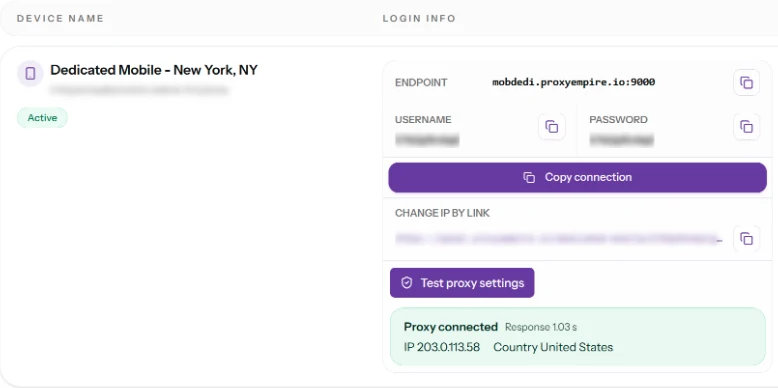
The username takes no targeting or session parameters: every request leaves through your device, on the same IP, until you change it. HTTP and SOCKS5 use the same login, so only the scheme changes.
# HTTP
curl --proxy "http://USERNAME:PASSWORD@mobdedi.proxyempire.io:9000" https://ipinfo.io/json

# SOCKS5, with DNS at the proxy
curl --proxy "socks5h://USERNAME:PASSWORD@mobdedi.proxyempire.io:9000" https://ipinfo.io/json
The reply shows the device’s mobile IP and its carrier. You can also click Test proxy settings: the dashboard then shows whether the proxy connected, the response time, the IP and the country.
3. Change the IP
There are two ways to give a device a new IP:
- Get New IP: the button in the Controls of the device.
- Change IP by link: an address of your own for each device. Opening it changes the IP, and it works without a login, so you can call it from a script or a scheduler.
# paste the address you copied with "Copy Change IP by link"
curl "YOUR-CHANGE-IP-LINK"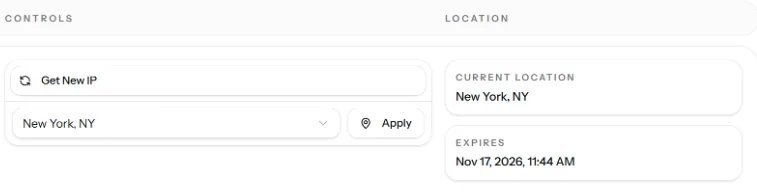
The device reconnects to the mobile network and comes back with a new IP. A request sent in those few seconds can fail, so send it again.
Keep the Change IP link private. Anyone who has it can change the IP of your device.
Change the location
To move a device to another city, choose the city in the list next to Get New IP and click Apply. Cities marked Unavailable can’t be chosen. Current location shows where the device is now.
Limits
- One device, one IP: all your requests share the device’s current IP, so many parallel requests are slower per request than on rotating proxies.
- Targeting: you choose the location of the device. The username has no targeting parameters.
- Ports: 80 and 443 are open by default. Dedicated Mobile carries TCP only, so UDP is not available on it.
- API: the ProxyEmpire API does not manage Dedicated Mobile devices. The Change IP link is the way to automate IP changes.
Related
- Connection referenceHosts, ports and strings for every proxy type
- Dedicated Mobile proxiesPackages, locations and prices
- Payment methodsCard, PayPal, crypto and bank transfer
- TroubleshootingCommon causes when a proxy doesn’t connect