
ISP Proxies (formerly Static Residential) are residential IPs, registered to real internet providers, that stay the same. This page shows how to get them, connect and keep them renewed.
At a glance
| Topic | How it works |
|---|---|
| Billing | With credits. One credit gives one IP for 30 days, or renews one IP for 30 days. |
| Price | $3.50 for a single credit, down to $2.00 per credit in the largest package. See the pricing page. |
| Credits | Unused credits never expire. They stay in your balance for later orders and renewals. |
| Traffic | Included: 100 GB per IP per month under our Fair Use Policy. You don’t buy bandwidth separately. |
| Targeting | By country, in 24 countries (listed on the ISP proxies page). You choose the country when you order. |
| Protocols | HTTP, HTTPS and SOCKS5 |
| Gateway | static.proxyempire.io:9000 |
1. Get IPs
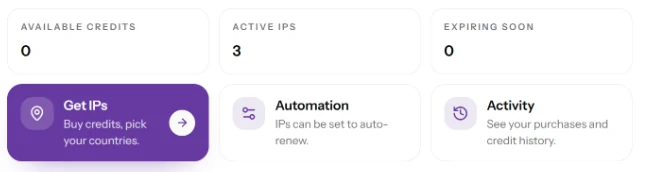
- In your dashboard, open ISP Proxies and click Get IPs.
- Under Locations, type the number of IPs you want next to each country. Every country shows how many IPs are in stock. A country that is out of stock has a Notify me button instead.
- Check the Order summary. It shows the credits the order needs and your credit balance. If you are short of credits, the order buys them in the same step, by card, PayPal or crypto (crypto adds a 5% fee).
- Place the order. It is fulfilled in the background, and your IPs then appear under Your IPs. If an IP can’t be delivered, its credit returns to your balance.
You can also buy credits without choosing a country: pick a credit package and leave the locations empty. The credits wait in your balance until you pick IPs.
Before you buy: some websites are blocked on all our proxy types, ISP Proxies included. That covers banks and payment services, and crypto, gaming, streaming and government websites. If your project needs one of them, verify your identity and send us an access request first, and wait for our answer before you order. See blocked websites and KYC.
2. Connect
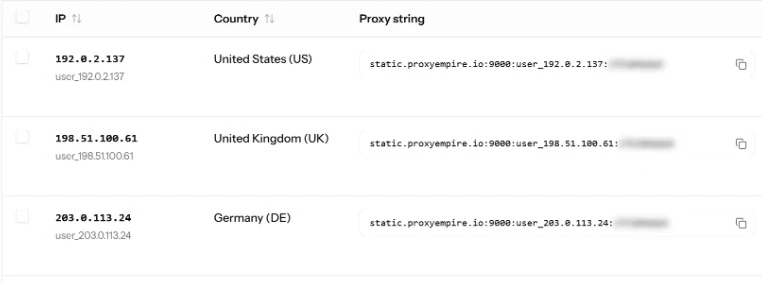
Every IP has its own fixed proxy string, shown in the Proxy string column. Choose a Format, then copy one string with the copy icon, click Copy All Proxy Strings, or use Download to save the list as a .txt or .csv file.
| Format | Example |
|---|---|
host:port:user:pass |
static.proxyempire.io:9000:user_203.0.113.7:PASSWORD |
user:pass:host:port |
user_203.0.113.7:PASSWORD:static.proxyempire.io:9000 |
user:pass@host:port |
user_203.0.113.7:PASSWORD@static.proxyempire.io:9000 |
The username ends with the IP itself. It takes no targeting or session parameters, because the IP never rotates: every request leaves from the IP you bought. HTTP and SOCKS5 use the same string, so only the scheme changes.
# HTTP
curl --proxy "http://user_203.0.113.7:PASSWORD@static.proxyempire.io:9000" https://ipinfo.io/json

# SOCKS5, with DNS at the proxy
curl --proxy "socks5h://user_203.0.113.7:PASSWORD@static.proxyempire.io:9000" https://ipinfo.io/json
The reply shows the IP from your proxy string. To keep many IPs apart, type a label in the Note field of each one and click Save. The search box finds IPs by IP, country or note.
Is an IP blocked on the website you need? Tell us on the 24/7 live chat or through the contact page: we can offer one free replacement if needed.
3. Renew
Each IP runs for 30 days from the order. The Expire date column shows when it ends, and the Expiring soon counter at the top of the page shows how many IPs are close to that date.
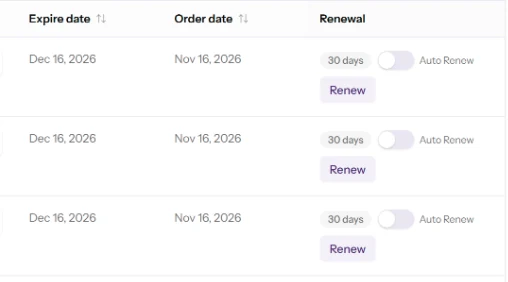
- Click Renew in the row of an IP.
- Choose the renewal period: 30, 90 or 180 days, for 1, 3 or 6 credits per IP.
- Tick the IPs of that order you want to renew, then confirm. If you are short of credits, the same window lets you buy them.
The new period is added to the current expiry date, so renewing early costs you no days. An IP stops working when it expires, but you can still renew that exact IP for 3 days after the expiry date. After that, it is released from your account.
Auto Renew
- For one IP: switch on Auto Renew in its row.
- For a whole order: open Automation and switch on Auto Renew for the order. You can still set single IPs differently there.
- Timing: Auto Renew uses one credit per IP about 24 hours before the IP expires, so keep enough credits in your balance.
- Auto Top-Up: adds credits before Auto Renew runs low. It charges the card of your active subscription.
- Monthly credit refill: adds the same number of credits every month, charged monthly until you cancel.
Activity lists your purchases and every change to your credit balance.
Limits
- Targeting: country only. You get an IP from a city in that country.
- One IP, one exit: all requests on a proxy string share its IP, so many parallel requests are slower per request than on rotating proxies.
- Ports: 80 and 443 are open by default. ISP Proxies carry TCP only, so UDP is not available on them.
- Websites: the blocked list applies.
By API or AI assistant
The API reads your credit balance and the stock per country, places and lists orders, renews IPs and sets Auto Renew. Credits themselves are bought in the dashboard. The ProxyEmpire MCP server can check ISP stock and your credit balance from Claude, ChatGPT or Cursor.
Related
- Connection referenceHosts, ports and strings for every proxy type
- Static proxiesWhat ISP Proxies are, in short
- Payment methodsCard, PayPal, crypto and bank transfer
- TroubleshootingCommon causes when a proxy doesn’t connect