
Unlimited Residential is residential proxy access billed by connection speed instead of by GB: you pick a speed and a period, and traffic within it is unlimited. This page shows how to buy a plan, connect and choose between sticky and random sessions.
At a glance
| Topic | How it works |
|---|---|
| Billing | By speed: 100, 200, 500 or 1,000 Mbit, for a day, a week or a month. There is no per-GB charge. |
| Price | 100 Mbit costs $200 a day, $650 a week or $1,500 a month. Faster plans are on the pricing page. |
| Pool | 1M+ residential IPs a day, with a consistently large pool in 85+ countries |
| Targeting | By country |
| Sessions | Sticky (the same IP for a session) or random (a new IP per request) |
| Protocols | HTTP, HTTPS and SOCKS5 |
| Gateway | unlimited.proxyempire.io:5000 |
1. Buy a plan
- In your dashboard, open Unlimited Residential and open Buy / upgrade your plan.
- Choose the billing period: Daily, Weekly or Monthly. Monthly costs the least per day.
- Choose the speed. Bigger plans cost less per Mbit.
- Choose card, PayPal or crypto (crypto adds a 5% fee) and pay. A monthly plan can also be started as a subscription.
The top of the page then shows your plan and the date and time it expires. To move to a faster plan, use Change / Upgrade Plan in the same place.
Want to test the speed and your target country first? Ask us for a 1-hour trial at 50 Mbit before you choose a plan. It is worth doing if your country is not one of the largest in the pool. The usual blocked websites apply to these proxies too.
2. Connect
The Connection builder shows the host, port, username and password, each with a copy button, and the full Connection string. Unlimited Residential has its own username and password, separate from your other proxy types.
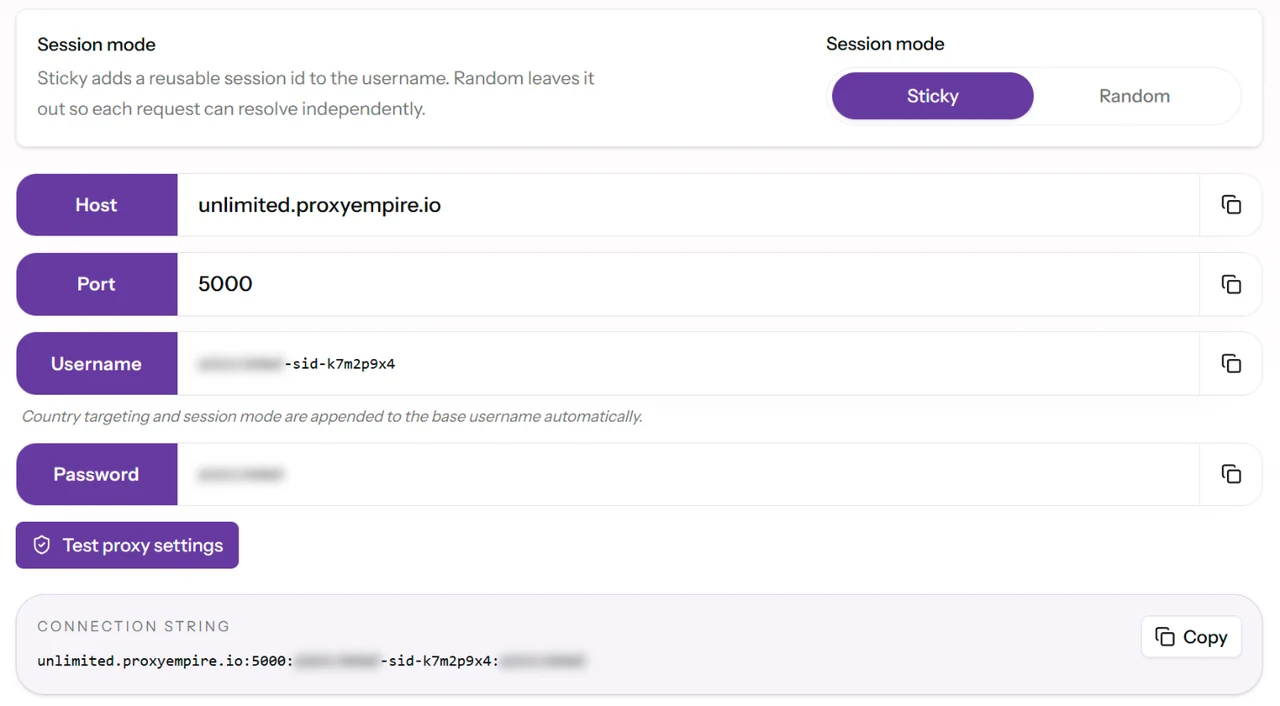
- Choose a Country, or leave it on Any country.
- Choose the Session mode: Sticky or Random.
- Copy the username: the country and session settings are added to it for you.
In the username, the country comes first and the session ID second:
# a new IP in Germany on each request
curl --proxy "http://USERNAME-country-de:PASSWORD@unlimited.proxyempire.io:5000" https://ipinfo.io/json

# one IP in Germany for this session (SOCKS5, DNS at the proxy)
curl --proxy "socks5h://USERNAME-country-de-sid-a1b2c3d4:PASSWORD@unlimited.proxyempire.io:5000" https://ipinfo.io/json
Click Test proxy settings to check the connection from the dashboard. The page also has code examples for cURL, Python, Node.js, PHP and Go, filled in with your login, and a Proxy list of up to 1,000 lines in the formats host:port:user:pass, user:pass:host:port or user:pass@host:port, to copy or download.
Sticky or random
| Mode | In the username | What happens |
|---|---|---|
| Random | No -sid- |
Each request can get a different IP. |
| Sticky | -sid-a1b2c3d4 |
Requests with the same session ID keep the same IP. |
Use a new session ID for a new IP, and give each parallel task its own ID. In a proxy list with sticky sessions, every line has its own session ID.
Usage and statistics
Under the connection builder, Unlimited Residential Statistics shows your live use in the last hour: peak speed in and out, requests, success and fail rates, and requests per minute. It also shows daily traffic for the last 30 days and the top domains you reached. Speeds are in Mbit/s, the same unit as your plan.
Limits
- Speed, not traffic: your plan sets the speed of the connection. Your real throughput also depends on how many requests you run in parallel and on the websites you reach.
- Targeting: country only. For region, city, ZIP, ISP, ASN or OS targeting, use Rotating Residential.
- Ports: 80 and 443 are open by default. Unlimited Residential carries TCP only, so UDP is not available on it.
- Websites: the blocked list applies.
Related
- Connection referenceHosts, ports and strings for every proxy type
- Unlimited Residential proxiesPlans, countries and the daily IP pool
- Sticky sessionsKeep one IP across many requests
- TroubleshootingCommon causes when a proxy doesn’t connect