
In today’s digital world, having a solid antidetect solution is super important if you’re juggling multiple accounts. A lot of people who manage many accounts know all too well how tricky it can be to dodge things like IP blocking due to cross-website tracking. That’s why many turn to antidetect browsers to keep things smooth. But, it’s key to remember that when you’re on mobile, you’re facing similar hurdles. Apps have a knack for tracking all sorts of stuff, from your device info to your phone number.
That’s where a mobile antidetect like GeeLark comes in super handy. By mimicking the mobile phone, it lets you handle multiple app accounts easily, making the risk of getting suspended a lot less likely.
What is GeeLark
GeeLark is a total game-changer as the first mobile antidetect out there. Instead of just simulating web and mobile browsers like the usual antidetect browsers, GeeLark goes a step further by simulating mobile phones, making it possible to run mobile apps.
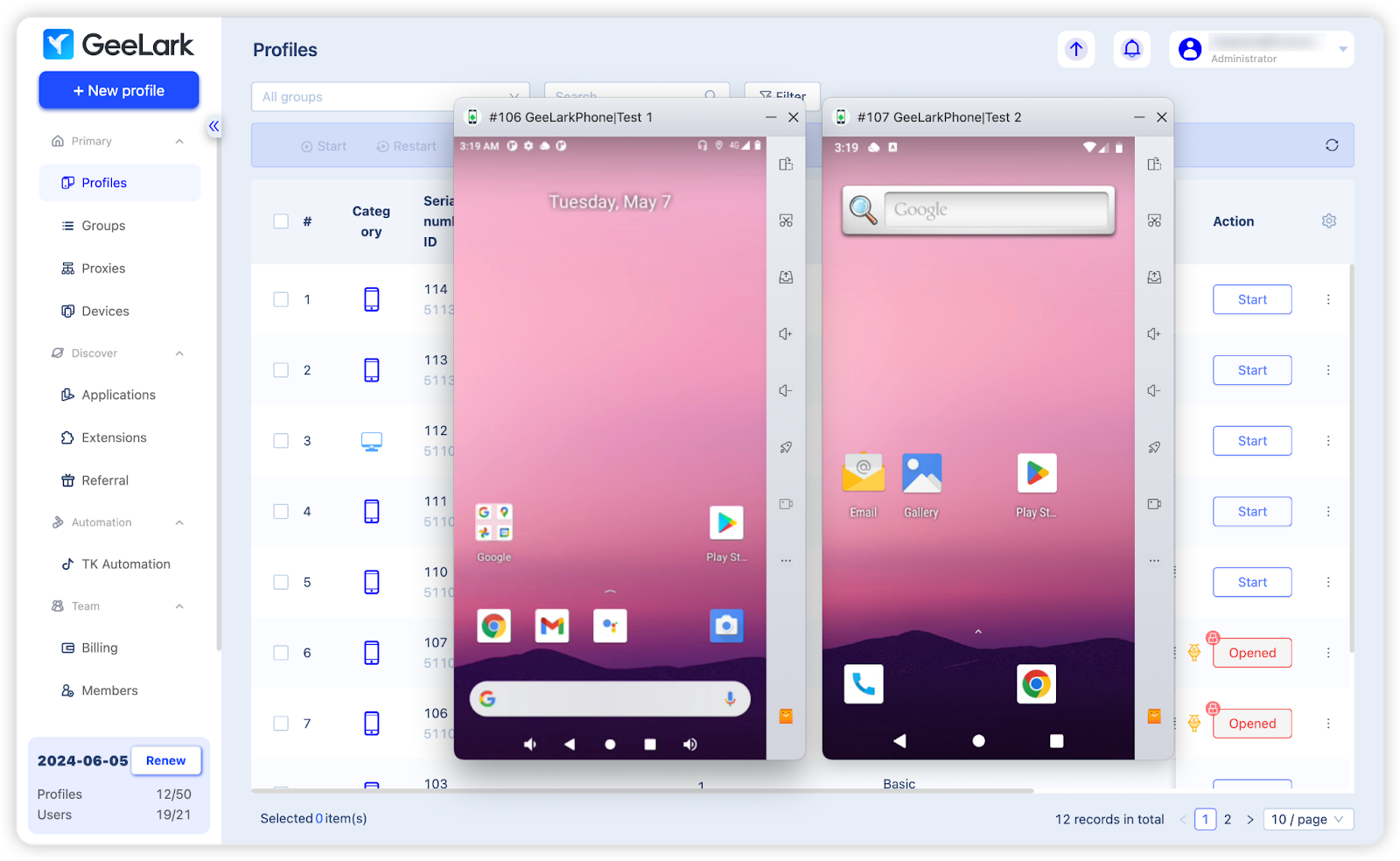
(GeeLark simulates mobile phones)
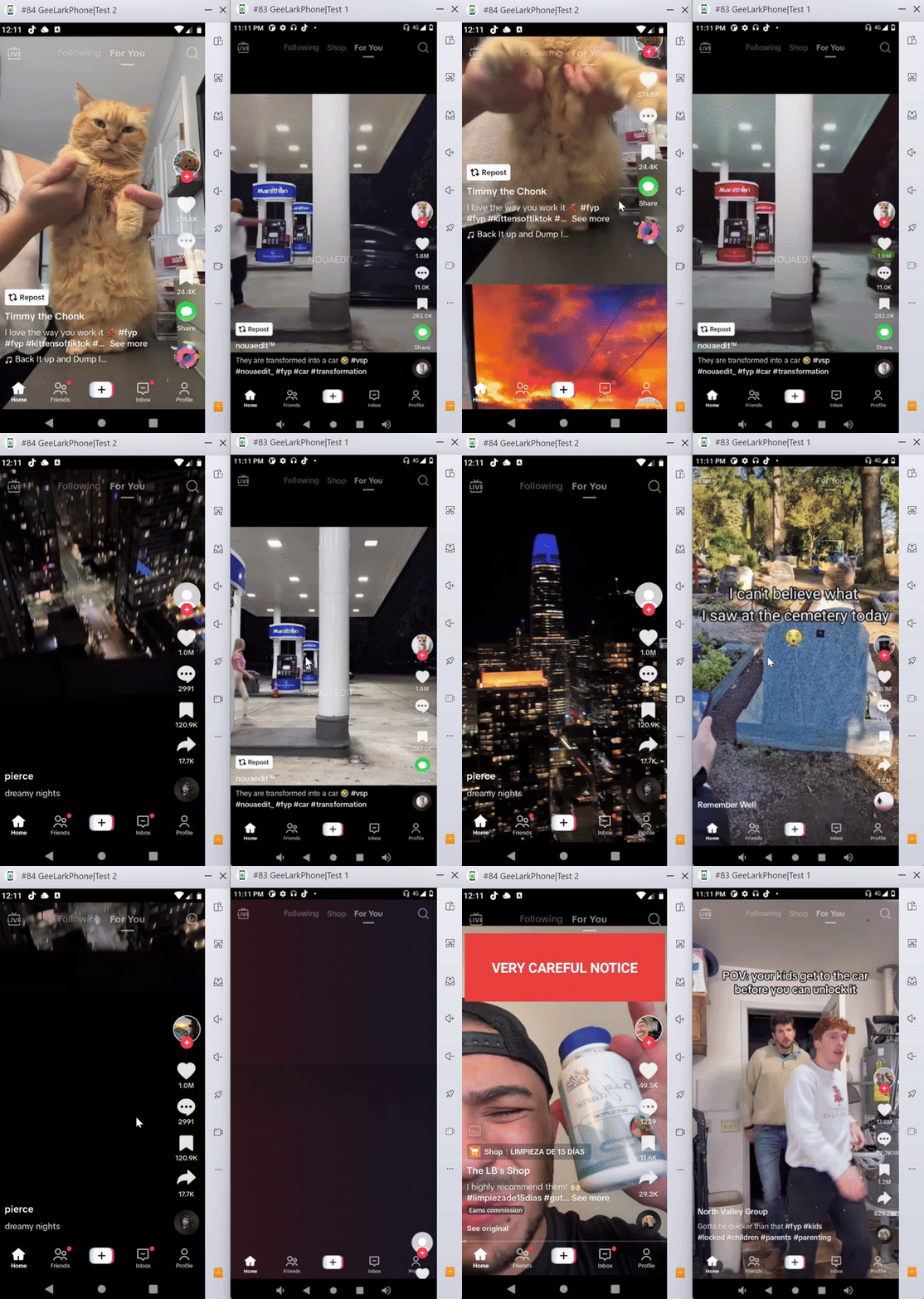
(Watching TikTok videos in GeeLark’s phone profiles)
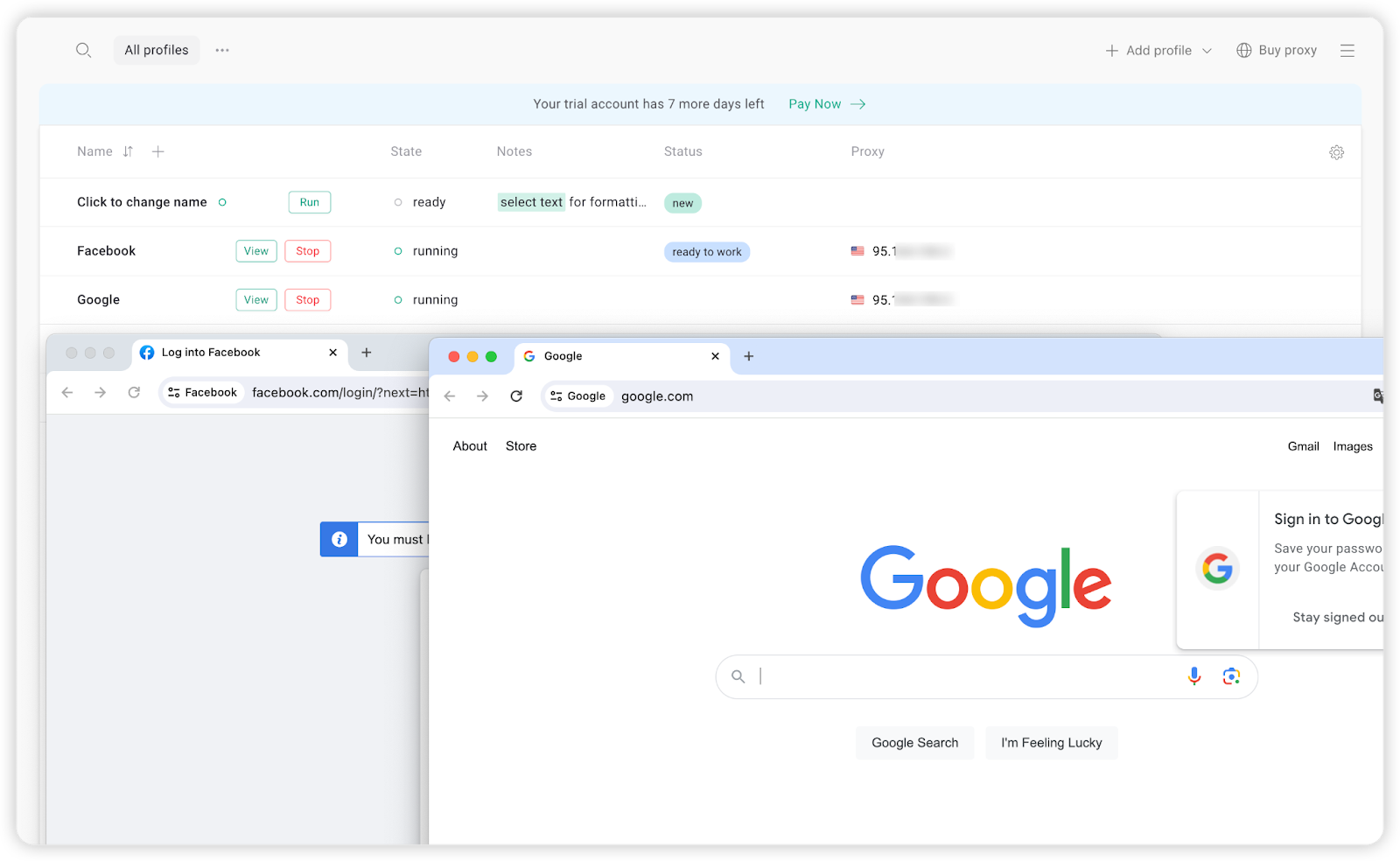
(Traditional antidetect browser simulates only the browser)
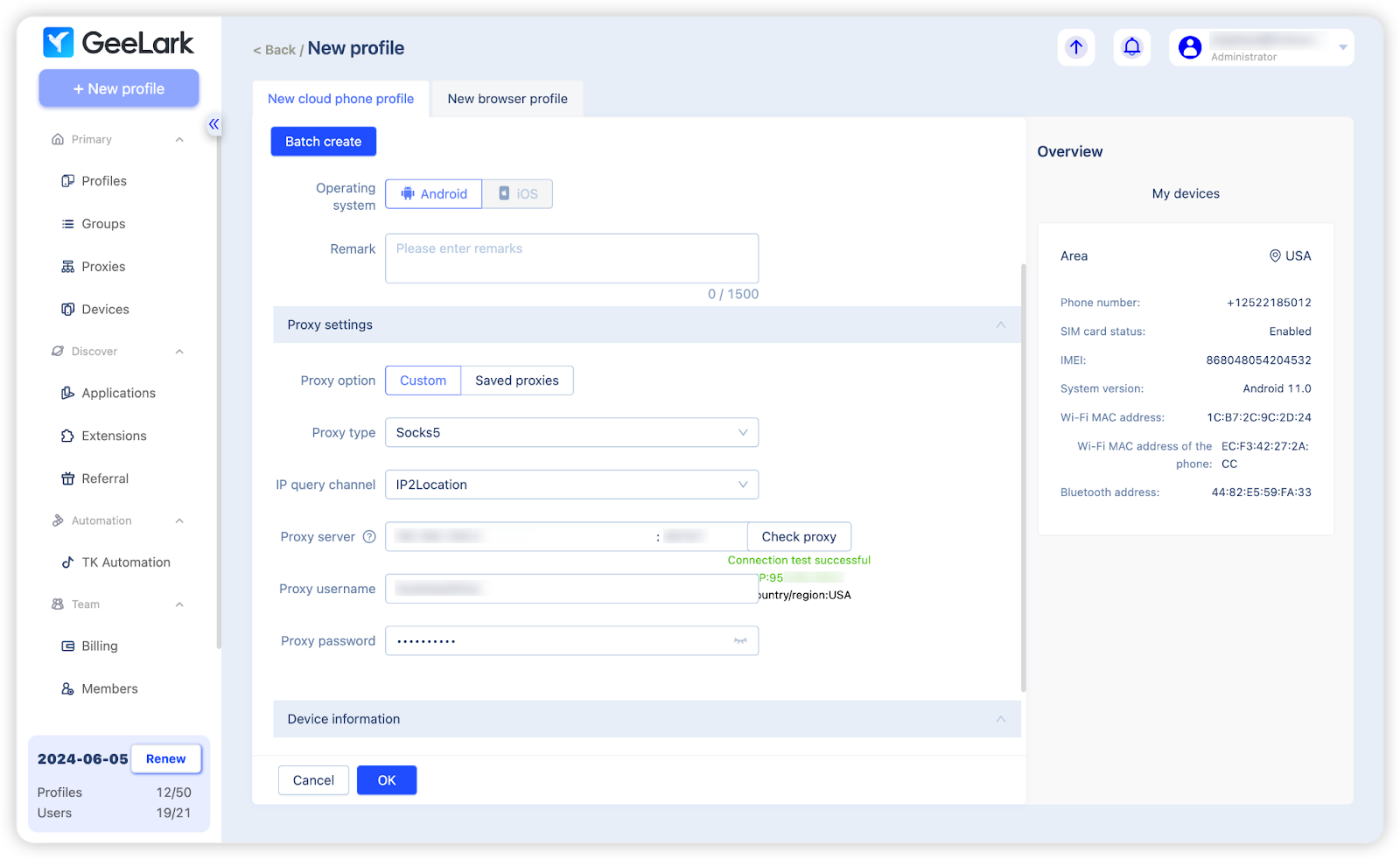
In GeeLark, you can create various phone profiles, each equipped with its own set of details like phone number, IMEI, WiFi Mac address, and Bluetooth address. It’s pretty cool because these profiles act just like real mobile phones, letting you run multiple apps simultaneously.
For what do you need to use GeeLark?
GeeLark comes into play wherever there’s a need to manage multiple accounts on the phone discreetly. Here are some areas where where it truly stands out:
Social media management
In a world dominated by mobile screens, social media platforms have rolled out mobile-exclusive features like Instagram’s Reels and Stories to improve the user experience. Platforms like TikTok favor mobile use, making video uploads and view accumulation easier. For social media managers, using GeeLark provides a strategic advantage, allowing access to mobile-specific features without needing multiple devices. GeeLark’s phone profiles enable easy account and region switching, and device emulation, crucial for engaging targeted audiences effectively.
Account farming
GeeLark is valuable for account farming by allowing users to manage multiple online profiles without needing a physical SIM for each. This simplifies and scales account farming, enabling better tracking and optimization of each account’s performance.
Crypto giveaway
Nowadays, many crypto giveaways boost community engagement by requiring actions on mobile apps. GeeLark’s phone profile, used as a dedicated device, keeps personal and promotional activities separate, enhancing privacy and security. For participants, it offers a way to manage events and track campaign performance without using their personal phones.
P2E mobile games
P2E mobile games offer real rewards but require accessible tech. GeeLark can remove device limitations, enabling seamless play in MMORPGs and metaverse projects, perfect for gamers and influencers looking to play globally without multiple devices.
Development tests
App developers need to ensure their apps work well on many devices, but can’t always test on each one. Using GeeLark lets them see how the app performs on different devices and conditions, giving quick feedback on user experience and performance, and identifying issues before launch.
Mobile iGaming
Whether you engage in an iGaming event through a mobile website or within an app, using GeeLark can spare you the expense and inconvenience of purchasing and managing a multitude of mobile phones.
How to work with GeeLark
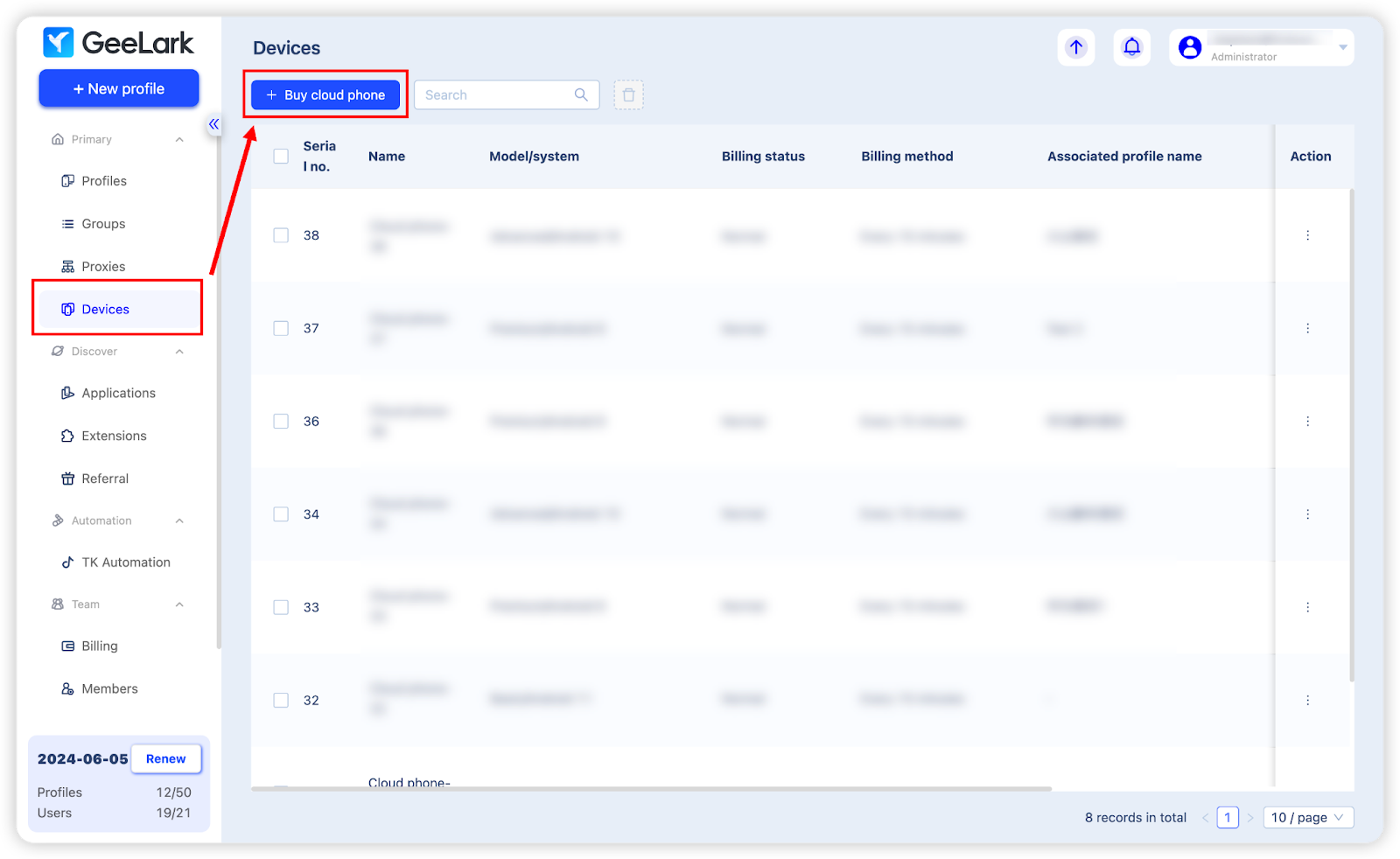
GeeLark enables mobile phone simulation through its use of cloud-based virtual phones. So, the first step in working with GeeLark is to buy cloud phones. Navigate to the “Devices” section and click “Buy cloud phone” to acquire your desired cloud phones.
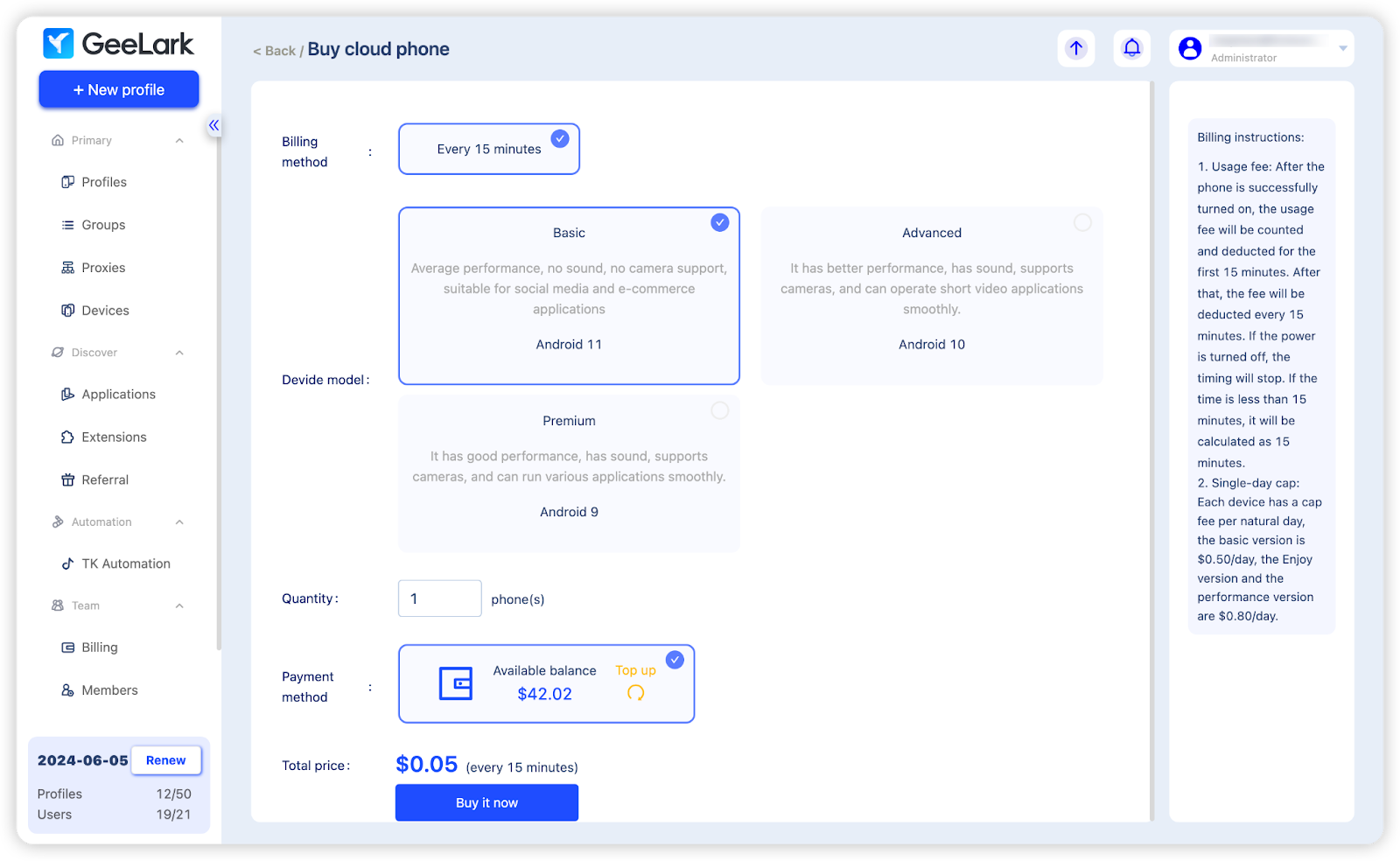
GeeLark offers three types of cloud phones, varying in usage charges and performance. Read here to find more details.
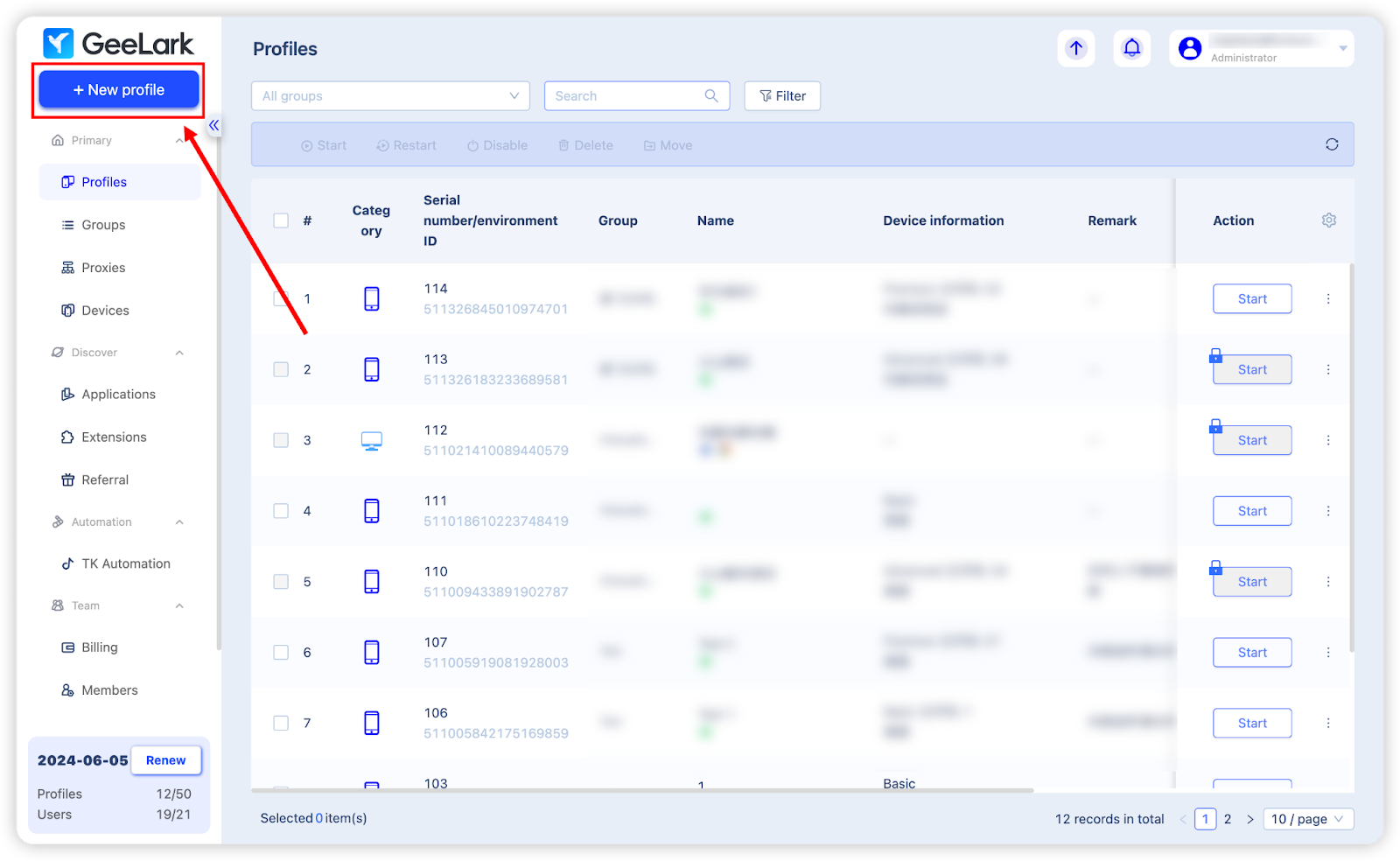
After this, you can start creating a new phone profile by clicking “New profile” in the top right corner.
Fill out the basic information for the new profile, like name, tag, group, etc., then set up a proxy in it and click “Check proxy” to verify its connection and location.
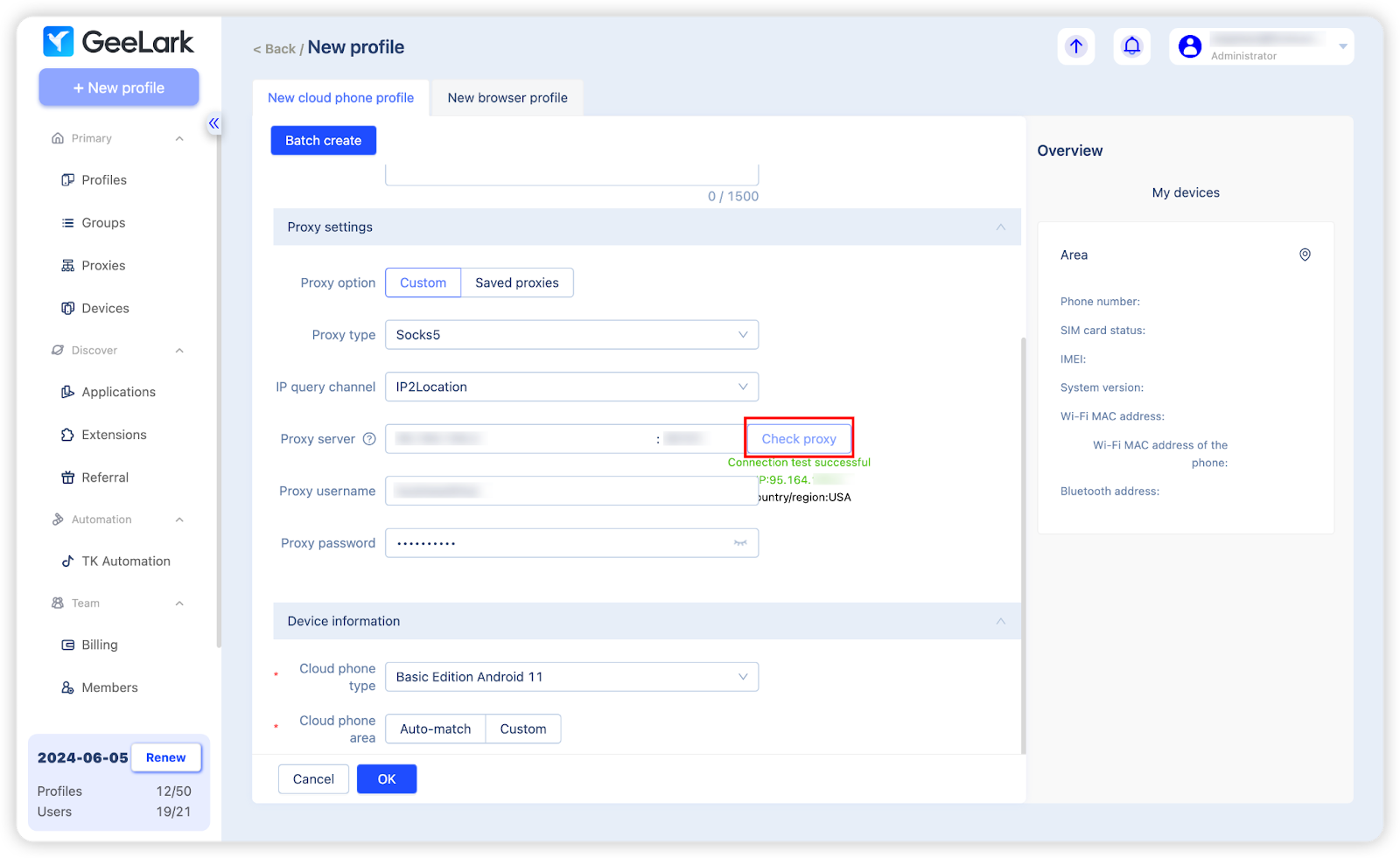
Finally, you must select a cloud phone on which to operate this new profile. Choose from the cloud phones purchased in the previous step, or pick your preferred type and purchase it after completing the new profile setup.
When it comes to the cloud phone area, you have two choices: the “Auto-match” feature, which automatically selects a region corresponding to your proxy location, or the “Custom” option, allowing you to manually select a region.
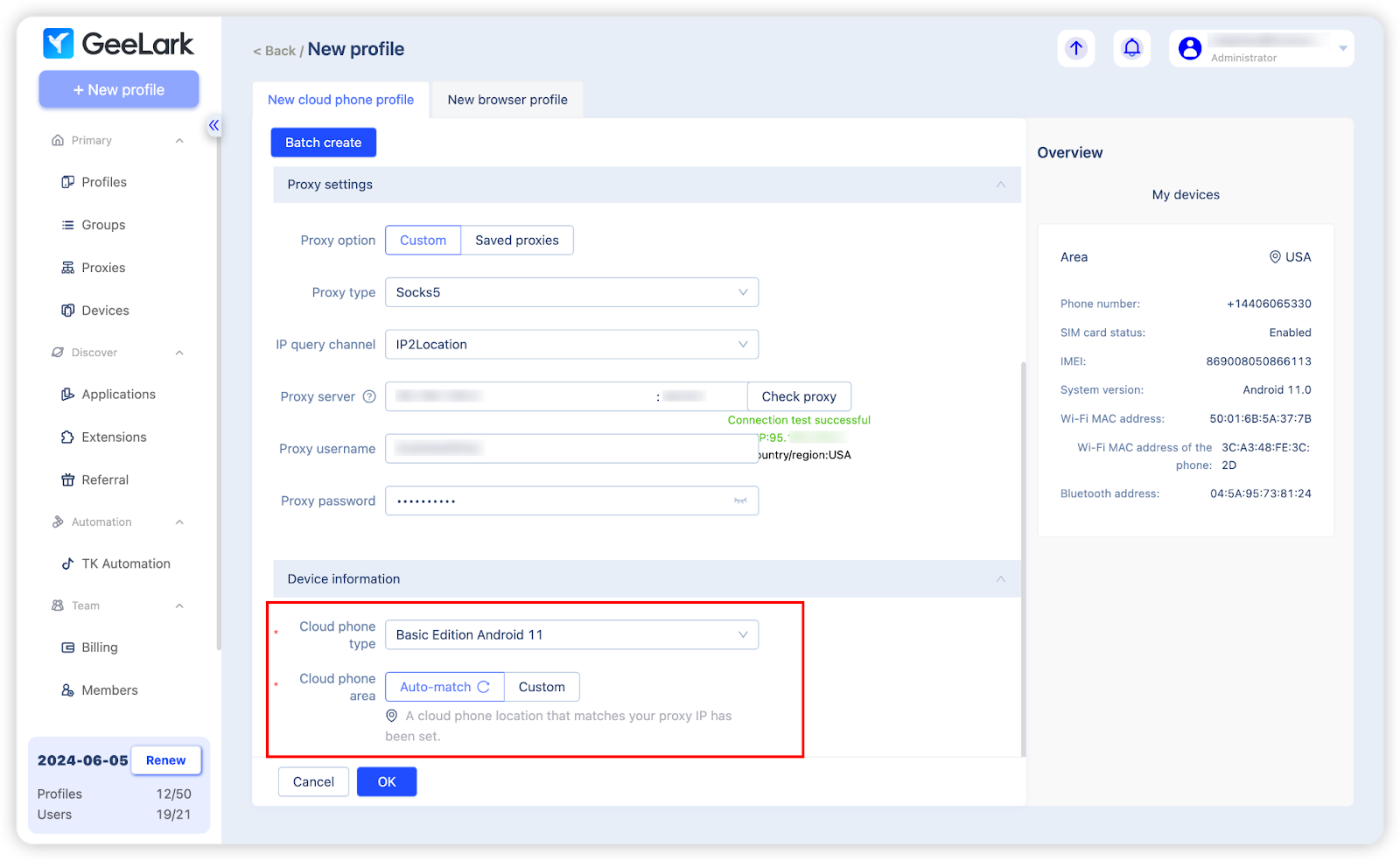
Now finish the profile creation by clicking “OK”, and you’re all set for work!
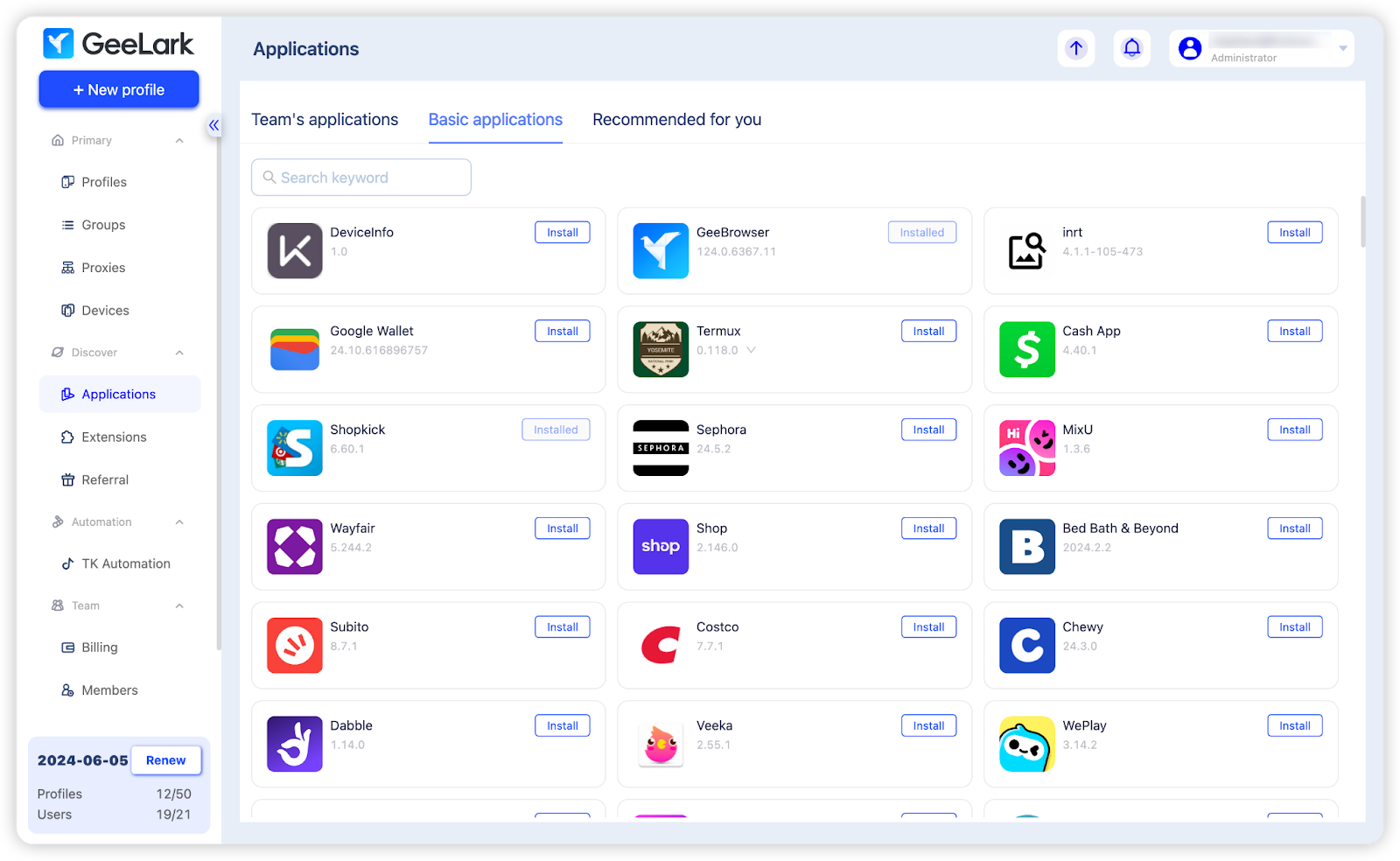
Beyond basic features such as profile and group management, as well as member permission settings, GeeLark provides additional advanced features. One of them is the built-in app marketplace that hosts a diverse collection of applications, covering areas like social media, E-commerce, and video editing. You can install any necessary apps directly to all phone profiles via the “Applications” section.
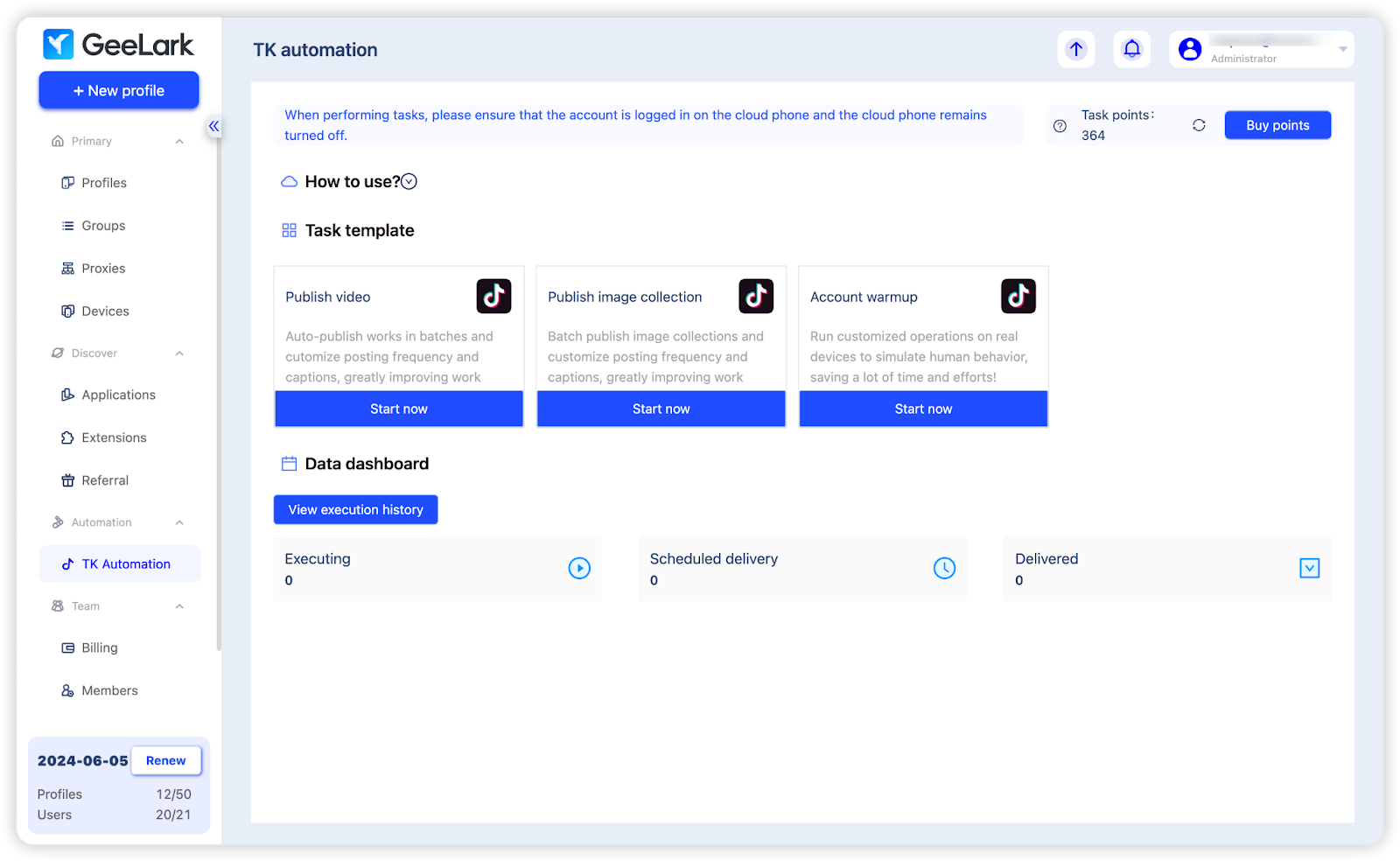
GeeLark also offers a tailored automation tool for TikTok account management. Currently, there are three automation templates to choose from: Publish video, Publish image collection, and Account warmup.
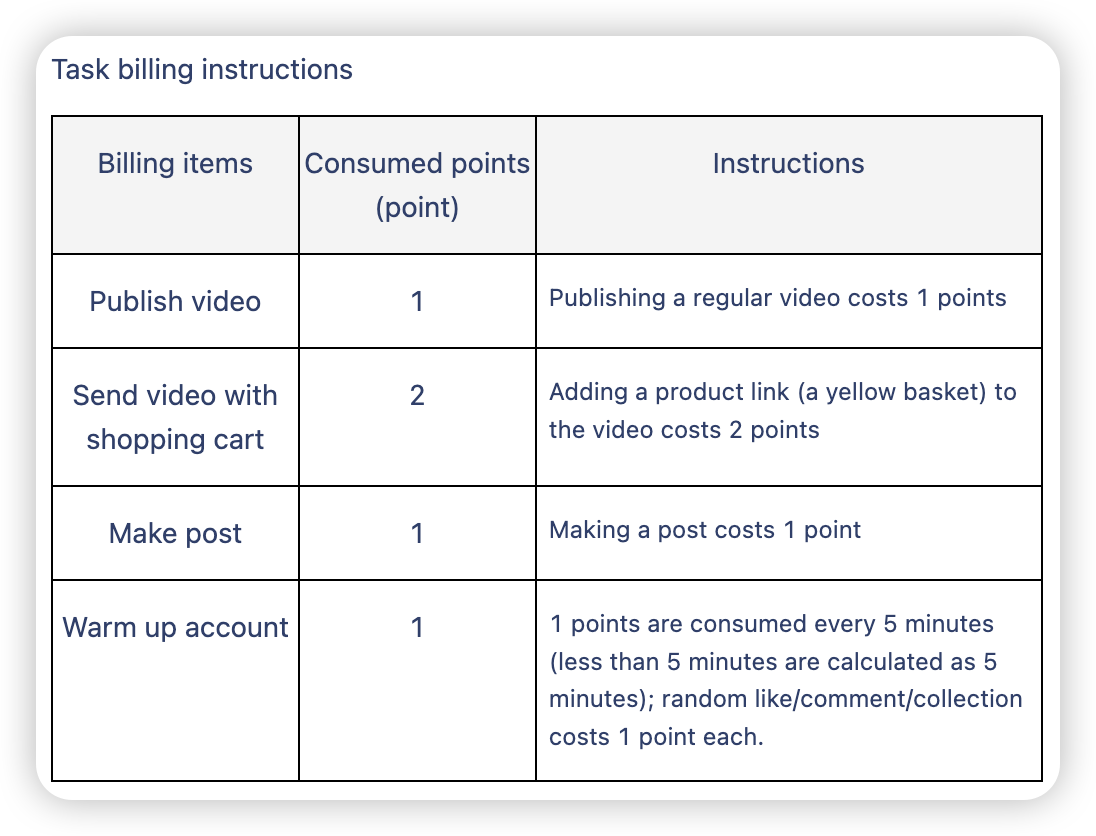
Task points are deducted for running automation tasks. New users can get 5000 points for free. Additional points can be purchased.
Getting started
To kick off your experience with GeeLark, visit the GeeLark website for comprehensive details on its features, pricing, and integration steps for enhancing your mobile workflows. Don’t forget to use the promo code “proxyempire” to enjoy a 15% discount on your subscription and purchase of automation task points. Perfect for affiliates, marketing professionals, or developers, GeeLark provides the best solution for efficient multi-account management.
Social post
Hello friends!
We’re excited to introduce our new partner, GeeLark, a groundbreaking mobile antidetect solution. Unlike traditional antidetect browsers that only mimic browsers, GeeLark innovatively emulates entire mobile phones, setting a new standard in the industry. 📱📱
👋Say goodbye to the costly and cumbersome method of using a lot of mobile phones!
GeeLark’s key features:
💫Unique virtual phone profile: Each profile works like a real phone
💫Convenient proxy management: Quickly import and select proxies for new profiles without the hassle of repeating entering the proxy info
💫Built-in app market: Get the mobile apps you want and install them in batches directly within GeeLark
💫TikTok automation: Leverage pre-designed templates to automate routine TikTok activities
💫Referral program: Refer GeeLark to your friends and earn a 10% commission on their subscription fees.
🔥Special offer: Users of Proxy-Solutions can use the promo code “proxyempire” for a 15% discount on all subscriptions and automation points.
Key Features of GeeLark
GeeLark runs real Android cloud phones that act like separate physical devices. Each phone profile gets its own hardware details such as IMEI, WiFi MAC address, Bluetooth address, and Android version. This proxy setup lets users install and open mobile apps directly, including TikTok, Instagram, and other native tools.
Profiles stay fully independent. One account cannot share cookies, storage, or device signals with another. The platform includes a built-in app marketplace so apps install across many profiles at once. Proxy support sits at the core of every profile. Users add rotating residential proxies or rotating mobile proxies during creation, and the cloud phone matches the connection for consistent sessions.
Automation tools handle repetitive work. Ready templates cover video publishing, image collections, and account warmup on short-form platforms. A Synchronizer copies actions from one phone to many others in real time. GeeLark AI helps create and edit content inside the same dashboard. Team members share access through permission settings and operation logs without extra seats on paid plans.
These pieces work together for social media management, account farming, and app testing. The same profiles also support static residential proxies when a longer fixed identity is needed for ongoing research or monitoring tasks. Many teams pair the setup with social media proxies to keep mobile workflows steady across platforms.
Pros and Cons of GeeLark
Pros
- Real Android environments with unique hardware fingerprints keep accounts separated better than software-only tools.
- Cloud phones replace racks of physical devices and remove daily maintenance.
- Built-in automation templates and the Synchronizer cut manual work for posting and engagement.
- Proxy setup happens inside each profile, so rotating mobile proxies or residential options pair cleanly with the device location.
- Team permissions and free extra seats make group workflows simple.
- App marketplace and AI content tools live in one place.
Cons
- Only Android is available right now.
- Dual billing for profiles and phone runtime needs careful planning for heavy daily use.
- Occasional connection drops can appear during long sessions.
- High-volume parallel phones require stable internet on the user side.
Overall, the strengths focus on mobile-first isolation and scale. The limits mainly appear when someone needs iOS or wants a single flat monthly fee for constant runtime. Users who rely on static residential proxies for stable sessions often find the combination works well for longer research or monitoring tasks.
Latest News In 2026
GeeLark expanded its AI content tools this year. Users now generate captions, edit short videos, and repurpose clips across profiles without leaving the dashboard. The Synchronizer gained finer controls so teams mirror only selected actions instead of every tap.
More Android versions became available on cloud phones, giving better match options for different app requirements. Team collaboration added clearer operation logs and role filters. Proxy matching improved so static residential proxies and mobile connections lock to the chosen phone region with less manual checking.
These updates keep the focus on real-device isolation for social media and research workflows while making multi-profile work smoother for larger groups. Many operators now combine the new tools with rotating residential proxies for broader public data collection and market research sessions.
FAQ
What makes a cloud phone different from a regular phone emulator?
A cloud phone runs on actual remote Android hardware and carries its own full set of device identifiers, sensors, and storage that stay separate from every other profile. Emulators share the host computer’s resources and often leave software traces that mobile platforms can detect. Cloud phones support native app installs through the Play Store or marketplace without the performance limits common in local virtual machines. This hardware-level separation helps maintain consistent behavior for apps that check device authenticity. The result is a closer match to how a real smartphone appears during everyday use.
Which proxy types pair best with GeeLark profiles?
Rotating residential proxies and rotating mobile proxies work well for most social and research sessions because they supply fresh IPs from real networks. Static residential proxies suit longer account activity where a fixed identity helps maintain steady logins and session history. Social media proxies give an extra layer of flexibility when the focus stays on platform-specific workflows. The choice depends on whether the task needs frequent IP changes or longer consistent connections. Matching the proxy type to the phone region keeps the overall environment aligned.
Can one GeeLark profile run several apps at the same time?
Yes. Each cloud phone behaves like a normal smartphone and can keep multiple apps open side by side. Users switch between TikTok, Instagram, browsers, or any other installed tools without closing the profile. The independent storage and process space prevent one app from affecting another inside the same phone. This multi-app support is useful for workflows that combine content creation, engagement, and quick checks in a single session. Background processes continue running while the user focuses on the active screen.
How does the Synchronizer help with multiple accounts?
The Synchronizer takes actions performed on one master phone and copies them across other open phones in real time. Users can choose to mirror only specific taps, swipes, or text inputs instead of every movement. This reduces the time spent repeating the same steps across many profiles during posting or engagement tasks. The tool works inside the same dashboard, so teams keep full visibility of what happens on each device. It supports both simple templates and custom sequences for more complex multi-account work.
Is GeeLark suitable for app testing and quality checks?
Yes. Developers and marketers launch different Android versions and device models to see how an app behaves under varied conditions. Each cloud phone provides a clean environment with its own hardware fingerprint, so tests stay isolated from personal devices. The setup allows quick switches between regions and network types when checking performance or display issues. Combined with rotating mobile proxies, the phones support realistic mobile network conditions for thorough quality reviews. Results appear in real time without the need for physical hardware racks.
Does GeeLark support team access and shared profiles?
Paid proxy plans include unlimited seats so several people can work on the same set of profiles. Managers assign specific roles and permissions to control who can create, edit, or launch phones. Operation logs record every action for easy review and accountability across the group. Shared profiles keep device fingerprints and installed apps consistent while still allowing individual proxy settings. This structure fits agencies and larger teams that need coordinated multi-account management without overlapping access.
Explore the power of mobile multi-accounting with GeeLark! 🚀


















