GoLogin Proxies: Easy Integration Tutorial 2026

⬇️ Experience our high-end residential proxies for just $1.97

backconnect proxies for gologin

GoLogin is an antidetect browser for multi-accounting. It enables the user to create and manage multiple profiles on websites. GoLogin lets you customize every single parameter of your browser footprint and has a large database of over 50 different pre-set configurations.

Each browser profile that you create is containerized separately in the cloud. It comes with built-in functionality for teamwork enabling you to easily share profiles and proxies between your team members and give them different levels of access.

In this tutorial, you will learn how to use GoLogin proxies, download GoLogin, and integrate it all in just a couple of clicks with ProxyEmpire.

Β 

GoLogin Proxies

We created this tutorial and tested it on a Windows operating system. Once you download GoLogin an installer will do the rest of the work. Saving the install to the taskbar was our favorite way to access theirΒ anti-detect browser.

You can download their application by visiting this GoLoginΒ download page.

Β 

Why do you need proxies for GoLogin?

GoLogin can change all parts of your digital footprint, except your IP – that’s where Proxyempire comes in! WeΒ offer 4G mobile proxiesΒ andΒ residential proxies with granular targetingΒ to give you total control of your online presence.

Follow these steps to use ProxyEmpire with Gologin

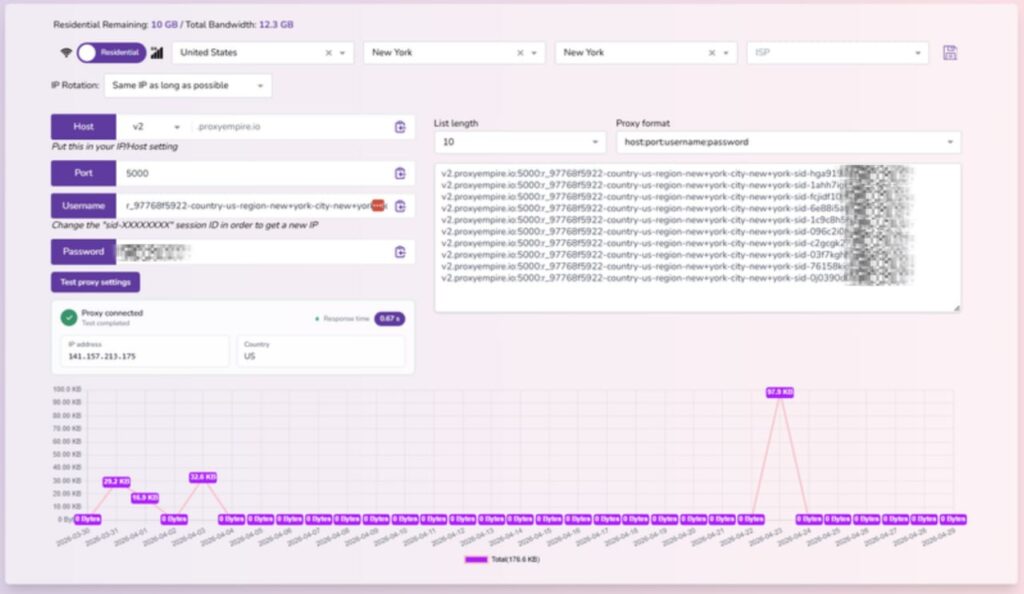
Open your personal ProxyEmpire Dashboard & navigate to the ProxyEmpire Proxy Manager section.

Use the Proxy Manager to pick the Type(Residential or Mobile), Country, Region, City & ISP of your proxies, for this example we’ll be using aΒ USA Residential Proxy in New York City

gologin proxies integration

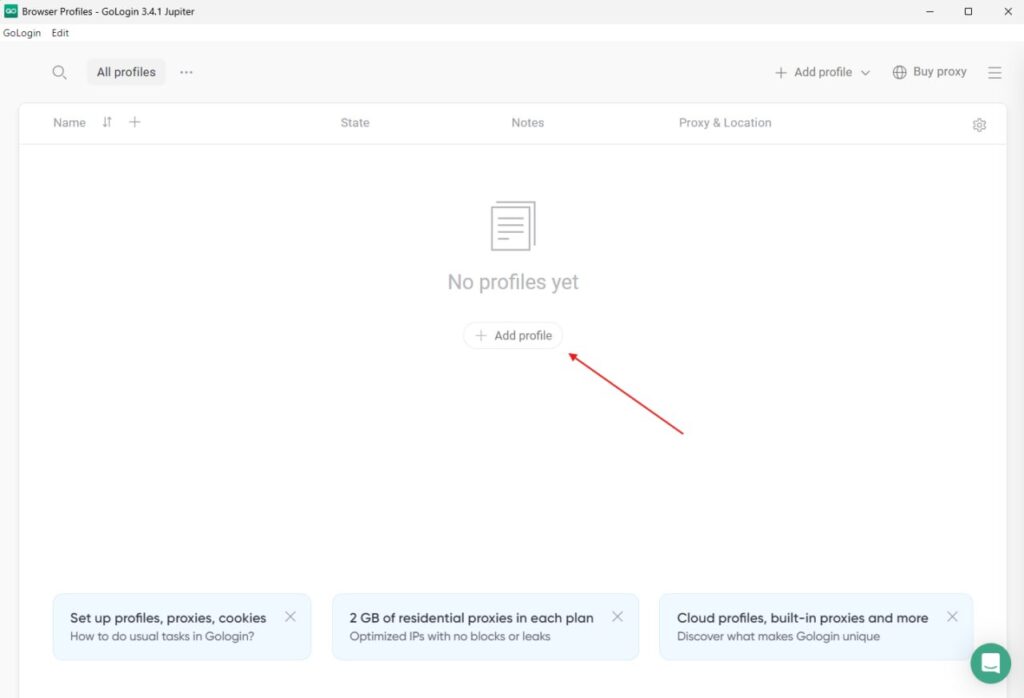
Once you have copied your proxy details, go ahead and open theΒ GoLogin appΒ and you’ll see the following screen:

gologin profile creation

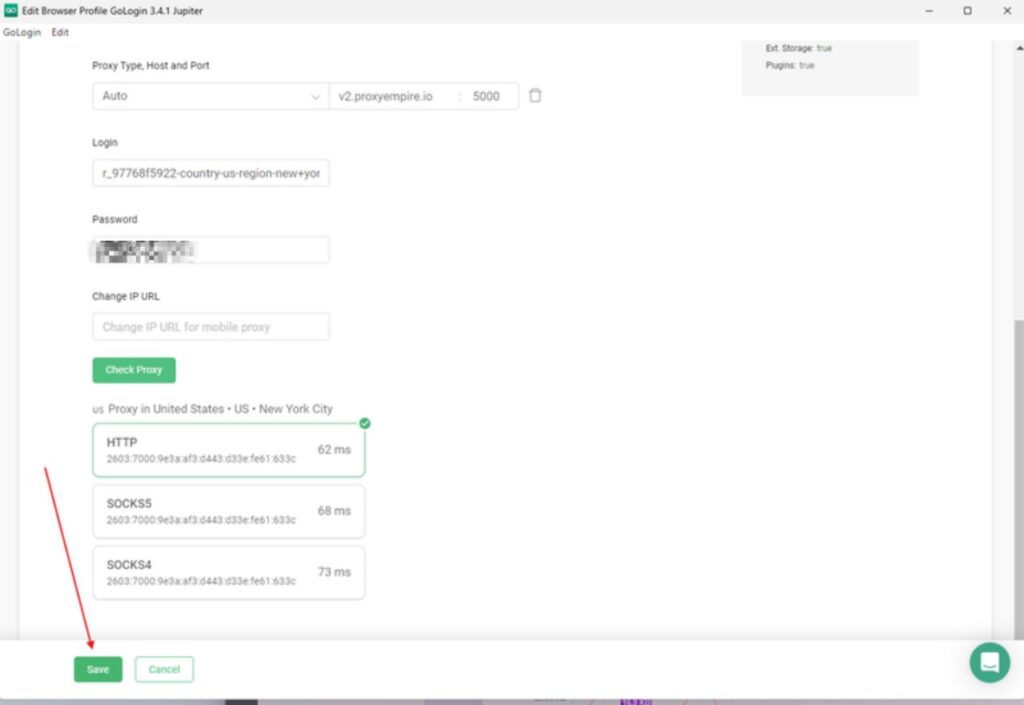
After you click on the ”New Profile” button, you’ll see the following screen, pick the connection type you want to use, ProxyEmpire supports the following protocols – HTTP, HTTPS, SOCKS5, and then enter your personal residential or mobile proxy details:

gologin proxy setup

After you’ve successfully created your profile, you can go ahead and start using your Gologin profile with ProxyEmpire’s proxies.

What Is a GoLogin Proxy?

People often ask what a GoLogin proxy is and how to best use them. It’s the wrong question to a correct answer. There’s really no such thing as a GoLogin proxy, but rather proxies that can be used with GoLogin. ProxyEmpire for example provides GoLogin clients with residential proxies.

Just to be clear, a basic account at GoLogin will provide you with shared proxies.

These proxies are convenient because they come with your account but typically aren’t safe to use on platforms that are sensitive like Instagram, Amazon, or Google.

Shared proxies mean that they come from a data center and are used by a lot of people. This opens them up to abuse and they can easily be blacklisted. That’s why people who use GoLogin come to ProxyEmpire in order to safely create and manage accounts.

To use Gologin to its maximum potential you should definitively use premium proxies – either residential or mobile depending on your target website and budget.

GoLogin Price Evaluation

The GoLogin price depends on how many profiles you need to create. A β€œprofile” represents a separate browser identity used for managing accounts.

The platform is subscription-based with both monthly and yearly plans. Users can save significantly (up to ~50%) by choosing annual billing.

For the most accurate and up-to-date pricing, it’s best to check the official GoLogin website.

Considering the advanced features of GoLogin that price seemed reasonable.

GoLogin Promo & Discounts

Periodically GoLogin offers discounts and promotions, especially during major events like Cyber Monday. They also provide a 7-day trial, so you can test the setup and features before committing.

You can reduce costs further by choosing annual plans, which typically offer significant savings.

For users of ProxyEmpire, Gologin offers an exclusive promotion β€” use code PROXYEMPIRE to get 50% off your first month purchase.

Benefits of using Gologin Browser

GoLogin is suitable for managing a large number of accounts across different platforms. It allows you to organize multiple profiles with unique browser fingerprints and scale operations efficiently.

It is commonly used for:

* Social media management

* Advertising account management

* E-commerce operations

The platform includes a large fingerprint database with hundreds of configurable parameters such as operating systems, timezones, WebRTC, fonts, and hardware characteristics.

You can also check the trust score of your fingerprint and use real-world browser configurations.

Additional features include:

* Team collaboration tools

* Session synchronization

* Master password protection

* Encrypted cloud storage (AES encryption)

The platform is user-friendly and supported across major operating systems, including its cloud version.

Getting Started With Proxy Empire

Starting yourΒ static residential proxiesΒ and mobile proxy journey is a breeze with ProxyEmpire’s $1.97 trial. Get access to 150+ countries and thousands of connections in minutes. Learn more about how to get started with your trial by checking out ourΒ getting started guide here.

Β 

Last Word

GoLogin is an antidetect browser that enables users to create and manage multiple profiles on websites. Integrating GoLogin with residential and mobile proxies from ProxyEmpire provides additional security and anonymity.

GoLogin allows customization of browser footprints with different pre-set configurations. Profiles are containerized separately in the cloud. It has built-in teamwork features to share profiles and proxies between team members.

To integrate ProxyEmpire proxies with GoLogin, first select the proxy type, country, region, city and ISP in the ProxyEmpire dashboard. Copy the proxy details. Open GoLogin and create a new profile. Pick the connection protocol – HTTP, HTTPS, SOCKS4 or SOCKS5. Paste in the proxy details. The profile can now be used with the ProxyEmpire proxy.

GoLogin proxies are shared proxies that come with basic accounts. They are convenient but not ideal for sensitive platforms. For best results, ProxyEmpire residential or mobile proxies should be used.

GoLogin is priced based on the number of profiles needed. Monthly or annual subscriptions are available, with annual saving 50%. Promotions may be offered on holidays. ProxyEmpire provides an exclusive promo code.

Benefits of GoLogin include bulk account management, organizing profiles and scaling faster. The fingerprint database has hundreds of options to avoid bans. It supports Windows, Mac, Linux, Android and a cloud version. ProxyEmpire makes integration simple to enhance privacy.

FAQ:

What is GoLogin?

GoLogin is an antidetect browser that allows users to create and manage multiple online profiles with unique digital fingerprints. It’s designed to help users maintain anonymity and manage multiple accounts for various online activities.

Why do I need proxies with GoLogin?

While GoLogin can mask your browser fingerprint, it doesn’t hide your IP address. Integrating proxies with GoLogin provides complete anonymity by masking both your fingerprint and IP address, making it ideal for tasks like web scraping, social media management, and e-commerce activities.

What types of proxies work with GoLogin?

GoLogin supports various proxy types, including:

  • Residential proxies
  • Mobile proxies
  • Datacenter proxies
  • HTTP/HTTPS proxies
  • SOCKS4/SOCKS5 proxies

How do I integrate proxies with GoLogin?

To integrate proxies with GoLogin:

  1. Open the GoLogin app and click “Create New Profile”
  2. Name your profile and go to the “Proxy” tab
  3. Select “Your Proxy” and choose the proxy type (e.g., HTTP, SOCKS5)
  4. Enter the proxy details (host, port, username, password)
  5. Click “Check Proxy” to verify the connection
  6. Adjust other browser settings as needed
  7. Click “Create Profile” to finish

Can I use different proxies for different GoLogin profiles?

Yes, you can assign different proxies to each GoLogin profile. This allows you to create unique online identities with distinct IP addresses for various tasks or accounts.

Can I use free proxies with GoLogin?

While it’s technically possible to use free proxies, it’s not recommended. Free proxies are often slow, unreliable, and may pose security risks. For best results and security, use paid proxy services from reputable providers.

How often should I rotate proxies in GoLogin?

The frequency of proxy rotation depends on your specific use case. For general browsing, you might rotate less frequently. For more intensive tasks like web scraping, you may want to rotate proxies more often to avoid detection and IP bans.

Does GoLogin offer its own proxies?

Yes, GoLogin does provide its proxies. However, its reccomended to obtain proxies from a third-party provider and integrate them with GoLogin manually.

By following this easy integration tutorial and understanding these FAQs, you’ll be well-equipped to use proxies effectively with GoLogin for enhanced online anonymity and multi-account management.
You May Also Like:

Flexible Pricing Plan

logo purple proxyempire

Our state-of-the-art proxies.

Experience online freedom with our unrivaled web proxy solutions. Pioneering in collecting location specific data at scale, our premium, ethically-sourced network boasts a vast pool of IPs, expansive location choices, high success rate, and versatile pricing. Advance your digital journey with us.

🏘️ Rotating Residential Proxies
  • 30M+ Premium Residential IPs
  • Β 170+ Countries
    Every residential IP in our network corresponds to an actual desktop device with a precise geographical location. Our residential proxies are unparalleled in terms of speed, boasting a success rate of 99.56%, and can be used for a wide range of different use cases. You can use Country, Region, City and ISP targeting for our rotating residential proxies.

See our Rotating Residential Proxies

πŸ“ Static Residential Proxies
  • 20+ Countries
    Buy a dedicated static residential IP from one of the 20+ countries that we offer proxies in. Keep the same IP for a month or longer, while benefiting from their fast speed and stability.

See our Static Residential Proxies

πŸ“³ Rotating Mobile Proxies
  • 5M+ Premium Mobile IPs
  • Β 170+ Countries
    Access millions of clean mobile IPs with precise targeting including Country, Region, City, and Mobile Carrier. Leave IP Blocks and Captchas in the past and browse the web freely with our 4G & 5G Proxies today.

See our Mobile Proxies

πŸ“± Dedicated Mobile Proxies
  • 5+ Countries
  • 50+ Locations
    Get your own dedicated mobile proxy in one of our supported locations, with unlimited bandwidth and unlimited IP changes on demand. A great choice when you need a small number of mobile IPs and a lot of proxy bandwidth.

See our 4G & 5G Proxies

🌐 Rotating Datacenter Proxies
  • 70,000+ Premium IPs
  • Β 10+ Countries
    On a budget and need to do some simple scraping tasks? Our datacenter proxies are the perfect fit! Get started with as little as $2

See our Datacenter Proxies

proxy locations

30M+ rotating IPs

99% uptime - high speed

99.9% uptime.

dedicated support team

24/7 Dedicated Support.

fair price

Fair Pricing.

ProxyEmpire Footer
Follow Us
ProxyEmpire Reviews
🏠 Residential Proxies Rotating / Static / Unlimited
πŸ“± Mobile Proxies Rotating and Dedicated
πŸ–₯️ Datacenter Proxies Rotating
🌍 Proxy Locations 30M+ Proxies · Worldwide coverage
🏎️ Speed High-speed connections