Kameleo lets you run multiple online accounts and bypass anti-bot systems without getting blocked or banned. Each profile gets its own isolated fingerprint. For developers, Kameleo provides an SDK and supports direct integration with Selenium, Puppeteer, or Playwright.
What Kameleo can’t do is change your IP. That’s where ProxyEmpire comes in: assign a different residential or mobile IP to each profile, and both detection layers are covered.
Before You Start: Get Your Proxy Details
Whichever integration path you use below, you’ll need your proxy credentials from ProxyEmpire first.
- Log in to your ProxyEmpire dashboard.
- Open the Proxy Manager.
- Pick your proxy type (Residential, Mobile, Static Residential, or Datacenter).
- Set your targeting: country, region, city, and ISP if needed.
- Copy the generated proxy string — you’ll need the host, port, username, and password.
Keep these handy. You’ll paste them into Kameleo in the next step.
Option A: Set Up a Profile in Desktop App
This is the standard path for manual profile management — running accounts, testing, ad verification, anything you’re doing without automation code.
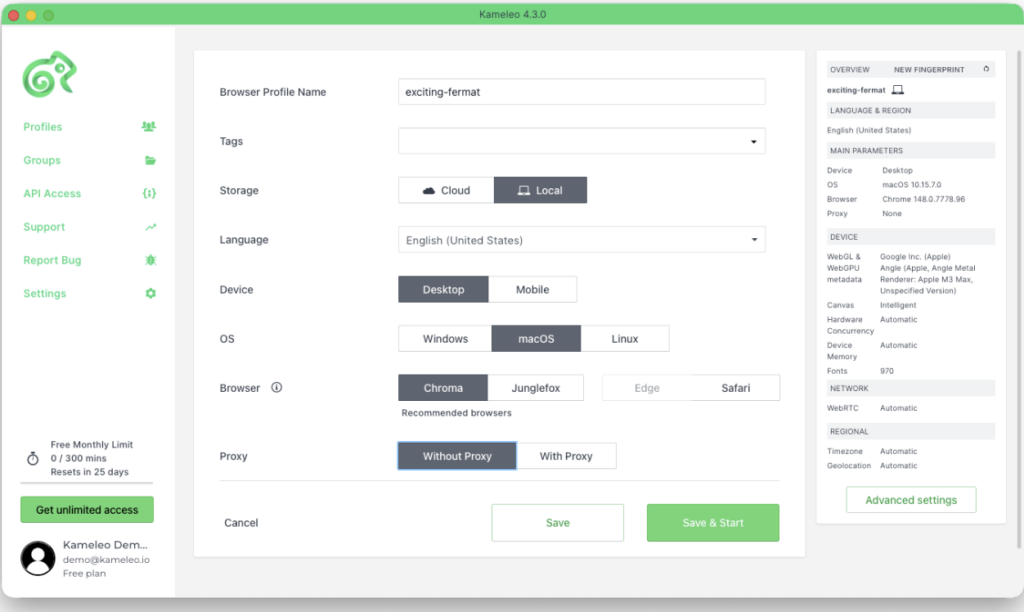
- Open Kameleo and click New Profile.
- If needed, adjust the Language to match your target market. Everything else — device type, OS, browser, timezone, geolocation — is pre-filled with sensible defaults and doesn’t need to be touched.
- Under Proxy, switch to With Proxy.
- Select your connection type (HTTP or SOCKS5) and enter the host, port, username, and password from your ProxyEmpire dashboard.
- Click Save & Start. The profile launches immediately.
That’s it. Your profile is running with a ProxyEmpire IP assigned to it.
Option B: Using ProxyEmpire with Kameleo SDK
This section is for developers running Kameleo headlessly — scraping, account automation, data pipelines. Kameleo exposes a local REST API that lets you create and launch profiles programmatically, then attach a Playwright, Puppeteer, or Selenium session to the running browser.
Proxies go in at profile creation time. Substitute the host, port, username, and password you copied from ProxyEmpire in the step above. Here’s a simplified example using the Kameleo Python SDK:
from kameleo.local_api_client import KameleoLocalApiClient
from kameleo.local_api_client.models import CreateProfileRequest, ProxyChoice, Server

client = KameleoLocalApiClient(endpoint='http://localhost:5050')

# Search for a Chrome fingerprint on a desktop device
fps = client.fingerprint.search_fingerprints(device_type='desktop', browser_product='chrome')

# Create the profile and attach your ProxyEmpire SOCKS5 proxy
profile = client.profile.create_profile(CreateProfileRequest(
    fingerprint_id=fps[0].id,
    name='Example Profile',
    proxy=ProxyChoice(
        value='socks5',
        extra=Server(host='<host>', port=<port>, id='<username>', secret='<password>')
    )
))

# Start the profile — Kameleo tests the proxy before the browser opens
client.profile.start_profile(profile.id)
From here, connect Playwright, Puppeteer, or Selenium to the running browser. See the integration guides in the Kameleo developer docs.
Every profile you spin up this way gets a separate fingerprint and a separate ProxyEmpire IP. You can run dozens of concurrent profiles on a single machine, each fully isolated.
What Makes Kameleo Different
Superior undetectability vs. DIY headless. Kameleo ships its own Chroma (Chromium-based) and Junglefox (Firefox-based) kernel builds. Canvas, WebGL, CDP signals, audio context, timezone, geolocation, device memory: all handled at the engine level. The fingerprint masking is baked into the kernel itself, so detection scripts have nothing to strip and Chrome updates don’t break your setup.
Rapid adaptation. Anti-bot systems update constantly, and Kameleo keeps pace with weekly+ release cycles. New Chroma kernels ship within 5 days of each Stable Chrome release; Junglefox ships roughly every two months. Your code stays the same.
Proven anti-bot bypass. Kameleo runs automated daily tests against the major anti-bot systems. Results are published openly in the Masking Status Report. You can check which targets pass before you commit to anything.
Developer-first from day one. The SDK is available for Python, JavaScript, and C#. Quickstarts and code examples are on GitHub. There’s a free tier you can spin up in under 5 minutes without a sales call.
Kameleo Pricing
Kameleo charges based on how many browsers run simultaneously. You can create as many profiles as you want; only the active ones count toward billing. Paid plans scale from 10 to 1000+ concurrent browsers, and there’s a free tier so you can test against real targets before committing to anything.
Start for Free or compare all plans at kameleo.io/pricing.
FAQ
What is Kameleo?
Kameleo is an anti-detect browser and browser automation platform. It lets you create multiple browser profiles, each with a unique, realistic fingerprint (canvas, WebGL, fonts, User-Agent, etc.) that is indistinguishable from a real user’s browser. It also provides a REST API for driving those browsers with Playwright, Puppeteer, or Selenium in automated workflows.
Why do I need proxies with Kameleo?
Kameleo controls what websites can read from your browser. Your IP address is a separate layer — that’s what ProxyEmpire covers. Without different IPs assigned to each profile, even the best fingerprint masking is undermined because all your activity traces back to one source IP.
What proxy protocols does Kameleo support?
Kameleo supports HTTP, HTTPS, SOCKS5, and SSH. SOCKS5 is generally recommended.
Can I use different proxies for different profiles?
Yes. Each Kameleo profile has its own proxy configuration. You can assign a different ProxyEmpire IP to every profile — whether you’re doing it manually in the UI or programmatically via the API.
Can I integrate ProxyEmpire proxies with Kameleo’s automation API?
Yes. When you create a profile via Kameleo’s REST API, proxy settings are part of the profile configuration payload. Any script using Kameleo’s Python, Node.js, or C# SDK can set the host, port, username, and password for each profile at creation time.
What operating systems does Kameleo support?
Kameleo runs on Windows and macOS as a desktop app. For server-side deployments, Docker images are available for both Linux and Windows containers.