
To hide your IP address, send your traffic through something else that connects to websites on your behalf: a proxy, a VPN, the Tor network, Apple’s iCloud Private Relay or a browser’s built-in protection, or simply connect from a different network. Each one swaps the address websites see, but none of them hides everything. This guide explains what your IP actually reveals, how each method works, what it costs and how fast it is, what still identifies you afterwards (cookies, logins, fingerprinting, WebRTC and DNS leaks), how to check it worked, and when a residential proxy is the right tool for the job.
The short version
The easiest way to hide your IP address from the websites you visit is a VPN or a proxy: the site sees the provider’s address instead of yours. Tor goes further by splitting trust across three relays but is slow; iCloud Private Relay and Safari or Firefox protections cover the browser only. None of them stops a site from recognising you by your login, cookies or browser fingerprint, so check for WebRTC and DNS leaks after you switch it on.
What your IP address reveals, and what it doesn’t
An address for your connection, not a nameEvery packet you send carries a source IP address so the reply can find its way back. The Tor Project compares it to the sender’s address on a letter: every router along the way, and the server at the other end, can read it. That is why a website always knows the public IP address of whoever connects to it.
From that address, a website or anyone it shares data with can usually work out:
- An approximate location. Geolocation databases map address blocks to a country and often a region or city. It is an estimate of where the network is, not your street address.
- Your network. Registry records (looked up with WHOIS or its successor, RDAP) name the organisation that holds the address block: your broadband provider, mobile carrier, employer or a hosting company.
- A way to link visits. If you come back from the same address, a site can connect today’s visit to last week’s, even without cookies.
What it doesn’t reveal on its own is your name, email address or exact home. Only your provider can match an address and a time to a customer account, and on shared connections even that takes more than the IP: the IETF’s RFC 6269 notes that when many subscribers share one address, as they do behind a provider’s carrier-grade NAT, the address alone no longer identifies one subscriber. The old idea that “no two people have the same IP” isn’t true either; mobile networks and many broadband providers put thousands of customers behind shared addresses, as our guide to CGNAT explains.
Key takeaways
- Websites always see the public IP address of whatever connects to them. Hiding yours means putting another address in front of it.
- An IP gives away an approximate location and your network, not your identity.
- Every method moves trust to someone else: the proxy, VPN or relay operator sees what your provider used to see.
- A new IP doesn’t hide logins, cookies or your browser fingerprint.
6 ways to hide your IP address
How each one works, and its catchAll six methods do the same basic thing: they make the website see an address that isn’t the one your provider gave you. They differ in how much traffic they cover, who can see what, and how much they cost you in speed and money.
1. Use a proxy server
A proxy is a server that makes requests for you. Your browser or app connects to the proxy, the proxy connects to the website, and the website sees the proxy’s IP address. Proxies are usually set per browser or per app, which is handy when you want one browser profile on a different address and everything else on your normal connection.
The type of proxy decides what the website sees. A datacenter proxy gives you a server address that sites can easily identify as a hosting company. A residential proxy routes you through an address that an internet provider assigned to a home connection, so you look like an ordinary visitor from that area. A mobile proxy uses a carrier address shared by many phone users.
Two catches. First, a proxy doesn’t encrypt anything by itself. HTTPS still encrypts the page between your browser and the site, but the proxy operator can see which sites you connect to, so pick one you trust. Second, not every proxy hides your address: MDN’s documentation of the X-Forwarded-For header explains that proxies can add it to pass on the client’s original IP. Our guide to anonymous proxies covers how to tell a transparent proxy from one that hides you.
2. Use a VPN
A VPN app sends all of your device’s traffic through an encrypted tunnel to the VPN provider’s server, which then connects to websites for you. The US Federal Trade Commission describes it plainly: a VPN can make your traffic appear to come from the VPN’s servers, and some VPNs encrypt the data between your device and that server so people on the same Wi-Fi can’t read it.
That makes a VPN the broadest everyday option: every app on the device, not only the browser, gets the new address. The FTC is just as clear about the limit: a VPN “doesn’t render you anonymous” and “just shifts trust” from your network to the VPN provider. Many free VPN apps pay for themselves with advertising or by sharing data, so read the privacy policy before you install one. Sites can often tell that an address belongs to a VPN, and they can still recognise you from anything you type into a form.
3. Use Tor Browser
Tor sends your traffic through at least three volunteer-run relays, with a separate layer of encryption for each. According to the Tor Project, the first relay can see your IP but not where you’re going, and the last relay (the exit) can see the destination but not who you are. If the site uses HTTPS, the exit sees only the site’s name, not what you send.
Tor Browser adds protection a VPN doesn’t have: it is built to make its users look alike, standardising window sizes with letterboxing, limiting fonts and narrowing the languages it reports, so fingerprinting has less to work with. The costs are speed, since every page crosses three relays around the world, and access: the list of Tor relays is public, and the Tor Project says openly that sites have the right to block Tor users; some do, and others add extra checks. Tor also carries only TCP traffic, so it isn’t suited to voice calls or most online games.
4. Connect from a different network
Your IP belongs to the network you’re on, not your device. Switch from home Wi-Fi to mobile data, or join a different Wi-Fi network, and websites see that network’s address. On mobile data you usually share a carrier address with many other subscribers, and turning mobile data off and on again can give you a different one.
It is free and needs no software, but it isn’t really hiding: you simply appear from another network that is still linked to you, through your phone contract or the café’s router. You also can’t choose a location. It is useful for a quick check of how a site behaves from another network, not for privacy.
5. Turn on iCloud Private Relay
Private Relay is part of Apple’s paid iCloud+ subscription. Apple’s documentation says it encrypts your traffic and sends it through two separate relays: the first, run by Apple, sees your IP address but not the site; the second, run by a third-party provider, gives you a temporary IP address and connects to the site, without knowing who you are. Apple’s network guide lists what it covers: Safari browsing, DNS lookups and unencrypted HTTP traffic from apps.
The address you get keeps your general location by default, so local search results still work, and you can choose a broader one instead. You can’t choose a country. Apple notes that one relay address may be shared by many Private Relay users, that some websites may ask for extra sign-in steps, and that the service isn’t available in every country or region. Other apps and other browsers on the device still use your real address.
6. Use your browser’s built-in protections
Browsers now include some IP protection of their own, but it is narrower than it sounds:
- Safari has a “Hide IP address” setting under Settings, Apps, Safari. Apple says it protects your IP address from known trackers for everyone, and from trackers and websites for iCloud+ subscribers, which is Private Relay.
- Firefox is rolling out a free built-in VPN, starting with version 149. Mozilla describes it as a secure proxy server that masks your IP for traffic from Firefox only, with a 50 GB monthly limit, a Mozilla account sign-in and a short list of locations. Firefox’s Enhanced Tracking Protection separately blocks known fingerprinting scripts.
- Private and Incognito windows don’t hide your IP at all. Google’s Chrome Help says the websites you visit and your school, employer or internet provider may still see your activity in Incognito, and Mozilla says a Private Window “doesn’t hide your IP address or your location”. They only stop history and cookies being kept on the device.
Proxy vs VPN vs Tor and the rest, compared
What each hides, speed, cost, and what still gives you away| Method | What it hides | Speed | Cost | What still identifies you |
|---|---|---|---|---|
| Proxy | Your IP from websites, for the browser or apps you set it in | Fast to moderate; depends on the provider and proxy type | Free lists (risky) or paid, often per GB | Logins, cookies, fingerprint, WebRTC if not blocked; the operator sees destinations |
| VPN | Your IP from websites and your traffic from the local network, for the whole device | Usually a small slowdown; depends on server distance | Mostly subscriptions; free apps may sell data | Logins, cookies, fingerprint; DNS or IPv6 leaks if misconfigured; the provider sees destinations |
| Tor Browser | Your IP from sites, and your destinations from your provider; no single relay sees both | Slow: three relays per connection | Free | Logins and anything you type; Tor use itself is visible and sometimes blocked or challenged |
| Another network | Your usual home or office IP | That network’s speed | Free, or your data plan | Everything else; the new network is still tied to you |
| iCloud Private Relay | Your IP and exact location from sites, and your Safari browsing from your provider | Close to normal | Needs iCloud+ | Logins, cookies, fingerprint; other browsers and most app traffic |
| Browser protections | Safari: your IP from known trackers. Firefox VPN: your IP for Firefox traffic | Close to normal | Free (Firefox VPN capped at 50 GB a month) | Logins, cookies; everything outside that browser |
The speed column is qualitative on purpose: real speed depends on how far away the server is, how loaded it is and what you’re doing, so any single figure would mislead.
What still identifies you after you hide your IP
Cookies, logins, fingerprints and leaksWhen you hide your IP address, you change one signal out of many. These are the others that most often give people away:
- Logins. If you sign in, the site knows who you are whatever your IP. The FTC makes the same point about VPNs: sites can still use identifying information you share with them.
- Cookies and site storage. A cookie set before you switched is sent again afterwards, so the site links old and new addresses. Use a fresh browser profile or clear site data if that matters.
- Browser fingerprinting. Screen size, fonts, graphics, language, time zone and dozens of other details together can make a browser unique. The Tor Project warns that this lets a device be tracked “even without cookies”, and the W3C publishes guidance for browser makers on limiting it.
- Mismatched details. An address in Germany with a browser clock and language set for New York looks odd to a site’s risk checks. Match the time zone and language to the IP location when you use one for testing.
- WebRTC leaks. WebRTC, the browser technology behind video calls, discovers network addresses so peers can connect. The IETF’s RFC 8828 explains that this can reveal addresses a VPN user is trying to hide and can bypass a proxy that only carries web traffic; MDN notes that the addresses it finds are always exposed to the page’s scripts. An HTTP proxy set in the browser doesn’t carry WebRTC’s UDP traffic, so block or restrict WebRTC when you use one.
- DNS leaks. Before connecting to a site, your device looks up its name. If those lookups still go to your provider’s resolver, it can see every site you visit, a risk the IETF describes in RFC 9076. With SOCKS5 proxies, make sure the proxy resolves names; with a VPN, make sure DNS goes through the tunnel.
- IPv6 leaks. RFC 7359 describes how VPN software that only handles IPv4 can let IPv6 traffic leave outside the tunnel on dual-stack networks.
How to check that it worked
Five quick testsDon’t assume a tool works because it says “connected”. Whichever way you hide your IP address, run these checks once after setup and again after browser or app updates:
- Note your real IP first. With everything off, open an IP-check page and write down the address and location it shows.
- Turn the method on and reload. The address and location should now be the proxy’s, VPN’s or relay’s. If the old address still appears, the browser or app isn’t using it.
- Run a WebRTC leak test. It should show no public address other than the new one. If your real address appears, restrict WebRTC in the browser or with an extension.
- Run a DNS leak test. The resolvers it lists should belong to your VPN or relay, not your home provider.
- Check the details match. Compare the IP’s location with the time zone and language your browser reports.
From a terminal, curl gives you the same first check in two lines. The first shows your own address, the second the address a site sees through the proxy:
# your own public IP (no proxy)
curl https://ifconfig.me

# the IP a website sees through a ProxyEmpire residential proxy in the US
curl -x "http://YOUR_USERNAME-country-us-sid-123456:YOUR_PASSWORD@v2.proxyempire.io:5000" https://ifconfig.me
If you have a list of proxies to test, our free proxy checker tests up to 100 HTTP, SOCKS4 or SOCKS5 proxies at once and reports status, speed, country, IP and ISP.
Which method fits which job
Match the tool to the reasonOur comparison of a residential proxy vs a VPN goes deeper on the two most common choices. Whatever you pick, the website’s terms and the laws where you live still apply.
When a residential proxy is the right tool
Location testing, research and data collectionVPNs are built for personal privacy: one person, one encrypted tunnel, a server address that many sites recognise as a VPN. A residential proxy is built for a different job, where you need to appear as an ordinary visitor from a specific place, often many times over. That makes it the better tool for work such as:
- Location testing. Check how your own site, app store listing, search results or ads look to visitors in another country or city, including local prices and language redirects.
- Market and price research. Compare prices, availability and offers across regions the way a local shopper would see them.
- Public data collection. Collect public web data at scale for price monitoring, brand protection or analytics, with requests spread across many addresses so they arrive as ordinary traffic.
- Ad verification. Confirm that ads appear where they should and that landing pages are what advertisers paid for.
Residential proxies suit this because the address really was assigned by an internet provider to a home connection, and because you can choose where it is. With ProxyEmpire, rotating residential proxies draw on 30M+ IPs in 179 countries and territories, and targeting by country, region, city, ZIP, ISP, ASN and OS fingerprint is included at no extra charge. You can rotate to a new IP on every request or keep a sticky session on one IP for as long as a task needs it.
Set up a ProxyEmpire proxy to hide your IP address
One gateway, a username and a password- Create an account. The $1.97 trial includes 100 MB of residential and 50 MB of mobile traffic, enough to test your setup.
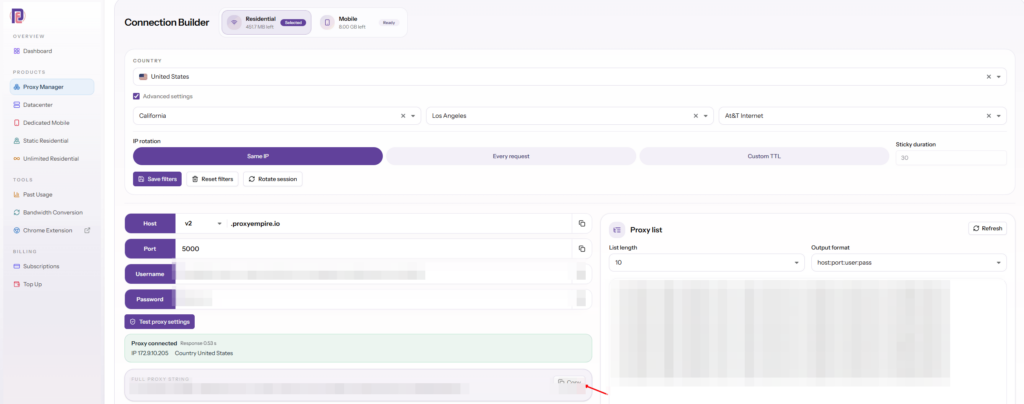
- Build the connection. In the dashboard’s Connection Builder, pick the country and, if you need them, the region, city or ISP, then choose rotation on every request or a sticky session.
- Copy the details. Host
v2.proxyempire.io, port5000, plus your proxy username and password. HTTP and SOCKS5 both use that host and port. Authentication is by username and password only, so there is no IP whitelist to maintain. - Add it to your browser or device using one of the options below.
- Check it with the tests above before you start work.
- Chrome: the free ProxyEmpire Proxy Manager extension stores your proxies as one-click profiles and signs in for you. Its store listing adds WebRTC leak protection, a kill switch that blocks traffic if the proxy drops, time zone and language matched to the proxy’s location, and a one-click Leak & Consistency Check. Our Chrome proxy settings guide walks through it.
- Android: the free ProxyEmpire Proxy Manager app on Google Play asks for your proxy login once, builds the profiles and routes all apps or only the ones you choose, with no root. See our Android proxy setup guide.
- Scripts and tools: use the proxy string from the Connection Builder, as in the curl example above. Your targeting and session choices are part of the username, so a different location is simply a different username.
A few limits to know before you start. Financial, government, crypto, bank and payment websites are blocked on all proxy types; unblocking one needs KYC and a review of your use case (see which websites are blocked). Only ports 80 and 443 are open by default, and there is no UDP, which is one more reason to keep WebRTC restricted. Exit IPs are mostly IPv4, with some IPv6. Pricing starts at $3.50/GB pay-as-you-go and falls to $1.50/GB on larger plans, unused bandwidth rolls over, and support is available 24/7 from real people.
Hiding your IP: FAQ
Short answersWhat is the easiest way to hide my IP address?
Turn on a reputable VPN, or set a proxy in your browser. Both make websites see the provider’s address instead of yours. On an iPhone or Mac with iCloud+, iCloud Private Relay does it for Safari.
Does Incognito mode hide my IP address?
No. Incognito and private windows only stop history and cookies being saved on your device. Websites and your internet provider still see your real IP address.
Is a proxy or a VPN better for hiding my IP?
A VPN covers the whole device and encrypts traffic on the local network, so it suits personal privacy. A proxy is set per browser or app and lets you choose the location and type of IP, so it suits location testing and research.
Can my IP address be hidden completely?
A website will always see some IP address, just not necessarily yours. The operator of the proxy, VPN or relay you use still sees your real address, and logins, cookies and fingerprinting can identify you without it.
Is it legal to hide my IP address?
Rules differ from country to country, so check the ones where you live. Hiding your IP doesn’t change the law or a website’s terms: both still apply to what you do.
Does changing Wi-Fi change my IP address?
Yes. Your public IP belongs to the network, so a different Wi-Fi network or mobile data gives you a different address, although it is still linked to you through that network.
What is a WebRTC leak?
WebRTC lets browsers connect directly for calls, and to do that it discovers your network addresses. A page can read them, which can reveal your real IP even with a proxy or VPN on. Browser settings or extensions can restrict it.
Can websites tell that I’m hiding my IP?
Often. The list of Tor relays is public, the FTC notes that sites may be able to tell you are using a VPN, and datacenter addresses are registered to hosting companies. Residential and mobile IPs belong to ordinary internet providers and carriers, which is why they are used for location testing and research.
References
Primary documentation- Apple — “About iCloud Private Relay”. support.apple.com/en-us/102602
- Apple Developer — “Prepare your network or web server for iCloud Private Relay”. developer.apple.com/support/prepare-your-network-for-icloud-private-relay
- Apple — “Browse the web privately in Safari on iPhone” (Hide IP address). support.apple.com/guide/iphone/iphb01fc3c85
- Tor Project — “What protections does Tor provide?” support.torproject.org/about-tor/introduction/protections
- Tor Project — “How is Tor different from other proxies?” support.torproject.org/about-tor/introduction/tor-vs-other-proxies
- Tor Project — “Fingerprinting protections” in Tor Browser. support.torproject.org/anti-fingerprinting
- Tor Project — “You should hide the list of Tor relays, so people can’t block the exits.” support.torproject.org/about-tor/alt-design/hide-list-of-exits
- US Federal Trade Commission — “In the market for a VPN app?” (2018). ftc.gov/business-guidance/blog/2018/02/market-vpn-app
- Mozilla — “Use built-in VPN in Firefox”. support.mozilla.org/kb/built-in-vpn
- Mozilla — “Firefox’s protection against fingerprinting”. support.mozilla.org/kb/firefox-protection-against-fingerprinting
- Mozilla — “How Private Windows protect you”. support.mozilla.org/kb/common-myths-about-private-browsing
- Google — Chrome Help, “How Chrome Incognito keeps your browsing private”. support.google.com/chrome/answer/95464
- IETF — RFC 8828, “WebRTC IP Address Handling Requirements”. rfc-editor.org/rfc/rfc8828
- MDN — “RTCIceCandidate: address property” (privacy and security). developer.mozilla.org/docs/Web/API/RTCIceCandidate/address
- MDN — “X-Forwarded-For” header. developer.mozilla.org/docs/Web/HTTP/Reference/Headers/X-Forwarded-For
- W3C — “Mitigating Browser Fingerprinting in Web Specifications”. w3.org/TR/fingerprinting-guidance
- IETF — RFC 9076, “DNS Privacy Considerations”. rfc-editor.org/rfc/rfc9076
- IETF — RFC 7359, “Layer 3 Virtual Private Network (VPN) Tunnel Traffic Leakages in Dual-Stack Hosts/Networks”. rfc-editor.org/rfc/rfc7359
- IETF — RFC 6269, “Issues with IP Address Sharing”. rfc-editor.org/rfc/rfc6269
- IETF — RFC 9083, “JSON Responses for the Registration Data Access Protocol (RDAP)”. rfc-editor.org/rfc/rfc9083
Appear from any city, on a real residential IP
30M+ residential IPs in 179 countries and territories, with country, city, ISP and ASN targeting at no extra charge, rotating or sticky sessions, a free Chrome extension and Android app, and 24/7 support from real people. The $1.97 trial includes 100 MB of residential and 50 MB of mobile traffic.


















