IPv4 vs IPv6: Everything You Need to Know

Networking guide · Last reviewed 1 October 2026 · 18 min read

IPv4 vs IPv6 starts with one number: an IPv4 address is 32 bits long and an IPv6 address is 128 bits. Everything else follows from that. IPv4 ran out of fresh addresses and now leans on NAT to share them, while IPv6 has enough addresses to give every device its own, a simpler fixed-size header, and built-in ways for devices to configure themselves. This guide covers address format, headers, NAT, SLAAC and DHCPv6, IPsec, fragmentation and ICMPv6, dual-stack and transition, adoption in 2026 and how to check your own IPv6. It ends with IPv6 proxies, and why most proxy traffic, including IPv4 proxies, still runs on the older protocol.

The short version

IPv6 is the successor to IPv4: it replaces 32-bit addresses (about 4.3 billion in total) with 128-bit addresses (about 3.4 × 1038), uses a fixed 40-byte header, and lets devices configure their own addresses, but the two protocols can’t talk to each other directly, so most networks run both. Google measured about 46% of its users reaching it over IPv6 on 28 September 2026. The other half still relies on IPv4, and so do many large websites, which is why most proxies still exit over IPv4.

What IPv4 and IPv6 are

Two versions of the Internet Protocol

The Internet Protocol (IP) is the layer that gives every device on a network an address and moves packets from one address to another. TCP, UDP, HTTP and everything built on them ride on top of it. There are two versions in use today.

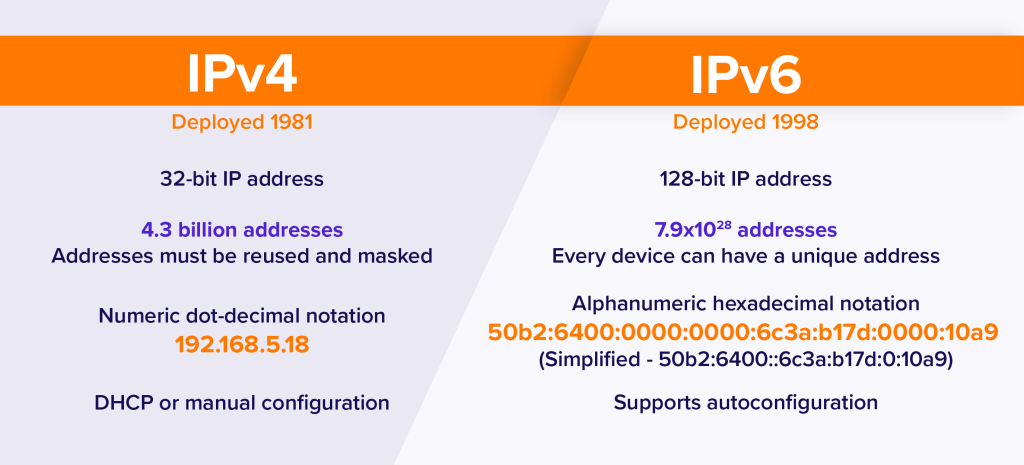
IPv4 is the original, specified in RFC 791 in 1981. Its addresses are 32 bits long and written as four decimal numbers, such as 192.0.2.33. It still carries a large share of internet traffic.

IPv6 is its replacement. The current specification is RFC 8200 (2017), which replaced the original 1998 standard. Its addresses are 128 bits long and written in hexadecimal, such as 2001:db8::8:800:200c:417a. RFC 8200 describes the main changes from IPv4 as expanded addressing, a simplified header, better support for extensions and options, flow labelling, and built-in support for authentication and privacy extensions.

The numbers in the names are version numbers, not a count of anything. Version 5 went to the experimental Internet Stream Protocol (ST, later ST2+ in RFC 1819), which IANA’s version-numbers registry now lists as historic, so the successor to IPv4 became version 6.

The most important practical fact in IPv4 vs IPv6 is that they are separate protocols. A device that only speaks IPv6 can’t open a connection to a server that only has an IPv4 address, and the reverse is also true, unless something in the middle translates. That is why the move to IPv6 has taken decades: both have to run side by side until the last IPv4-only services are gone.

Key takeaways

  • IPv4 addresses are 32 bits (about 4.3 billion); IPv6 addresses are 128 bits (about 3.4 × 1038).
  • IANA handed out its last free IPv4 blocks in February 2011; NAT and carrier-grade NAT stretch what is left.
  • The IPv6 header is a fixed 40 bytes; the IPv4 header is 20 to 60 bytes and carries a checksum.
  • IPv6 devices can configure themselves with SLAAC; DHCPv6 is optional.
  • Routers don’t fragment IPv6 packets, and ICMPv6 must not be blocked wholesale.
  • The two protocols don’t interoperate directly, so networks run both (dual-stack) or translate (NAT64, 464XLAT).
  • Many large sites still have no IPv6 address, so proxies with IPv4 exits work on the widest range of targets.

Address format and size

Dotted decimal against hexadecimal groups

An IPv4 address is 32 bits, split into four 8-bit parts written in decimal and separated by dots. That gives 232 addresses, exactly 4,294,967,296, before any are set aside for special uses.

An IPv6 address is 128 bits. RFC 4291 defines the preferred text form as eight groups of up to four hexadecimal digits separated by colons, each group covering 16 bits. Two shortcuts keep addresses readable: leading zeros in a group can be dropped, and one run of all-zero groups can be replaced by a double colon (::), which may appear only once in an address. RFC 5952 then recommends one canonical way to write each address: lowercase letters, and the double colon used on the longest run of zero groups.

Figure 1 — the same kinds of address in both versions (documentation ranges)
IPv4   192.0.2.33                                 4 bytes, dotted decimal
       127.0.0.1                                  loopback
       192.168.1.20                               private (RFC 1918)

IPv6   2001:0db8:0000:0000:0000:ff00:0042:8329    full form, 16 bytes
       2001:db8::ff00:42:8329                     same address, compressed (RFC 5952)
       ::1                                        loopback
       fe80::1c2b:3aff:fe4d:5e6f                  link-local
       64:ff9b::192.0.2.33                        IPv4 address inside the NAT64 prefix

The size difference is hard to picture. 2128 is roughly 3.4 × 1038, often quoted as 340 undecillion. A more useful comparison: in IPv6 a single ordinary subnet is a /64, meaning the first 64 bits identify the network and the last 64 bits identify the device. RFC 4291 requires 64-bit interface identifiers for almost all unicast addresses. One /64 therefore holds 264 addresses, about 18.4 quintillion, which is more than four billion times the entire IPv4 address space. Home and business sites are meant to receive many /64s at once; RFC 6177 discusses assigning end sites a /48 or a /56 and advises giving home sites significantly more than a single /64.

Address types

  • Global unicast. Public, routable addresses. In IPv4 that is most of the space outside the reserved ranges; in IPv6, IANA currently assigns global unicast addresses from 2000::/3.
  • Private or local. IPv4 has the RFC 1918 private ranges (10.0.0.0/8, 172.16.0.0/12 and 192.168.0.0/16), plus the 100.64.0.0/10 shared space used by carrier-grade NAT. IPv6 has unique local addresses in fc00::/7, and every IPv6 interface also has a link-local address in fe80::/10 that only works on its own network segment.
  • Loopback. 127.0.0.1 (from 127.0.0.0/8) in IPv4, ::1 in IPv6.
  • Broadcast. IPv4 has broadcast addresses. IPv6 has none: RFC 4291 states that their function is taken over by multicast (ff00::/8).
  • Anycast. IPv6 defines anycast addresses formally, for sending a packet to the nearest of a group of nodes.

One IPv6 device normally has several addresses at the same time: a link-local address, one or more global addresses, and often temporary addresses that change over time for privacy. That is normal, not a misconfiguration.

Why IPv4 ran out, and how NAT stretched it

The free pool, private ranges and address sharing

IANA, which manages the global address pool, hands large blocks to the five regional internet registries (AFRINIC, APNIC, ARIN, LACNIC and RIPE NCC), which pass them on to providers. IANA’s IPv4 address space registry shows the final five unallocated /8 blocks (102/8, 103/8, 104/8, 179/8 and 185/8) going to the five registries in February 2011, one each. That was the end of IANA’s free pool. The regional registries then worked through their own remaining stock over the following years, and new IPv4 space now mostly changes hands through transfers between organisations.

IPv4 lasted this long because of network address translation. RFC 1918 set aside private ranges that anyone can reuse inside their own network. A home router gives its devices private addresses and rewrites their traffic so it all leaves from one public address. Providers took the same idea a step further with carrier-grade NAT, which shares one public IPv4 address among many subscribers; our guide to what CGNAT is explains how that works and what it breaks.

NAT saved IPv4, but at a cost. Devices behind it can’t easily accept incoming connections, peer-to-peer and gaming traffic needs workarounds, and one public address can stand for hundreds of people. IPv6 removes the reason for NAT: there are enough addresses for every device to have a globally unique one. Networks still put a firewall in front of IPv6 devices, but they no longer need to hide many devices behind one address.

NAT kept IPv4 alive. IPv6 makes it unnecessary, but only for traffic where both ends speak IPv6.

Header differences

20 to 60 bytes against a fixed 40

Every IP packet starts with a header that tells routers where it is going and how to handle it. The IPv4 header in RFC 791 is at least 20 bytes: its Internet Header Length field counts 32-bit words, the minimum valid value is 5, and options can stretch it to 60 bytes. The IPv6 header in RFC 8200 is always exactly 40 bytes. It is bigger only because its two addresses are four times longer; it actually has fewer fields.

Figure 2 — the two headers, field by field (RFC 791 and RFC 8200)
IPv4 header: 20 bytes, up to 60 with options
+---------+---------+-----------------+-------------------------+
| Version |   IHL   | Type of Service |      Total Length       |
+---------+---------+-----------------+-------+-----------------+
|        Identification               | Flags | Fragment Offset |
+-------------------+-----------------+-------+-----------------+
|   Time to Live    |    Protocol     |     Header Checksum     |
+-------------------+-----------------+-------------------------+
|                  Source Address (32 bits)                     |
+---------------------------------------------------------------+
|                Destination Address (32 bits)                  |
+---------------------------------------------------------------+
|                 Options (0-40 bytes) + padding                |
+---------------------------------------------------------------+

IPv6 header: always 40 bytes
+---------+-----------------+-----------------------------------+
| Version |  Traffic Class  |         Flow Label (20 bits)      |
+---------+-----------------+---+-------------+-----------------+
|        Payload Length         | Next Header |    Hop Limit    |
+-------------------------------+-------------+-----------------+
|                  Source Address (128 bits)                    |
+---------------------------------------------------------------+
|                Destination Address (128 bits)                 |
+---------------------------------------------------------------+
IPv4 fieldIn IPv6What changed
Header Length (IHL)RemovedThe header is fixed at 40 bytes, so there is nothing to measure.
Type of ServiceTraffic ClassSame 8-bit role: marking packets for priority handling.
Total LengthPayload LengthCounts only what follows the fixed header.
Identification, Flags, Fragment OffsetFragment extension headerOnly present when the sender fragments a packet.
Time to LiveHop LimitRenamed to match what it always did: each router lowers it by 1 and drops the packet at zero.
ProtocolNext HeaderNames the next header, which can be TCP, UDP or an extension header.
Header ChecksumRemovedRouters no longer recompute a checksum at every hop; link layers and upper layers check errors instead.
OptionsExtension headersOptional information moves into separate headers chained after the main one.
(none)Flow LabelNew 20-bit field that lets a sender label a sequence of packets as one flow.

Two consequences are worth knowing. First, because the IPv6 header has no checksum, RFC 8200 makes the UDP checksum mandatory for IPv6, where it was optional in IPv4. Second, IPv6 extension headers (Hop-by-Hop Options, Routing, Fragment, Destination Options, and the IPsec Authentication and Encapsulating Security Payload headers) are chained through the Next Header field. RFC 8200 says that, apart from Hop-by-Hop Options, routers along the path don’t examine or process them; only the destination does. That keeps the common case simple for routers.

Some older articles claim that IPv6 packets are “faster” because of the simpler header. The header does make forwarding simpler, but real-world speed depends much more on the route, congestion and whether traffic has to pass through a translator. A native IPv6 path can be quicker or slower than the IPv4 path to the same site.

How devices get addresses: SLAAC, DHCPv6 and neighbours

Self-configuration instead of a server

On IPv4, a device usually gets its address from a DHCP server (RFC 2131), typically the home router, which leases out addresses from a pool. IPv6 offers two ways, and networks can use either or both.

  • SLAAC, stateless address autoconfiguration (RFC 4862). Routers regularly send Router Advertisements that announce the network prefix. A device combines that prefix with an interface identifier it creates itself, checks that nobody else on the link is using the result (Duplicate Address Detection), and starts using it. RFC 4862 notes that stateless autoconfiguration requires no manual configuration of hosts and no additional servers.
  • DHCPv6 (RFC 8415). A client/server protocol that gives managed configuration: the server can assign addresses, hand out other settings, and delegate whole prefixes to downstream routers. Prefix delegation is how many home routers receive the block of /64s they share out to the home network.

Interface identifiers used to be built from the network card’s MAC address, which meant the same device could be recognised on every network it joined. RFC 8981 defines temporary addresses with randomised interface identifiers that change over time, to limit how easily someone can link a host’s activity by its address. Many operating systems use temporary addresses for outgoing connections by default, which is one reason your IPv6 address may change during the day.

IPv6 also replaces ARP. In IPv4, ARP finds the hardware address that belongs to an IP address on the local network. In IPv6, Neighbor Discovery (RFC 4861) does that job, along with finding routers and detecting unreachable neighbours, all carried in ICMPv6 messages. RFC 4861 describes it as the IPv6 counterpart of the IPv4 protocols ARP, ICMP Router Discovery and ICMP Redirect combined.

IPsec and security

Neither protocol is secure by itself

A common claim is that IPv6 is “more secure” than IPv4 because it has IPsec built in. That is only partly true. IPsec, the suite that authenticates and encrypts IP packets, works with both versions. When IPv6 was first standardised, every IPv6 node was required to implement IPsec. RFC 6434 relaxed that to a recommendation, and RFC 8504, the current IPv6 node requirements, keeps it: support for the IPsec architecture is a SHOULD, not a MUST. Whether any traffic is actually protected by IPsec depends on how it is configured. Most web traffic is protected at a higher layer instead, by TLS inside HTTPS, on either IP version.

What really changes with IPv6 is the security model around addresses:

  • No NAT to hide behind. NAT is not a firewall, but it did stop unsolicited incoming connections by accident. With IPv6, devices have globally reachable addresses, so a proper firewall matters more. RFC 6092 describes “simple security” for home IPv6 gateways, which filters unsolicited incoming traffic; the same document allows a transparent mode that turns it off, so check what your router does.
  • Scanning is harder. RFC 7707 explains that brute-force scanning of a full /64 subnet is infeasible because of its size, though attackers can still find addresses in other ways, such as DNS or predictable address patterns.
  • IPv6 is on even if you don’t use it. RFC 8504 points out that most common platforms have IPv6 enabled by default, so IPv6 security matters even on networks that are meant to be IPv4-only.
  • Privacy. Temporary addresses (RFC 8981) stop a device from carrying one fixed identifier everywhere. With IPv4 behind NAT, many people share one address; with IPv6, one person may use many.

Fragmentation, MTU and ICMPv6

Why blocking ICMPv6 breaks things

Every network link has a maximum packet size, the MTU. When a packet is too big for the next link, something has to happen. In IPv4, a router in the middle can split the packet into fragments, unless the sender has set the “don’t fragment” flag. RFC 791 describes this fragmentation and reassembly process and requires every host to accept datagrams of at least 576 bytes.

IPv6 changes the rules. RFC 8200 says fragmentation in IPv6 is performed only by source nodes, not by routers along the path. Every link must carry packets of at least 1,280 bytes. If a packet is too big, the router drops it and sends back an ICMPv6 “Packet Too Big” message, and the sender reduces its packet size. That process, Path MTU Discovery, is described for IPv6 in RFC 8201, which notes that it relies on Packet Too Big messages to learn the path’s MTU.

This is why ICMPv6 matters so much more than ICMP did in IPv4. RFC 4443 defines ICMPv6 as an integral part of IPv6 that every node must implement, and Neighbor Discovery and router advertisements run on it too. A firewall that drops all ICMPv6, the way some IPv4 firewalls drop all ping traffic, can break Path MTU Discovery and make connections hang on large transfers even though small requests work. RFC 4890 gives recommendations for which ICMPv6 messages firewalls should let through.

Dual-stack and transition: NAT64, 464XLAT and DS-Lite

How the two protocols coexist

Because IPv4 and IPv6 don’t interoperate directly, the internet has to run both during a very long transition. There are three broad approaches.

Dual-stack

The simplest and most common approach: devices, networks and servers run IPv4 and IPv6 side by side, each with its own addresses. When a site publishes both an A record (IPv4) and an AAAA record (IPv6) in DNS, the client chooses. RFC 6724 sets the default address selection rules, and its default policy table ranks native IPv6 above IPv4. To stop a broken IPv6 path from causing long delays, clients use Happy Eyeballs (RFC 8305): they start with IPv6 and, if it hasn’t connected after a short delay (250 milliseconds is one recommended default), try IPv4 in parallel and use whichever connects first.

Translation: NAT64 and 464XLAT

Some networks, especially mobile networks, give devices only IPv6 addresses and translate when a device needs an IPv4-only site. Stateful NAT64 (RFC 6146) lets IPv6-only clients reach IPv4 servers, sharing one or more public IPv4 addresses among many clients. It works with DNS64 (RFC 6147), which synthesises an IPv6 address for an IPv4-only site, typically inside the well-known prefix 64:ff9b::/96 defined in RFC 6052. The client connects to that IPv6 address, and the NAT64 gateway translates to the real IPv4 address.

NAT64 alone fails for apps that insist on IPv4 or use IPv4 addresses directly. 464XLAT (RFC 6877) fixes that by adding a small stateless translator on the device itself (the CLAT), which turns the app’s IPv4 packets into IPv6; the provider’s stateful NAT64 (the PLAT) turns them back into IPv4. RFC 6877 covers 3GPP mobile networks directly, and it is a common way for mobile carriers to run IPv6-only networks while still reaching IPv4 sites.

Tunnelling: DS-Lite

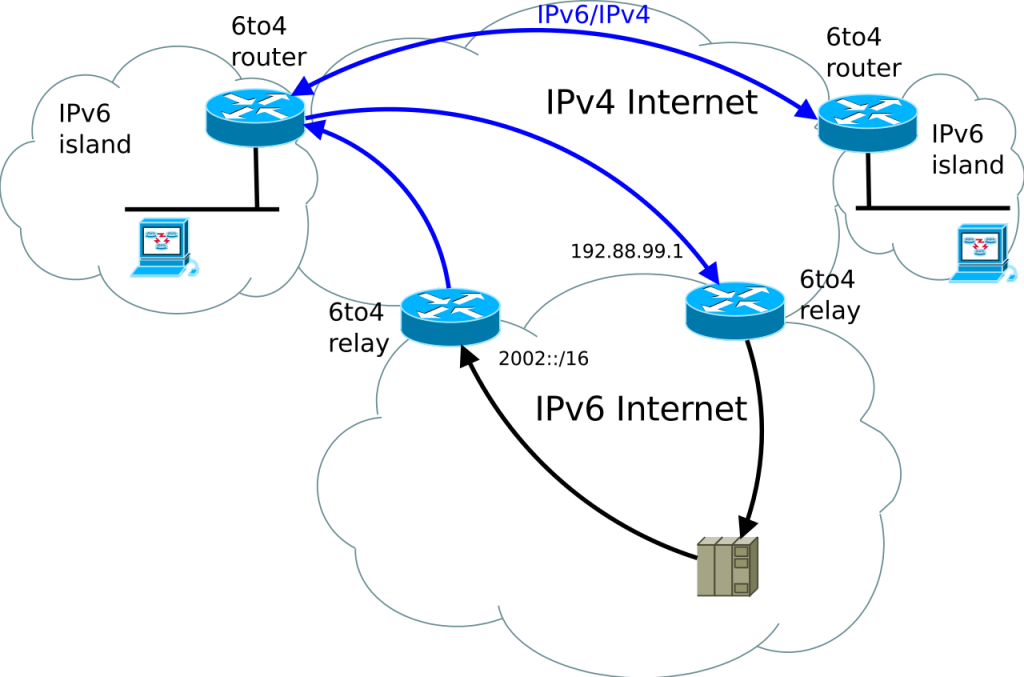
Dual-Stack Lite (RFC 6333) goes the other way round. The provider runs an IPv6-only access network, and the customer’s router (the B4 element) wraps IPv4 packets inside IPv6 and tunnels them to a provider NAT (the AFTR), which shares public IPv4 addresses among customers. The customer gets native IPv6 plus shared IPv4. Older automatic tunnels have not aged as well: RFC 7526 found 6to4 in its anycast mode unsuitable for widespread use and deprecated it.

All of these translation and tunnel designs share one side effect: IPv4 traffic from many users ends up leaving through a shared provider address, exactly as with carrier-grade NAT.

IPv6 adoption in 2026

About half of Google’s users

The most widely quoted measure is Google’s IPv6 statistics page, which shows the percentage of users who reach Google over IPv6. When we read its data on 1 October 2026, the latest point, for 28 September 2026, was 46.2%. The line moves in a weekly pattern: on the weekend of 26 and 27 September it reached 51.0% and 50.0%, and it drops back on weekdays, which suggests home and mobile networks are further along than many office networks.

The same data shows how slow the change has been. In late September 2016 the figure was around 11%, and in late September 2020 around 30%. A year before our reading, in late September 2025, it moved between roughly 45% and 50% across the week, so growth has slowed to a crawl at around half of users. Google’s per-country map shows large differences between countries, so the global figure hides a wide spread.

On the server side, plenty of major sites still publish no IPv6 address at all. When we queried DNS on 1 October 2026, github.com, www.ebay.com, www.reddit.com and x.com returned no AAAA record, while www.google.com, www.facebook.com, www.amazon.com, www.linkedin.com and www.wikipedia.org did. A user or a proxy with only IPv6 can’t reach the first group without a translator.

How to check your IPv6

Commands for Windows, macOS and Linux
Figure 3 — checking your addresses and IPv6 connectivity
# Windows (Command Prompt)
ipconfig                        # look for "IPv6 Address" lines
ping /6 www.google.com          # test IPv6 reachability

# macOS
ifconfig | grep inet6
ping6 www.google.com

# Linux
ip -6 addr show scope global    # global IPv6 addresses only
ip -6 route show default        # is there an IPv6 default route?
ping -6 www.google.com

# Any system with curl
curl -4 https://ifconfig.me     # the public IPv4 address sites see
curl -6 https://ifconfig.me     # the public IPv6 address (fails if you have none)

# Does a website publish an IPv6 address?
nslookup -type=AAAA github.com
  1. Look for a global address. An address starting with fe80: is link-local and exists on every IPv6 interface, so it proves nothing. You need one that starts with 2 or 3 (from 2000::/3).
  2. Check for a default route. A global address without an IPv6 default route means you can’t reach the IPv6 internet.
  3. Test a real connection. curl’s -6 flag tells it to request only IPv6 addresses when resolving host names, so curl -6 against a dual-stack site succeeds only if your IPv6 path works end to end.
  4. Check the site. If a site returns no AAAA record, you will reach it over IPv4 no matter how good your IPv6 is.

IPv6 proxies: what they are and when they help

Huge address blocks, narrower reach

For proxies, the IPv4 vs IPv6 question is about the exit. An IPv6 proxy is a proxy whose exit address, the one the target website sees, is an IPv6 address. You still connect to the proxy the usual way; what changes is how the proxy reaches the site.

When IPv6 proxies help

  • Many addresses, cheaply. A provider with a single /48 has 65,536 separate /64 subnets, each with 264 addresses. That lets IPv6 proxy sellers offer very large numbers of unique addresses for far less than IPv4, whose addresses have to be bought or leased on a scarce market.
  • Targets that accept IPv6. If the site you are collecting from publishes an AAAA record and treats IPv6 visitors normally, IPv6 exits can spread high-volume requests across many addresses.
  • Testing your own services. Checking how your site, CDN or API behaves for IPv6 visitors from different networks.

Why many sites still need IPv4

  • No AAAA, no connection. An IPv6-only exit can’t reach an IPv4-only site. On 1 October 2026 that still included github.com, www.ebay.com, www.reddit.com and x.com. If the provider translates through NAT64, the site sees the provider’s shared IPv4 address instead.
  • Sites count prefixes, not addresses. Because a single home or server is normally given at least a whole /64, a site that sees hundreds of addresses from one /64 can simply rate-limit or block the whole prefix. A million IPv6 addresses from one block can count as one visitor.
  • Datacenter ranges are easy to spot. When IPv6 proxies come from a hosting network, sites can identify them by the network that owns the range, exactly as with IPv4 datacenter IPs.
  • Software and settings. Some tools, libraries and older systems still expect IPv4 addresses, and an IPv4 allowlist entry does nothing for traffic that arrives over IPv6.

IPv4 vs IPv6 proxies at a glance

IPv4 exitIPv6 exit
ReachesEvery public websiteOnly sites with an AAAA record, unless translated
Address supplyScarce, so each address costs morePlentiful, so large blocks are cheap
How sites group youUsually by single addressOften by /64 or wider prefix
Best forAnything that must work on every targetHigh volume against IPv6-ready targets

Where ProxyEmpire fits

ProxyEmpire’s exit IPs are mostly IPv4, with some IPv6. It does not sell a separate IPv6 proxy product or IPv6 blocks. If your project specifically needs large IPv6 ranges, a provider that sells IPv6 proxies is the better fit. If it needs to work on every site, including IPv4-only ones, residential and mobile IPs with IPv4 exits are the safer choice. ProxyEmpire’s rotating residential proxies cover 30M+ IPs in 179 countries and territories, and its rotating mobile proxies cover 4M+ IPs in 174 countries, with targeting by country, region, city, ZIP, ISP or carrier, ASN and OS fingerprint included at no extra charge. Our comparison of the best IPv4 proxies covers providers that also sell dedicated IPv4 by the IP.

To see which address family a proxy exit uses, request a dual-stack IP-echo service through it. If the answer contains colons, the exit is IPv6; if it has four dotted numbers, it is IPv4.

Figure 4 — which IP version does the proxy exit use?
curl -x http://USERNAME:PASSWORD@v2.proxyempire.io:5000 https://ifconfig.me
# 203.0.113.50        -> IPv4 exit
# 2001:db8::1f:9a     -> IPv6 exit

With an HTTP proxy, curl’s -4 and -6 flags only change how curl looks up the proxy’s own host name. The proxy decides how it reaches the website, so those flags don’t choose the exit’s IP version.

IPv4 vs IPv6: the full comparison table

Every difference in one place
FeatureIPv4IPv6
SpecificationRFC 791 (1981)RFC 8200 (2017), addressing in RFC 4291
Address length32 bits128 bits
Total addressesAbout 4.3 billion (232)About 3.4 × 1038 (2128)
Written asDotted decimal: 192.0.2.33Hex groups with colons: 2001:db8::33
Typical subnetVaries, often /24 or smaller/64 for almost all subnets
Header size20 to 60 bytesFixed 40 bytes
Header checksumYes, recomputed at each hopNone
OptionsIn the headerSeparate extension headers
Flow labelNoYes, 20 bits
FragmentationBy sender or routersBy the sender only
Minimum MTUHosts must accept 576-byte datagramsEvery link carries 1,280 bytes
Address configurationManual or DHCPSLAAC, DHCPv6, or both
Local address lookupARPNeighbor Discovery over ICMPv6
BroadcastYesNo, multicast instead
NATCommon, including carrier-grade NATNot needed for address sharing
IPsecOptional add-onRecommended for nodes (SHOULD), not required
ICMPICMP, often filteredICMPv6, essential and must not be blocked wholesale
UDP checksumOptionalMandatory
DNS recordAAAAA
Loopback127.0.0.1::1
Reach in 2026Every public siteAbout 46% of Google users (28 Sep 2026); many sites still IPv4-only

IPv4 vs IPv6 FAQ

Short answers
What is the main difference between IPv4 and IPv6?

Address size. IPv4 uses 32-bit addresses, about 4.3 billion in total; IPv6 uses 128-bit addresses, about 3.4 × 1038. IPv6 also has a fixed 40-byte header, self-configuration with SLAAC, and no need for NAT.

Is IPv6 faster than IPv4?

Not inherently. The simpler header makes forwarding easier, but speed depends mainly on the route and congestion. A native IPv6 path can be quicker or slower than the IPv4 path to the same site.

Is IPv6 more secure than IPv4?

Not by itself. IPsec works with both, and RFC 8504 only recommends IPsec support for IPv6 nodes. IPv6 devices have globally reachable addresses, so a firewall matters more, not less.

Can IPv4 and IPv6 talk to each other?

Not directly. Networks either run both (dual-stack) or translate between them with NAT64 and DNS64, 464XLAT or DS-Lite.

When did IPv4 addresses run out?

IANA allocated its last five free /8 blocks to the regional registries in February 2011. The regional registries then ran through their own stock over the following years.

How do I know if I have IPv6?

Look for a global IPv6 address (starting with 2 or 3, not fe80) in ipconfig, ifconfig or ip -6 addr, then run curl -6 against a dual-stack site. If it returns an address, your IPv6 works end to end.

Should I disable IPv6?

Usually not. Operating systems prefer IPv6 when it works and fall back to IPv4 quickly thanks to Happy Eyeballs. Fix a broken IPv6 setup instead of switching it off.

Should I use IPv4 or IPv6 proxies?

IPv4 if the proxy has to work on every site. IPv6 only when your targets accept IPv6 and you need very large address blocks cheaply. Many major sites still have no IPv6 address.

Are ProxyEmpire’s proxies IPv4 or IPv6?

Mostly IPv4, with some IPv6. ProxyEmpire doesn’t sell a separate IPv6 proxy product.

References

Primary documentation, checked 1 October 2026
  1. IETF — RFC 791, “Internet Protocol” (1981). rfc-editor.org/rfc/rfc791
  2. IETF — RFC 8200, “Internet Protocol, Version 6 (IPv6) Specification” (2017). rfc-editor.org/rfc/rfc8200
  3. IETF — RFC 4291, “IP Version 6 Addressing Architecture”. rfc-editor.org/rfc/rfc4291
  4. IETF — RFC 5952, “A Recommendation for IPv6 Address Text Representation”. rfc-editor.org/rfc/rfc5952
  5. IETF — RFC 4862, “IPv6 Stateless Address Autoconfiguration”. rfc-editor.org/rfc/rfc4862
  6. IETF — RFC 8415, “Dynamic Host Configuration Protocol for IPv6 (DHCPv6)”. rfc-editor.org/rfc/rfc8415
  7. IETF — RFC 8981, “Temporary Address Extensions for Stateless Address Autoconfiguration in IPv6”. rfc-editor.org/rfc/rfc8981
  8. IETF — RFC 4861, “Neighbor Discovery for IP version 6 (IPv6)”. rfc-editor.org/rfc/rfc4861
  9. IETF — RFC 4443, “Internet Control Message Protocol (ICMPv6) for IPv6”. rfc-editor.org/rfc/rfc4443
  10. IETF — RFC 8201, “Path MTU Discovery for IP version 6”. rfc-editor.org/rfc/rfc8201
  11. IETF — RFC 4890, “Recommendations for Filtering ICMPv6 Messages in Firewalls”. rfc-editor.org/rfc/rfc4890
  12. IETF — RFC 8504, “IPv6 Node Requirements”. rfc-editor.org/rfc/rfc8504
  13. IETF — RFC 7707, “Network Reconnaissance in IPv6 Networks”. rfc-editor.org/rfc/rfc7707
  14. IETF — RFC 6092, “Recommended Simple Security Capabilities in Customer Premises Equipment (CPE) for Providing Residential IPv6 Internet Service”. rfc-editor.org/rfc/rfc6092
  15. IETF — RFC 1918, “Address Allocation for Private Internets”. rfc-editor.org/rfc/rfc1918
  16. IETF — RFC 6177, “IPv6 Address Assignment to End Sites”. rfc-editor.org/rfc/rfc6177
  17. IETF — RFC 6724, “Default Address Selection for Internet Protocol Version 6 (IPv6)”. rfc-editor.org/rfc/rfc6724
  18. IETF — RFC 8305, “Happy Eyeballs Version 2: Better Connectivity Using Concurrency”. rfc-editor.org/rfc/rfc8305
  19. IETF — RFC 6146, “Stateful NAT64”. rfc-editor.org/rfc/rfc6146
  20. IETF — RFC 6147, “DNS64”. rfc-editor.org/rfc/rfc6147
  21. IETF — RFC 6052, “IPv6 Addressing of IPv4/IPv6 Translators”. rfc-editor.org/rfc/rfc6052
  22. IETF — RFC 6877, “464XLAT: Combination of Stateful and Stateless Translation”. rfc-editor.org/rfc/rfc6877
  23. IETF — RFC 6333, “Dual-Stack Lite Broadband Deployments Following IPv4 Exhaustion”. rfc-editor.org/rfc/rfc6333
  24. IETF — RFC 7526, “Deprecating the Anycast Prefix for 6to4 Relay Routers”. rfc-editor.org/rfc/rfc7526
  25. IANA — Version Numbers registry. iana.org/assignments/version-numbers
  26. IANA — IPv4 Address Space Registry. iana.org/assignments/ipv4-address-space
  27. IANA — Internet Protocol Version 6 Address Space. iana.org/assignments/ipv6-address-space
  28. IANA — IPv6 Special-Purpose Address Registry. iana.org/assignments/iana-ipv6-special-registry
  29. Google — IPv6 statistics (data read 1 October 2026). google.com/intl/en/ipv6/statistics
  30. curl — command-line manual (-4, -6, -x). curl.se/docs/manpage
  31. Microsoft — ping and ipconfig command references. learn.microsoft.com — ping

Proxies that work on every site, IPv4 or not

Exit IPs that are mostly IPv4, with some IPv6: 30M+ residential IPs in 179 countries and territories and 4M+ mobile IPs in 174 countries, with city, ISP and ASN targeting at no extra charge, and 24/7 support from real people. The $1.97 trial includes 100 MB of residential and 50 MB of mobile traffic.

Flexible Pricing Plan

logo purple proxyempire

Our state-of-the-art proxies.

Experience online freedom with our unrivaled web proxy solutions. Pioneering in collecting location specific data at scale, our premium, ethically-sourced network boasts a vast pool of IPs, expansive location choices, high success rate, and versatile pricing. Advance your digital journey with us.

🏘️ Rotating Residential Proxies
  • 30M+ Premium Residential IPs
  •  170+ Countries
    Every residential IP in our network corresponds to an actual desktop device with a precise geographical location. Our residential proxies are fast and reliable, with 99.9% uptime, and work for a wide range of use cases. You can use Country, Region, City and ISP targeting for our rotating residential proxies.

See our Rotating Residential Proxies

📍 Static Residential Proxies
  • 19 Countries
    Buy a dedicated static residential IP from one of the 19 countries that we offer proxies in. Keep the same IP for a month or longer, while benefiting from their fast speed and stability.

See our Static Residential Proxies

📳 Rotating Mobile Proxies
  • 4M+ Premium Mobile IPs
  •  170+ Countries
    Access millions of clean mobile IPs with precise targeting including Country, Region, City, and Mobile Carrier. Get far fewer IP blocks and CAPTCHAs with our 4G and 5G proxies.

See our Mobile Proxies

📱 Dedicated Mobile Proxies
  • 5+ Countries
  • 50+ Locations
    Get your own dedicated mobile proxy in one of our supported locations, with unlimited bandwidth and unlimited IP changes on demand. A great choice when you need a small number of mobile IPs and a lot of proxy bandwidth.

See our 4G & 5G Proxies

🌐 Rotating Datacenter Proxies
  • 197,000+ IPs Premium IPs
  •  62 Countries
    On a budget and need to do some simple scraping tasks? Our datacenter proxies are the perfect fit! Get started with as little as $2

See our Datacenter Proxies

proxy locations

30M+ rotating IPs

99% uptime - high speed

99.9% uptime.

dedicated support team

24/7 Dedicated Support.

fair price

Fair Pricing.

🏠 Residential Proxies Rotating / Static / Unlimited
📱 Mobile Proxies Rotating and Dedicated
🖥️ Datacenter Proxies Rotating
🌍 IP Pool 30M+ residential + 4M+ mobile IPs
📶 Uptime 99.9% · Live status
💳 Payment Card · PayPal · Crypto · Bank transfer
💬 Support 24/7 live chat · sales@proxyempire.io