ScrapeBox proxies decide how much of ScrapeBox you can actually use. The harvester, the keyword scraper and most of the add-ons send thousands of requests to search engines and websites, and without proxies they all leave from your own IP address, which search engines slow down or block quickly. This guide covers what ScrapeBox is and what it costs today, which proxy types suit which job, the exact proxy format ScrapeBox expects, how to load a single rotating residential gateway or a list, the connection and timeout settings that matter, how to read the proxy tester, and how to fix the errors you are most likely to see.
The short version
Use rotating residential proxies for harvesting Google and other search engines, datacenter proxies for less protected targets such as your own sites, and load them in ScrapeBox as one line per proxy in the form host:
What is ScrapeBox?
A desktop SEO toolkit, bought onceScrapeBox is a Windows and Mac desktop application for search engine and website data collection. Its developer calls it “the Swiss Army Knife of SEO”, and the parts most people buy it for are the search engine harvester, which collects result URLs for a list of keywords or search operators, the keyword scraper, which pulls suggestion terms from search and shopping sites, and a proxy harvester and tester. Around those sit more than 30 free add-ons for jobs such as checking whether pages are indexed, grabbing page metadata, checking whether domains are registered and extracting links from pages.
On 1 October 2026 the ScrapeBox website listed these details:
| Item | What scrapebox.com says |
|---|---|
| Current version | ScrapeBox v2.1.57, with a latest release date of 29 January 2026 |
| Price | $197 list, offered at $97 as a limited-time discount |
| Licence | One-time purchase, not a subscription. One PC licence, with one free licence transfer a month; bug fixes and minor upgrades are free |
| Systems | Windows 10 and 11, Windows Server 2016, 2019 and 2022 (64-bit), and Apple Mac |
| Payment | Checkout runs through PayPal |
Two licence details matter for proxy users. First, a Mac licence and a Windows licence are separate: according to the ScrapeBox FAQ site linked from scrapebox.com, the platform you activate on is the one the licence stays on. Second, you can run several copies of ScrapeBox on the same machine with one licence, each from its own folder, which is handy if you want one instance harvesting while another checks the results.
ScrapeBox also includes a harvester for free public proxies. It works, but public proxies are slow, short-lived and shared with everyone else who found the same list, so most users who harvest at any volume buy ScrapeBox proxies instead. The ScrapeBox FAQ site says the same: paid proxies are faster and far more stable than public ones.
Key takeaways
- ScrapeBox v2.1.57 is a one-time $97 purchase (from a $197 list price) for one PC, on Windows or Mac.
- Proxies go in as one line each:
host:.port: username: password - Rotating residential proxies suit search engine harvesting; datacenter proxies suit easy targets.
- A rotating gateway is one proxy line; you scale with connections, not with list length.
- Connection and timeout controls live under Settings, in Connections, Timeouts and Other Settings.
Best ScrapeBox proxies: which type for which job
Match the proxy to the targetThe right proxy depends less on ScrapeBox than on what ScrapeBox is talking to. Google and the other big search engines watch request rates per IP closely and answer too many automated queries with CAPTCHA pages or blocks. Your own website, a sitemap or a list of pages you want to check for a meta tag usually don’t. That split gives you a simple rule: residential or mobile IPs for search engines, datacenter IPs where the target doesn’t care.
| Proxy type | Best for in ScrapeBox | How it loads | ProxyEmpire option |
|---|---|---|---|
| Rotating residential | Harvesting Google, Bing and other engines; keyword scraping from suggestion services; rank checks from a chosen country or city | One gateway line; a new IP on every request, or sticky sessions | 30M+ IPs in 179 countries and territories, from $3.50/GB down to $1.50/GB |
| Rotating mobile | The hardest targets, when residential IPs still hit CAPTCHAs | One gateway line, same format | 4M+ IPs in 174 countries, carrier targeting included |
| Rotating datacenter | Less protected targets: your own sites, page and metadata checks, alive checks, bulk page fetching | One line, with the endpoint from your dashboard | About 197,000 IPs in 62 countries, from $0.35/GB, country-level targeting |
| Static residential (ISP) | The classic “private proxy list” model: a fixed set of IPs that stay yours | A list, one IP per line | $3.50 down to $2.00 per IP a month, sold in 24 countries |
Rotating residential is the default for search engine work. Each request leaves from a different home IP, so no single address builds up the query history that gets it blocked, and you can pin the country, region, city, ZIP code, ISP or ASN so the results match the market you are researching. ProxyEmpire’s rotating residential and mobile proxies include all of that targeting at no extra charge. For more on scraping result pages, see our guide to Google scraping proxies.
Rotating datacenter proxies are faster and cheaper per GB, but their IPs belong to hosting networks, which search engines recognise. Use them for targets that don’t rate-limit hard. ProxyEmpire’s rotating datacenter proxies start at a single GB for $2.
Static residential proxies fit people who like ScrapeBox’s traditional workflow of a fixed list tuned over time. They are billed per IP rather than per GB, which helps if you run very large harvests where bandwidth adds up. ProxyEmpire sells static residential proxies in a fixed list of 24 countries with country-level targeting. If you are weighing ScrapeBox proxies against a wider SEO setup, our overview of proxies for SEO compares the use cases.
The ScrapeBox proxy format
One proxy per line, colons between the partsScrapeBox reads proxies as plain text, one per line. The ScrapeBox FAQ gives two forms: IP:PORT for proxies without a login, and IP:PORT:USERNAME:PASS for proxies that need a username and password, illustrated with a local address on port 80. There are no spaces and no http:// prefix.
# no authentication
203.0.113.10:8080

# username and password (order: host, port, username, password)
203.0.113.10:8080:USERNAME:PASSWORD

# a hostname in place of the IP, as with a rotating gateway
v2.proxyempire.io:5000:YOUR_USERNAME:YOUR_PASSWORD
A few details trip people up:
- Hostnames. The FAQ writes the format with an IP address, but ScrapeBox also takes a hostname in that position; its changelog records a fix for “non-ip proxies” back in version 2.0.0.42. A rotating gateway is a hostname, so it goes where the IP would.
- Colons in credentials. Because the colon separates the four parts, a colon inside a username or password splits the line in the wrong place. ProxyEmpire usernames use hyphens for their targeting options, so they are safe; keep colons out of your password.
- HTTP, not HTTPS, proxies. The ScrapeBox FAQ says ScrapeBox doesn’t support HTTPS proxies, meaning proxies you connect to over TLS. That doesn’t stop you scraping HTTPS websites: a normal HTTP proxy carries an encrypted connection to the site through a CONNECT tunnel, as the HTTP standard describes, and that is how ScrapeBox reaches Google and every other HTTPS site.
- SOCKS. ScrapeBox added full SOCKS5 support in version 2.0.0.30, and the FAQ says to mark a SOCKS proxy by putting an
Sin front of it, for exampleS195.195.195.195:80. ProxyEmpire accepts SOCKS5 on the same host and port, but HTTP is the simpler choice in ScrapeBox and is what this guide uses.
Getting your ProxyEmpire connection details
One gateway, the options live in the usernameProxyEmpire’s rotating residential and mobile proxies run through one gateway: host v2.proxyempire.io, port 5000. Authentication is by username and password only; there is no IP whitelist, so ScrapeBox works the same on your desktop, a laptop or a Windows VPS. Open the Proxy Manager in the ProxyEmpire dashboard and use the Connection Builder to choose residential or mobile, set the location (country, region, city, ZIP, ISP or carrier, ASN) and pick how the IP behaves:
- Every request: a new IP on every request. This is the mode for harvesting.
- Same IP: a sticky session. The IP stays with no fixed time limit, until you rotate it or the device behind it goes offline.
- Custom TTL: the IP changes on a timer you set, up to two hours.
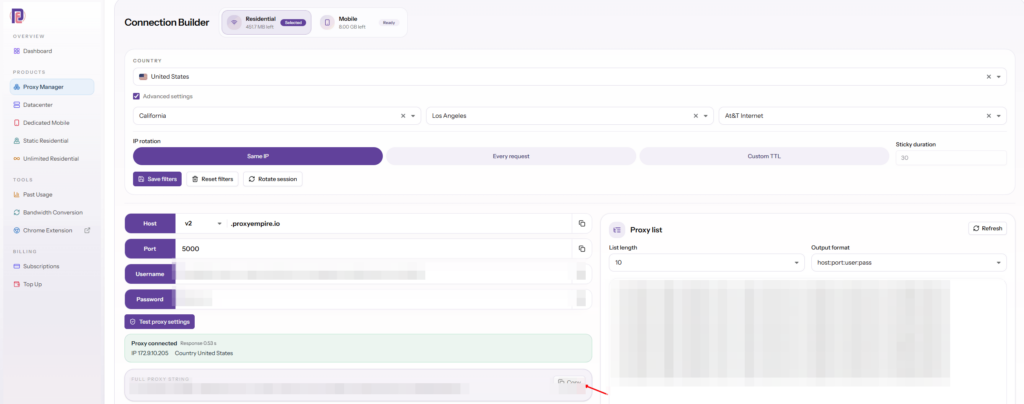
Your choices end up in the username. The sample on ProxyEmpire’s product pages uses country-us to select the United States and sid-123456 to hold a session, so a different location or session is simply a different username with the same host, port and password. Copy the string the Connection Builder generates rather than typing it, then rearrange it into ScrapeBox’s colon format: host, port, username, password.
If you also want to see what a search engine shows in a given country before you start a long harvest, ProxyEmpire’s free Chrome extension, ProxyEmpire Proxy Manager, puts the same proxies into your browser with one click, so you can run a few manual searches from that location first.
Loading proxies: one rotating gateway or a list
Paste, load from file, or grab from a file on a scheduleScrapeBox keeps its active proxies in the proxies box on the main window, and the Use Proxies checkbox beside it switches them on for the harvester and the tools that use them. You can paste lines straight into that box, or open the Proxy Manager from the proxies section to load, test and filter them. The Proxy Manager can load or append proxies from the clipboard, grab proxies from a local file (or grab and append them), save proxies to a file or the clipboard, and remove duplicates; all of those options appear by name in ScrapeBox’s changelog.
Option 1: a single rotating gateway
With rotating residential or mobile proxies you normally load exactly one line. The gateway picks a new exit IP for every request, so ScrapeBox’s connections each go out through different IPs even though ScrapeBox sees a single proxy.
v2.proxyempire.io:5000:YOUR_USERNAME-country-us:YOUR_PASSWORDThis changes how you think about ScrapeBox. Old guides tell you to buy dozens of proxies and keep the number of connections well below the number of proxies. With a gateway the list length is always one, and the thing you tune is the connection count. Loading the same gateway line twenty times gains nothing, and the Proxy Manager’s duplicate removal would fold them back into one line anyway.
Option 2: a list of sticky sessions
Some ScrapeBox jobs work better when each connection keeps its IP for a while, for example a sequence of requests to one site that should come from one address. Build a list where each line has its own session ID. Each unique session is a separate sticky IP, so ScrapeBox treats the lines as separate proxies.
v2.proxyempire.io:5000:YOUR_USERNAME-country-us-sid-100001:YOUR_PASSWORD
v2.proxyempire.io:5000:YOUR_USERNAME-country-us-sid-100002:YOUR_PASSWORD
v2.proxyempire.io:5000:YOUR_USERNAME-country-us-sid-100003:YOUR_PASSWORD
v2.proxyempire.io:5000:YOUR_USERNAME-country-us-sid-100004:YOUR_PASSWORD
Option 3: a list of static IPs
Static residential and other per-IP proxies arrive as a list of addresses. Paste them in as they are, one per line with the credentials appended, and the classic ScrapeBox advice about the ratio of proxies to connections applies again (see the next section).
For long jobs, ScrapeBox’s harvester can reload proxies from a file at a set interval, which the changelog lists as the custom harvester loading proxies from file “every xxx minutes”. That is useful with static lists you update elsewhere; with a single gateway line there is nothing to refresh.
Connections, timeouts and retries
Settings, then Connections, Timeouts and Other SettingsScrapeBox’s connection controls sit in the Settings menu under Connections, Timeouts and Other Settings. The changelog lists what lives there for the harvester: the number of connections, the timeout, and separate proxy retries, error retries and redirect retries. An Adv. checkbox on the connections tab raises the harvester’s connection limit to 3,500. ScrapeBox’s own feature page says you could run 3,000 connections at once, or one connection on a slow line. You will almost never want the top of that range through proxies.
With a rotating gateway
ScrapeBox’s documentation doesn’t give numbers for rotating gateways, so treat these as a starting point, not a rule:
- Start low. Begin with around 5 to 10 connections and a small keyword list, and watch how many queries complete without errors.
- Raise gradually. Increase connections in steps while the error rate stays low. When blocks or CAPTCHA redirects start climbing, step back to the last count that ran cleanly.
- Give residential IPs time. A residential exit is a real home connection, so response times vary more than on a datacenter line. A timeout that is too short marks good requests as failures; lengthen it before you conclude the proxies are bad.
- Use retries. A few proxy retries let ScrapeBox resend a failed query, and with a gateway each retry leaves from a fresh IP.
With a list of static proxies
For fixed lists the ScrapeBox FAQ gives a rule of thumb for Google: about one connection per 20 to 30 private proxies for plain keyword scraping, and one connection per 30 to 50 proxies when your queries use advanced operators such as inurl: or site:. With fewer proxies than that, it suggests using the single-threaded detailed harvester with a delay between queries. It is frank that there is no fixed rule: how quickly an IP gets blocked depends on its history and on the engine.
A gateway turns the question of how many proxies you need into how many connections the target can take.
The proxy tester, and why a gateway shows one IP
What the Proxy Manager can and can’t tell youScrapeBox’s proxy tester is multi-threaded, with an adjustable number of connections and a connection timeout, and it can test private proxies that need a username and password. Beyond a plain “is it working” check, it can test whether a proxy is anonymous, whether it works with Google by running a real search, and, with the Custom Test option, whether it can load a URL you choose and find a piece of text or HTML you specify on the page. Afterwards you can retest failures, sort by speed, and keep only the fastest, anonymous or Google-passed proxies.
Those checks were built for lists of individual IPs, so read them differently with a rotating gateway:
- One row, not many. The Proxy Manager lists what you loaded. A gateway is one line, so it appears as one proxy, however many exit IPs sit behind it.
- The address is the entry point. The row shows the gateway host you entered. Any location ScrapeBox displays for that row describes the gateway, not the residential exits the websites see, and it won’t change when your targeting changes.
- A test is a snapshot. A Google pass means the exit IP used at that moment passed. The next request goes out from another IP, so one pass or one failure says little about the pool.
- Speed includes the exit. The speed figure covers the trip through the gateway and the residential connection behind it, so it will be slower and more variable than a datacenter proxy.
The practical approach with rotating ScrapeBox proxies: use the tester to confirm the line authenticates and connects, then judge quality from a real harvest with a small keyword list. To see the exit IPs for yourself, send a few requests through the same proxy string with curl to an IP-echo service; our curl with proxy guide shows the commands. If you use a sticky list, the tester works as it does for static IPs, one session per row.
Harvester tips at sensible rates
Fewer, better queries- Pick the market first. Search results vary by location. Target the country or city whose results you need in the proxy username, and use the matching Google domain in ScrapeBox. The ScrapeBox FAQ makes the same point for rank checking: use proxies from the country your visitors are in.
- Set the result depth. The Results box in the engines and proxies section sets how many URLs to collect per keyword per engine. The FAQ notes that engines themselves stop at about 1,000 results per query, so deeper settings don’t help.
- Split big operator queries. Queries with several operators are the ones engines treat most strictly. Run them with fewer connections than plain keywords, or in smaller batches.
- Keep the gateway alive. ScrapeBox’s harvester has options to remove dead proxies while it runs. With a list that is useful; with a single gateway line, a short burst of errors could remove your only proxy and stall the run. Turn that removal off or raise the retries before a long gateway harvest.
- Watch bandwidth. Residential proxies are billed per GB. The harvester downloads result pages, not the sites they list, but a large keyword list across several engines still adds up. Harvest one engine and a sample of keywords first to see what a run costs.
- Save as you go. ScrapeBox stores harvested URLs in its Harvester Sessions folder in chunks of one million, so a long run isn’t lost if you stop it.
Keyword scraper tips
Suggestion data without your own IPThe keyword scraper takes one or more seed keywords and collects related terms from the autocomplete suggestions of search engines and shopping sites. It is multi-threaded and supports proxies, but it doesn’t use them unless you tell it to: ScrapeBox added a Use Proxies checkbox to the keyword scraper in version 2.0.0.44, and the FAQ confirms that by default the keyword scraper runs without proxies.
- Tick Use Proxies in the keyword scraper window when you run large seed lists, so the suggestion requests don’t all come from your IP.
- Match location to language. Suggestions differ by country. A German seed list through German exits returns what German users actually see.
- Read the colours. In ScrapeBox 2 the keyword scraper colours each row: green completed, red error, blue aborted, magenta timeout and black still working. Lots of magenta means the timeout is too short for the proxy; lots of red means look at the error log.
- Go wide, not fast. Suggestion endpoints are light, so a modest connection count through a rotating gateway usually finishes big lists quickly without tripping limits.
Troubleshooting ScrapeBox proxy errors
What the codes usually meanWhen ScrapeBox proxies fail, the error code usually tells you why. Most ScrapeBox error codes are ordinary HTTP status codes, the same ones a browser would get. The quickest way to see what is going on is to switch the harvester to single-threaded mode in the Settings menu and run a few queries: ScrapeBox then shows each query, the proxy it used and the result, including the error.
| Symptom | Likely cause | Fix |
|---|---|---|
| Error 407 | The proxy wants authentication and didn’t get valid credentials | Check the order host: |
| Error 0 | The ScrapeBox FAQ says it generally means bad proxies or a misconfiguration | Test the line in the Proxy Manager, check the host and port, and try one connection. |
| Error 302 from Google | The IP is being redirected away from results, usually to a block or CAPTCHA page | Lower connections, split operator queries, and if it persists try mobile exits. |
| Error 404 | The proxy is bad or wasn’t found, per the FAQ | Check the host name and port for typos. |
| “Completed, but error” | The request worked, but ScrapeBox couldn’t find the results on the page, often because an engine changed its layout | Update ScrapeBox and the add-on; fixes often ship quickly. |
| Many timeouts | The timeout is shorter than residential response times, or too many connections for your line | Lengthen the timeout, then lower connections if needed. |
| Socket errors in an add-on | A firewall, antivirus or bad proxy closing the connection | Run once without proxies. Add-ons read the proxy settings when they start, so restart the add-on after changing them. |
| Stop button greys out, nothing stops | Locked threads, often from security software or proxies that trickle data | Whitelist the ScrapeBox folder in your security software and lower connections. |
| Some sites never load | ProxyEmpire blocks financial, government, crypto, bank and payment sites on all proxy types, and only ports 80 and 443 are open by default | Check the site isn’t in a blocked category; see our list of blocked websites. |
If the whole of ScrapeBox misbehaves, the FAQ’s general order of steps is sensible: restart the computer, update ScrapeBox to the latest version, check your settings again, and reinstall if all else fails. On a Mac, the FAQ adds that too many errors stacking up at once can make ScrapeBox choke, and lowering connections fixes it.
ScrapeBox proxy FAQ
Short answersWhat are the best ScrapeBox proxies?
Rotating residential proxies for harvesting search engines and scraping keyword suggestions, rotating mobile proxies for the strictest targets, and datacenter proxies for sites that don’t rate-limit hard. Static residential proxies suit users who prefer a fixed private list.
What is the ScrapeBox proxy format?
One proxy per line: IP:PORT without a login, or IP: with one. A hostname such as v2.proxyempire.io can take the place of the IP.
How much does ScrapeBox cost?
On 1 October 2026 scrapebox.com listed ScrapeBox at $97, down from $197, as a one-time purchase for one PC with free minor upgrades. It isn’t a subscription.
Do I have to buy proxies to use ScrapeBox?
No. ScrapeBox can harvest and test free public proxies. They are slow and unreliable, though, and paid proxies are far more dependable for anything beyond small jobs.
How many proxies do I need for ScrapeBox?
With a rotating gateway, one line, and you tune the number of connections. With a static list, the ScrapeBox FAQ suggests about one connection per 20 to 30 proxies for Google keyword scraping and one per 30 to 50 for operator queries.
Why does the proxy tester show only one IP for my rotating proxy?
Because a gateway is one proxy line. The tester sees the gateway you entered; the exit IPs change behind it with every request.
Does ScrapeBox support SOCKS5 proxies?
Yes. ScrapeBox added full SOCKS5 support in version 2.0.0.30; its FAQ says to put an S in front of each SOCKS proxy. HTTP proxies are the simpler choice and work with HTTPS websites.
Does the keyword scraper use my proxies?
Not by default. Tick the Use Proxies checkbox in the keyword scraper window.
Can I test ProxyEmpire with ScrapeBox before paying more?
Yes. The $1.97 trial includes 100 MB of residential and 50 MB of mobile traffic and never expires. Datacenter proxies start separately, at a single GB for $2.
References
Primary documentation, checked 1 October 2026- ScrapeBox — homepage: version, price, licence and supported systems. scrapebox.com
- ScrapeBox — v2 changelog: Proxy Manager options, Connections, Timeouts and Other Settings, SOCKS5, keyword scraper Use Proxies. scrapebox.com/scrapebox-v2-changelog
- ScrapeBox — Proxy Harvester and tester. scrapebox.com/proxy-harvester
- ScrapeBox — Search Engine Scraper. scrapebox.com/search-engine-scraper
- ScrapeBox — Keyword Scraper. scrapebox.com/keyword-scraper
- ScrapeBox FAQ (linked from scrapebox.com) — proxy format for username and password. scrapeboxfaq.com
- ScrapeBox FAQ — proxies and connections for Google. scrapeboxfaq.com
- ScrapeBox FAQ — scraping not working or returning no results. scrapeboxfaq.com
- IETF — RFC 9110, HTTP Semantics, section 9.3.6 (CONNECT). rfc-editor.org/rfc/rfc9110
Residential IPs built for ScrapeBox harvesting
30M+ residential IPs in 179 countries and territories and 4M+ mobile IPs in 174 countries, one gateway for ScrapeBox, targeting down to city, ZIP and ISP at no extra charge, rotating or sticky sessions, and 24/7 support from real people. The $1.97 trial includes 100 MB of residential and 50 MB of mobile traffic.