A proxy pool is a set of IP addresses that your requests are spread across, so no single address carries all of your traffic. You can run one yourself, as a list of proxies your code rotates through, or rent a managed one from a provider and reach it through a single gateway, the setup known as a backconnect proxy. This guide covers the pool types and how size trades against quality, how a managed pool works behind one gateway, the three rotation strategies, a working Python rotator with retries, backoff and health checks, the metrics that tell you a pool is healthy, and when buying one beats building one.
The short version
A proxy pool is a group of proxy IPs that share your traffic between them: each request, or each session, leaves from one address in the group, and failing addresses are taken out of rotation. A small list of datacenter proxies can be managed with a few dozen lines of Python. Large residential and mobile pools, with millions of addresses in many countries, are only practical as a managed service behind one gateway, where the provider handles rotation, health checks and replacement.
What is a proxy pool?
Many exit addresses, one jobA single proxy gives you one different IP address. That is enough to test a site from another country, but not to send thousands of requests: every one of them comes from the same address, so a rate limit or a block on that address stops the whole job. A pool solves this by giving you many addresses and a rule for choosing between them.
Every pool, however it is built, has the same four parts:
- The addresses. A set of exit IPs, from a handful to many millions, of one type (residential, mobile, datacenter or ISP) or a mix.
- A selection rule. Which address the next request uses: a new one each time, the same one for a session, or a new one only after a failure.
- Health tracking. Something that notices when an address times out, gets blocked or slows down, and takes it out of rotation.
- Replacement. A way to add fresh addresses as old ones go stale, so the pool keeps its size and quality over time.
When you build a pool yourself, your code does all four. When you buy one, the provider does them on its side and you see only a gateway address, a username and a password. The rest of this guide looks at both.
Key takeaways
- A pool spreads requests across many IPs so that one block or rate limit doesn’t stop the job.
- Pool type matters more than raw size: residential and mobile IPs are trusted more than datacenter IPs.
- Managed pools sit behind one gateway (backconnect); your code sends every request to the same host and port.
- Rotate per request for independent pages, keep a sticky session for multi-step flows, rotate on failure for everything else.
- Track success rate, latency and block rate per exit, and bench addresses that keep failing.
Proxy pool types: residential, mobile, datacenter and ISP
Where the addresses come fromThe type of address decides how websites treat your traffic, how many addresses a provider can offer and what they cost. Here is how the four common types compare.
| Type | Where the IPs come from | Pool size | How sites treat it | Best for |
|---|---|---|---|---|
| Residential | Home internet connections, registered to consumer ISPs | Largest: big networks run into the millions, spread over many countries and cities | Looks like ordinary home users, so it is trusted more than hosting IPs | Scraping protected sites, local search results, price and ad checks by city |
| Mobile | Carrier connections on phones and mobile routers | Smaller than residential, but each carrier IP is shared by many real subscribers | The most cautious treatment: blocking one carrier IP can block many real people | The strictest targets, app traffic, mobile-only content |
| Datacenter | Servers in hosting facilities, usually bought in blocks of consecutive addresses | Easy to scale, but addresses often sit in the same few ranges | Easy to spot, because the IP belongs to a hosting network | High-volume work on lenient sites, speed tests, internal tools |
| ISP (static residential) | Addresses registered to consumer ISPs, usually hosted in a data centre | Small: sold per IP, in selected countries | Residential-looking address that stays the same | Accounts and allowlists that need one fixed address for weeks |
Residential proxy pools
A residential pool is what most people mean when they talk about large pools. Its strength is variety: many different ISPs, cities and address ranges, so traffic spread across it looks like many unrelated visitors. Because the addresses belong to real home connections, individual exits come and go as devices go offline, and the provider’s job is to keep enough of them available in each location. Residential traffic is usually sold per gigabyte rather than per IP, because you are renting access to the whole pool, not specific addresses. ProxyEmpire’s rotating residential proxies work this way.
Mobile proxy pools
Mobile pools are smaller, but each address carries more weight. Mobile carriers put many subscribers behind one public IP with carrier-grade NAT, so a single carrier address can stand for a large number of real phones. Sites know that blocking it risks blocking all of them, which makes mobile exits the most resilient type for hard targets. The trade-off is price and speed: mobile bandwidth costs more, and latency depends on the carrier network.
Datacenter proxy pools
A datacenter pool is built from server addresses. It is the cheapest and fastest type and the simplest to scale: a provider can add a block of addresses at once. The weak point is diversity. Datacenter IPs belong to hosting networks, and they often arrive in consecutive ranges, so a site that blocks one address may block its neighbours too, or the whole network behind them. That makes datacenter pools a good fit for high-volume work on sites that don’t filter hosting traffic, and a poor fit for sites that do. A rotating datacenter pool spreads requests across many such addresses behind one gateway, just like a residential one.
ISP and static residential pools
ISP proxies, also sold as static residential proxies, combine a residential-looking address with the stability of a server. They are sold per IP, and each address stays assigned to you, so a “pool” of them is usually a short list you manage yourself: a few dozen fixed addresses, one per account or per workflow. That is the opposite of a rotating pool, and it suits jobs where changing the IP would look suspicious.
Pool size vs pool quality
Why the headline number is only a startPool size is the number providers put in their headlines, and it does matter: a bigger pool means fewer repeats, more locations and more room to replace addresses that get blocked. But the number that affects your job is smaller and harder to see. Four questions get closer to it:
- How many addresses are available where you need them? A pool of millions spread over many countries may have far fewer exits in one city, or on one ISP. If you target a narrow location, the size of that slice is what counts.
- How many are online right now? Residential and mobile exits come and go through the day. A headline figure counts addresses seen over a period, not addresses you can use at a given moment.
- How diverse are they? A thousand addresses from a thousand different networks are worth more than ten thousand from the same few ranges, because blocks are often applied to whole ranges or networks.
- How clean are they? An address that was recently used for abuse may already be on block lists. Quality comes from the source of the addresses and from how quickly a provider rotates out bad ones.
A pool is as large as the part of it that is online, in your target location, and not already blocked on your target site.
The practical test is to measure. Send a sample of your real requests, in your real target locations, and count how many distinct exit IPs you get back, how many requests succeed, and how often the same address repeats. That tells you more about the effective size of an IP pool than any figure on a pricing page.
Managed pools: one gateway vs your own list
Backconnect, explainedThere are two ways to put a pool to work. You can hold the list of addresses yourself and pick one for each request, or you can send every request to a provider’s gateway and let it pick. The second design is called a backconnect proxy, and it is how every large residential and mobile network is sold.
YOUR OWN LIST                          MANAGED POOL (BACKCONNECT)

your code                              your code
  |  picks proxy 3 of 50                 |  always the same host:port
  v                                      v
203.0.113.12:8080  -->  site          gateway  (v2.proxyempire.io:5000)
                                         |  provider picks an exit that
  your code tracks:                      |  matches the username: country,
  - which proxies failed                 |  city, ISP, session
  - which are benched                    v
  - when to add new ones               exit IP from the pool  -->  site
With a gateway, your side of the connection never changes. You configure one host, one port and one set of credentials, and the provider chooses the exit for each connection. Targeting and session behaviour are usually encoded in the proxy username, so a different country or a new session is just a different username, not a new list of addresses. The provider runs the health checks, drops exits that go offline, and fills the pool with new ones. That is also how large networks keep rotation and uptime steady: no single exit is a point of failure, because the gateway routes around it.
With your own list, you get full control and a fixed set of addresses, at the price of doing that work yourself. You decide when an address is dead, you buy replacements, and your code has to cope when half of the list gets blocked on the same afternoon.
| Your own list | Managed pool behind a gateway | |
|---|---|---|
| What your code sees | Many host:port entries | One host:port, targeting in the username |
| Rotation | Your code picks the next proxy | The gateway picks the exit per request or per session |
| Health checks | You write and run them | The provider runs them; you still watch your own success rate |
| Replacement | You buy and add new IPs | Continuous, on the provider’s side |
| Size and reach | As many IPs as you buy | The provider’s whole pool, across its locations |
| Billing | Usually per IP | Usually per GB for residential and mobile |
The two designs can also be combined: a scraper can rotate across several gateways, or send traffic through a proxy before the gateway. That layering is covered in our guide to proxy chaining. For a comparison of providers that sell gateway access, see the best backconnect residential proxies.
Rotation strategies: per request, sticky, on failure
When the IP should changeRotation is the rule that decides when the next request gets a new address. There are three common strategies, and most real jobs use more than one.
| Strategy | How it works | Use it for | Watch out for |
|---|---|---|---|
| Per request | Every request leaves from a different address | Independent pages: product pages, search results, listings | Breaks logins, carts and anything that ties cookies to the IP |
| Sticky session | The same address is kept for a series of requests | Logins, checkouts, paginated results, multi-step forms | If that one address gets blocked, the whole session fails |
| On failure | Keep the address until a request fails or is blocked, then switch | Long crawls where you want few changes but quick recovery | Needs a clear definition of “failed” (see the next section) |
Per-request rotation is the default on a rotating gateway. For sticky sessions, the gateway pins your traffic to one exit for as long as you keep using the same session in the username, and ProxyEmpire’s sticky residential proxies do exactly that. Rotation on failure is usually client-side: you hold a sticky session, and when it fails, your code starts a new one.
Whatever you pick, keep the rest of the request consistent with the address. A session that keeps one IP but changes its user agent on every request, or a US exit that sends a German Accept-Language header, is easier to flag than a steady one.
Build a simple proxy rotator in Python
requests, retries, backoff and health checksThe code below builds a small pool manager for your own list of proxies with the requests library. It picks a random healthy proxy for each attempt, retries with exponential backoff and jitter, honours a server’s Retry-After header, benches proxies after repeated failures, and probes the whole list with a health check. It uses only documented parts of requests and the Python standard library. Install requests with pip install requests; the examples use documentation addresses (203.0.113.x) in place of real proxies.
1. The pool: pick, record, bench
import random
import time
from collections import deque

import requests

# Status codes that mean "try again, probably from another IP"
RETRY_STATUS = {403, 429, 500, 502, 503, 504}


class ProxyPool:
    """Rotate across a list of proxy URLs and bench the ones that keep failing."""

    def __init__(self, proxy_urls, max_failures=3, cooldown=300):
        self.max_failures = max_failures   # failures in a row before benching
        self.cooldown = cooldown           # seconds a benched proxy sits out
        self.stats = {
            url: {"ok": 0, "fail": 0, "streak": 0,
                  "benched_until": None, "latency": deque(maxlen=100)}
            for url in proxy_urls
        }

    def healthy(self):
        now = time.monotonic()
        return [u for u, s in self.stats.items()
                if s["benched_until"] is None or s["benched_until"] <= now]

    def pick(self):
        candidates = self.healthy()
        if not candidates:
            raise RuntimeError("no healthy proxies left in the pool")
        return random.choice(candidates)

    def record(self, url, ok, seconds=None):
        s = self.stats[url]
        if ok:
            s["ok"] += 1
            s["streak"] = 0
            s["benched_until"] = None      # a success brings it back
            if seconds is not None:
                s["latency"].append(seconds)
        else:
            s["fail"] += 1
            s["streak"] += 1
            if s["streak"] >= self.max_failures:
                s["benched_until"] = time.monotonic() + self.cooldown
                s["streak"] = 0
Each proxy keeps a success count, a failure count, a failure streak and its last 100 response times. A deque with maxlen drops the oldest value when a new one arrives, so memory stays flat on long runs. Benching uses time.monotonic(), which isn’t affected by system clock changes; its starting point is undefined, which is why “not benched” is stored as None instead of zero.
2. Fetch with retries, backoff and jitter
def fetch(pool, url, attempts=4, base_delay=1.0, max_delay=30.0):
    """GET url through the pool: new proxy per attempt, backoff between attempts."""
    last_error = None
    for attempt in range(attempts):
        proxy = pool.pick()
        proxies = {"http": proxy, "https": proxy}
        wait = None
        try:
            r = requests.get(url, proxies=proxies, timeout=(5, 30))
        except requests.exceptions.RequestException as exc:
            if "407" in str(exc):
                raise                      # wrong proxy credentials: retrying won't help
            pool.record(proxy, ok=False)
            last_error = exc
        else:
            if r.status_code == 407:
                raise RuntimeError("proxy rejected the credentials (HTTP 407)")
            if r.status_code not in RETRY_STATUS:
                pool.record(proxy, ok=True, seconds=r.elapsed.total_seconds())
                return r                   # 200, 404 and so on: the proxy did its job
            pool.record(proxy, ok=False)
            last_error = requests.HTTPError(f"HTTP {r.status_code}", response=r)
            retry_after = r.headers.get("Retry-After", "")
            if retry_after.isdigit():
                wait = min(max_delay, int(retry_after))
        if attempt + 1 < attempts:
            if wait is None:               # exponential backoff with full jitter
                wait = random.uniform(0, min(max_delay, base_delay * 2 ** attempt))
            time.sleep(wait)
    raise last_error
A few details matter here:
- Proxies are passed on every request. The requests documentation warns that proxies set on a
Sessioncan be overwritten by environment variables, and recommends theproxiesargument on each call when that matters. Proxy URLs must include the scheme, and credentials go in the URL ashttp://user:password@host:port. URL-encode a password that contains characters such as@or:. - Always set a timeout. requests doesn’t time out by default. The tuple
(5, 30)sets a 5-second connect timeout and a 30-second read timeout; a dead proxy then costs seconds, not minutes. - 407 is never retried. Status 407 means the proxy wants valid credentials. On an
http://target it arrives as a response; on anhttps://target the tunnel fails and requests raises aProxyErrorwhose message contains the 407. Either way, retrying through other proxies with the same credentials only burns time. - A 404 counts as a success for the proxy. The proxy delivered the site’s answer; the page just doesn’t exist. Only connection errors, timeouts, blocks (403), rate limits (429) and server errors count against an address.
- Backoff with jitter. The wait before attempt n is a random value between zero and
base_delay * 2 ** n, capped atmax_delay. The randomness keeps many workers from retrying in lockstep. If the site sends a numeric Retry-After header, as RFC 6585 allows on a 429, the code waits that long instead.
3. Health checks and a report
def health_check(pool, test_url="https://httpbin.org/ip"):
    """Probe every proxy once; benched proxies that pass come back into rotation."""
    for proxy in list(pool.stats):
        try:
            r = requests.get(test_url, proxies={"http": proxy, "https": proxy},
                             timeout=(5, 15))
            pool.record(proxy, ok=r.status_code == 200,
                        seconds=r.elapsed.total_seconds())
        except requests.exceptions.RequestException:
            pool.record(proxy, ok=False)


def report(pool):
    healthy = set(pool.healthy())
    for proxy, s in pool.stats.items():
        total = s["ok"] + s["fail"]
        rate = s["ok"] / total if total else 0.0
        lat = sorted(s["latency"])
        p50 = f"{lat[len(lat) // 2]:.2f}s" if lat else "n/a"
        state = "active" if proxy in healthy else "benched"
        host = proxy.rsplit("@", 1)[-1]    # never log the credentials
        print(f"{host:24} {state:8} success {rate:6.1%}  p50 {p50}  requests {total}")


if __name__ == "__main__":
    PROXIES = [
        "http://USERNAME:PASSWORD@203.0.113.10:8080",
        "http://USERNAME:PASSWORD@203.0.113.11:8080",
        "http://USERNAME:PASSWORD@203.0.113.12:8080",
    ]
    pool = ProxyPool(PROXIES)
    health_check(pool)
    for page in ["https://example.com/", "https://example.org/"]:
        try:
            r = fetch(pool, page)
            print(page, r.status_code)
        except Exception as exc:
            print(page, "failed:", exc)
    report(pool)
The health check sends one light request through every proxy, including benched ones, so a proxy that has recovered comes back into rotation. Run it on a schedule, for example every few minutes in a background thread, rather than before every request. Response.elapsed measures the time from sending the request to finishing parsing the response headers, so it is a fair latency figure that doesn’t depend on page size. The report strips credentials before printing, which keeps them out of logs.
4. The same job through a managed gateway
With a rotating gateway, the list collapses to a single entry, and the benching logic has nothing to do: the provider rotates and replaces exits on its side. What stays is the retry loop, because each retry is a new request and a rotating gateway gives it a new exit.
import random
import time

import requests

GATEWAY = "http://USERNAME:PASSWORD@v2.proxyempire.io:5000"
PROXIES = {"http": GATEWAY, "https": GATEWAY}
RETRY_STATUS = {403, 429, 500, 502, 503, 504}


def fetch_via_gateway(url, attempts=4):
    for attempt in range(attempts):
        try:
            r = requests.get(url, proxies=PROXIES, timeout=(5, 30))
            if r.status_code not in RETRY_STATUS:
                return r
        except requests.exceptions.RequestException as exc:
            if "407" in str(exc):
                raise
        if attempt + 1 < attempts:
            time.sleep(random.uniform(0, min(30, 2 ** attempt)))
    raise RuntimeError(f"gave up on {url} after {attempts} attempts")


print(fetch_via_gateway("https://httpbin.org/ip").text)
If you would rather not write the retry loop, urllib3’s Retry class can do it inside requests: mount an HTTPAdapter on a session and pass it a Retry object as max_retries, with backoff_factor, status_forcelist and respect_retry_after_header. By default it only retries idempotent methods such as GET. It retries through the same proxy entry, so it suits a gateway better than a list of individual proxies. Our guide to Python scraping with residential proxies shows that approach alongside httpx, Scrapy and Playwright.
Pool health metrics: success rate, latency and bans
What to measure, per exit and per targetA pool that worked last week can degrade without any error in your code: a target tightens its filters, a range gets blocked, a location runs thin. These metrics catch it early. Measure them per target site, because the same pool can be healthy on one site and blocked on another.
| Metric | How to measure it | What it tells you |
|---|---|---|
| Success rate | Requests that returned usable content, divided by all requests | The headline health figure. A drop is the first sign of blocks or dead exits. |
| Block rate | Share of 403 and 429 responses, CAPTCHA pages and empty or challenge pages that return 200 | Whether the target is pushing back, as opposed to the proxies failing |
| Latency | Median (p50) and slow-tail (p95) response time from Response.elapsed | Slow exits, overloaded locations, or a target throttling you |
| Error rate | Connection errors, proxy errors and timeouts per attempt | Dead or unstable exits, and whether your timeouts are too tight |
| Distinct IPs | Unique exit addresses seen over a sample of requests | The effective pool size for your location and target |
| Retries per success | Attempts divided by successful results | The real cost of each result, in time and bandwidth |
Don’t trust status codes alone. Many sites answer a blocked request with status 200 and a challenge page, so validate the content: check for an element or a field you expect, and count the response as a block when it is missing. Watch trends rather than single numbers, too. There is no universal “good” success rate, because it depends on the target and the pool type; what matters is a drop against your own baseline.
Last, separate proxy failures from your own. A spike in 407s is a credentials problem, a spike in timeouts right after a deploy is often your own code, and a steady rise in 403s on one site while others stay clean is that site’s filters, not the pool.
Proxy pool service: when to buy a managed pool
Build it, or rent itRunning your own rotator makes sense when the list is small, the addresses are fixed and the targets are lenient. Buying a managed pool makes sense as soon as you need scale, locations or address types you can’t get on your own.
| Your situation | Better fit |
|---|---|
| A few dozen fixed IPs, one account per address | Your own list of static IPs |
| High volume on sites that don’t filter hosting traffic | Datacenter IPs, your own list or a rotating datacenter gateway |
| Protected sites, thousands of requests a day | Managed residential pool |
| City, ISP or ASN-level targeting | Managed residential or mobile pool |
| The strictest targets and app traffic | Managed mobile pool |
| Many countries at once | Managed pool; buying residential IPs country by country isn’t practical |
The signs that you have outgrown your own list are easy to spot: you spend more time replacing blocked addresses than using them, your success rate swings with every batch of new IPs, or you need a location you can’t buy addresses in. At that point a managed service costs less than the engineering time. Your code keeps its retries, validation and metrics; only the proxy list turns into one gateway.
When comparing providers, test rather than read. Run the same sample of real requests through each trial, in your real locations, and compare success rate, latency and distinct IPs. Check how targeting works (country only, or down to city and ISP), whether sticky sessions are available on the pool type you need, and how bandwidth is billed.
ProxyEmpire’s IP pools
Residential, mobile and datacenter behind one loginProxyEmpire sells managed pools behind the gateway described above. Residential and mobile traffic both use v2.proxyempire.io on port 5000, with username and password authentication (there is no IP whitelisting). Location and session are written into the username, and the dashboard’s Connection Builder generates it for you.
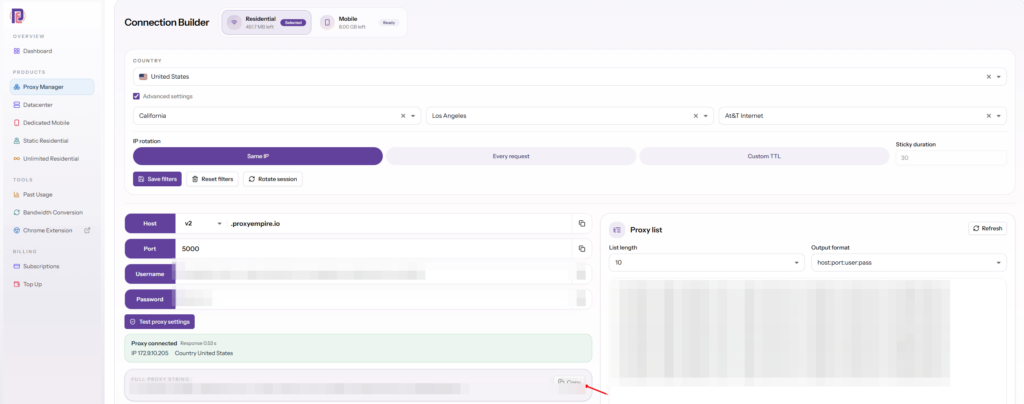
- Residential: 30M+ ethically sourced IPs in 179 countries and territories, with targeting by country, region, city, ZIP, ISP, ASN and OS fingerprint at no extra charge. Rotation per request or sticky sessions. $3.50/GB pay as you go, down to $1.50/GB on larger plans. See rotating residential proxies.
- Mobile: 4M+ IPs in 174 countries, with carrier-level targeting included, rotating or sticky. See rotating mobile proxies.
- Datacenter: from $0.35/GB, country-level targeting, with sticky sessions on rotating datacenter. See rotating datacenter proxies.
- Static residential: one fixed IP per proxy, country-level targeting, sold in a fixed list of countries. See static residential proxies.
Unused bandwidth rolls over to the next period, the network runs at 99.9% uptime (see the public status page), and support is available 24/7 from real people. Only ports 80 and 443 are open by default, and UDP (ports 443 and 53) is available on Rotating Residential and Rotating Mobile only, which covers web traffic. Exit IPs are mostly IPv4, with some IPv6. Financial, government, crypto exchange, bank and payment sites are blocked on all proxy types unless you pass KYC and a use-case review. The $1.97 trial includes 100 MB of residential and 50 MB of mobile traffic; datacenter proxies start at a single GB for $2.
Proxy pool FAQ
Short answersWhat is a proxy pool?
A group of proxy IP addresses that share your traffic. Each request or session leaves from one address in the group, and addresses that fail or get blocked are taken out of rotation.
How big should an IP pool be?
Big enough in the location you target. Count the addresses available in your country or city, and measure distinct IPs and success rate on your real target, rather than relying on a provider’s total.
Is a residential pool better than a datacenter pool?
For protected sites, usually yes, because residential IPs look like home users. For high volume on lenient sites, datacenter IPs are faster and cheaper.
What is the difference between a proxy pool and a backconnect proxy?
The pool is the set of addresses. A backconnect proxy is the gateway in front of it: you connect to one host and port, and the gateway picks an address from the pool for you.
Should I rotate on every request?
For independent pages, yes. For logins, carts and paginated results, keep a sticky session so the site sees one visitor, and start a new session if it fails.
Why do my requests fail with 407?
The proxy rejected your credentials. Check the username and password, URL-encode special characters, and don’t retry automatically.
How do I test a proxy pool?
Send a sample of your real requests in your real locations and record success rate, block rate, latency and distinct exit IPs. Compare pools on the same sample.
Can I rotate proxies with Python requests?
Yes. Pass a proxies dictionary on each request, pick the proxy per attempt from your list, set a timeout, and retry failures with backoff, as in the rotator above. With a rotating gateway, one proxy URL is enough.
References
Primary documentation- Requests — Advanced Usage: proxies, transport adapters, automatic retries, timeouts. requests.readthedocs.io/en/latest/user/advanced
- Requests — API reference: exceptions, Response.elapsed. requests.readthedocs.io/en/latest/api
- urllib3 — Retry: backoff_factor, status_forcelist, Retry-After. urllib3.readthedocs.io
- Python — random: choice and uniform. docs.python.org/3/library/random
- Python — time: monotonic and sleep. docs.python.org/3/library/time
- Python — collections: deque with maxlen. docs.python.org/3/library/collections
- IETF — RFC 9110, “HTTP Semantics”: 403, 407 and Retry-After. rfc-editor.org/rfc/rfc9110
- IETF — RFC 6585, “Additional HTTP Status Codes”: 429 Too Many Requests. rfc-editor.org/rfc/rfc6585
- IETF — RFC 5737, “IPv4 Address Blocks Reserved for Documentation”. rfc-editor.org/rfc/rfc5737
A managed pool, one gateway, no list to maintain
30M+ residential IPs in 179 countries and territories and 4M+ mobile IPs in 174 countries, per-request rotation or sticky sessions, city, ZIP, ISP and ASN targeting at no extra charge, and 24/7 support from real people. The $1.97 trial includes 100 MB of residential and 50 MB of mobile traffic.