
Undetectable is an anti-detect browser for Windows and Mac that keeps each profile’s fingerprint, cookies and storage separate, so many accounts can run from one computer. The browser can’t give those profiles separate IP addresses, which is where a proxy comes in. This guide reviews Undetectable from a proxy user’s point of view and walks through Undetectable browser proxy setup with ProxyEmpire: adding a proxy to a profile, the proxy manager, the checks to run, and whether to pick residential, mobile or static residential proxies. ProxyEmpire customers also get 20% off Undetectable with a promo code.
The short version
In Undetectable, open a profile’s General tab, choose New Proxy in the proxy dropdown, pick HTTP or SOCKS5 and paste v2.proxyempire.io:5000:username:password. Click the check button, confirm the country, name the proxy and save. Give every profile its own sticky session, use the proxy manager for bulk work, and use the code PROXYEMPIRE for 20% off your first Undetectable purchase.
Undetectable Review for Proxy Users
Where it helps, and where the proxy takes overUndetectable is an anti-detect browser: each profile is its own browser environment with a separate fingerprint, cookie jar and storage. It targets people who manage many accounts, such as e-commerce sellers, affiliate and ad teams and social media managers, and it runs on both Windows and macOS.
For anyone pairing it with a proxy provider, these are the useful parts:
- Forgiving proxy input. Undetectable accepts proxy details in several layouts, including
host:port:login:password,login:password@host:portand versions with a pipe between the address and the credentials, so you rarely need to reformat what your provider gives you. - A proxy check that tests real sites. The check button shows the proxy’s country and green status icons for Google, Facebook and Yandex when the proxy works, which tells you more than a simple connection test.
- A proxy manager for adding proxies one by one or in bulk, importing them from a file or text, checking their status, editing, exporting and deleting them.
- An IP change link field for mobile proxies that rotate through a URL; you can leave it empty if your provider doesn’t use one.
As with every anti-detect browser, Undetectable separates profiles inside the browser, not on the network. Whether platforms see your accounts as separate people depends just as much on the IP behind each profile, which is the other half of the setup.
That is why the Undetectable browser proxy you choose matters as much as the browser itself. Without one, every profile shares your own connection, and platforms that see several accounts on one IP address can link them no matter how different their fingerprints look. With a separate residential or mobile IP behind each profile, each account arrives from its own address in its own location, the way real customers do. A good Undetectable browser proxy setup is therefore simple to describe: one profile, one fingerprint, one sticky session, and the same country and city every time that account logs in.
Step 1: Get Your ProxyEmpire Proxy Details
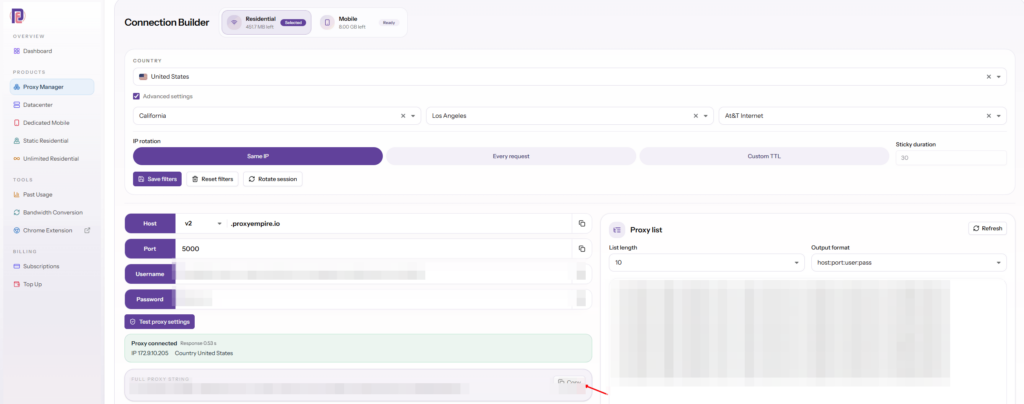
Target, choose a session, copyIn the ProxyEmpire dashboard, open the Proxy Manager to get to the Connection Builder. Choose Residential or Mobile and a country, then use the advanced settings for a region, city or ISP (carrier on mobile). Residential and mobile can also be targeted by ZIP, ASN and OS fingerprint, and targeting never costs extra. Static residential and datacenter proxies are targeted by country.
Choose the IP rotation:
- Same IP is a sticky session with no fixed time limit; the IP stays until you rotate it or the device behind it goes offline. Every account profile should use it.
- Every request gives a new IP each time, which is for data collection, not accounts.
- Custom TTL rotates on a timer you set, up to two hours.
The builder then shows host v2.proxyempire.io, port 5000, your username and password, a Test proxy settings button and a full proxy string you can copy. Your targeting and session are part of the username, so a different city or a fresh IP just means a different username. ProxyEmpire supports HTTP, HTTPS and SOCKS5, the same details work over HTTP and SOCKS5, and ProxyEmpire authenticates by username and password, not by whitelisted IP.
Step 2: Add the Proxy to an Undetectable Profile
General tab, New Proxy, check- Open the General tabCreate a new profile or open an existing one’s settings and go to the General tab.
- Choose New ProxyOpen the proxy dropdown and select New Proxy.
- Pick the protocolSelect HTTP or SOCKS5 from the protocol list. ProxyEmpire uses the same details for both.
- Paste the detailsPaste the full proxy string from ProxyEmpire into the field next to the protocol.
- Check, name and saveClick the check button, confirm the country and green status icons, name the proxy and save.
Leave the IP change link field empty. It exists for mobile proxies that rotate when you open a URL; with ProxyEmpire you get a fresh IP by starting a new sticky session and updating the profile with its username.
HTTP works for every website, including HTTPS ones, because the browser tunnels encrypted traffic through the proxy. After launching the profile, check the IP on any IP-check page. A neighbouring town is normal; location databases often disagree about the exact city.
The Undetectable Proxy Manager
For more than a handful of profilesUndetectable’s documentation recommends its proxy manager for adding and managing proxies in bulk. You can add proxies one at a time or many at once, import them from a file or pasted text, check their status, edit or export them, and then assign them to profiles.
v2.proxyempire.io:5000:username-for-session-1:password
v2.proxyempire.io:5000:username-for-session-2:password
v2.proxyempire.io:5000:username-for-session-3:password
The usernames are placeholders. The Proxy list panel in ProxyEmpire’s Connection Builder generates real ones: set the list length, choose the host:port:user:pass output format and copy. Each line is a separate sticky session, so each profile gets its own IP.
Keep the proxy manager tidy as it grows. Name each proxy after the account it belongs to, not after its city, so you always know which session goes with which profile. When a sticky IP drops, replace just that one entry with a new session in the same city. Exporting the list now and then also gives you a simple backup of which session belongs to which account.
Keeping Each Undetectable Profile Consistent
The IP and the fingerprint should agreeAn anti-detect browser and a proxy work best when they tell the same story. A profile on a Chicago IP that reports a Moscow timezone, or that leaks your home IP through WebRTC, gives away exactly what you are trying to hide. Before you log in to anything:
- Timezone and geolocation should match the proxy’s location, not your computer’s.
- WebRTC should show the proxy’s IP or be masked. ProxyEmpire carries TCP traffic, not UDP, so WebRTC’s peer-to-peer traffic has to be masked to stay private.
- Language should be one the account’s owner would plausibly use there.
- Operating system and device type should fit the account: a mobile-first account on a mobile IP, a desktop store on a residential one.
Then keep each account in the same place over time: same country and, ideally, the same city at every login. Never give two accounts on the same platform the same session, and warm new accounts up with ordinary browsing before doing anything unusual.
Which ProxyEmpire Proxy to Use with Undetectable
Match the IP to the account| Rotating residential | Rotating mobile | Static residential | |
|---|---|---|---|
| IP source | Home broadband | 4G carrier networks | Residential ISP ranges |
| In Undetectable | One sticky session per profile | One sticky session per profile | One IP per profile |
| Targeting | Country to ZIP, ISP, ASN | Country to ZIP, carrier, ASN | Country |
| Best for | Stores, ad accounts, most web accounts | Social media and app-first platforms | Accounts that must keep one IP |
| Price | $3.50/GB, down to $1.50/GB | $4.50/GB, down to $2.00/GB | $3.50 for one IP, down to $2.00/IP a month |
Rotating residential on a sticky session suits most Undetectable profiles. Mobile IPs, shared by many real subscribers on carrier networks, are the safer choice for strict platforms. Static residential, sold in 19 countries, fits accounts that should always log in from the same address. All three share one ProxyEmpire balance, and unused bandwidth rolls over.
Troubleshooting an Undetectable Browser Proxy
When the check fails| Problem | Likely cause and fix |
|---|---|
| Check fails | Usually a typo, an extra space or an old password. Copy the full proxy string from the Connection Builder again. |
| Country is right, status icons aren’t all green | The proxy works, but one test site blocked or timed out. Re-check once; if it persists, start a new session. |
| IP changed mid-session | The username is set to Every request, or the device behind the sticky IP went offline. Use Same IP and start a new session in the same city. |
| Timezone doesn’t match the IP | The profile’s timezone is fixed to your computer or a manual value. Set it to follow the proxy. |
| Stopped working | Check your bandwidth balance and whether targeting changed, which changes the username. |
| One site won’t load | Some site categories are restricted on ProxyEmpire by default, including banks, payment processors such as PayPal and Stripe, and crypto exchanges, and only ports 80 and 443 are open. Access can be reviewed after KYC and a use-case explanation to support. |
ProxyEmpire support is available 24/7 through live chat in the dashboard. Comparing anti-detect browsers? See our Octo Browser review and proxy guide.
Undetectable Promo Code
For ProxyEmpire customersUse the promo code PROXYEMPIRE at checkout for 20% off your first purchase of any Undetectable package. Get Undetectable from its official site.
Undetectable Proxy FAQ
Straight answersWhat is the best Undetectable browser proxy?
Rotating residential proxies with one sticky session per profile suit most accounts. Use rotating mobile proxies for social media and app-first platforms, and static residential proxies for accounts that must keep one IP.
How do I add a proxy in Undetectable?
Open the profile’s General tab, choose New Proxy in the proxy dropdown, pick HTTP or SOCKS5 and paste host:port:login:password. With ProxyEmpire that starts v2.proxyempire.io:5000. Click the check button, name the proxy and save.
What proxy formats does Undetectable accept?
Several, including host:port:login:password, login:password@host:port and host:port|login:password. ProxyEmpire’s full proxy string works as it is.
How do I add many proxies to Undetectable?
Use the proxy manager, which can add proxies in bulk, import them from a file or text, check their status and assign them to profiles.
Is there an Undetectable promo code?
Yes. The code PROXYEMPIRE gives 20% off your first purchase of any Undetectable package.
Is Undetectable a good anti-detect browser?
For proxy users it is practical: flexible proxy formats, a check that tests real sites, and a proxy manager for bulk work, on Windows and Mac. Like any anti-detect browser, it depends on one good proxy per profile to keep accounts apart.
Do I need the IP change link?
No, not with ProxyEmpire. Start a new sticky session to get a new IP and update the profile with the new username.
Can I try ProxyEmpire with Undetectable first?
Yes. The $1.97 trial includes 100 MB of residential and 50 MB of mobile bandwidth, and unused trial bandwidth doesn’t expire.
References
Primary documentation- Undetectable Docs — Connecting proxies. docs.undetectable.io/setting-up-proxies/proxies-setup
- Undetectable Docs — Proxy manager. docs.undetectable.io/en/mass-management/proxy-manager
Give every Undetectable profile its own real IP
Residential, 4G mobile and static residential proxies with city, ZIP, ISP and carrier targeting included, a sticky session for each profile, bandwidth that rolls over and 24/7 support from real people. Try it for $1.97.


















