
Golang scraping at any real volume runs through proxies, and Go makes that easy: the standard library’s net/http takes a proxy URL on its Transport, adds the credentials for you and opens CONNECT tunnels to HTTPS sites. This guide shows every piece you need, with code checked against the Go documentation: http.ProxyURL and proxy authentication, the HTTP_PROXY, HTTPS_PROXY and NO_PROXY rules, SOCKS5 in net/http and in golang.org/, timeouts and why keep-alive decides whether a rotating residential proxy gives you a new IP, worker pools with rate limits and retries, Colly, goquery and chromedp, and a table of the errors you will actually see.
The short version
Clone http.DefaultTransport, set Proxy: http.ProxyURL(u) with the username and password inside u, and every request from that client goes through the proxy. Go sends the credentials as a Proxy-Authorization header, tunnels https:// targets with CONNECT, and accepts socks5:// proxy URLs in the same field. Keep-alive reuses connections, so set DisableKeepAlives or use one client per session when the exit IP matters.
Golang scraping through a proxy: the basic setup
One Transport field does the workEverything in Go’s HTTP client goes through a RoundTripper, and the standard one, *http.Transport, has a Proxy field. It holds a function that returns the proxy URL to use for each request. http.ProxyURL builds that function for a fixed URL, so the whole setup is a parsed proxy URL and one assignment.
package main

import (
	"fmt"
	"io"
	"log"
	"net/http"
	"net/url"
	"time"
)

func main() {
	proxyURL, err := url.Parse("http://USERNAME:PASSWORD@proxy.example.com:8080")
	if err != nil {
		log.Fatal(err)
	}

	// start from the default transport so its timeouts and HTTP/2 settings are kept
	tr := http.DefaultTransport.(*http.Transport).Clone()
	tr.Proxy = http.ProxyURL(proxyURL)

	client := &http.Client{Transport: tr, Timeout: 30 * time.Second}

	resp, err := client.Get("https://api.ipify.org")
	if err != nil {
		log.Fatal(err)
	}
	defer resp.Body.Close()

	body, err := io.ReadAll(resp.Body)
	if err != nil {
		log.Fatal(err)
	}
	fmt.Println(resp.StatusCode, string(body)) // prints the proxy's exit IP, not yours
}
Three choices in that snippet matter more than they look:
- Clone the default transport.
http.DefaultTransportcomes with a 30-second dial timeout, a 10-second TLS handshake timeout, a 90-second idle timeout andForceAttemptHTTP2: true. A bare&http.Transport{}has none of those timeouts.Clonereturns a deep copy of the exported fields, so you can change the proxy without touching the global. - Build one client and reuse it. A
Transportkeeps a pool of connections and is safe for concurrent use by many goroutines. Creating a new one per request throws that pool away and leaves idle connections open. - Always close the body. The
net/httpdocs say that if the body is not both read to EOF and closed, the transport may not be able to reuse the connection for the next request.
If you only want to scrape a few pages and your proxy is already in the environment, you don’t need any of this: the default client reads HTTPS_PROXY and friends automatically, as covered below. The same host, port, username and password you would give curl with a proxy go straight into the Go URL, which makes curl a handy first test.
Why Go suits proxy-heavy scraping
Goroutines, one binary and a strong standard libraryGolang scraping works well at scale because the parts a scraper spends its time on are built in. Goroutines are cheap, so a program can keep hundreds of requests in flight while it waits on slow residential exits. Channels and sync give you worker pools without a framework. The net/http client handles proxies, TLS, HTTP/2, cookies (through net/http/cookiejar) and redirects, and a scraper compiles to one static binary you can copy onto a server or into a container.
The trade-off is the ecosystem. Python has more ready-made scraping tools and more examples for unusual sites. Go’s main scraping libraries are Colly for crawling, goquery for jQuery-style parsing and chromedp for driving Chrome, and all three are covered below. If you are still choosing a language, our comparison of Go vs Python goes into the differences, and our guide to Python scraping with residential proxies shows the same proxy setup with requests.
Whatever the language, the proxy part works the same way. Your program connects to the proxy, not to the website; the proxy connects onward from its own IP address; the website sees and rate-limits that address. The rest of this guide is about controlling which address that is, and how often it changes.
How net/http talks to a proxy
Plain forwarding for http://, a CONNECT tunnel for https://The Transport.Proxy documentation is short and precise. The function returns a URL for each request; if it returns an error, the request is aborted with that error; if Proxy is nil or returns a nil URL, no proxy is used. The proxy type comes from the URL scheme: http, https, socks5 and socks5h are supported, and an empty scheme means http. If the URL contains a username and password, Go passes them in a Proxy-Authorization header.
| Proxy URL scheme | Go’s first hop | Notes |
|---|---|---|
http:// | Plain TCP to the proxy | The usual choice for commercial gateways. HTTPS sites still get end-to-end TLS inside a CONNECT tunnel. |
https:// | TLS to the proxy itself | Only for proxies that actually serve TLS on that port. Pointing it at a plain HTTP port fails the handshake. |
socks5:// | SOCKS5 handshake | Username and password go in the SOCKS5 sub-negotiation. Go treats it the same as socks5h. |
socks5h:// | SOCKS5 handshake | Accepted since Go 1.23. The hostname is sent to the proxy, which resolves it. |
Plain HTTP targets
For an http:// URL, Go sends the whole request to the proxy with the full URL in the request line, adds Proxy-Authorization if you gave credentials, and the proxy forwards it. The proxy can read and change that traffic, which is one reason to prefer HTTPS targets whenever the site offers them.
HTTPS targets and CONNECT
For an https:// URL through an HTTP proxy, Go first sends CONNECT host:443 with the Proxy-Authorization header. If the proxy answers 200, the connection becomes a raw tunnel and Go runs the TLS handshake with the website through it, checking the site’s certificate as usual. The proxy relays encrypted bytes. If the proxy answers anything other than 200, Go closes the connection and returns an error whose text is the status phrase, for example Proxy Authentication Required. RFC 9110 defines both CONNECT and the 407 status.
Two Transport fields let you customise the CONNECT step. ProxyConnectHeader adds fixed headers to every CONNECT request, and GetProxyConnectHeader returns them per proxy and target when you need them to vary. OnProxyConnectResponse is called with the proxy’s reply before Go checks for 200, which is the place to log a proxy’s error headers. Go sets Proxy-Authorization itself from the URL, so you don’t need to add it to ProxyConnectHeader.
fixed, _ := url.Parse("http://USERNAME:PASSWORD@proxy.example.com:8080")

tr := http.DefaultTransport.(*http.Transport).Clone()
tr.Proxy = func(req *http.Request) (*url.URL, error) {
	if req.URL.Hostname() == "internal.example.com" {
		return nil, nil // nil URL: go direct
	}
	return fixed, nil
}
tr.OnProxyConnectResponse = func(ctx context.Context, proxyURL *url.URL, connectReq *http.Request, connectRes *http.Response) error {
	if connectRes.StatusCode != http.StatusOK {
		log.Printf("proxy %s refused CONNECT %s: %s", proxyURL.Redacted(), connectReq.Host, connectRes.Status)
	}
	return nil // returning an error here aborts the request with that error
}
Because Proxy is an ordinary function, it is also where you implement your own rules: route one domain through a proxy in Germany and another through the US, skip the proxy for internal services, or pick from a list. Keep it fast and safe for concurrent calls, since the transport calls it for every request from every goroutine.
Proxy credentials and URL encoding
Build the URL with url.UserPasswordCredentials live in the userinfo part of the proxy URL. Writing them into a string and calling url.Parse works for simple passwords, but some characters break it. A /, ? or # in the password ends the host part of the URL early, and characters outside the allowed set make url.Parse fail with net/url: invalid userinfo. Go’s parser does tolerate an @ in the password, because it splits on the last @, but other tools don’t, so it’s better not to rely on that.
The safe way is to build the URL from parts. url.UserPassword stores the username and password, and URL.String() escapes them correctly when the URL is written out, so any password works.
proxyURL := &url.URL{
	Scheme: "http",
	User:   url.UserPassword(os.Getenv("PROXY_USER"), os.Getenv("PROXY_PASS")),
	Host:   "proxy.example.com:8080",
}

tr := http.DefaultTransport.(*http.Transport).Clone()
tr.Proxy = http.ProxyURL(proxyURL)

log.Println("using proxy", proxyURL.Redacted()) // http://user:xxxxx@proxy.example.com:8080
Read the credentials from environment variables or a secrets store rather than hard-coding them, and log proxy URLs with Redacted(), which replaces the password with xxxxx. The net/url docs also carry RFC 2396’s warning that credentials in a URL are a security risk; for proxy URLs that you build in memory it’s the standard mechanism, but it is exactly why they shouldn’t end up in logs, error reports or git.
Go sends proxy credentials with HTTP Basic authentication, which is what commercial proxies expect. Basic means Base64, not encryption: on an http:// proxy URL the header crosses the network between you and the proxy in the clear. That is normal for proxy gateways, but it’s worth knowing when you debug with a packet capture or share one.
HTTP_PROXY, HTTPS_PROXY and NO_PROXY in Go
What http.ProxyFromEnvironment actually doeshttp.DefaultTransport, and so http.Get and a zero http.Client, uses http.ProxyFromEnvironment. It reads HTTP_PROXY, HTTPS_PROXY and NO_PROXY, or their lower-case versions, which take precedence when both are set. Each request uses the variable matching its own scheme, unless NO_PROXY excludes the host. The rules come from golang., and a few of them surprise people:
| Rule | What it means in practice |
|---|---|
HTTPS_PROXY is for https:// URLs only | An https:// request never falls back to HTTP_PROXY. Set both if you fetch both kinds of URL. |
Value may be host:port | A value without a scheme is treated as http://. Any other malformed value is an error. |
No ALL_PROXY | net/http ignores it. FromEnvironment in golang.org/ reads it instead. |
| localhost and loopback skip the proxy | Requests to localhost or a loopback address such as 127.0.0.1 go direct, whatever you set. |
NO_PROXY matching | Comma-separated. foo.com matches foo.com and bar.foo.com; .foo.com matches subdomains only; IPs, CIDR ranges and host:port work; a single * disables the proxy. |
| Read once | net/http reads the variables the first time they are needed. Changing them later in the same process has no effect. |
| CGI safety | When REQUEST_METHOD is set (a CGI handler), a request that would use HTTP_PROXY fails with an error, because a client could have set it through a Proxy: header. |
# shell: every Go program started from here uses the proxy for https:// URLs
export HTTPS_PROXY="http://USERNAME:PASSWORD@proxy.example.com:8080"
export HTTP_PROXY="$HTTPS_PROXY"
export NO_PROXY="localhost,10.0.0.0/8,.internal.example"

// Go: the default client picks it up with no code at all
resp, err := http.Get("https://api.ipify.org")

// Go: same matching rules, values from your own config instead of the environment
cfg := &httpproxy.Config{ // import "golang.org/x/net/http/httpproxy"
	HTTPProxy:  proxyString,
	HTTPSProxy: proxyString,
	NoProxy:    "localhost,10.0.0.0/8,.internal.example",
}
proxyFor := cfg.ProxyFunc()

tr := http.DefaultTransport.(*http.Transport).Clone()
tr.Proxy = func(req *http.Request) (*url.URL, error) { return proxyFor(req.URL) }
The environment approach is handy for command-line tools and containers, but for a scraper it has a catch: it applies to every request the process makes through the default transport, including calls to your own database API or a webhook, unless you list them in NO_PROXY. For scraping code, an explicit Transport with http.ProxyURL is easier to reason about. The httpproxy package’s own docs note that its API isn’t covered by the Go 1 compatibility promise.
SOCKS5 proxies in Go
Built into net/http, or as a dialer from x/net/proxyFor HTTP and HTTPS traffic you don’t need an extra package: put a socks5:// URL in Transport.Proxy and net/http performs the SOCKS5 handshake itself, including username and password authentication from the URL (RFC 1928 and RFC 1929). The current net/http docs say socks5 is treated the same as socks5h, and Go 1.23 was the first release to accept the socks5h spelling. In both cases Go sends the target’s hostname to the proxy, so DNS is resolved on the proxy side, not on your machine.
// 1. net/http only: a socks5:// proxy URL
u, _ := url.Parse("socks5://USERNAME:PASSWORD@proxy.example.com:1080")
tr := http.DefaultTransport.(*http.Transport).Clone()
tr.Proxy = http.ProxyURL(u)

// 2. golang.org/x/net/proxy: a SOCKS5 dialer (import "golang.org/x/net/proxy")
auth := &proxy.Auth{User: "USERNAME", Password: "PASSWORD"}
dialer, err := proxy.SOCKS5("tcp", "proxy.example.com:1080", auth, &net.Dialer{Timeout: 15 * time.Second})
if err != nil {
	log.Fatal(err)
}
cd, ok := dialer.(proxy.ContextDialer)
if !ok {
	log.Fatal("SOCKS5 dialer has no DialContext")
}

tr2 := http.DefaultTransport.(*http.Transport).Clone()
tr2.Proxy = nil // don't also apply HTTP_PROXY from the environment
tr2.DialContext = cd.DialContext
client := &http.Client{Transport: tr2, Timeout: 30 * time.Second}

// the same dialer also opens raw TCP connections through the proxy
conn, err := cd.DialContext(ctx, "tcp", "example.com:443")
proxy.SOCKS5 returns a Dialer that makes SOCKSv5 connections with an optional username and password; the fourth argument is the dialer it uses to reach the proxy, so a *net.Dialer with a timeout is a sensible choice. Type-assert the result to proxy.ContextDialer to get a DialContext you can plug into a Transport and cancel with a context. proxy.FromURL builds the same dialer from a socks5:// or socks5h:// URL, and proxy.FromEnvironment reads ALL_PROXY and NO_PROXY.
Use the x/net/proxy route when you need more than HTTP: a raw TCP protocol, a websocket library that takes a dial function, or a gRPC client. For ordinary scraping, the built-in socks5:// support is simpler and behaves the same. Our explainer on SOCKS vs HTTP proxies covers when either protocol is the better choice; for web pages the answer is usually “whichever your stack handles best”.
Timeouts, connection reuse and TLS
Keep-alive decides how often your IP changesTimeouts
A request through a residential or mobile proxy has one more hop than a direct one, and the exit is a real device on a consumer connection, so an occasional slow answer is normal. Put a limit on every request. Client.Timeout covers the whole exchange, including connecting, redirects and reading the body, and the docs note the timer keeps running after Get or Do returns and will interrupt a slow body read. For finer control, the transport has TLSHandshakeTimeout, ResponseHeaderTimeout (time to wait for headers after sending the request) and IdleConnTimeout, and net.Dialer.Timeout caps the TCP connect. A context from context.WithTimeout passed to http.NewRequestWithContext does the same per request and also lets you cancel a whole batch at once.
Keep-alive and rotating gateways
This is the detail most Go proxy tutorials skip. http.Transport keeps finished connections open and reuses them. Through a proxy, the reused connection for an https:// site is the CONNECT tunnel, and a tunnel is one TCP connection that leaves through one exit. So even when your gateway is set to give a new IP on every request, a Go client that reuses its tunnel keeps sending requests out of the same IP until the connection closes. For plain http:// targets the reused connection goes only as far as the proxy, and what happens next depends on the gateway.
Pick the behaviour you want deliberately:
| You want | Do this in Go | Cost |
|---|---|---|
| A new IP on every request | tr.DisableKeepAlives = true with a rotating gateway | A new TCP and TLS handshake per request, so more latency |
| One IP for a sequence of requests | One client per sticky session, keep-alive on | Fastest; the session decides the IP, not the connection |
| A fresh start mid-run | tr.CloseIdleConnections() | Closes idle connections only; requests in flight carry on |
Go’s connection pool is keyed on the full proxy URL, username included. When the session ID lives in the proxy username, as it does on ProxyEmpire, two sessions never share a connection even inside one transport. One client per session is still the clearest way to write it.
Connection limits
MaxIdleConnsPerHost defaults to 2 (http.). With a proxy, every request goes to the same proxy host, so under high concurrency Go opens connections faster than it keeps them, and you pay for extra handshakes. Raise it to roughly your number of workers, and use MaxConnsPerHost if you want a hard cap: once it’s reached, new dials wait.
tr := http.DefaultTransport.(*http.Transport).Clone()
tr.Proxy = http.ProxyURL(proxyURL)
tr.MaxIdleConns = 100
tr.MaxIdleConnsPerHost = 32         // about the number of workers
tr.MaxConnsPerHost = 64             // hard cap on connections to the proxy
tr.ResponseHeaderTimeout = 20 * time.Second
tr.DisableKeepAlives = rotatePerRequest // true = new tunnel, so new exit IP, per request

client := &http.Client{Transport: tr, Timeout: 45 * time.Second}
TLS notes
Through an HTTP or SOCKS5 proxy, the TLS session is between your program and the website, so Go verifies the site’s real certificate. Leave InsecureSkipVerify off. If you see x509: certificate signed by unknown authority only when the proxy is on, something in the path is inspecting TLS, typically a corporate proxy or antivirus, and the fix is to trust its CA in RootCAs, not to disable checks. Setting your own TLSClientConfig or DialContext turns off automatic HTTP/2 unless ForceAttemptHTTP2 is true; the default transport sets it, so a cloned transport keeps HTTP/2 through CONNECT tunnels.
Rotating and sticky sessions with ProxyEmpire in Go
One gateway; the session lives in the usernameProxyEmpire’s rotating residential and mobile proxies use one gateway: host v2.proxyempire.io, port 5000, over HTTP or SOCKS5 with the same username and password. Authentication is username and password only, so there is no IP whitelist to maintain, and the same Go binary works from a laptop, a server or a CI runner.
Open the Proxy Manager in the dashboard and use the Connection Builder. Choose residential or mobile, then where the IP should come from: country, region or state, city, ZIP code, ISP (carrier on mobile), ASN and OS fingerprint, all included at no extra charge. Then choose how the IP behaves:
- Every request: a new IP for each request. Pair it with
DisableKeepAlivesin Go, for the reason explained above. - Same IP: a sticky session. The IP stays with no fixed time limit, until you rotate it or the device behind it goes offline. Use it for a login followed by page views, or a cart and checkout flow you are testing.
- Custom TTL: the IP changes on a timer you set, up to two hours.
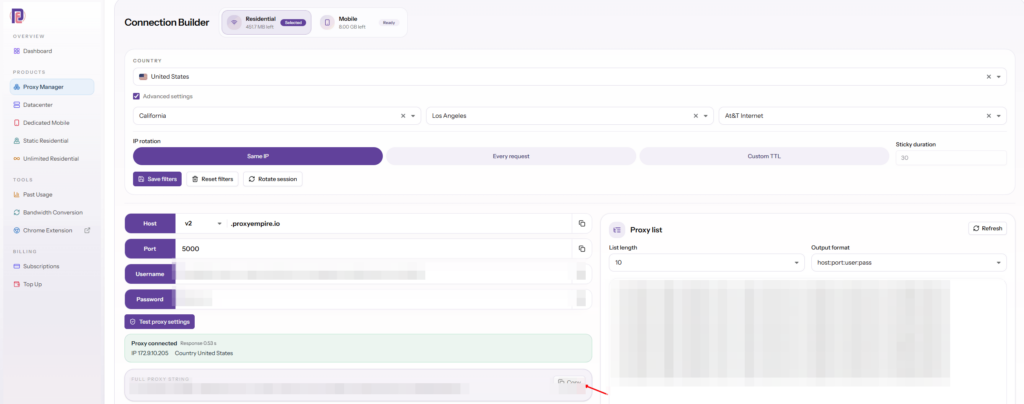
Your choices are encoded in the proxy username, so a different country or session is simply a different username with the same host, port and password. The sample on ProxyEmpire’s product pages is r_username-, where country-us selects the United States and sid-123456 holds a session. Copy your exact string from the Connection Builder rather than assembling it by hand: the builder knows which parameters your plan and product accept.
// user is the full username copied from the Connection Builder,
// for example "r_username-country-us-sid-123456"
func proxyClient(user, pass string, rotateEachRequest bool) *http.Client {
	u := &url.URL{
		Scheme: "http", // or "socks5"; same host, port and login
		User:   url.UserPassword(user, pass),
		Host:   "v2.proxyempire.io:5000",
	}
	tr := http.DefaultTransport.(*http.Transport).Clone()
	tr.Proxy = http.ProxyURL(u)
	tr.DisableKeepAlives = rotateEachRequest
	return &http.Client{Transport: tr, Timeout: 45 * time.Second}
}

pass := os.Getenv("PE_PASS")

// sticky: every request from this client leaves from the same IP
sticky := proxyClient("r_username-country-us-sid-123456", pass, false)

// another session ID means another sticky IP
second := proxyClient("r_username-country-us-sid-654321", pass, false)

// rotating: username set to "Every request" in the builder, new tunnel per request
rotating := proxyClient(os.Getenv("PE_ROTATING_USER"), pass, true)
Our guide to sticky vs rotating proxies explains which mode suits which job. For checking a location by hand before you point code at it, ProxyEmpire’s free Chrome extension, ProxyEmpire Proxy Manager, puts your browser on the same proxy, and the Android app with the same name does it for a phone.
Limits worth knowing before you debug
- Ports: only target ports 80 and 443 are open by default. A request to
https://fails even with a correct login, and so does a raw TCP dial through SOCKS5 to an unusual port.example.com:8443 - No UDP: SOCKS5 UDP ASSOCIATE isn’t available, so QUIC and DNS-over-UDP won’t go through the proxy. Go’s HTTP client uses TCP, so this rarely matters for scraping.
- Blocked categories: financial, government, crypto exchange, bank and payment sites are blocked on all proxy types. See are there any blocked websites for the list and the KYC review that can unblock a use case.
- IPv4 exits: exit IPs are mostly IPv4, with some IPv6. There’s no separate IPv6 product, so don’t build logic that expects an IPv6 address.
Concurrency, rate limits and retries
A worker pool, a limiter and backoff that honours Retry-AfterIn Golang scraping, goroutines make it tempting to launch one per URL. Don’t: ten thousand simultaneous requests overwhelm your own machine, the proxy plan and the target site. A fixed pool of workers reading from a channel bounds the concurrency, and golang.org/ bounds the request rate across all of them. rate.NewLimiter(r, b) allows events at rate r with bursts of up to b, rate.Every converts an interval to a rate, and Wait(ctx) blocks until a request may go, or the context ends.
package main

import (
	"context"
	"fmt"
	"io"
	"log"
	"net/http"
	"net/url"
	"os"
	"strconv"
	"sync"
	"time"

	"golang.org/x/time/rate"
)

// retryAfter parses a Retry-After header: seconds or an HTTP date (RFC 9110).
func retryAfter(v string) (time.Duration, bool) {
	if v == "" {
		return 0, false
	}
	if secs, err := strconv.Atoi(v); err == nil && secs >= 0 {
		return time.Duration(secs) * time.Second, true
	}
	if t, err := http.ParseTime(v); err == nil {
		return time.Until(t), true
	}
	return 0, false
}

func fetch(ctx context.Context, client *http.Client, lim *rate.Limiter, target string) ([]byte, error) {
	backoff := time.Second
	for attempt := 1; attempt <= 4; attempt++ {
		if err := lim.Wait(ctx); err != nil {
			return nil, err
		}
		req, err := http.NewRequestWithContext(ctx, http.MethodGet, target, nil)
		if err != nil {
			return nil, err
		}
		resp, err := client.Do(req)
		if err == nil {
			if resp.StatusCode == http.StatusOK {
				defer resp.Body.Close()
				return io.ReadAll(resp.Body)
			}
			io.Copy(io.Discard, resp.Body) // drain so the connection can be reused
			resp.Body.Close()
			retryable := resp.StatusCode == http.StatusTooManyRequests || resp.StatusCode >= 500
			if !retryable {
				return nil, fmt.Errorf("%s: status %d", target, resp.StatusCode)
			}
			if d, ok := retryAfter(resp.Header.Get("Retry-After")); ok && d > backoff {
				backoff = d
			}
		}
		select {
		case <-time.After(backoff):
		case <-ctx.Done():
			return nil, ctx.Err()
		}
		backoff *= 2
	}
	return nil, fmt.Errorf("%s: giving up after 4 attempts", target)
}

func main() {
	proxyURL := &url.URL{
		Scheme: "http",
		User:   url.UserPassword(os.Getenv("PE_USER"), os.Getenv("PE_PASS")),
		Host:   "v2.proxyempire.io:5000",
	}
	tr := http.DefaultTransport.(*http.Transport).Clone()
	tr.Proxy = http.ProxyURL(proxyURL)
	tr.MaxIdleConnsPerHost = 8
	client := &http.Client{Transport: tr, Timeout: 45 * time.Second}

	lim := rate.NewLimiter(rate.Every(250*time.Millisecond), 4) // about 4 requests a second
	ctx, cancel := context.WithTimeout(context.Background(), 10*time.Minute)
	defer cancel()

	urls := []string{"https://example.com/a", "https://example.com/b", "https://example.com/c"}
	jobs := make(chan string)
	var wg sync.WaitGroup

	for w := 0; w < 8; w++ {
		wg.Add(1)
		go func() {
			defer wg.Done()
			for u := range jobs {
				body, err := fetch(ctx, client, lim, u)
				if err != nil {
					log.Println("error:", err)
					continue
				}
				fmt.Println(u, len(body), "bytes")
			}
		}()
	}
	for _, u := range urls {
		jobs <- u
	}
	close(jobs)
	wg.Wait()
}
A few design notes. The limiter is shared, so the total rate stays the same however many workers you run; set it per target domain if you scrape several sites at once. A 429 status (defined in RFC 6585) or a 503 often carries Retry-After, which RFC 9110 allows as either a number of seconds or an HTTP date; the code waits at least that long. Other 4xx answers aren’t retried, because repeating a 404 or 403 immediately rarely helps. For a 403 from a site that blocks by IP, the useful retry is a different sticky session, which with ProxyEmpire means a different session ID in the username.
If you prefer a semaphore to a worker pool, a buffered channel does the job: sem := make(chan struct{}, 8), send before each request and receive when it finishes. Both give the same bound. Our overview of proxy pools covers how many IPs and sessions a job of a given size needs.
Rate is part of the design
- Start slow and raise the rate while the success rate holds. A steady rate the site serves comfortably beats bursts that end in 429s.
- Count bandwidth, not just requests: residential and mobile plans are billed per GB, so skip images and fonts you don’t parse.
- Log the status code, proxy session and duration of every request. Those three numbers explain most failures.
Colly proxy setup: SetProxy and RoundRobinProxySwitcher
The most popular Go scraping frameworkColly (github.com/) is a crawling framework built on net/http: you create a collector, register callbacks for HTML elements, responses and errors, and call Visit. It handles cookies, per-domain delays and parallelism, and it has two ways to set a Colly proxy. c.SetProxy(url) sets one proxy for every request. c.SetProxyFunc(f) takes any function with the Transport.Proxy signature, and the colly/v2/proxy package provides RoundRobinProxySwitcher, which rotates through a list of proxy URLs on every request and supports http, https and socks5 schemes.
package main

import (
	"fmt"
	"log"
	"time"

	"github.com/gocolly/colly/v2"
	"github.com/gocolly/colly/v2/proxy"
)

func main() {
	c := colly.NewCollector(
		colly.AllowedDomains("books.toscrape.com"),
		colly.Async(true),
	)
	c.SetRequestTimeout(45 * time.Second) // Colly's default is 10 seconds

	rp, err := proxy.RoundRobinProxySwitcher(
		"http://r_username-country-us-sid-100001:PASSWORD@v2.proxyempire.io:5000",
		"http://r_username-country-us-sid-100002:PASSWORD@v2.proxyempire.io:5000",
		"http://r_username-country-us-sid-100003:PASSWORD@v2.proxyempire.io:5000",
	)
	if err != nil {
		log.Fatal(err)
	}
	c.SetProxyFunc(rp)

	if err := c.Limit(&colly.LimitRule{
		DomainGlob:  "*",
		Parallelism: 4,
		RandomDelay: 500 * time.Millisecond,
	}); err != nil {
		log.Fatal(err)
	}

	c.OnHTML("article.product_pod h3 a", func(e *colly.HTMLElement) {
		fmt.Println(e.Attr("title"))
	})
	c.OnHTML("li.next a", func(e *colly.HTMLElement) {
		e.Request.Visit(e.Attr("href"))
	})
	c.OnResponse(func(r *colly.Response) {
		log.Println(r.StatusCode, r.Request.URL, "via", r.Request.ProxyURL)
	})
	c.OnError(func(r *colly.Response, err error) {
		log.Println("error:", r.StatusCode, r.Request.URL, err)
	})

	c.Visit("https://books.toscrape.com/")
	c.Wait()
}
Things the Colly docs and source tell you that matter with proxies:
- Keep-alive is switched off for you.
SetProxyFunc, whichSetProxycalls, setsDisableKeepAlives = trueon the transport. Every request gets a new connection, so a rotating gateway gives a new IP per request, and the round-robin switcher really does move across your sessions. - Order matters with a custom transport.
c.WithTransportreplaces the transport. Call it first, thenSetProxyFunc, which updates an existing*http.Transportin place. The other way round, your new transport has no proxy. - The default timeout is 10 seconds. That is short for residential and mobile exits; raise it with
SetRequestTimeout. - Know which proxy served a request. The switcher stores the proxy on the request, and
r.Request.ProxyURLgives it back in callbacks. It contains the password, so redact it before logging in production. - Limit rules are per domain.
Parallelismcaps concurrent requests andDelayplusRandomDelayspace them out. WithAsync(true), callc.Wait()at the end or the program exits early.
For a single-gateway setup, c. with the username set to rotate on every request is enough: the gateway rotates and Colly’s disabled keep-alive makes sure each request uses a fresh tunnel. The round-robin list is for when you want a known, fixed set of sticky sessions, or several countries in one crawl.
Parsing pages with goquery
CSS selectors on top of net/httpIf you don’t need Colly’s crawling features, net/http plus goquery (github.) is a lean alternative. Colly itself uses goquery for its OnHTML selectors. Fetch the page with your proxied client, then parse the body.
resp, err := client.Get("https://books.toscrape.com/")
if err != nil {
	log.Fatal(err)
}
defer resp.Body.Close()

doc, err := goquery.NewDocumentFromReader(resp.Body)
if err != nil {
	log.Fatal(err)
}
doc.Find("article.product_pod").Each(func(i int, s *goquery.Selection) {
	title, _ := s.Find("h3 a").Attr("title")
	price := s.Find(".price_color").Text()
	fmt.Println(i, title, price)
})
NewDocumentFromReader parses any io.Reader, Find takes a CSS selector, Each walks the matches, Attr returns a value and whether it exists, and Text returns the combined text. goquery’s README points out that, because the underlying net/html parser requires UTF-8, so does goquery; convert pages in other encodings before parsing.
chromedp: headless Chrome through an authenticated proxy
–proxy-server for the address, the Fetch domain for the loginSome pages only render their data with JavaScript. chromedp (github.com/) drives Chrome over the DevTools protocol from Go, and the proxy goes on Chrome’s command line with chromedp.ProxyServer, which sets the --proxy-server flag. Chrome won’t take credentials in that flag: Chromium’s proxy documentation says it doesn’t use credentials embedded in proxy settings, and that it supports no authentication methods for SOCKS5 at all. So use an http:// proxy address and answer the login challenge through the DevTools Fetch domain, as chromedp’s own proxy example does.
package main

import (
	"context"
	"log"
	"os"
	"time"

	"github.com/chromedp/cdproto/fetch"
	"github.com/chromedp/chromedp"
)

func main() {
	opts := append(chromedp.DefaultExecAllocatorOptions[:],
		chromedp.ProxyServer("http://v2.proxyempire.io:5000"), // address only, no credentials
	)
	allocCtx, cancel := chromedp.NewExecAllocator(context.Background(), opts...)
	defer cancel()
	ctx, cancel := chromedp.NewContext(allocCtx)
	defer cancel()
	ctx, cancel = context.WithTimeout(ctx, 60*time.Second)
	defer cancel()

	chromedp.ListenTarget(ctx, func(ev interface{}) {
		switch ev := ev.(type) {
		case *fetch.EventRequestPaused:
			go func() {
				_ = chromedp.Run(ctx, fetch.ContinueRequest(ev.RequestID))
			}()
		case *fetch.EventAuthRequired:
			if ev.AuthChallenge.Source == fetch.AuthChallengeSourceProxy {
				go func() {
					_ = chromedp.Run(ctx, fetch.ContinueWithAuth(ev.RequestID, &fetch.AuthChallengeResponse{
						Response: fetch.AuthChallengeResponseResponseProvideCredentials,
						Username: os.Getenv("PE_USER"), // e.g. r_username-country-us-sid-123456
						Password: os.Getenv("PE_PASS"),
					}))
				}()
			}
		}
	})

	var ip string
	if err := chromedp.Run(ctx,
		fetch.Enable().WithHandleAuthRequests(true),
		chromedp.Navigate("https://api.ipify.org"),
		chromedp.Text("body", &ip, chromedp.ByQuery),
	); err != nil {
		log.Fatal(err)
	}
	log.Println("exit IP:", ip)
}
With the Fetch domain enabled, Chrome pauses every request and waits for you. The EventRequestPaused handler lets them continue, and the EventAuthRequired handler supplies the username and password when the challenge comes from the proxy. The calls run in goroutines because the listener must not block. chromedp’s example also notes that Chrome remembers the credentials for the browser instance, so you can call fetch.Disable() after the first successful login to stop pausing requests.
One browser process uses one proxy address, and Chrome keeps connections alive, so plan sessions per browser rather than per request: start a new allocator with a different username for a different sticky IP. A headless browser also uses far more bandwidth per page than net/http, because it loads scripts, images and fonts. Use it for the pages that need it and plain HTTP for the rest.
Testing the exit IP from Go
Prove the proxy works before you rely on itBefore a long run, check three things: that the proxy is used at all, that the exit is in the right place, and that sticky and rotating modes behave as you expect. An IP echo service answers the first two. Calling it several times with the same client answers the third.
func exitIP(client *http.Client) string {
	resp, err := client.Get("https://api.ipify.org")
	if err != nil {
		return "error: " + err.Error()
	}
	defer resp.Body.Close()
	b, _ := io.ReadAll(resp.Body)
	return string(b)
}

direct := &http.Client{Transport: &http.Transport{Proxy: nil}, Timeout: 15 * time.Second}
fmt.Println("direct: ", exitIP(direct))

sticky := proxyClient("r_username-country-us-sid-123456", pass, false)
rotating := proxyClient(os.Getenv("PE_ROTATING_USER"), pass, true)
for i := 0; i < 3; i++ {
	fmt.Println("sticky: ", exitIP(sticky), " rotating:", exitIP(rotating))
}
The sticky column should print the same address three times and the rotating column a different one each time. If the rotating column repeats, check that DisableKeepAlives is set and that the username is configured for “Every request” in the Connection Builder. If the direct and proxy answers are the same, the proxy isn’t in use: look for a Proxy field that was never set, a transport that was replaced later, or a host listed in NO_PROXY. The direct client above uses its own transport with Proxy: nil so the environment can’t affect the comparison.
Go proxy errors and how to fix them
What the message means and what to check firstGo’s error strings are consistent, and most of them tell you which hop failed. Errors that start with proxyconnect happened while connecting to the proxy itself; errors that name a status phrase came from the proxy’s answer to CONNECT; HTTP status codes in a successful response came from the website, or from the proxy for plain http:// targets.
| Error or status | Meaning | Fix |
|---|---|---|
Get "https://...": Proxy Authentication Required | The proxy answered 407 to CONNECT | Check username and password, build the URL with url.UserPassword, and make sure the Proxy func returns the URL with credentials. |
resp.StatusCode == 407, no error | The same refusal for a plain http:// target | As above; the proxy’s answer comes back as the response. |
Forbidden, Bad Gateway as the error text | The proxy logged you in but refused or failed the tunnel | Check the target port (80 and 443 only on ProxyEmpire by default) and whether the site is in a blocked category. |
proxyconnect tcp: dial tcp ...: connect: connection refused or i/o timeout | Nothing answered on the proxy host and port | Check the port, then a firewall, VPN or container network blocking outbound connections. |
proxyconnect tcp: dial tcp: lookup ...: no such host | The proxy hostname didn’t resolve | Look for a typo in the host. |
proxyconnect tcp: tls: first record does not look like a TLS handshake | An https:// proxy URL aimed at a plain HTTP proxy port | Use http:// in the proxy URL. The site still gets TLS through the tunnel. |
net/url: invalid userinfo | A character in the credentials that url.Parse rejects | Build the URL with url.UserPassword instead of string formatting. |
socks connect tcp ...: username/password authentication failed | SOCKS5 login rejected | Same checks as a 407. |
context deadline exceeded (Client.Timeout exceeded while awaiting headers) | Proxy or site too slow for your timeout | Retry with backoff, raise the timeout moderately, or move to a new session. |
x509: certificate signed by unknown authority | Something in the path is inspecting TLS | Trust the right CA in RootCAs; don’t set InsecureSkipVerify. |
| 403 or 429 from the site | The website is refusing or rate-limiting this IP or pattern | Slow down, honour Retry-After, and switch to a new sticky session or location. |
When the message isn’t enough, net/http/httptrace shows each step. httptrace.WithClientTrace attaches hooks such as ConnectStart, ConnectDone, TLSHandshakeDone and GotConn to a request’s context; GotConn reports whether the connection was reused, which is the quickest way to confirm the keep-alive behaviour described above. Our list of curl proxy commands is also useful here: if the same proxy string works in curl -x but not in Go, the problem is in your Go code, not in the proxy.
GOPROXY: the other “Go proxy”
Module downloads, not web requestsSearch for “go proxy” and half the results are about something else: GOPROXY, the setting that tells the go command where to download modules from. It has nothing to do with scraping. The Go modules reference describes GOPROXY as a comma-separated list of module proxy URLs or the keywords direct and off, and its default is https://: the go command tries the Google-run module mirror first and falls back to the source repository if the mirror answers 404 or 410.
# show the current value
go env GOPROXY

# private modules: skip the public mirror and checksum database for these paths
go env -w GOPRIVATE=corp.example.com

# a company module proxy first, then the public mirror, then direct
go env -w GOPROXY=https://proxy.corp.example.com,https://proxy.golang.org,direct

# behind a corporate network proxy: the go command honours HTTPS_PROXY for its downloads
export HTTPS_PROXY="http://proxy.corp.example.com:3128"
go mod download
The two meet only in the last example. The go command’s own HTTP client uses http.ProxyFromEnvironment, so a network proxy set in HTTPS_PROXY applies to module downloads from a module proxy. Fetches that go direct to a repository run through Git or another version control tool, which has its own proxy settings. For everything about module proxies, private modules and checksum verification, the Go Modules Reference is the source.
Golang proxy FAQ
Short answersHow do I set a proxy for an http.Client in Go?
Clone http.DefaultTransport, set tr.Proxy = http.ProxyURL(u) where u is the parsed proxy URL, and create the client with &http.Client{Transport: tr}. Every request from that client then uses the proxy.
How do I pass a proxy username and password in Go?
Put them in the proxy URL, ideally with url.UserPassword(user, pass). Go sends them to HTTP proxies as a Proxy-Authorization Basic header, including on CONNECT for HTTPS sites, and to SOCKS5 proxies in the SOCKS5 login.
Does Go’s net/http support SOCKS5 proxies?
Yes. Transport.Proxy accepts socks5:// URLs, and socks5h:// since Go 1.23; Go treats them the same and lets the proxy resolve hostnames. For raw TCP through SOCKS5, use proxy.SOCKS5 from golang.org/.
Why does my rotating proxy return the same IP in Go?
Keep-alive. Go reuses the CONNECT tunnel for HTTPS sites, and a tunnel leaves through one exit. Set DisableKeepAlives = true on the transport to open a new tunnel, and get a new IP, for every request.
Does Go read HTTP_PROXY and HTTPS_PROXY automatically?
The default transport does, through http.ProxyFromEnvironment. Lower-case names win over upper-case ones, NO_PROXY excludes hosts, localhost always goes direct, and the variables are read once per process. A custom transport only uses them if you set Proxy: http.ProxyFromEnvironment.
How do I use a proxy with Colly?
Call c. for one proxy, or pass proxy. from colly/v2/proxy to c.SetProxyFunc to rotate through several. Colly disables keep-alive when you set a proxy.
Can chromedp use a proxy with a username and password?
Yes, but not in the flag. Set the address with chromedp.ProxyServer, enable fetch., and answer fetch.EventAuthRequired with fetch.ContinueWithAuth. Chrome doesn’t support SOCKS5 authentication, so use an HTTP proxy address.
What is the best library for Golang scraping?
For crawling many pages, Colly. For fetching with net/http and parsing yourself, goquery. For pages that need JavaScript, chromedp. All three work with proxies: Colly and goquery through net/http, chromedp through Chrome’s --proxy-server flag.
Is GOPROXY the same as a web proxy?
No. GOPROXY tells the go command where to download modules, by default https://. Web proxies for your program’s HTTP requests are set on http.Transport or through HTTPS_PROXY.
References
Primary documentation- Go — package net/http: Transport (Proxy, ProxyConnectHeader, OnProxyConnectResponse, DisableKeepAlives, MaxIdleConnsPerHost), ProxyURL, ProxyFromEnvironment, Client.Timeout. pkg.go.dev/net/http
- Go — package net/url: URL, UserPassword, Redacted. pkg.go.dev/net/url
- Go — golang.org/x/net/http/httpproxy: environment rules and NO_PROXY matching. pkg.go.dev/golang.org/x/net/http/httpproxy
- Go — golang.org/x/net/proxy: SOCKS5, Auth, ContextDialer, FromURL. pkg.go.dev/golang.org/x/net/proxy
- Go — golang.org/x/time/rate: Limiter, NewLimiter, Every, Wait. pkg.go.dev/golang.org/x/time/rate
- Go — net/http/httptrace: ClientTrace hooks. pkg.go.dev/net/http/httptrace
- Colly v2 — Collector.SetProxy, SetProxyFunc, SetRequestTimeout, LimitRule. pkg.go.dev/github.com/gocolly/colly/v2
- Colly v2 — proxy.RoundRobinProxySwitcher. pkg.go.dev/github.com/gocolly/colly/v2/proxy
- goquery — NewDocumentFromReader, Find, Each, Attr, Text. pkg.go.dev/github.com/PuerkitoBio/goquery
- chromedp — ProxyServer, NewExecAllocator, ListenTarget. pkg.go.dev/github.com/chromedp/chromedp
- chromedp examples — authenticating to a proxy with the Fetch domain. github.com/chromedp/examples/proxy
- Chromium — proxy support in Chrome (SOCKS5 authentication, credentials in proxy settings). chromium.googlesource.com/…/net/docs/proxy.md
- Go — Go Modules Reference: GOPROXY, GOPRIVATE, module proxies. go.dev/ref/mod
- IETF — RFC 9110, “HTTP Semantics”: CONNECT, 407, Retry-After. rfc-editor.org/rfc/rfc9110
- IETF — RFC 1928, “SOCKS Protocol Version 5”, and RFC 1929, username/password authentication. rfc-editor.org/rfc/rfc1928
- IETF — RFC 6585: 429 Too Many Requests. rfc-editor.org/rfc/rfc6585
Run your Go scraper on real residential IPs for $1.97
Residential and mobile proxies on one gateway over HTTP and SOCKS5, with country, city, ZIP, ISP and ASN targeting at no extra charge, rotating or sticky sessions, 99.9% uptime and 24/7 support from real people. The trial includes 100 MB of residential and 50 MB of mobile traffic.


















