The ProxyEmpire proxy trial gives you 100 MB of rotating residential bandwidth and 50 MB of rotating mobile bandwidth for a one-time $1.97. It is the same network, the same targeting and the same dashboard that paying customers use, so you can test your real targets and your real tools before you buy a plan. This guide walks through setup screen by screen, shows how to send your first request, and explains how to get the most out of 150 MB.
The short version
Create an account with Google or email, pay $1.97 once to activate it, then open the Proxy Manager, pick a country and copy your host, port, username and password. Setup takes about three minutes. There is no subscription, no KYC for the trial, and the trial bandwidth never expires: whatever you don’t use stays in your account and carries over when you upgrade.
What the $1.97 Proxy Trial Includes
Two proxy types, one small fee, no expiryThe trial is an account activation. You pay $1.97 once, your account becomes active, and two starter balances appear on it. Nothing renews and nothing is billed later.
| In the trial | |
|---|---|
| Rotating residential | 100 MB from a pool of 30M+ residential IPs |
| Rotating mobile | 50 MB from a pool of 4M+ mobile IPs on real carrier networks |
| Targeting | Country, region, city, ZIP, ISP or carrier, ASN and OS fingerprint, at no extra charge |
| Sessions | Sticky (same IP), a new IP on every request, or a custom rotation timer |
| Protocols | HTTP(S) and SOCKS5 |
| Support | 24/7 live chat with real people, plus a dedicated account manager who contacts you by email |
| Not included | Datacenter, static residential, ISP and dedicated mobile proxies. These are separate products with their own pricing. |
Why charge at all? A free proxy trial is an open door for spam and abuse, and abusive traffic gets IPs flagged for everyone else on the network. A small payment filters most of that out while keeping the test cheap for genuine users. Companies and business customers who want to evaluate the network at a larger scale can ask the sales team about a free business trial instead.
How to Set Up Your Proxy Trial
Four steps, about three minutes- Create your accountSign up with Google or with your name, email and a password.
- Activate for $1.97Pay once by card, PayPal or crypto. Activation is instant.
- Build a connectionOpen the Proxy Manager, choose residential or mobile, a country and a rotation mode.
- Connect and testCopy the credentials or a ready-made code example and send a request.
Step 1: Create your ProxyEmpire account
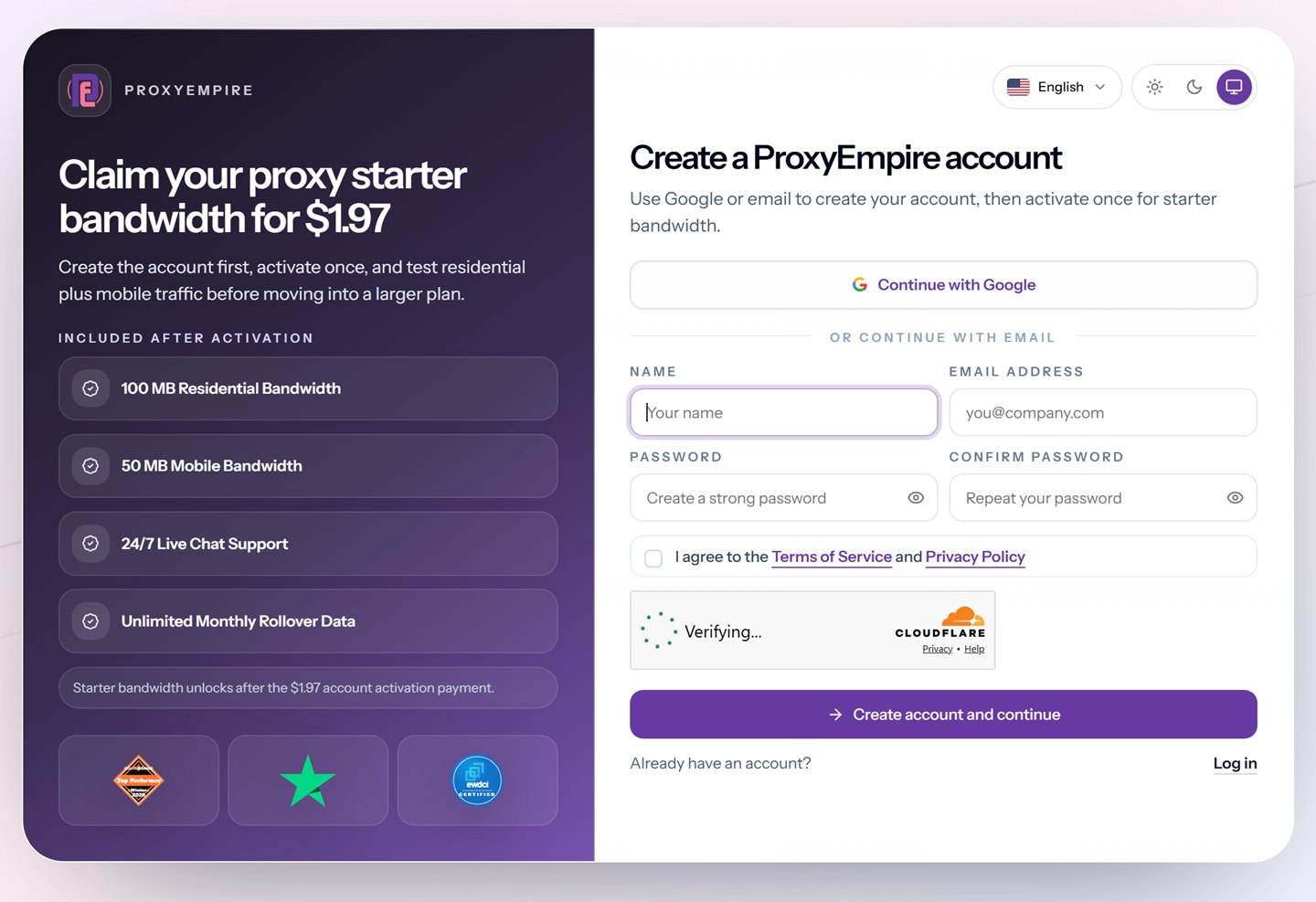
Go to the registration page. Click Continue with Google to sign up in one step, or fill in your name, email address and a password, accept the Terms of Service and click Create account and continue. Use an email address you check. It is where your receipts go, and it is how your account manager will reach you.
Step 2: Activate your account for $1.97
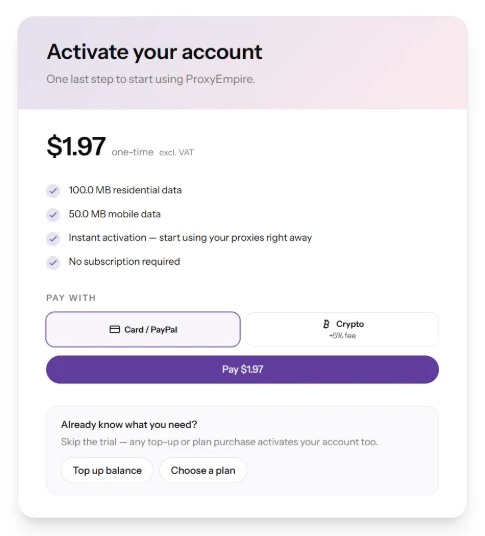
After sign-up you land in the dashboard with an Activate account button in the header. Click it and the activation screen opens: $1.97, one-time, excluding VAT, with 100 MB of residential and 50 MB of mobile data and no subscription.
Choose how to pay:
- Card / PayPal: credit card, debit card or a PayPal account.
- Crypto: available with a 5% processing fee.
Click Pay $1.97. Activation is instant, so the bandwidth is on your account as soon as the payment clears. No identity check is needed.
Already know what you need? The trial is optional. Any top-up or plan purchase activates your account too, so you can use Top up balance or Choose a plan on the same screen and skip straight to a larger package.
Step 3: Build a connection in the Proxy Manager
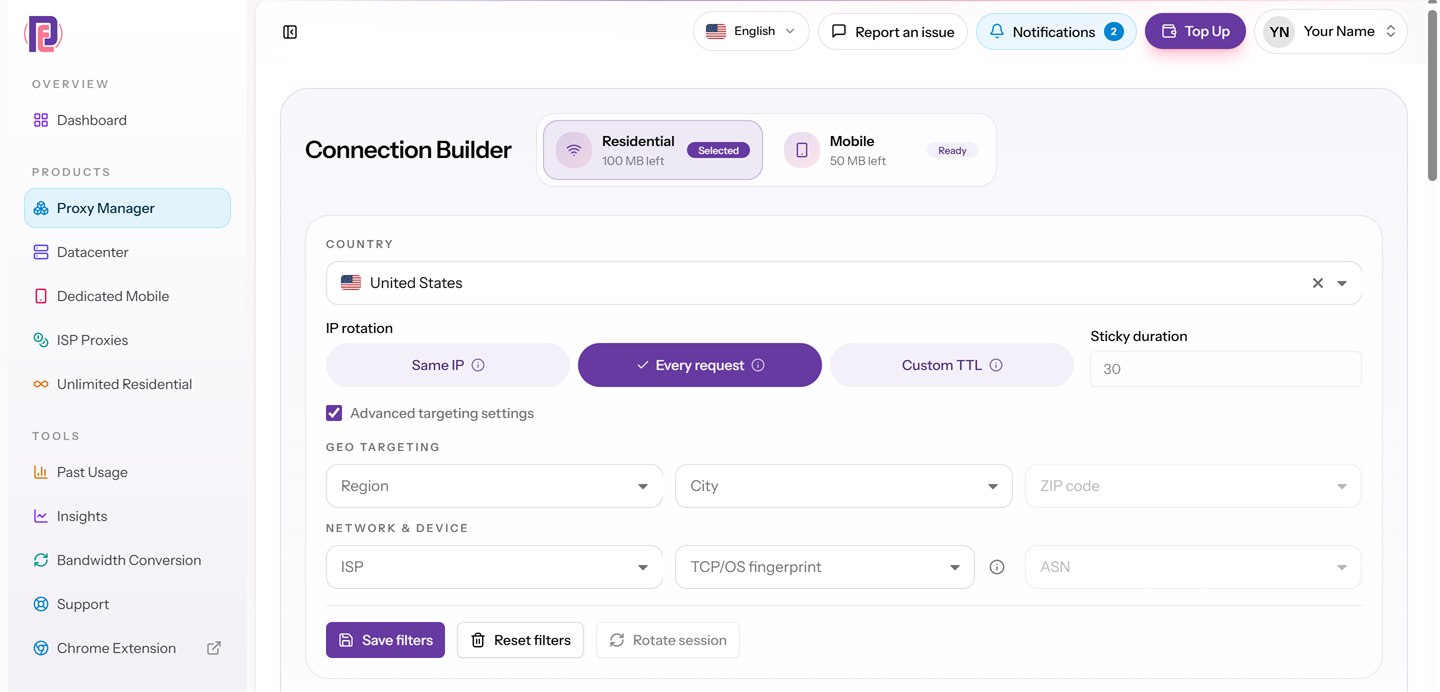
Open Proxy Manager in the left menu. The Connection Builder at the top shows both trial balances. Select Residential or Mobile, then:
- Country: pick the country you want to appear from. Browse coverage on the locations page.
- IP rotation: Same IP for a sticky session, Every request for a fresh IP on each request, or Custom TTL to rotate on a timer you set.
- Advanced targeting settings: tick the box to narrow down by region, city, ZIP code, ISP, ASN or TCP/OS fingerprint.
Click Save filters to keep the setup for next time, or Rotate session when you want a new IP on a sticky session.
Step 4: Copy your credentials
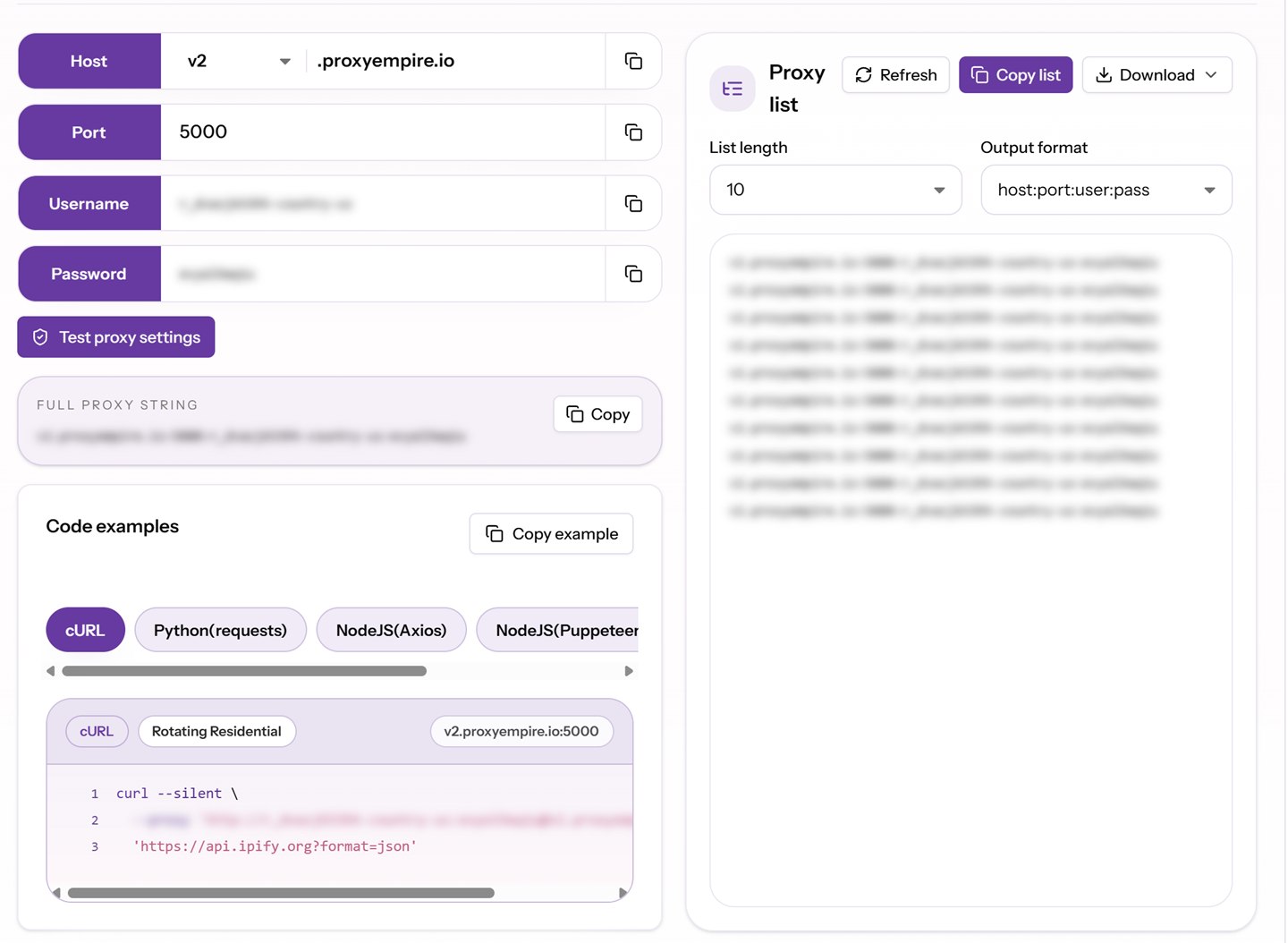
Below the builder, the dashboard shows everything a tool needs to connect: the host (for example v2.proxyempire.io), the port, your username and your password. Your targeting choices are written into the username, so a new country or city means a new username string. You don’t have to type any of it yourself.
- Full proxy string: one line you can paste into most tools.
- Proxy list: generate a list of endpoints (each with its own session) in formats such as
host:port:user:pass, then copy or download it. - Code examples: ready-to-run snippets for cURL, Python (requests), Node.js (Axios and Puppeteer), PHP (cURL) and Go (net/http), already filled in with your credentials.
- Test proxy settings: checks the connection from the dashboard before you touch your own code.
Treat the username and password like any other password. Anyone who has them can spend your bandwidth.
Send Your First Request Through the Trial Proxies
Prove the connection works in one commandThe quickest check is to ask an IP-echo service which address it sees. ipify returns your public IP in a response of a few bytes, so the test costs almost no bandwidth. Replace USERNAME and PASSWORD with the values from your dashboard:
curl --silent \
  --proxy 'http://USERNAME:PASSWORD@v2.proxyempire.io:5000' \
  'https://api.ipify.org?format=json'
If the IP in the response is not your own, the proxy is working. Run it again with Every request rotation and the IP should change each time. With Same IP it should stay the same.
import requests

proxy = "http://USERNAME:PASSWORD@v2.proxyempire.io:5000"
proxies = {"http": proxy, "https": proxy}

r = requests.get("https://api.ipify.org?format=json", proxies=proxies, timeout=30)
print(r.json())
Most scraping frameworks, browsers and anti-detect tools accept the same four values: host, port, username and password. For browser profiles, see the integration guides for popular anti-detect browsers and tools that work with ProxyEmpire.
Targeting and Rotation on the Trial
The trial is not a cut-down versionTrial bandwidth is ordinary bandwidth. Every targeting option and rotation mode that paying customers have is available on it, at no extra charge.
For rotation, Same IP keeps one address with no fixed time limit: the IP stays until you rotate it or the device behind it goes offline. Every request gives each request a new IP, which suits large crawls. Custom TTL rotates on a schedule you choose. Sticky sessions are what you want for logins, carts and multi-step flows. Per-request rotation is what you want for spreading many independent requests across the pool.
How Far 150 MB of Trial Bandwidth Goes
Enough to test, not enough to wasteProxy bandwidth is counted on the traffic that passes through the proxy, requests plus responses. How much you can do with 150 MB depends almost entirely on what you download.
- Full web pages are heavy. The HTTP Archive’s 2025 Web Almanac puts the median desktop home page at about 2.9 MB and the median inner page at about 2 MB, most of it images and JavaScript. At that size, 100 MB of residential data covers roughly 35 to 50 full page loads in a real browser.
- HTML only is much lighter. Fetching just the HTML with an HTTP client skips images, fonts and scripts, and typically costs a fraction of the full page.
- APIs and IP checks are tiny. A JSON response of a few kilobytes means thousands of requests fit in the trial.
To make the trial last:
- Block images, media and fonts in headless browsers while you test.
- Test with a small sample of target URLs instead of a full crawl.
- Use the IP-echo request above to check geo and rotation, and save real pages for success-rate tests.
- Keep the 50 MB of mobile data for the targets where mobile IPs actually matter, such as social and app-driven platforms.
Watch your usage under Past Usage and Insights in the dashboard. They show how much each product has used and on which days.
What to Test During Your Proxy Trial
A short checklist for a useful verdictA proxy trial is only worth something if it answers the questions you would otherwise find out after paying. Use it to check:
- Success rate on your own targets. Run a sample of your real URLs and count how many return the page you expected rather than a block, CAPTCHA or error.
- Geo accuracy. Target a country or city and confirm the exit IP geolocates there with the service your target uses, not just any lookup tool.
- Session behaviour. Check that a sticky session holds through a login or multi-step flow, and that per-request rotation really changes the IP.
- Speed. Time a few requests at the hour you normally run jobs. Response time depends on the target, the country and the network behind each IP, so measure your own case.
- Residential vs mobile. Run the same small test on both. Some platforms trust mobile carrier IPs more. For many sites residential is enough and cheaper per GB.
- Tool compatibility. Connect the scraper, browser or automation tool you will actually use, with HTTP(S) or SOCKS5.
Stuck on any of these? The 24/7 live chat in the dashboard is staffed by real people who can look at your setup with you.
After the Proxy Trial: Upgrading
Your trial data comes with youWhen you are ready for more, open Top Up or Subscriptions in the dashboard. Trial bandwidth does not expire and is not lost when you buy a plan, and unused bandwidth on paid plans rolls over from month to month as well.
| Product | Starts at | At volume |
|---|---|---|
| Rotating residential | $3.50/GB pay-as-you-go | $1.50/GB on 1,000 GB |
| Rotating mobile | $4.50/GB pay-as-you-go | $2.00/GB on 1,000 GB |
| Rotating datacenter | From $0.35/GB | Plans from 40 GB for $25 |
| Static residential | $3.50 per IP a month | $2.00 per IP a month |
Current prices and every plan size are on the pricing page. If your test showed you will need a lot of bandwidth, or a mix of products, the account manager who emails you after activation can help you pick a plan.
Trial Rules and Limits
What to know before you start- One-time payment. $1.97 plus VAT where it applies. No subscription is created.
- No KYC for the trial. Identity checks are not needed for the trial or for normal plan purchases.
- Some sites are blocked by default. On all proxy types, financial, government and other high-risk sites, such as banks, payment processors and crypto exchanges, are blocked. Access to a specific site can be reviewed after KYC and an explanation of your use case.
- Ports 80 and 443 are open by default. That covers web traffic over HTTP and HTTPS. Other ports go through the same review.
- Refunds. The trial exists so you can test before you commit, so payments are generally non-refundable. If something went wrong, contact support: refunds are reviewed case by case.
- Fair use. No spam, fraud or illegal activity. That protects the network for everyone, including you.
Network status for each product is public on the ProxyEmpire status page, which tracks the 99.9% uptime the network runs at.
Proxy Trial FAQ
Quick answersIs the ProxyEmpire proxy trial free?
No. The trial costs a one-time $1.97 (excluding VAT) and gives you 100 MB of residential and 50 MB of mobile bandwidth. The small fee keeps abusers off the network. Companies and business customers can contact sales about a free trial for a larger evaluation.
Does the trial turn into a subscription?
No. It is a single payment that activates your account. Nothing renews and you are not charged again unless you top up or buy a plan yourself.
Does the trial bandwidth expire?
No. Trial bandwidth stays on your account until you use it, including after you upgrade to a paid plan.
Which payment methods can I use for the trial?
Credit and debit cards, PayPal, and crypto. Crypto payments carry a 5% processing fee.
Do I need to verify my identity to start the trial?
No. KYC is not required for the trial or for normal plan purchases. It only applies if you ask to unlock a site that is blocked by default, together with a review of your use case.
Do you offer an ISP or static residential proxy trial?
No. The $1.97 trial covers rotating residential and rotating mobile proxies only. Static residential proxies are sold per IP, from $3.50 for one IP a month, so a single IP is a cheap way to test them. ISP and datacenter proxies are separate products too. Datacenter starts from $0.35/GB.
Can I choose the country and city on the trial?
Yes. Trial bandwidth has the same targeting as paid bandwidth: country, region, city, ZIP code, ISP or carrier, ASN and OS fingerprint, at no extra charge.
How many requests can I make with 100 MB?
It depends on response size. Tens of full web pages in a real browser, many more if you fetch HTML only, and thousands of small API or IP-check requests. Blocking images and media stretches the trial furthest.
Can I skip the trial and buy a plan straight away?
Yes. Any top-up or plan purchase activates your account, so the trial is optional.
What if I need help setting up?
Use the 24/7 live chat in the dashboard or on the website. It is answered by real people, day and night. After activation, your dedicated account manager will also contact you by email.
References
Sources and documentation- HTTP Archive — Web Almanac 2025, “Page Weight” chapter (median page weight, July 2025 crawl). almanac.httparchive.org/en/2025/page-weight
- curl — manual page,
-x, --proxy. curl.se/docs/manpage.html - Requests — Advanced usage: Proxies. requests.readthedocs.io/en/latest/user/advanced
- ipify — public IP address API. ipify.org
Test ProxyEmpire on your own targets for $1.97
100 MB of rotating residential and 50 MB of rotating mobile bandwidth, full targeting down to ZIP, ISP and ASN, sticky or rotating sessions, and 24/7 support from real people. No subscription, and the data never expires.