Anti-detect browsers keep web accounts apart, but mobile apps are harder: they read device details such as the phone model, IMEI and phone number, not just cookies. GeeLark solves that with cloud phones, remote Android devices you control from your computer, each with its own device identity. This GeeLark review covers what the cloud phones can do, the automation and AI tools, current GeeLark pricing, and how to set up a GeeLark proxy with ProxyEmpire’s mobile and residential proxies, so every phone also has its own IP.
The short version
GeeLark runs Android cloud phones, each with its own device model, identifiers and apps, plus RPA templates, a synchronizer, an API and AI content tools. Plans start free with 2 profiles, paid plans start at $13 a month, and cloud phone time costs $0.007 a minute, capped at $1.20 a day per device on a subscription. Give every cloud phone its own proxy: in the profile’s Proxy settings choose Custom, pick the type, enter v2.proxyempire.io:5000 with your username and password, and click Check proxy.
What GeeLark Is
Real Android phones, in the cloudGeeLark is a cloud phone platform. Instead of a desk full of physical handsets, you get Android environments hosted on remote servers and controlled from the GeeLark app on your computer. Each cloud phone profile has its own device configuration, including brand, model, IMEI and phone number, and runs native Android apps just like a phone in your hand.
That is what makes it different from a browser-based anti-detect tool. Apps such as TikTok, Instagram and YouTube read device-level details that a browser profile can’t change. A cloud phone presents a complete, separate device to every app. GeeLark currently offers Android versions 9 through 16 and more than 290 device models from brands such as Samsung, Xiaomi and Vivo.
Unlike an emulator on your own computer, a cloud phone doesn’t share your machine’s hardware or leave traces of it, and it keeps running on the server while you work on something else.
What People Use GeeLark For
Wherever mobile accounts need to stay separate- Social media management. Platforms such as TikTok and Instagram put their best features in the mobile app. Cloud phones let managers use those features for several accounts, each in its own region, without a drawer of phones.
- Affiliate marketing. Promoting offers across several accounts and channels, with automation handling repetitive posting.
- E-commerce. Running storefront and social accounts from one place, with automated product promotion and AI-generated content.
- App testing. Developers can check how an app behaves on different Android versions and device models without buying the hardware.
In every case the same rule applies: each account lives on its own cloud phone, and each cloud phone needs its own IP address, which is where proxies come in.
GeeLark’s Main Features
Cloud phones, automation, AI and teamsCloud phones and profiles
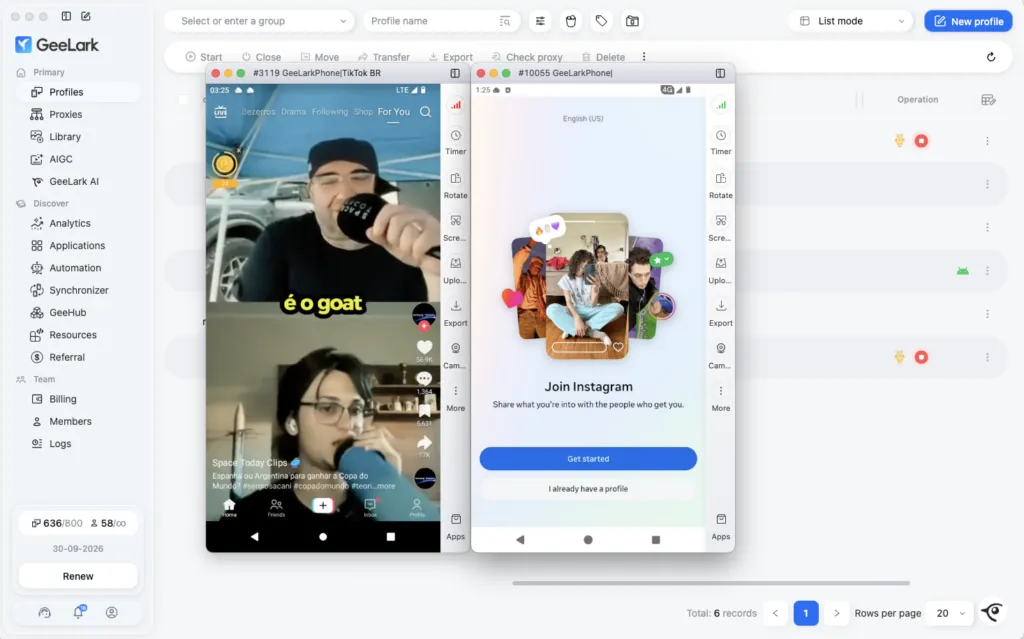
Each profile is one cloud phone. From the Profiles page you can start, stop and open phones, group and tag them, and see which are running. Several phones can run at once, and each can keep several apps open, just like a real device.
Automation: RPA, synchronizer and API
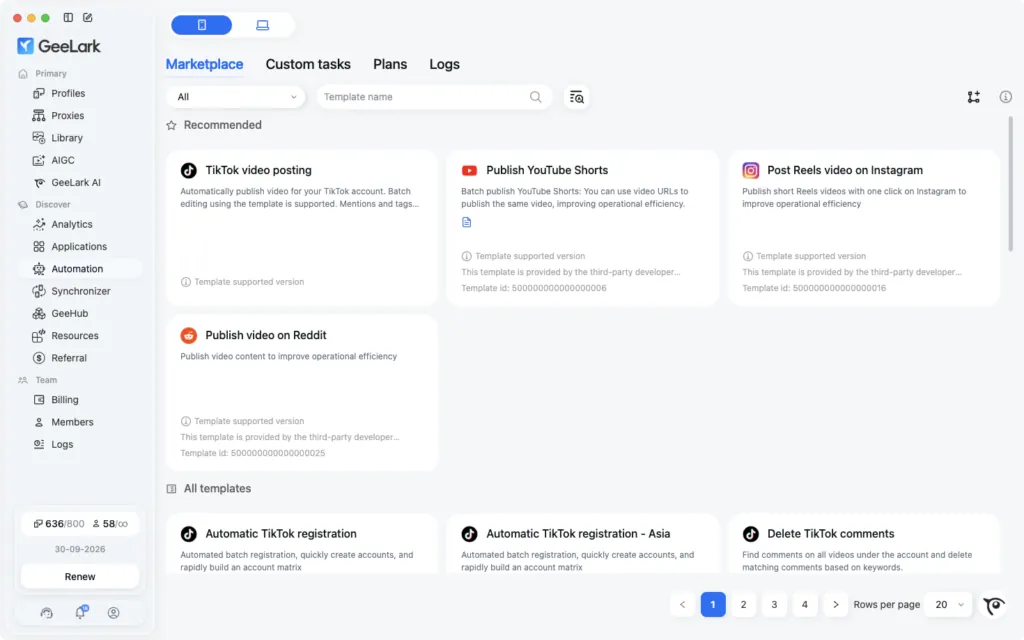
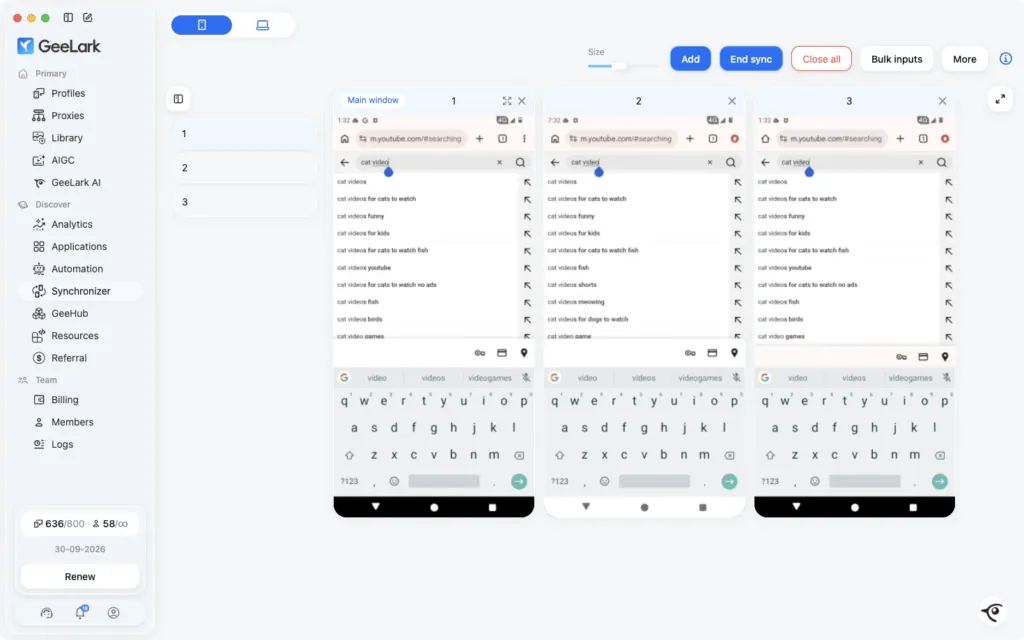
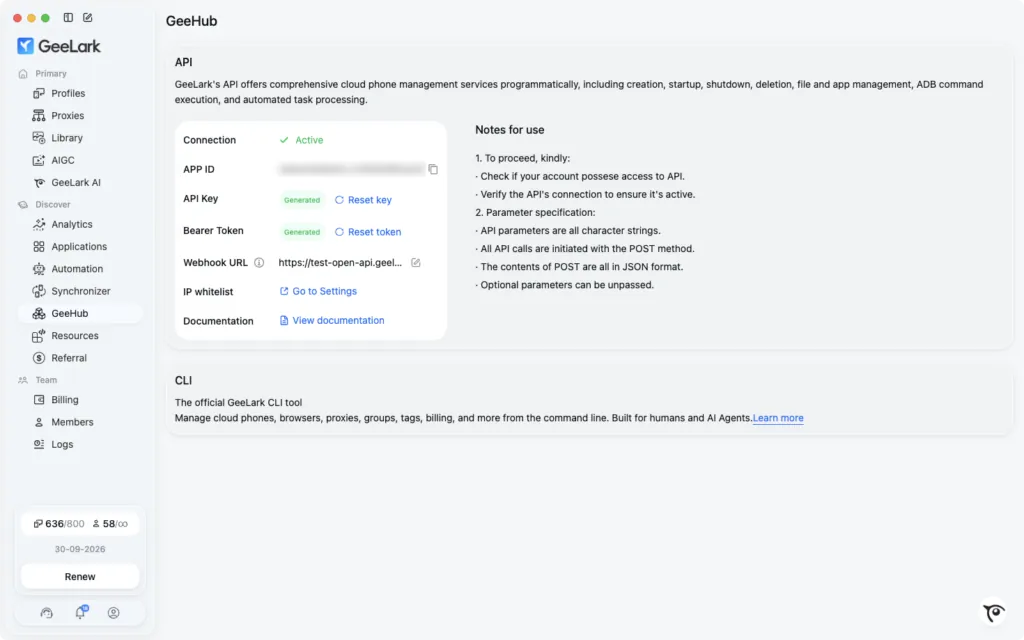
GeeLark has three layers of automation. RPA comes with ready-made templates for platforms such as TikTok, Instagram, YouTube and Reddit, covering tasks like posting videos, and you can build custom workflows too. The synchronizer mirrors what you do on one phone to other selected phones at the same time. The API lets developers manage cloud phones from code.
GeeLark AI and AIGC tools
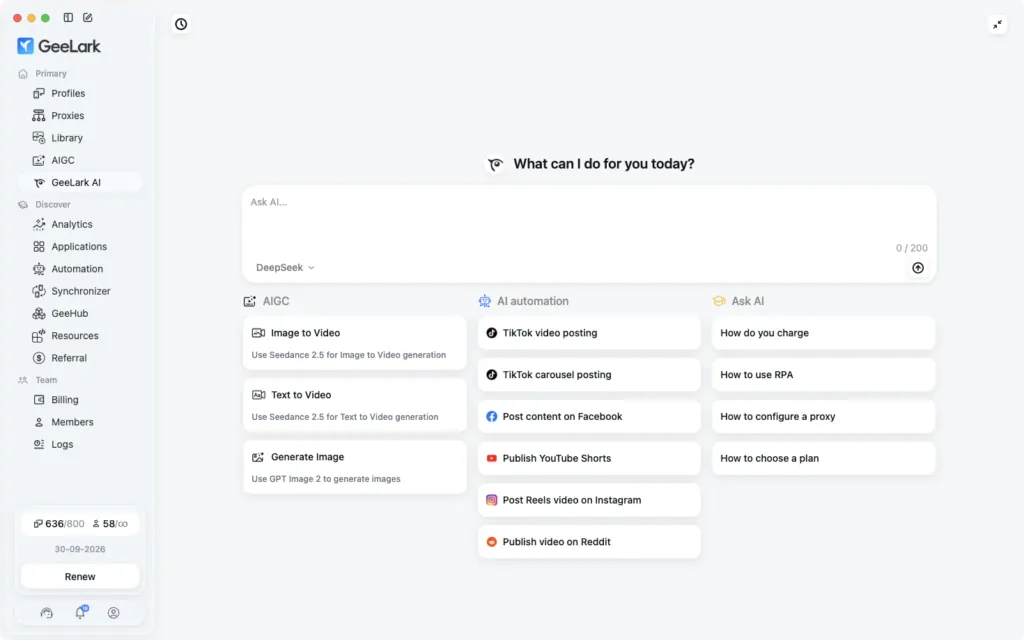
GeeLark includes an AI assistant that answers questions about the platform and can set up tasks, plus AIGC tools for generating images and videos, including image-to-video and text-to-video, for content you then post from your cloud phones.
App store and teams
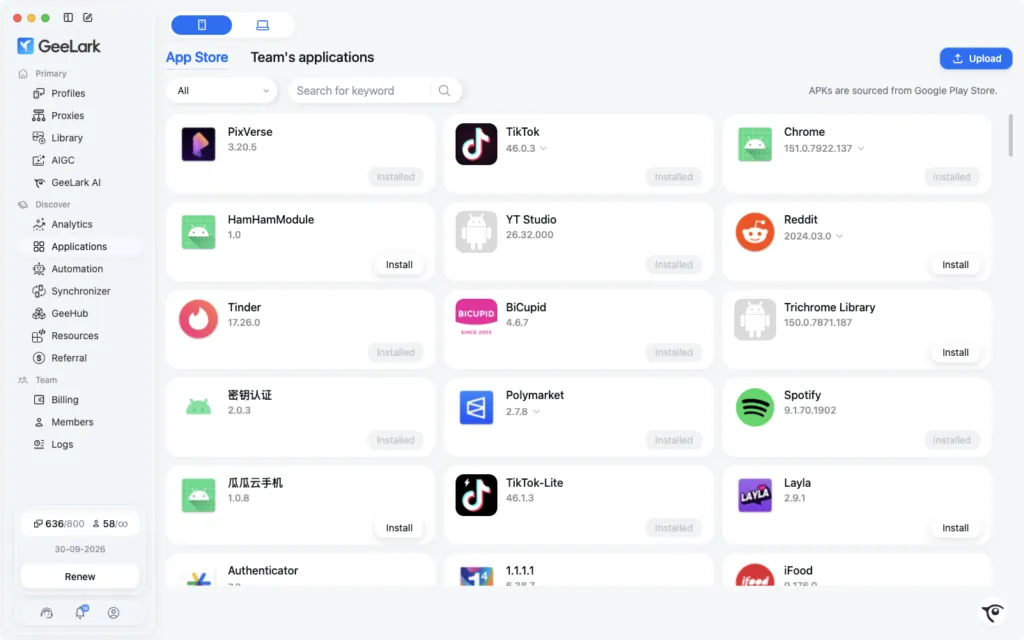
A built-in app store installs common apps onto your cloud phones, and you can upload your own APK files for anything that isn’t listed. For teams, GeeLark supports members with roles and permissions and shared profiles, so an agency can split work between people without sharing account passwords.
GeeLark Pricing
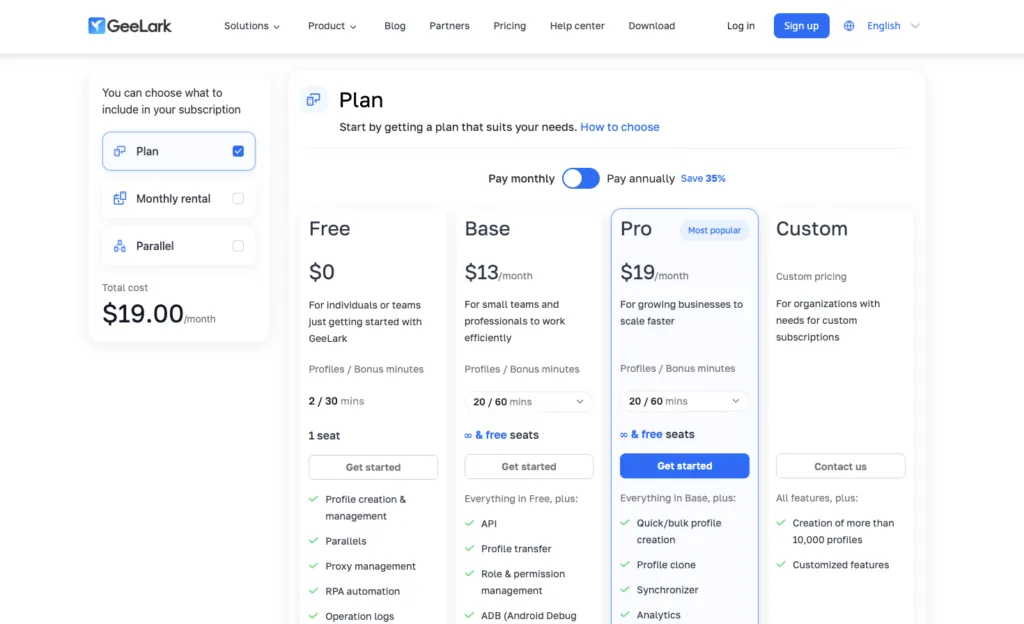
Checked on 27 September 2026GeeLark pricing has two parts: a subscription, which sets how many profiles you can create, and cloud phone usage, which you pay for while phones are running.
| Plan | Price | Profiles | Main extras |
|---|---|---|---|
| Free | $0 | 2, with 30 bonus minutes | Proxy management, RPA automation, AIGC, GeeLark AI; 1 seat |
| Base | $13/month, or $8.45/month billed yearly | From 5 up to 1,000 | API, profile transfer, roles and permissions, ADB; unlimited free seats |
| Pro | $19/month, or $12.35/month billed yearly | From 20 up to 50,000 | Quick and bulk profile creation, profile clone, synchronizer, analytics |
| Custom | Custom pricing | More than 10,000 | Customised features |
Cloud phone usage costs $0.007 a minute by default, and on a subscription it is capped at $1.20 per device per day, however long the phone runs. Paid plans come with monthly bonus minutes that are used first, and heavy users can cut costs with monthly rentals, parallels and time add-ons. The prices above are the ones GeeLark listed on 27 September 2026; seasonal deals can lower them further.
GeeLark Proxy Setup with ProxyEmpire
One cloud phone, one IPA cloud phone with its own device identity still needs its own network identity. If several phones share one IP, an app can link their accounts no matter how different the devices look. GeeLark offers its own proxies, and it also lets you bring your own. Using ProxyEmpire gives you targeting down to city, ZIP, carrier and ASN, mobile IPs from real 4G networks, and one bandwidth balance you can use across all your tools.
Step 1: Get your ProxyEmpire details
In the ProxyEmpire dashboard, open the Proxy Manager to reach the Connection Builder. For cloud phones, Mobile is the natural choice; Residential works well too. Pick the country, then use the advanced settings for a region, city or carrier. Set IP rotation to Same IP, a sticky session with no fixed time limit that keeps the IP until you rotate it or the device behind it goes offline. The builder shows host v2.proxyempire.io, port 5000, your username and password. Your targeting and session are part of the username, so each phone’s session is simply a different username. ProxyEmpire supports HTTP, HTTPS and SOCKS5, and HTTP and SOCKS5 use the same details.
Step 2: Add the proxy to a cloud phone profile
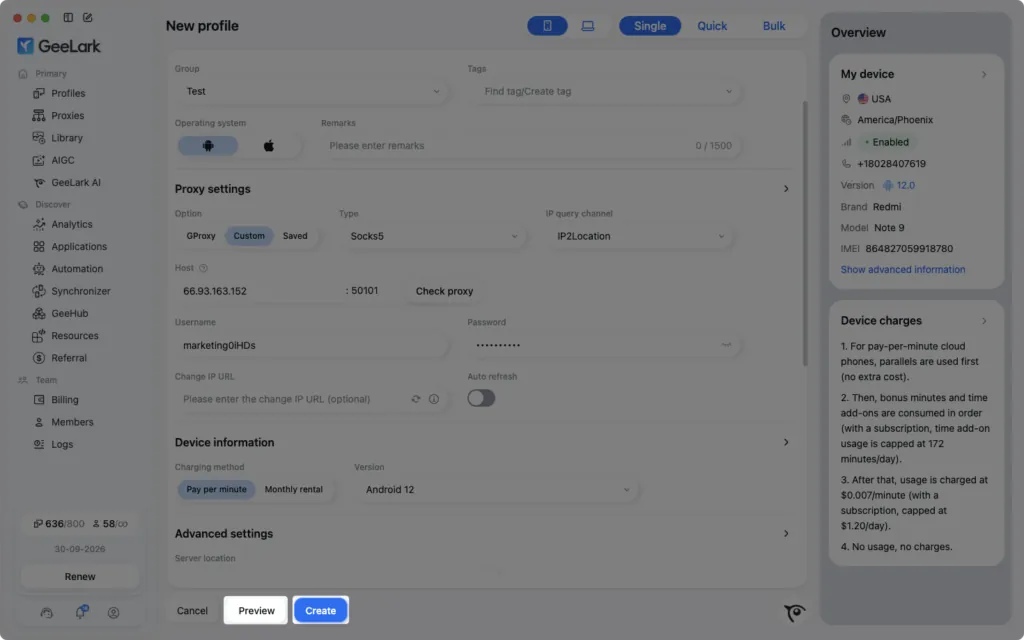
- Start a new profileOn the Profiles page, click New profile.
- Open Proxy settingsUnder Option, choose Custom, or Saved to pick a proxy you’ve already imported.
- Choose the typePick SOCKS5 or HTTP; both work with the same ProxyEmpire details.
- Enter the detailsEnter the host and port, then the ProxyEmpire username and password.
- Check proxyClick Check proxy and confirm the country, city and ISP in the proxy info.
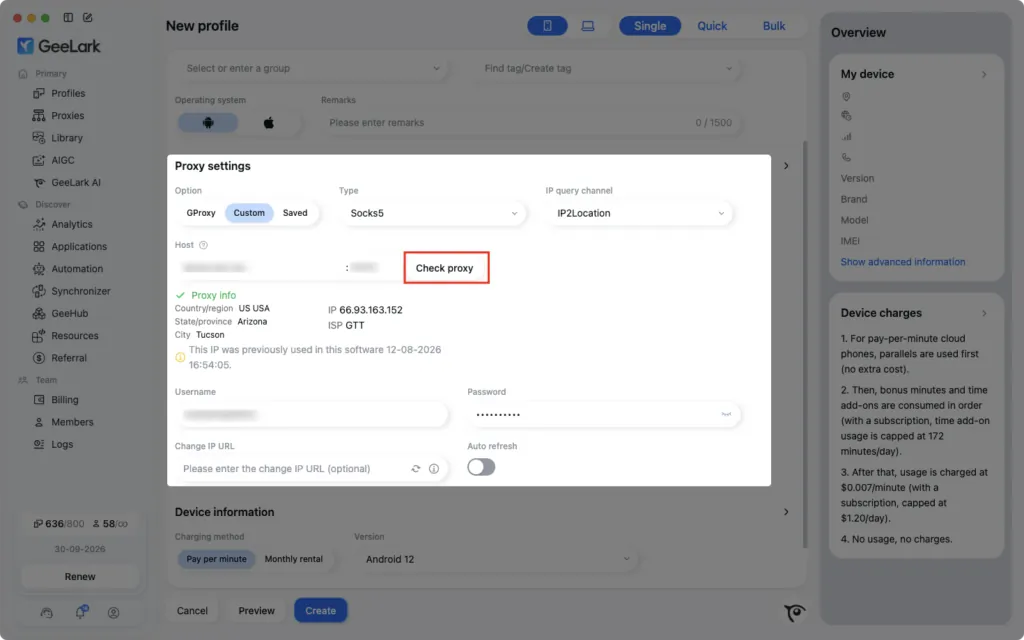
GeeLark may show a note that an IP was previously used in the software. If you want a clean IP for a new account, start a new sticky session in ProxyEmpire, which gives you a new username, and check again. Leave the Change IP URL field empty; it is for providers that rotate through a link.
Importing proxies in bulk
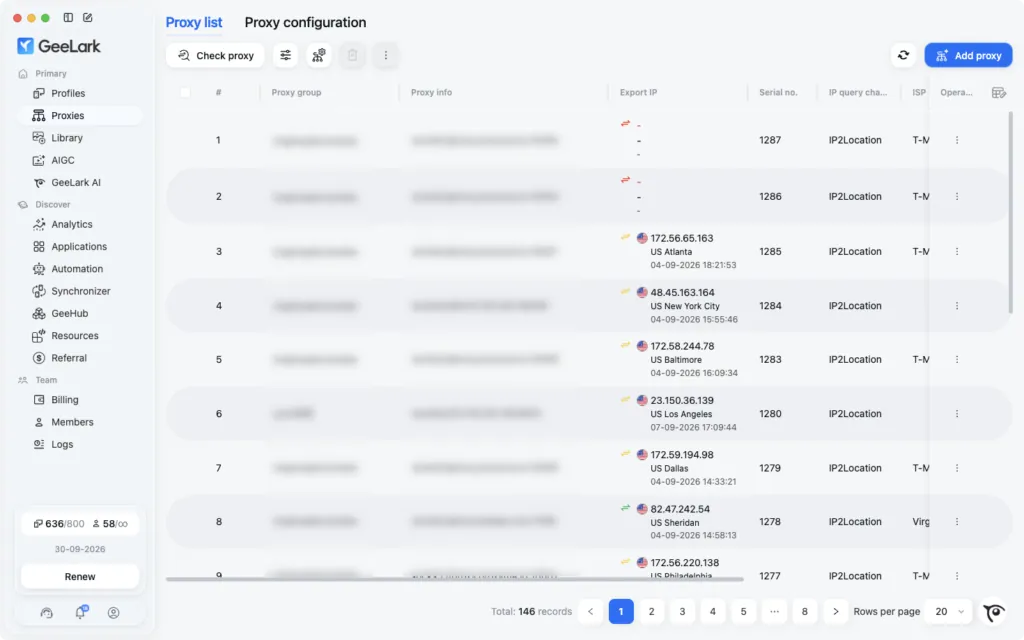
On GeeLark’s Proxies page you can add up to 100 proxies at once, one per line, and GeeLark skips duplicates automatically. Include the type at the start of each line. Then use Check proxy to see each exit IP with its country, region and city, and pick them from Saved when you create profiles.
socks5://v2.proxyempire.io:5000:username-for-session-1:password
socks5://v2.proxyempire.io:5000:username-for-session-2:password
http://v2.proxyempire.io:5000:username-for-session-3:password
The usernames are placeholders. The Proxy list panel in ProxyEmpire’s Connection Builder generates real ones: set the list length, choose the host:port:user:pass output format and copy, then add the type prefix to each line.
Creating a GeeLark Cloud Phone Profile
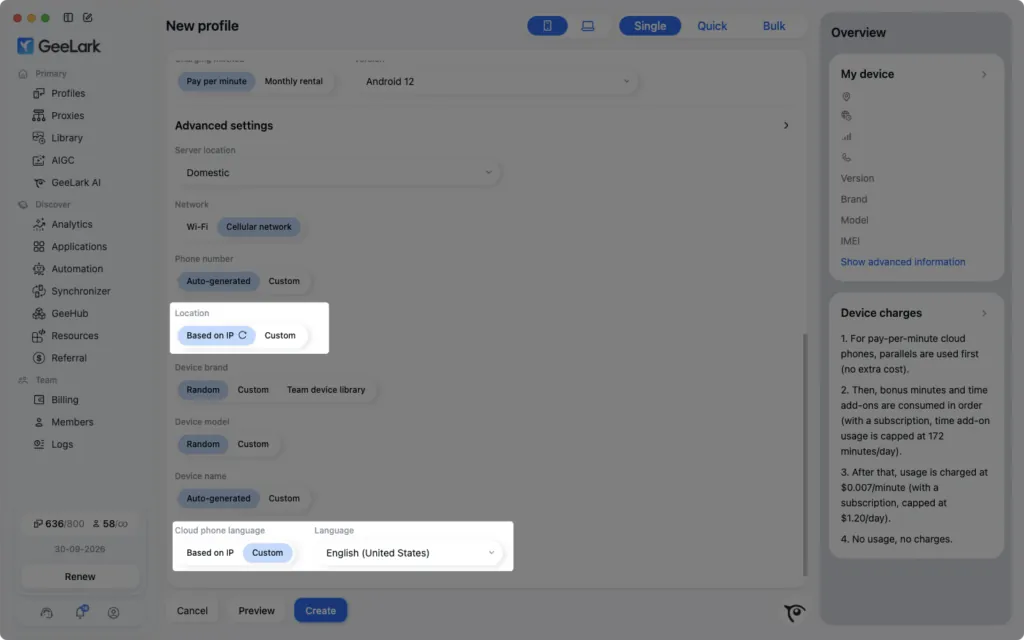
The settings after the proxyOnce the proxy checks out, the rest of the new profile form defines the device. Here is what each part does:
- Charging method: pay per minute, or a monthly rental for phones you use every day.
- Version: the Android version, from 9 to 16.
- Network: Wi-Fi or cellular network. A cellular setting pairs naturally with a mobile proxy.
- Phone number: auto-generated or custom.
- Location and cloud phone language: choose Based on IP so the phone’s region and language follow the proxy, or Custom to set them yourself.
- Device brand, model and name: random, custom, or from your team’s device library.
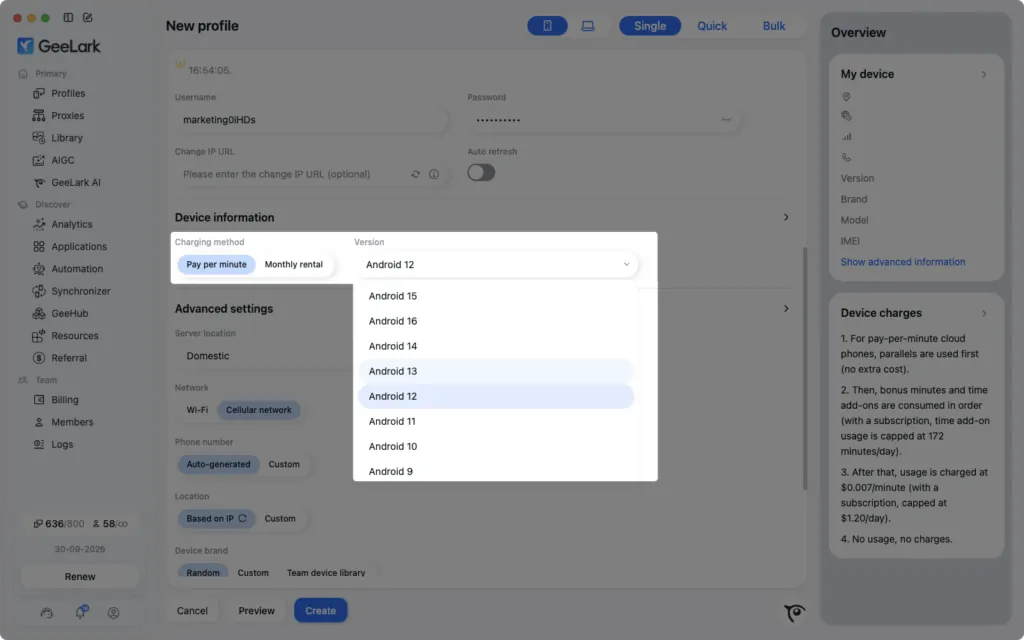
Click Preview to review the full device information, then Create. With location and language based on the IP, the phone’s region, time and language match the proxy, which is exactly the consistency apps look for.
Which ProxyEmpire Proxy to Use with GeeLark
Match the IP to the phone| Rotating mobile | Rotating residential | Static residential | |
|---|---|---|---|
| IP source | 4G carrier networks | Home broadband | Residential ISP ranges |
| In GeeLark | One sticky session per cloud phone | One sticky session per cloud phone | One IP per cloud phone |
| Targeting | Country to ZIP, carrier, ASN | Country to ZIP, ISP, ASN | Country |
| Best for | TikTok, Instagram and other app-first accounts | Accounts that mix app and web use | Accounts that must keep one IP |
| Price | $4.50/GB, down to $2.00/GB | $3.50/GB, down to $1.50/GB | $3.50 for one IP, down to $2.00/IP a month |
A phone on a real carrier IP is what mobile apps expect, so rotating mobile proxies on a sticky session are the natural GeeLark proxy for app-first accounts. Residential works well for accounts that also use the web, and static residential, sold in 24 countries, suits accounts that should never change address. Keep each account in the same country and ideally the same city, and never share a session between two phones. For a phone that needs one reserved mobile IP, see dedicated 4G mobile proxies.
Troubleshooting a GeeLark Proxy
Common problems and fixes| Problem | Likely cause and fix |
|---|---|
| Check proxy fails | Usually a typo, a stray space or an old password. Copy the details from the Connection Builder again. |
| Bulk import rejects lines | Each line needs the type prefix and host:port:username:password, one proxy per line, up to 100 at a time. |
| “IP previously used” note | Start a new sticky session in ProxyEmpire for a fresh IP, then check again. |
| Phone region or language is wrong | Location or language is set to Custom. Switch to Based on IP. |
| IP changed mid-session | The username is set to Every request, or the device behind the sticky IP went offline. Use Same IP and start a new session in the same city. |
| One app or site won’t load | Some site categories are restricted on ProxyEmpire by default, including banks, payment processors such as PayPal and Stripe, and crypto exchanges, and only ports 80 and 443 are open. Access can be reviewed after KYC and a use-case explanation to support. |
ProxyEmpire support is available 24/7 through live chat in the dashboard. If you manage accounts from a desktop browser as well, see our Multilogin proxy guide, which also covers Android cloud phones.
GeeLark Promo Code
For ProxyEmpire customersUse the GeeLark promo code proxyempire for 15% off. Create your GeeLark account here and enter the code when you pay for your plan.
GeeLark FAQ
Straight answersWhat is GeeLark?
GeeLark is a cloud phone platform: Android phones hosted on remote servers that you control from your computer, each with its own device model and identifiers, plus automation, AI content tools and team features.
How much does GeeLark cost?
The Free plan is $0 with 2 profiles. Base is $13 a month and Pro $19 a month, or $8.45 and $12.35 a month billed yearly. Cloud phone usage is $0.007 a minute, capped at $1.20 per device per day on a subscription.
Is a cloud phone better than an emulator?
For multi-account work, usually yes. A cloud phone runs on remote hardware with its own device identity, while an emulator shares your computer’s resources and can leave traces that apps detect.
How do I add a proxy in GeeLark?
In a new profile’s Proxy settings, choose Custom, pick SOCKS5 or HTTP, enter v2.proxyempire.io, port 5000 and your ProxyEmpire username and password, then click Check proxy. You can also import up to 100 proxies at once on the Proxies page.
What is the best proxy for GeeLark?
Rotating mobile proxies on a sticky session suit app-first accounts such as TikTok and Instagram. Residential proxies work for mixed app and web use, and static residential proxies for accounts that must keep one IP.
Which proxy types does GeeLark support?
HTTP, HTTPS and SOCKS5. ProxyEmpire supports all three.
Does GeeLark have automation?
Yes: RPA with ready-made templates for platforms like TikTok, Instagram and YouTube, a synchronizer that mirrors actions across phones, and an API.
Is there a GeeLark promo code?
Yes. The code proxyempire gives 15% off GeeLark.
Can I try GeeLark and ProxyEmpire for free?
GeeLark’s Free plan includes 2 profiles and 30 bonus minutes. ProxyEmpire’s $1.97 trial includes 100 MB of residential and 50 MB of mobile bandwidth, and unused trial bandwidth doesn’t expire.
References
Sources- GeeLark — Official site. geelark.com
- GeeLark — Pricing (checked 27 September 2026). geelark.com/pricing
- GeeLark — Proxy management. geelark.com/features/proxy-management
- GeeLark — Download center. geelark.com/download-center
Give every GeeLark cloud phone its own real IP
4G mobile, residential and static residential proxies with city, ZIP, carrier and ISP targeting included, a sticky session for every phone, bandwidth that rolls over and 24/7 support from real people. Try it for $1.97.