Next gen residential proxies are residential proxy networks built around one backconnect gateway, fine-grained targeting and flexible sessions, instead of the fixed lists of IP addresses that older services sold. The IPs are still ordinary home connections assigned by internet providers. What has changed is how you reach them, how you pick them and how you pay for them. This guide explains each feature that separates a modern network from an older one, from gateways and ZIP-level targeting to sticky sessions, sourcing, protocols, billing and APIs, and ends with a checklist for judging any provider. ProxyEmpire’s rotating residential proxies serve as the worked example.
The short version
A modern residential proxy network gives you one gateway address that sends each connection out through a real home IP you choose by country, region, city, ZIP, ISP, ASN or operating system, keeps or rotates that IP as you ask, speaks HTTP, HTTPS and SOCKS5, and bills by traffic instead of by IP. None of that makes you anonymous: a proxy changes the IP address a website sees, not your cookies, logins or browser fingerprint. Judge a provider on how well each feature works in a trial, not on the “next-gen” label.
What are next gen residential proxies?
The same home IPs, used in a different wayA residential proxy forwards your traffic through an IP address that an internet provider assigned to a home connection, so the website sees a household address instead of a server in a data center. The HTTP standard, RFC 9110, defines a proxy as a message-forwarding agent chosen by the client, usually through local configuration. That part hasn’t changed in years.
“Next-gen” is not a standard or a separate product type. It is shorthand for how residential networks work today compared with the first generation, which usually sold a list of IP:port pairs, charged per address, offered country targeting at best, and stopped working when the home device behind an address went offline. A current network hides the whole pool behind a gateway, lets you describe the IP you want, and leaves the plumbing to the provider. When people search for next gen residential proxies, this bundle of features is what they are really comparing.
| Older residential services | Modern networks | |
|---|---|---|
| Access | A list of IP:port entries loaded into each tool | One gateway host and port, with the pool behind it |
| Choosing an IP | Country, if anything | Country, region, city, ZIP, ISP, ASN and operating system |
| Sessions | A fixed IP until it disappears, or random | New IP per request, sticky sessions or timed rotation, chosen per connection |
| Protocols | Often HTTP only | HTTP, HTTPS and SOCKS5 with the same credentials |
| Billing | Per IP, per month | Per GB of traffic, ideally with unused traffic rolling over |
| Management | A static list and email support | Dashboard, proxy-list generator, sub-users and an API |
Key takeaways
- The IPs are ordinary residential addresses; the gateway, targeting and session controls are what make a network modern.
- Targeting down to ZIP, ASN and OS should not cost extra. At ProxyEmpire it is included on rotating residential and mobile.
- Sticky and rotating sessions should both be available on the same endpoint.
- Per-GB billing fits rotating pools; check whether unused traffic expires.
- No proxy makes you anonymous. It changes the IP a site sees, nothing more.
Backconnect gateways: one address, a whole pool
Why you no longer manage IP listsA backconnect proxy is a gateway that accepts your connection and forwards it through an exit IP from its pool. Your tool points at one host and one port. Which residential IP carries a given connection is decided by the gateway, based on the targeting and session parameters you send with your login.
your scraper, browser or app
      |  HTTP CONNECT or SOCKS5, username:password
      v
gateway  v2.proxyempire.io:5000
      |  reads targeting and session from the username
      v
residential exit  (home IP in the country, city or ISP you chose)
      |
      v
website  -->  sees the residential IP, not yours
Under the hood the connection is standard. For an HTTPS website, the client sends the gateway a CONNECT request. RFC 9110 says CONNECT asks the recipient to set up a tunnel to the destination and then blindly forward data in both directions, so the TLS session runs end to end between your client and the website. With SOCKS5, defined in RFC 1928, the client sends a CONNECT command with the destination address and the gateway relays the TCP stream. Either way, the gateway checks your credentials first. An HTTP proxy that needs a login answers with status 407 Proxy Authentication Required, and the client repeats the request with a Proxy-Authorization header. SOCKS5 uses the username and password exchange from RFC 1929.
The practical gains are large. When a home device goes offline, the gateway simply uses another exit, so there is no list to refresh. Scaling up means opening more connections to the same endpoint. Changing country or city means changing the username, not reconfiguring every tool. ProxyEmpire runs one gateway for residential and mobile, host v2.proxyempire.io on port 5000, and builds your choices into the proxy username:
curl -x "http://YOUR_USERNAME-country-us-sid-123456:YOUR_PASSWORD@v2.proxyempire.io:5000" https://ifconfig.meHere country-us selects the United States and sid-123456 holds a session. Copy the full string from the dashboard rather than typing it. To see how different providers run their gateways, read our comparison of backconnect residential proxies. The gateway is the foundation that every other feature of next gen residential proxies builds on.
Fine targeting: from country down to ZIP, ASN and OS
Pick the IP a real local user would haveMany websites change what they show by location and network: prices, search results, stock levels, ads and even which content is available at all. Targeting lets you see the page the way a real user in that place, on that network, sees it. Older services stopped at the country. Targeting depth is where next gen residential proxies differ most from what came before.
| Level | What it selects | Typical use |
|---|---|---|
| Country | Any exit in one country | Localized prices, content availability, national search results |
| Region / state | Exits in one region or state | Regional ads, state-specific offers and rules |
| City | Exits geolocated to one city | Local search results, store listings, local news |
| ZIP | Exits in one postal code area | Delivery-area pricing and very local listings |
| ISP | One internet provider’s network (the carrier, on mobile) | Checking how a page or ad reaches one provider’s customers |
| ASN | One autonomous system, the network that announces the IP | Matching a network precisely when an ISP runs several |
| OS fingerprint | Exit devices running a given operating system | Keeping network-level signals consistent with your browser profile |
Two of those levels need a word of explanation. An ASN is the number of an autonomous system; RFC 1930 describes an AS as a connected group of IP prefixes run by one or more network operators with a single, clearly defined routing policy. A large ISP may run more than one, so ASN targeting is the precise way to say “this exact network”. OS targeting exists because websites can see more than your browser’s headers. Passive fingerprinting tools such as p0f infer a device’s operating system from how its TCP/IP traffic looks, and p0f’s documentation describes a flag for when the User-Agent string doesn’t match that operating system, noting that proxying can be the cause. Choosing an exit device with the same operating system as the browser you present removes one such mismatch.
Keep two limits in mind. City and ZIP targeting depend on IP geolocation, which is imperfect: RFC 8805, the standard for publishing geolocation feeds, calls this information best-effort and lets consumers treat it as a hint only. Check a sample of exit IPs against more than one geolocation database before you rely on them. And the narrower the target, the fewer IPs match it: one ISP in a small town is a small pool.
At ProxyEmpire, rotating residential and rotating mobile proxies can be targeted by country, region or state, city, ZIP, ISP (carrier on mobile), ASN and OS fingerprint, all included at no extra charge. Static residential and datacenter proxies are targeted at country level only.
Sticky and rotating sessions
Hold an IP, or change it on every requestA rotating session gives each new connection a different IP. That suits work where requests are independent of each other, such as collecting public prices or search results across thousands of pages, because the load is spread over many addresses and no single IP stands out.
A sticky session keeps the same IP across many requests. You need it whenever the website links those requests together. RFC 6265 describes how a server hands a browser cookies with Set-Cookie and gets them back on later requests; logins, carts and multi-page forms rely on that state. Many sites also watch the IP behind a session, so an IP change halfway through a checkout can force a new login or a security check. Keeping the IP steady avoids that.
A residential sticky session has one natural limit: it depends on the home device behind the IP. If that device goes offline or its provider changes its address, the IP changes too. A good network makes that the only reason, rather than cutting sessions on a short fixed timer.
ProxyEmpire’s Proxy Manager offers three rotation modes for residential and mobile. Every request gives each connection a new IP. Same IP is a sticky session with no fixed time limit: the IP stays until you rotate it or the device behind it goes offline. Custom TTL rotates on a timer you set. Each sticky session has its own session ID in the username, a generated proxy list gives one session per line, and a Rotate session button changes the IP on demand. Rotating datacenter proxies support sticky sessions too. Read more about sticky residential proxies.
Rotate when requests are independent. Stick when they belong together.
IP quality and ethical sourcing
Where the IPs come from, and how clean they areEvery residential IP in a proxy pool belongs to a real device on a real home connection. How the provider got access to that device is the most important question you can ask. The ethical model is informed, opt-in consent: the device owner agrees, usually inside an app, to share spare bandwidth, is told what that means, and can stop at any time. A provider that can’t explain its sourcing plainly is a risk to you as well as to the people behind the IPs.
Questions worth asking any provider:
- How do device owners join the network, and how do they leave it?
- Is consent explicit, or buried in terms nobody reads?
- What traffic is refused? A network that blocks high-risk categories protects its IPs and the people behind them.
- How is abuse handled when an IP is reported?
IP quality is the other half. A residential IP should be announced by a consumer ISP’s network, not a hosting company, which you can check with any ASN lookup. Its geolocation should agree across databases. And it should not already sit on common blocklists. No provider can promise that every address in a large pool is clean, because the IPs are shared and change hands, so test a sample on your own targets and keep rotating.
ProxyEmpire’s pool has more than 30 million ethically sourced residential IPs in 179 countries and territories, with 99.9% uptime shown on the public status page. Exit IPs are mostly IPv4, with some IPv6. Financial, government, crypto exchange, bank and payment sites are blocked on every proxy type; unblocking a site needs KYC and a use-case review, as explained on the blocked websites page.
HTTP, HTTPS and SOCKS5 support
One set of credentials for every toolProtocol support decides which of your tools can use the network. A modern provider should accept all three common options on the same gateway and login, so you never have to buy a second product because one app speaks a different protocol.
| Protocol | How it works | Where it is used |
|---|---|---|
| HTTP | The client sends web requests to the proxy, which forwards them; the proxy can read plain http:// traffic | Browsers, scrapers, SEO and price tools, HTTP libraries |
| HTTPS sites | The client opens a CONNECT tunnel through the proxy and runs TLS inside it, end to end with the website | Almost every website today |
| SOCKS5 | The proxy relays a TCP connection after a short handshake, without parsing HTTP | Apps that only speak SOCKS, non-HTTP TCP traffic, anti-detect browsers |
None of these protocols encrypts the hop between you and the proxy by itself. RFC 1929 warns that the SOCKS5 username and password exchange sends the password in cleartext, and a plain HTTP proxy login with the Basic scheme of RFC 7617 is only base64-encoded. For HTTPS websites that matters less, because the page itself travels inside TLS. SOCKS5 also defines a UDP mode, but support for it varies by provider. For a fuller comparison, see SOCKS vs HTTP proxy.
All ProxyEmpire proxy types support HTTP, HTTPS and SOCKS5. HTTP and SOCKS5 share the same host, port and credentials on v2.proxyempire.io:5000. Authentication is by username and password only, so there is no IP whitelist to maintain, and the same login works from a laptop, a server or a CI runner. UDP is not supported, and only ports 80 and 443 are open by default.
Usage-based billing with rollover
Pay for traffic, keep what you don’t usePer-IP pricing made sense when you bought a fixed list. In a rotating pool you might touch thousands of IPs in an hour, so modern residential networks charge for the traffic you send and receive instead. That lines up cost with work: a small job costs little, and a busy month costs more.
To estimate what you need, multiply the number of requests by the average response size. Measure that size on your real targets during a trial rather than guessing, because pages vary widely. curl can print it for you with the size_download write-out variable, which reports the total bytes downloaded:
curl -s -o /dev/null -w "%{size_download}\n" -x "http://YOUR_USERNAME-country-us:YOUR_PASSWORD@v2.proxyempire.io:5000" https://example.com/A browser-based job loads images, scripts and fonts too, so check a full page load in your automation tool as well. Then look at the billing terms, which differ more between providers than the headline price: does traffic you paid for expire at the end of the month, is there a minimum commitment, and what does the trial include?
ProxyEmpire’s rotating residential proxies cost $3.50/GB pay-as-you-go, falling to $1.50/GB on larger plans. Unused bandwidth rolls over to the next billing period. The $1.97 trial includes 100 MB of residential and 50 MB of mobile traffic, never expires, needs no KYC, and can be paid by card, PayPal or crypto. Datacenter proxies start from $0.35/GB, and you can start with a single GB for $2.
APIs, dashboards and tools
Managing the network, not just using itOnce a proxy network runs inside real workflows, you need to manage it without opening a support ticket: generate proxy strings for new jobs, give colleagues or clients their own access, and watch usage before it runs out. That is the job of the dashboard and the API, and it is one of the clearest differences between a modern provider and an older one.
In ProxyEmpire’s dashboard, the Proxy Manager opens the Connection Builder. You pick residential or mobile, choose a country, open the advanced settings for region, city and ISP, and set the rotation mode. The builder shows the host and port, can test the settings, and copies the full proxy string. A proxy list panel generates many sessions at once in the format your tool expects, such as host:port:user:pass.
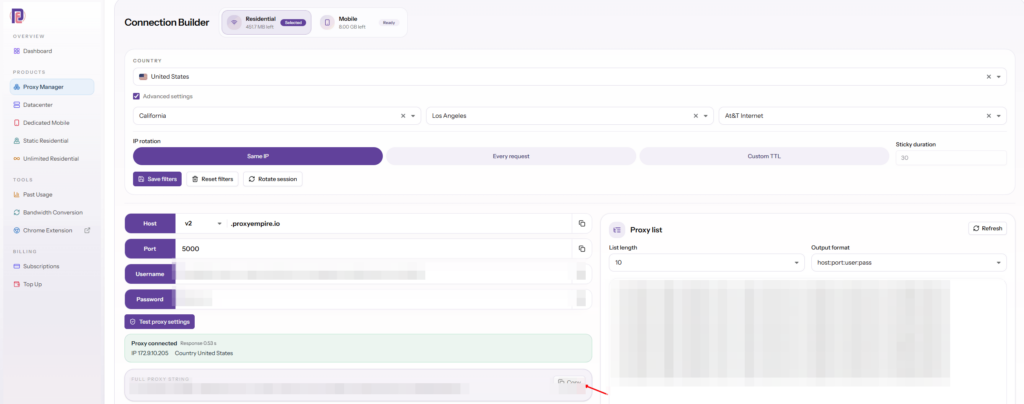
The ProxyEmpire API covers the same ground from code. It can check your account and live bandwidth balance for every product, generate proxy lists and rotate sticky sessions, list the countries, regions, cities and ISPs available for targeting, create and manage sub-users and move bandwidth to them, and read usage history and top domains. You create a token in the dashboard and send it as a Bearer token; the full reference is at panel.proxyempire.io/docs.
For everyday use outside code, ProxyEmpire has two free apps of its own, both called ProxyEmpire Proxy Manager: a Chrome extension for managing proxies in regular Chrome, and an Android app that routes Chrome or any app you pick through an HTTP or SOCKS5 proxy with a login.
Mobile carrier IPs
Carrier addresses shared by many real subscribersMobile carriers have far more phones than public IPv4 addresses, so they put mobile data behind carrier-grade NAT. RFC 6888 describes a carrier-grade NAT as a function that shares the same IPv4 address among several subscribers. One public carrier IP can therefore stand for many real people at once, which makes websites cautious about blocking it outright. Our guide to what CGNAT is explains the mechanism.
A modern network treats mobile IPs as another pool behind the same gateway, with the same session modes and targeting, where the ISP becomes the mobile carrier. That lets you move a hard target from residential to mobile by changing one setting instead of changing provider.
ProxyEmpire’s rotating mobile proxies have more than 4 million mobile IPs in 174 countries, targeted by country, region, city, ZIP, carrier, ASN and OS fingerprint at no extra charge, with sticky sessions and the same v2.proxyempire.io:5000 gateway as residential.
What a residential proxy won’t do
Honest limits, whatever the marketing saysOlder articles, including an earlier version of this one, sold residential proxies as a path to complete internet anonymity. That overstates it. A proxy is a useful tool with a narrow job.
- It changes your IP, not your identity. Cookies, account logins and browser fingerprints still identify you to a site, whichever IP you use.
- It is not encryption. HTTPS protects the content of a page; plain http:// traffic is readable by any proxy it passes through.
- It doesn’t lift a site’s own limits. Rate limits and challenges still apply, so pace your requests and handle errors.
- It doesn’t change the rules. Website terms and the law still apply. Collect public data responsibly and at a reasonable rate.
What a good residential network does do is let you see the web the way ordinary users in a chosen place see it, reliably and at scale. That is the honest case for it: web data collection, price and SEO monitoring, ad verification and market research.
How to evaluate a residential proxy provider
A checklist you can run during a trialLabels such as “next-gen” or “premium” tell you nothing on their own. Before you commit to any provider of next gen residential proxies, run these checks on a trial account against the sites you actually work with.
- Gateway. One host and port for the whole pool, with targeting and sessions set in the username or dashboard.
- Targeting depth and cost. Country, region, city, ZIP, ISP, ASN and OS, and whether any of them costs extra.
- Geolocation accuracy. Pull 20 or so exit IPs for a city target and check them in more than one geolocation database.
- Network type. Look up the ASN of a sample of exits: they should belong to consumer ISPs, not hosting companies.
- Session control. Per-request rotation, sticky sessions without a short fixed cut-off, timed rotation, and many sessions in parallel.
- Session stability. Hold a sticky session through a real multi-step flow and note how often the IP changes on its own.
- Success rate and speed. Run a few hundred requests on your targets and record errors and response times.
- Protocols and login. HTTP, HTTPS and SOCKS5 on the same credentials, and whether you are tied to IP whitelisting.
- Sourcing. A plain explanation of how device owners opt in and out, and which traffic is refused.
- Billing. Per-GB price at your volume, whether unused traffic expires, and what the trial costs.
- Management. A dashboard, proxy-list export, sub-users and an API for usage and locations.
- Support. Ask a technical question at an odd hour and see who answers, and how fast.
For reference, here is how ProxyEmpire’s products line up against the main points.
| Rotating residential | Rotating mobile | Static residential (ISP) | Rotating datacenter | |
|---|---|---|---|---|
| Targeting | Country, region, city, ZIP, ISP, ASN, OS | Country, region, city, ZIP, carrier, ASN, OS | Country | Country |
| Sessions | Rotating or sticky | Rotating or sticky | One fixed IP | Rotating or sticky |
| Protocols | HTTP, HTTPS, SOCKS5 | HTTP, HTTPS, SOCKS5 | HTTP, HTTPS, SOCKS5 | HTTP, HTTPS, SOCKS5 |
| Pricing | $3.50/GB down to $1.50/GB | Per GB | $3.50 down to $2.00 per IP a month | From $0.35/GB |
| Coverage | 30M+ IPs, 179 countries and territories | 4M+ IPs, 174 countries | A fixed list of 24 countries | 62 countries |
Targeting is included at no extra charge on every product, unused bandwidth rolls over, and support is available 24/7 from real people.
Next-gen residential proxy FAQ
Short answersWhat does “next-gen” mean for residential proxies?
It isn’t a standard. It describes networks that use a backconnect gateway, fine targeting, flexible sessions, several protocols and per-GB billing, instead of a fixed list of IPs sold one by one.
Do next gen residential proxies make me anonymous?
No. They change the IP address a website sees. Cookies, logins and browser fingerprints can still identify you, and plain HTTP traffic is readable by the proxy.
What is a backconnect residential proxy?
A gateway you connect to with one host and port. It forwards each connection through a residential IP from its pool, chosen by the targeting and session settings in your login.
How long does a sticky session last?
At ProxyEmpire there is no fixed time limit: the IP stays until you rotate it or the device behind it goes offline. You can also set a timer to rotate automatically.
Does city, ZIP or ASN targeting cost extra?
Not at ProxyEmpire. Every targeting option on rotating residential and mobile proxies is included at no extra charge. Very narrow targets simply have fewer IPs.
Do residential proxies support SOCKS5?
Many do. ProxyEmpire supports HTTP, HTTPS and SOCKS5 on every proxy type, with HTTP and SOCKS5 on the same host, port and login. UDP is not supported.
Is per-GB or per-IP pricing better?
Per-GB suits rotating pools, where you use many IPs. Per-IP suits a few fixed addresses, such as static residential proxies you keep for weeks.
How can I tell if residential IPs are ethically sourced?
Ask how device owners opt in and out, whether consent is explicit, and which traffic the network refuses. A provider should answer plainly.
Can I use residential proxies for banking or crypto sites?
Not with ProxyEmpire. Financial, government, crypto exchange, bank and payment sites are blocked on all proxy types unless unblocked after KYC and a use-case review.
References
Primary documentation- IETF — RFC 9110, “HTTP Semantics” (2022): proxy definition, CONNECT, 407 and Proxy-Authorization. rfc-editor.org/rfc/rfc9110
- IETF — RFC 7617, “The ‘Basic’ HTTP Authentication Scheme” (2015). rfc-editor.org/rfc/rfc7617
- IETF — RFC 1928, “SOCKS Protocol Version 5” (1996). rfc-editor.org/rfc/rfc1928
- IETF — RFC 1929, “Username/Password Authentication for SOCKS V5” (1996). rfc-editor.org/rfc/rfc1929
- IETF — RFC 1930, “Guidelines for creation, selection, and registration of an Autonomous System (AS)” (1996). rfc-editor.org/rfc/rfc1930
- IETF — RFC 8805, “A Format for Self-Published IP Geolocation Feeds” (2020). rfc-editor.org/rfc/rfc8805
- IETF — RFC 6265, “HTTP State Management Mechanism” (2011). rfc-editor.org/rfc/rfc6265
- IETF — RFC 6888, “Common Requirements for Carrier-Grade NATs (CGNs)” (2013). rfc-editor.org/rfc/rfc6888
- Michal Zalewski — p0f v3 README, passive OS fingerprinting. lcamtuf.coredump.cx/p0f3/README
- curl — man page,
--write-outvariables including size_download. curl.se/docs/manpage
A residential network with every targeting option included
30M+ ethically sourced residential IPs in 179 countries and territories and 4M+ mobile IPs in 174 countries, targeting down to ZIP, ASN and OS at no extra charge, rotating or sticky sessions, HTTP, HTTPS and SOCKS5, rollover bandwidth and 24/7 support from real people. The $1.97 trial includes 100 MB of residential and 50 MB of mobile traffic.