AdsPower keeps every browser profile’s cookies, storage and fingerprint separate, so one computer can run many accounts without them being linked through the browser. The IP address is the part AdsPower can’t supply on its own. This guide shows how to set up an AdsPower proxy with ProxyEmpire: adding it to one profile, saving and importing proxies in bulk, the fingerprint settings that should follow the proxy, and which of our residential, mobile and static residential proxies to use for which accounts.
The short version
In AdsPower, click New Profile, open the Proxy tab, choose Custom, pick HTTP and paste your ProxyEmpire details into the Host:Port field as v2.proxyempire.io:5000:username:password. The username and password fields fill in automatically; click Check Proxy, then OK. Leave timezone, language and location on “Based on IP” so the fingerprint follows the proxy, and give every profile its own sticky session.
Why an AdsPower Proxy Matters
Separate fingerprints still need separate IPsAdsPower is an anti-detect browser for managing many accounts. Each profile runs in its own browser, SunBrowser (based on Chromium) or FlowerBrowser (based on Firefox), with its own fingerprint, cookies and local storage. Teams use it for e-commerce stores, ad accounts, social media and affiliate work, often with its RPA tool automating repetitive tasks across profiles.
None of that changes your IP address. If twenty profiles connect from the same office line, every website sees twenty “different” users on one IP, which is one of the simplest ways platforms link accounts. A proxy gives each profile its own IP in the location you choose, so the network matches the identity the fingerprint presents. What kind of IP it is matters too:
- Residential IPs come from real home broadband connections and look like ordinary users to marketplaces, ad platforms and social sites.
- Mobile IPs come from 4G carrier networks, where each address is shared by many real subscribers, so platforms are careful about blocking them. They are the strongest option for social media and app-first platforms.
- Datacenter IPs are fast and cheap but easy to recognise as hosting traffic. They suit scraping and testing, not accounts you want to keep.
What you need
- AdsPower installed and signed in.
- A ProxyEmpire account with residential, mobile or static residential bandwidth. The $1.97 trial includes 100 MB of residential and 50 MB of mobile bandwidth.
- A few minutes for the first profile. After that, bulk import does the rest.
Step 1: Get Your ProxyEmpire Proxy Details
Location, session and credentials in one placeLog in to the ProxyEmpire dashboard and open the Proxy Manager, where the Connection Builder is. Choose the product and the location. On rotating residential and mobile you can target by country, region or state, city, ZIP code, ISP (carrier on mobile), ASN and OS fingerprint, with all targeting included at no extra charge. Static residential and datacenter proxies are targeted by country.
Next, choose how the IP behaves:
- Sticky session (Same IP): the same IP with no fixed time limit, kept until you rotate it or the device behind it goes offline. Use this for every AdsPower profile you log in to.
- Rotating (Every request): a new IP on every request. Right for scraping, wrong for accounts.
- Custom rotation (Custom TTL): a new IP on a timer you set, up to two hours.
The connection details are always the same host and port, v2.proxyempire.io and 5000. Your targeting and session live in the proxy username, so a different location or session is just a different username. Authentication is by username and password; there is no IP whitelisting to configure.
Proxy type HTTP
Host:Port v2.proxyempire.io:5000:username:password
AdsPower splits it into:
Host v2.proxyempire.io
Port 5000
Username your ProxyEmpire proxy username (includes targeting + session)
Password your ProxyEmpire proxy password
Step 2: Add the Proxy to an AdsPower Profile
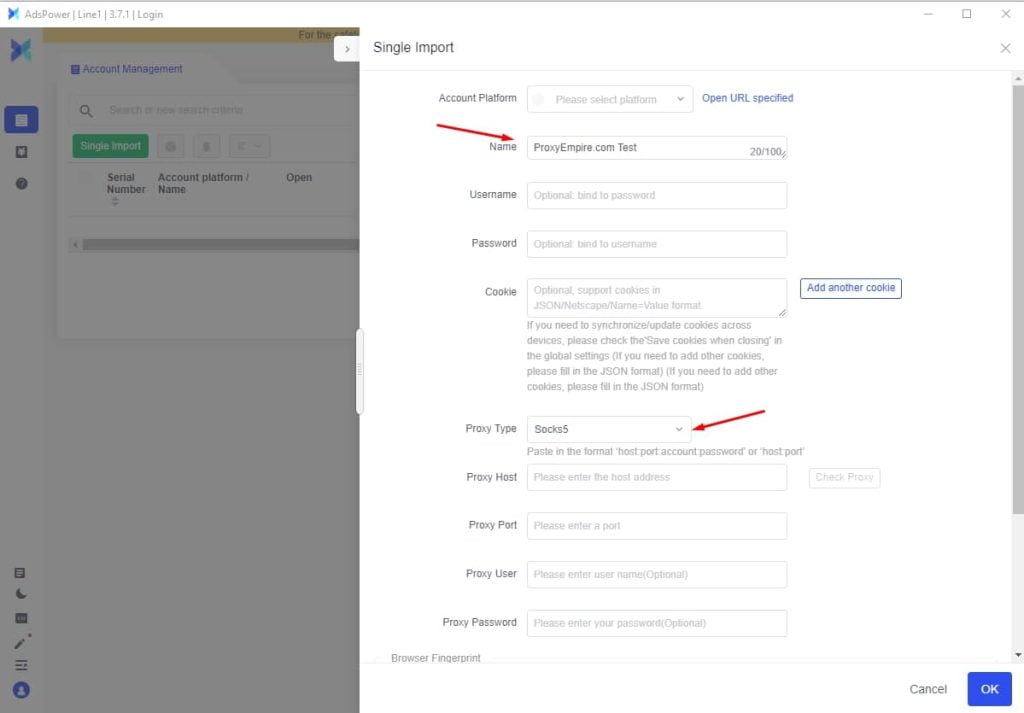
Custom proxy, paste, check- Create a profileClick New Profile in the top-left corner, give it a name and choose the browser and operating system.
- Open the Proxy tabClick Custom and set the proxy type to HTTP or SOCKS5, which use the same ProxyEmpire details. ProxyEmpire also supports HTTPS, and AdsPower supports SSH too.
- Paste your detailsPaste the full proxy string from ProxyEmpire into the Host:Port field. AdsPower fills in the username and password fields for you.
- Check the proxyClick Check Proxy. You should see “Connection test passed” and the IP’s location.
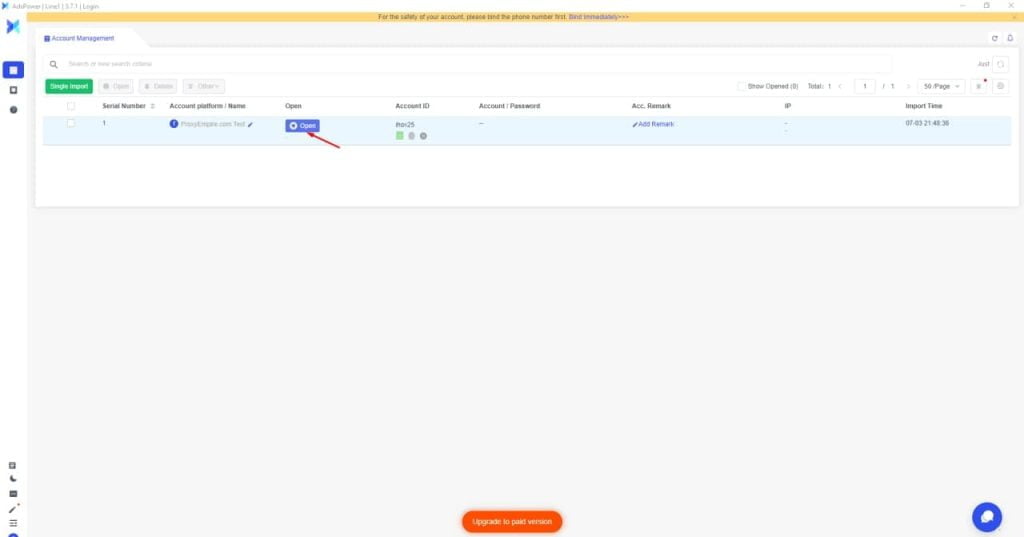
- Save and openClick OK, go to the Profiles page and click Open on the new profile.
HTTP is the simplest option and works for every website, HTTPS sites included, because the browser opens an encrypted tunnel through the proxy. SOCKS5 works with the same host, port and credentials if you prefer it. You can ignore the Change IP URL field: AdsPower describes it as a mobile-proxy feature for rotating an IP from a link, and with ProxyEmpire you get a fresh IP by starting a new sticky session instead.
Once the profile opens, visit any IP-check page. The IP, city and timezone should match the location you picked in the Proxy Manager. A slightly different town is normal: IP-location databases often place the same IP in different nearby places.
AdsPower Fingerprint Settings That Follow the Proxy
Keep the defaults that read from the IPAn IP from Chicago with a browser that reports a Berlin timezone is a mismatch risk systems notice. AdsPower’s fingerprint tab has settings designed to prevent that, and most of them already do the right thing by default:
- Time zone: “Based on IP” is the default and sets the timezone from the proxy’s location. Real would expose your computer’s timezone.
- Language: “Based on IP” is the default and uses a language for the IP’s location. Choose Custom if the account’s owner would realistically use another language.
- Location: “Based on IP” is the default for geolocation, with a choice of Ask each time or Always allow when a site requests it, or Block.
- WebRTC: use Forward, Replace or Disabled UDP, never Real, which exposes your device’s own IP. AdsPower describes Replace as swapping in data consistent with your proxy, and Forward as routing WebRTC requests through public servers so your real IP stays hidden.
WebRTC matters more than usual with any HTTP or SOCKS5 proxy provider, because video calls and peer-to-peer features use UDP and ProxyEmpire carries TCP traffic only. The WebRTC modes above keep that traffic from revealing your real IP.
Saving and Importing AdsPower Proxies in Bulk
From one profile to hundredsThe Proxies page
AdsPower’s Proxies page stores proxies so you can reuse them. Click Add Proxy and paste one proxy per line in host:port:username:password format, with an optional remark in curly brackets. AdsPower checks them and colours each one: green for passed, red for failed, grey for not yet checked. When you create a profile, pick one under Saved Proxies, or use the random button to assign one from the list.
v2.proxyempire.io:5000:username-for-session-1:password{US store 1}
v2.proxyempire.io:5000:username-for-session-2:password{US store 2}
v2.proxyempire.io:5000:username-for-session-3:password{UK ads}
The usernames above are placeholders. The Proxy list panel in ProxyEmpire’s Connection Builder generates real ones: set the list length, pick the host:port:user:pass output format and copy. Each line is its own sticky session, so its own IP.
Bulk Create
To create many profiles in one go, use Bulk Create. With the Mass import template, each row is a profile: put the proxy in the proxy column as host:port:username:password and set the proxy type column to http, https, socks5 or ssh. The proxy type field is required. You can also reference a saved proxy by its ID instead of typing it out.
For Developers: Adding Proxies with the AdsPower Local API
Automate the proxy listAdsPower’s Local API has an endpoint for adding proxies to the proxy list, up to 500 per request. Each proxy needs a type (http, https, ssh or socks5), a host and a port, with the username and password as optional fields. A request body for two ProxyEmpire sticky sessions looks like this:
[
{ "type": "http", "host": "v2.proxyempire.io", "port": "5000",
"user": "username-for-session-1", "password": "password", "remark": "US store 1" },
{ "type": "http", "host": "v2.proxyempire.io", "port": "5000",
"user": "username-for-session-2", "password": "password", "remark": "US store 2" }
]
Check AdsPower’s API documentation for the base address and authentication of your installation. If a tool you use only accepts an IP address rather than a host name, ProxyEmpire’s support team can give you an IP endpoint.
Which ProxyEmpire Proxy to Use with AdsPower
Match the IP to the account| Rotating residential | Rotating mobile | Static residential | |
|---|---|---|---|
| IP source | Home broadband | 4G carrier networks | Residential ISP ranges |
| Use in AdsPower with | A sticky session per profile | A sticky session per profile | One IP per profile |
| Targeting | Country to ZIP, ISP, ASN | Country to ZIP, carrier, ASN | Country |
| Best for | E-commerce, ad accounts, most web accounts | Social media and app-first platforms | Long-lived accounts that must keep one IP |
| Price | $3.50/GB, down to $1.50/GB | $4.50/GB, down to $2.00/GB | $3.50 for one IP, down to $2.00/IP a month |
Rotating residential with a sticky session is the default for most AdsPower profiles. Move to mobile for platforms that are strict with new accounts or built around their app, and to static residential when an account should always log in from the same address, such as a seller account; static residential is sold in 19 countries. One ProxyEmpire account covers all three, and unused bandwidth rolls over. The same details work in other anti-detect browsers too; see our Multilogin proxy setup guide.
Rules That Keep AdsPower Profiles Apart
The habits that matter most- One session per profile. Two accounts on the same platform should never share a sticky session or a static IP, whatever their fingerprints look like.
- Stay in one place. Keep each account in the same country and, ideally, the same city every time it logs in.
- Keep the story consistent. Operating system, timezone, language and IP location should describe the same kind of person.
- Replace, don’t relocate. If a sticky IP drops because the device behind it went offline, start a new session in the same city.
- Don’t over-narrow targeting. A small town plus one ISP can leave few IPs to choose from. City or state is usually enough.
- Automate gently. RPA flows that run at machine speed look automated whatever the IP. Add realistic pauses.
Troubleshooting an AdsPower Proxy
The errors people hit most often| Problem | Likely cause and fix |
|---|---|
| “Connection test failed” | Usually a typo, a stray space or an old password. Copy the details again from the Proxy Manager and paste them as host:port:username:password. |
| Works in one profile, fails in another | Compare the two entries. ProxyEmpire uses the same host, port and credentials for HTTP and SOCKS5, so the cause is almost always a typo or an old session username, not the protocol. |
| Worked before, fails now | Check your bandwidth balance, and whether the targeting changed, since that changes the username. |
| IP changed mid-session | The profile uses a rotating username, or the device behind a sticky IP went offline. Use sticky sessions and start a new one in the same city if it drops. |
| Timezone doesn’t match the IP | Time zone is set to Real or Custom in the fingerprint tab. Set it back to “Based on IP”. |
| One site won’t load | Some site categories are restricted on ProxyEmpire by default, including banks, payment processors such as PayPal and Stripe, and crypto exchanges, and only ports 80 and 443 are open. Access can be reviewed after KYC and a use-case explanation to support. |
Still stuck? ProxyEmpire’s support team is available 24/7 through live chat in the dashboard and can check your setup with you.
AdsPower Discount Code
For ProxyEmpire customersUse the AdsPower promo code ProxyEmpire when you buy an AdsPower plan. New AdsPower users get 10% off, and existing AdsPower users get 5% off. Get AdsPower here and enter the code at checkout.
AdsPower Proxy FAQ
Straight answersWhat is the best proxy for AdsPower?
Rotating residential proxies with one sticky session per profile suit most AdsPower accounts. Use rotating mobile proxies for social media and app-first platforms, and static residential proxies for accounts that must keep the same IP long term.
How do I add a proxy in AdsPower?
Click New Profile, open the Proxy tab, choose Custom, select HTTP and paste host:port:username:password into the Host:Port field. With ProxyEmpire that starts v2.proxyempire.io:5000. Click Check Proxy, then OK.
Can I import many proxies into AdsPower at once?
Yes. Paste one proxy per line on the Proxies page with Add Proxy, use the Bulk Create template to create profiles with a proxy in each row, or add up to 500 proxies per request with the Local API.
Does AdsPower support SOCKS5?
Yes. AdsPower supports HTTP, HTTPS, SOCKS5 and SSH proxies. ProxyEmpire supports HTTP, HTTPS and SOCKS5; HTTP and SOCKS5 use the same host, port, username and password.
Should several AdsPower profiles share one proxy?
Not for accounts on the same platform. Shared IPs can link accounts no matter how different their fingerprints are, so give each profile its own sticky session.
What is the best mobile proxy for AdsPower?
A rotating mobile proxy on a sticky session, targeted to the account’s country and, if needed, its carrier. ProxyEmpire’s mobile IPs come from 4G carrier networks, with city, carrier and ASN targeting included.
Do I need the Change IP URL field?
No. With ProxyEmpire you get a new IP by starting a new sticky session, which gives you a new username. Leave Change IP URL empty.
Is there an AdsPower discount code?
Yes. The code ProxyEmpire gives new AdsPower users 10% off and existing AdsPower users 5% off an AdsPower plan.
Can I test ProxyEmpire with AdsPower first?
Yes. The $1.97 trial includes 100 MB of residential and 50 MB of mobile bandwidth, enough to set up and test several profiles, and unused trial bandwidth doesn’t expire.
References
Primary documentation- AdsPower Help Center — Create a profile (Proxy tab and Custom proxy). help.adspower.com/docs/creating_browser_profiles
- AdsPower Help Center — Proxy types. help.adspower.com/docs/proxy_types
- AdsPower Help Center — Proxies: add, check and filter. help.adspower.com/docs/proxy_list
- AdsPower Help Center — Bulk Create. help.adspower.com/docs/Bulk-Create
- AdsPower Help Center — What is browser fingerprint? (time zone, language, location and WebRTC settings). help.adspower.com/docs/browser_fingerprint
- AdsPower Local API — Add proxy. localapi-doc-en.adspower.com/docs/Add-proxy
Give every AdsPower profile its own real IP
Residential, 4G mobile and static residential proxies with city, ZIP, ISP and carrier targeting included, a sticky session for every profile, bandwidth that rolls over and 24/7 support from real people. Try it for $1.97.