GoLogin lets you run many browser profiles side by side, each with its own fingerprint and cookies, so accounts on the same platform don’t bleed into each other. The piece GoLogin can’t isolate by itself is your IP address. This guide covers GoLogin proxy setup with ProxyEmpire: getting your details, adding a proxy to a profile, importing proxies in bulk, assigning them to many profiles at once, and choosing between residential, mobile and static residential proxies.
The short version
In GoLogin, click the + in a profile’s Location column, paste v2.proxyempire.io:5000:username:password and click Connect. GoLogin splits the string into host, port, username and password and checks the proxy straight away: green means it works. For many profiles, import proxies on the Proxies page or select profiles and use the Proxy bulk action. Give every profile its own sticky session.
Why GoLogin Needs a Proxy
One IP behind many profiles links themGoLogin is an anti-detect browser built for multi-account work: e-commerce sellers, affiliate and ad teams, social media managers and anyone else who needs several accounts on one platform. Each GoLogin profile has its own browser fingerprint and its own storage, so the platform can’t connect accounts through cookies or device details.
It can still connect them through the network. If every profile goes online from your office or home connection, the site sees many accounts sharing one IP address, and shared IPs are one of the most common reasons accounts get linked, reviewed or restricted together. A GoLogin proxy gives each profile a separate IP in the location you choose.
Quality matters as well. Residential IPs belong to real home connections, so they look like ordinary visitors. Mobile IPs come from 4G carrier networks, where one address is shared by many genuine subscribers, which makes platforms reluctant to block them. Datacenter IPs are cheap and quick, but hosting ranges are easy to recognise, so they belong on scraping jobs rather than accounts you care about.
GoLogin also offers its own built-in proxy locations. Bringing your own ProxyEmpire proxies is worth it when you need targeting beyond country, such as a specific city, ZIP code, ISP, mobile carrier or ASN; when you use the same bandwidth in scrapers and other tools as well; or when an account needs a static residential IP that stays the same for months. It also keeps billing simple: one balance for every tool, with unused bandwidth rolling over.
What you need
- GoLogin installed, or open in your browser, with at least one profile.
- A ProxyEmpire account with bandwidth. The $1.97 trial includes 100 MB of residential and 50 MB of mobile bandwidth.
- Your proxy username and password from the ProxyEmpire dashboard.
Step 1: Get Your ProxyEmpire Proxy Details
Choose location and session firstIn the ProxyEmpire dashboard, open the Proxy Manager to reach the Connection Builder. Pick Residential or Mobile and a country, then use the advanced settings to go down to a region, city or ISP (carrier on mobile) if the account needs it. ZIP, ASN and OS fingerprint targeting are available on residential and mobile too, all at no extra charge. Static residential and datacenter proxies are targeted by country.
Set the IP rotation:
- Same IP keeps a sticky session with no fixed time limit; the IP stays until you rotate it or the device behind it goes offline. This is the right choice for GoLogin profiles you log in to.
- Every request hands out a new IP each time, useful for collecting data but not for accounts.
- Custom TTL rotates on a timer you set, up to two hours.
The builder shows host v2.proxyempire.io, port 5000, your username and password, a Test proxy settings button and a full proxy string to copy. Location and session are written into the username, so changing city or starting a new session changes only the username. The same details work over HTTP and SOCKS5, and there is no IP whitelisting to set up.
v2.proxyempire.io:5000:username:password

GoLogin splits it into:
Host       v2.proxyempire.io
Port       5000
Username   your ProxyEmpire proxy username (includes targeting + session)
Password   your ProxyEmpire proxy password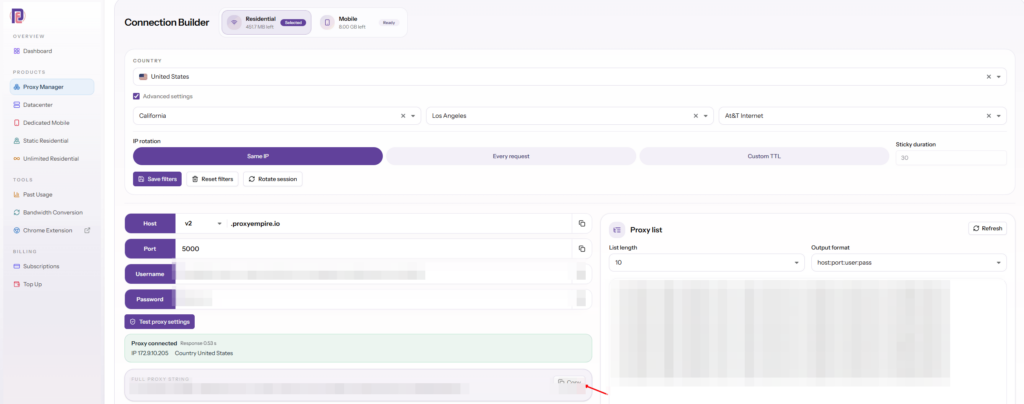
Step 2: Add the Proxy to a GoLogin Profile
Paste, connect, go green- Find the profileOn the All profiles page, find the profile and click the + in its Location column.
- Choose your own proxyPick the option for your own proxy rather than GoLogin’s built-in locations.
- Paste the detailsPaste the full proxy string from ProxyEmpire. GoLogin splits it into host, port, username and password.
- ConnectClick Connect. GoLogin checks the proxy immediately: a green indicator means it works, red means it doesn’t.
- Run the profileStart the profile and check the IP and location on any IP-check page.
You can also set the proxy from inside a profile’s settings: open the profile’s three-dot menu, choose Settings, then Proxy, and enter the same details. GoLogin supports HTTP, SOCKS4 and SOCKS5 and picks HTTP or SOCKS automatically when it can, and you can change the type afterwards. ProxyEmpire supports HTTP, HTTPS and SOCKS5, and HTTP and SOCKS5 both work with the same details.
If an IP-check page shows a nearby town rather than the exact city you targeted, that is normal. Location databases often disagree by a few miles. What matters is that the country, region and timezone match.
Importing and Assigning GoLogin Proxies in Bulk
From one profile to a hundredImport on the Proxies page
Open Proxies in GoLogin’s left menu, click Import proxies, paste your list and click Import proxies. GoLogin accepts several formats, including plain host:port:username:password and forms with the protocol in front, such as http:// or socks5://, with an optional name at the end.
v2.proxyempire.io:5000:username-for-session-1:password
v2.proxyempire.io:5000:username-for-session-2:password
http://v2.proxyempire.io:5000:username-for-session-3:password:US store 3
The usernames are placeholders. The Proxy list panel in ProxyEmpire’s Connection Builder generates real ones: set the list length, choose the host:port:user:pass output format and copy. Every line is a different sticky session, so a different IP.
Assign to many profiles at once
To give a batch of existing profiles their own proxies, tick the profiles, click Proxy in the bulk actions row, paste your list and click Update proxy. GoLogin assigns the proxies to the profiles in order, first proxy to first profile, so paste exactly one line per profile.
Keeping the GoLogin Fingerprint Consistent with the Proxy
The IP and the browser should agreeA proxy only helps if the rest of the profile tells the same story. An IP in Texas paired with a browser clock set to Warsaw, or a WebRTC leak that exposes your real address, undoes the work. When you set up a GoLogin profile:
- Timezone and geolocation should come from the proxy’s IP, not from your own computer.
- WebRTC should show the proxy’s IP or be masked, never your real one. ProxyEmpire carries TCP traffic only, not UDP, so WebRTC’s peer-to-peer traffic must be masked to stay private.
- Language should be something the account’s owner would plausibly use in that country.
- Operating system should fit the account: a mobile-first account on a mobile IP, a desktop store account on a residential one.
Check a new profile once on an IP and browser-leak test page before logging in to anything important.
Which ProxyEmpire Proxy to Use with GoLogin
Pick by account, not by habit| Rotating residential | Rotating mobile | Static residential | |
|---|---|---|---|
| IP source | Home broadband | 4G carrier networks | Residential ISP ranges |
| In GoLogin | One sticky session per profile | One sticky session per profile | One IP per profile |
| Targeting | Country to ZIP, ISP, ASN | Country to ZIP, carrier, ASN | Country |
| Best for | Stores, ad accounts, most web accounts | Social media and app-first platforms | Accounts that must keep one IP |
| Price | $3.50/GB, down to $1.50/GB | $4.50/GB, down to $2.00/GB | $3.50 for one IP, down to $2.00/IP a month |
Most GoLogin users run rotating residential with a sticky session per profile. Step up to mobile for platforms that are strict about new accounts, and use static residential, sold in 24 countries, when an account should look like it never moves. One ProxyEmpire account covers all three, and unused bandwidth rolls over.
Habits that keep accounts apart
- Never share a session between two accounts on the same platform.
- Keep each account’s location stable: same country and, ideally, same city at every login.
- Replace a dropped IP in the same city instead of moving the account somewhere new.
- Target at city or state level; a small town plus one ISP may leave very few IPs.
Troubleshooting a GoLogin Proxy
Red indicator? Start here| Problem | Likely cause and fix |
|---|---|
| Red indicator after Connect | Usually a typo, a trailing space or an old password. Copy the full proxy string from the Connection Builder again. |
| Bulk update gave the wrong IPs | Update proxy assigns in order. Make sure your list has one line per selected profile, in the order you want. |
| Protocol confusion | HTTP and SOCKS5 use the same ProxyEmpire details, so switching type rarely fixes a failure; recheck the credentials instead. |
| IP changed mid-session | The username is set to Every request, or the device behind the sticky IP went offline. Use Same IP and open a new session in the same city. |
| It stopped working | Check your bandwidth balance, and whether you changed targeting, which changes the username. |
| One site won’t load | Some site categories are restricted on ProxyEmpire by default, including banks, payment processors such as PayPal and Stripe, and crypto exchanges, and only ports 80 and 443 are open. Access can be reviewed after KYC and a use-case explanation to support. |
ProxyEmpire support is available 24/7 through live chat in the dashboard. Using more than one anti-detect browser? Our AdsPower proxy guide uses the same details.
GoLogin Promo Code
For ProxyEmpire customersProxyEmpire customers get 50% off their first month of GoLogin with the promo code PROXYEMPIRE. It applies to the first month’s purchase. Sign up for GoLogin here and enter the code at checkout.
GoLogin Proxy FAQ
Straight answersWhat is the best proxy for GoLogin?
Rotating residential proxies with one sticky session per profile suit most GoLogin accounts. Use rotating mobile proxies for social media and app-first platforms, and static residential proxies for accounts that must keep one IP.
How do I add a proxy in GoLogin?
Click the + in the profile’s Location column, paste host:port:username:password and click Connect. With ProxyEmpire that starts v2.proxyempire.io:5000. A green indicator means the proxy works.
How do I import many proxies into GoLogin?
Go to Proxies, click Import proxies, paste one proxy per line and click Import proxies. To assign them to existing profiles, select the profiles, click Proxy in the bulk actions row, paste the list and click Update proxy.
Does GoLogin support SOCKS5?
Yes. GoLogin supports HTTP, SOCKS4 and SOCKS5. ProxyEmpire supports HTTP, HTTPS and SOCKS5; HTTP and SOCKS5 use the same host, port, username and password.
Can several GoLogin profiles share one proxy?
Not for accounts on the same platform. A shared IP can link accounts however different their fingerprints are, so give each profile its own sticky session.
What is the best mobile proxy for GoLogin?
A rotating mobile proxy on a sticky session, targeted to the account’s country and, if needed, its carrier. ProxyEmpire’s mobile IPs come from 4G carrier networks with city, carrier and ASN targeting included.
Is there a GoLogin promo code?
Yes. ProxyEmpire customers get 50% off the first month of GoLogin with the code PROXYEMPIRE.
Can I try ProxyEmpire with GoLogin first?
Yes. The $1.97 trial includes 100 MB of residential and 50 MB of mobile bandwidth, and unused trial bandwidth doesn’t expire.
References
Primary documentation- GoLogin documentation — Adding and managing proxies. gologin.com/docs/proxy/proxy-management/adding-proxies
- GoLogin Help Center — FAQ: Proxies. support.gologin.com/en/articles/14839275-faq-proxies
Give every GoLogin profile its own real IP
Residential, 4G mobile and static residential proxies with city, ZIP, ISP and carrier targeting included, a sticky session for each profile, bandwidth that rolls over and 24/7 support from real people. Try it for $1.97.