A Mercari proxy gives your browser or research tool an IP address inside the market you are studying, so you see Mercari the way a shopper in the United States or in Japan sees it. Businesses use residential proxies for Mercari to research prices across thousands of listings, track what items actually sell for, find counterfeits of their brand, and check how their own listings look in-region. This guide explains the difference between Mercari US and Mercari Japan, why location matters on both, which proxies for Mercari fit each job, and how to set them up with ProxyEmpire’s US residential proxies and Japanese residential proxies.
The short version
For Mercari research, use rotating residential proxies targeted to the US or Japan, down to the city; switch to a sticky session when a job has to keep one IP, such as signed-in work on your own account; and use mobile proxies to test the Mercari app on a real carrier network. Location matters because both marketplaces are regional: Mercari US says it can only be accessed from within the United States, and Mercari Japan restricts access from outside Japan.
What a Mercari proxy does
An in-market IP address for research and your own accountA proxy sits between your device and Mercari. Your request goes to the proxy, the proxy fetches the page from its own IP address, and Mercari answers the proxy. With a residential proxy, that IP belongs to a home internet connection in the country, state or city you choose, so the marketplace serves you the same local version it serves a shopper there: local prices, local search results and the listings that are actually available in that market.
That matters for anyone who studies Mercari from outside a single desk: a resale business pricing its stock, a brand protection team scanning for fakes, an analyst tracking a product category, or a seller checking how a listing looks to buyers. One office connection can’t show you Mercari the way buyers in Tokyo and Texas see it, and it can’t cover thousands of listing pages a day on its own.
Key takeaways
- Mercari runs separate regional marketplaces: Mercari US (mercari.com) and Mercari Japan (jp.mercari.com).
- Both are tied to their home country, so a proxy’s location decides what you see.
- The best proxies for Mercari research are rotating residential; sticky sessions suit work that must keep one IP.
- Mobile proxies suit testing the Mercari app on real carrier networks.
- “Mercari Japan proxy” also means a proxy-buying service, which is a different thing from an IP proxy.
Mercari US vs Mercari Japan
Two marketplaces, two sets of listingsMercari started in Japan and runs its Japanese marketplace at jp.mercari.com. It is one of the biggest second-hand markets in the country: Mercari says the Japanese service has passed 4 billion cumulative listings. Mercari US at mercari.com is a separate marketplace for buyers and sellers in the United States, with its own listings, prices in dollars and its own help centre and rules. An account, a listing or a saved search on one doesn’t carry over to the other.
| Mercari US | Mercari Japan | |
|---|---|---|
| Site | mercari.com | jp.mercari.com and the Mercari app |
| Currency and language | US dollars, English | Japanese yen, Japanese |
| Who can use it | Mercari says it can only be accessed from within the United States | Access from outside Japan is restricted; overseas buyers use Mercari’s Global App or a proxy-buying partner |
| Typical research | Resale pricing, sold comps, sneakers, cards, fashion, electronics | Anime and game merchandise, collectibles, fashion, sourcing for export |
| Proxy location to use | US residential, by state or city | Japanese residential, by prefecture or city |
For a researcher the practical difference is simple: the two sites are separate data sets. A card, a handbag or a figure can sell for very different prices on each, and supply, demand and trends move differently in each country. If your job covers both, you need IPs in both countries and you should keep the two data sets apart.
Why location matters on Mercari
Both sites are regional by designMercari ties each marketplace to its home country, and says so in its own help pages. Mercari US’s login troubleshooting page states that Mercari can only be accessed from within the United States, and that a VPN can make a connection look as if it comes from outside the country, which blocks the login. Mercari Japan’s help centre says it restricts access from outside Japan and through external environments, and shows an alert when it detects such access. Mercari Japan’s overseas help pages add that only residents of countries or regions it supports can register, log in and buy.
For research, this means the IP address decides what you can collect. A research server in a data centre, or an office outside the market, sees a different or restricted Mercari. A residential IP in the right country sees the same listings, prices and search order as local shoppers, which is the data you actually want when you price stock or monitor a brand in that market.
It also sets a clear limit. Mercari accounts belong to their home market. A proxy doesn’t make Mercari Japan a service you can sign up for from abroad, and it doesn’t change who Mercari’s rules allow to hold an account. If you are overseas and want to buy from Mercari Japan, use the official routes described below.
Location decides the data. Match the proxy country to the Mercari marketplace you are researching, and keep US and Japan data in separate runs.
What businesses use Mercari proxies for
Research, pricing, brand protection and QAPrice research and resale market analysis
Resale businesses, sourcing teams and analysts collect Mercari listings in bulk to understand a market: asking prices, condition, how many units are listed, how fast new listings appear and which sellers dominate a category. Useful coverage means thousands of search result pages and listing pages, collected on a schedule. That is automated collection at scale, and it is what rotating residential proxies are built for: every request can leave from a different in-country home IP, so the work is spread across a large pool rather than a single address.
Typical questions this answers: what is the going rate for this model in this condition, how many are for sale right now, how far apart are the US and Japanese prices, and is a category getting crowded.
Tracking sold prices and trends
Asking prices tell you what sellers hope for; sold prices tell you what buyers pay. Mercari’s search has a Status filter that separates listings still on sale from those that have sold, and Mercari Japan lets a signed-in user save up to 100 search conditions with new-item notifications. At business scale, teams run the same searches every day, store each sold listing’s price, date and condition, and build a price history per product. That history shows seasonality, the effect of a new release or restock, and the point where a product’s resale value starts to fall.
Brand protection and counterfeit detection
Brands and their agencies scan Mercari for counterfeits, replicas and unauthorised use of their trademarks and product photos. The scan has to cover many searches, spellings and categories every day, in each market where the brand sells, so it is automated too. When the scan finds a suspect listing, the rights holder reports it through Mercari’s own channels: on Mercari US, the Mercari Authorized Reporting System (MARS) for counterfeits, replicas and trademark or copyright infringement; in Japan, Mercari’s IP Protection Program, which lets enrolled rights holders file removal claims without resubmitting documents each time. Proxies do the finding; Mercari’s programmes do the removal. Our brand protection page covers the wider workflow.
Checking how your listings appear in-region
Sellers and the agencies that run shops for them want to know where a listing lands in search, how its title and photos look on the app and the web, and which competing listings sit next to it. Mercari Japan’s own advice on search visibility is to use relevant keywords and their variants, choose the correct item details and category, and price sensibly; it also warns that unrelated keywords count as spam and that repeatedly deleting and relisting is prohibited. A Japanese or US IP lets you check the results from the buyer’s side, city by city, instead of guessing from your own account’s view.
Market checks before you source or export
Exporters and importers use the gap between the two marketplaces. A US reseller sourcing Japanese goods checks Mercari Japan prices and supply before committing to stock; a Japanese seller planning to sell abroad checks what similar items fetch in the US. Both need to see the other market as locals see it, which needs an IP in that market.
Fair use: ProxyEmpire is for research, price monitoring, brand protection and running your own account, not for spam, fake reviews, feedback manipulation or illegal activity.
Mercari Japan proxy services vs IP proxies
Two meanings of “Mercari Japan proxy”Search for “Mercari Japan proxy” and most results are about proxy-buying services, not IP addresses. The two are different tools:
Mercari has worked with proxy-buying services since 2019, when it started cross-border sales through Buyee. In that model, the service’s official account buys the item on Mercari, the seller ships it to the service’s warehouse in Japan, and the service handles international shipping to more than 100 countries. In September 2025 Mercari launched the Mercari Global App in Taiwan and Hong Kong, and on 17 June 2026 it added the United States. Mercari says cross-border sales have grown more than 15 times in three years to over 90 billion yen a year.
So if you want to buy a single item from Mercari Japan, use the Global App where it is available or a proxy-buying service. If you want to watch Mercari Japan as a market, with prices, supply, sold items and counterfeits across thousands of listings, that is a job for Japanese residential IPs.
Choosing proxies for Mercari
Rotating, sticky and mobileThe right Mercari proxy depends on the job, not on the site. Three set-ups cover almost everything:
| Job | Proxy set-up | Why |
|---|---|---|
| Price research, sold comps, brand scans | Rotating residential, US or Japan, by city if needed | A new home IP per request spreads thousands of page loads across a large in-country pool. |
| Paging through one search, or a multi-step check | Residential sticky session | Keeps one IP while you move through pages that belong together. |
| Signed-in work on your own account | Residential sticky session in the account’s country | One steady IP for the whole session instead of a new address on every click. |
| Testing the Mercari app and mobile site | Rotating mobile, by country, city or carrier | Shows the app on a real carrier connection, as phone users see it. |
- Rotating residential proxies are the default for Mercari research. ProxyEmpire’s rotating residential proxies draw on 30M+ residential IPs in 179 countries and territories, with targeting by country, region or state, city, ZIP, ISP, ASN and OS fingerprint included at no extra charge.
- Sticky sessions keep the same residential IP across requests until you change the session, with no fixed time limit. Use them for anything that belongs to one continuous visit, including signed-in work on your own account from the account’s country. See sticky residential proxies.
- Mobile proxies route through real carrier connections. ProxyEmpire’s rotating mobile proxies cover 4M+ mobile IPs in 174 countries, with carrier targeting included. In Japan that means NTT docomo, au (KDDI), SoftBank and Rakuten Mobile.
- Static residential and datacenter proxies are targeted by country only. Datacenter IPs are cheap for bulk work on sites that accept them, but they don’t show Mercari as a home user sees it; for marketplace research, residential is the better fit.
Pricing is by traffic: residential starts at $3.50/GB pay-as-you-go and falls to $1.50/GB on larger plans, unused bandwidth rolls over, and the $1.97 trial includes 100 MB of residential and 50 MB of mobile traffic. Mercari pages are image-heavy, so the bandwidth a job needs depends mostly on whether your tool downloads images; skipping them cuts traffic sharply.
US and Japan coverage
From ProxyEmpire’s location list, checked 1 October 2026| United States | Japan | |
|---|---|---|
| Residential regions | All 50 states plus Washington, D.C. | All 47 prefectures |
| Residential cities | Thousands of cities, including New York, Los Angeles, Chicago, Houston, Dallas, Miami, Seattle and San Francisco | More than 200 cities and districts, including Tokyo, Osaka, Nagoya, Yokohama, Sapporo, Kyoto, Fukuoka, Kobe and Hiroshima |
| Mobile | T-Mobile, Verizon and AT&T, with carrier targeting | NTT docomo, au (KDDI), SoftBank and Rakuten Mobile, plus MVNOs such as IIJmio, mineo (OPTAGE), BIGLOBE and Japan Communications; mobile cities include Tokyo, Osaka and Kyoto |
| Country page | US residential proxies | Japanese residential proxies |
City targeting is useful when a question is local: a seller in Osaka wants to see what Osaka buyers see, or an analyst wants to compare results between two US metro areas. For national price research, country-level targeting is usually enough and gives the widest pool.
How to set up a Mercari proxy
From trial to first request- Create an accountSign up and start the $1.97 trial, which covers residential and mobile traffic.
- Open the Proxy ManagerIn the dashboard, the Proxy Manager opens the Connection Builder. Pick Residential or Mobile.
- Pick the marketChoose United States or Japan, then a state, prefecture, city or carrier if the job needs it.
- Choose rotationRotating for research across many listings, or a sticky session to keep one IP.
- Copy and testCopy host, port, username and password into your browser or tool and open Mercari to confirm the location.
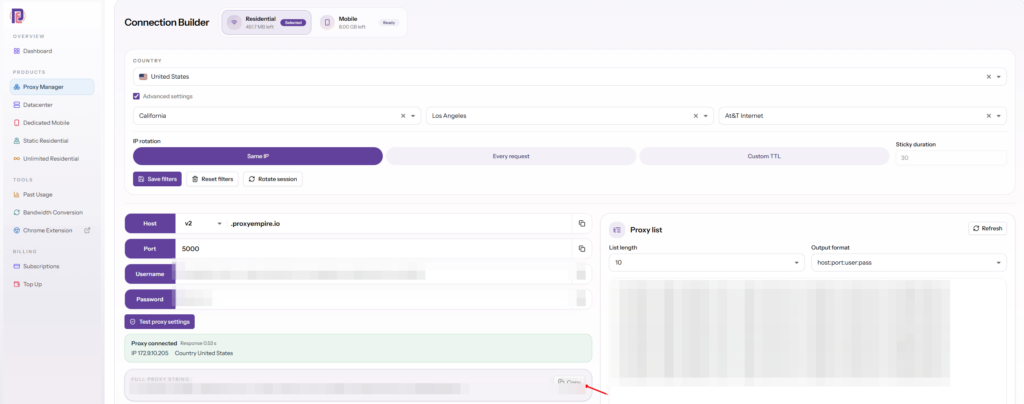
Residential and mobile proxies use one gateway for every location. Your targeting and session are written into the proxy username by the Connection Builder, so switching from a Tokyo IP to a Chicago IP, or from rotating to sticky, means copying a different username; the host and port stay the same.
Host       v2.proxyempire.io
Port       5000
Protocol   HTTP, HTTPS or SOCKS5
Username   from the Connection Builder (country, city and session are part of it)
Password   from the Connection Builder

One-line format used by many tools:
v2.proxyempire.io:5000:username:password
A few practical notes:
- Authentication is by username and password. There is no IP whitelisting, so the same login works from a laptop, a server or a cloud function.
- Ports 80 and 443 are open by default, which covers Mercari’s web pages over HTTP and HTTPS. There is no UDP.
- In a browser, the free ProxyEmpire Proxy Manager extension for Chrome puts Chrome alone on a proxy, without touching system settings.
- On Android, the free ProxyEmpire Proxy Manager app routes the whole phone, or only the apps you choose, through a residential or mobile proxy, which is the easy way to test the Mercari app in-region.
- Check the exit IP first. Open an IP lookup page through the proxy and confirm the country and city before you start a large job.
Running Mercari research at scale
Habits that keep data clean and costs downMost problems with large Mercari jobs are data problems, not proxy problems. These habits keep results accurate and bandwidth predictable:
- One market per run. Point US jobs at US IPs and Japanese jobs at Japanese IPs, and store the results separately. Mixing them mixes currencies, languages and listing sets.
- Rotate for breadth, stick for sequences. Use rotating IPs when each request stands alone, such as one listing page per request. Use a sticky session when requests belong together, such as pages 1 to 10 of one search.
- Pace requests. Spread a daily crawl across the day and keep concurrency sensible. A steady, moderate rate gives more complete data than bursts that end in errors.
- Retry with a back-off. If a request fails or times out, wait and retry through a new IP rather than hammering the same address.
- Skip what you don’t need. Photos are usually the heaviest part of a listing page. If you only need titles, prices, condition and status, don’t download images, and cache pages you have already seen.
- Record the time and place. Store the timestamp, the proxy country and city, and the listing status with every record, so a price history can be traced back to the exact conditions it was collected under.
- Normalise before you compare. Convert yen and dollars at a fixed daily rate, and group items by model and condition before comparing prices between the two markets.
If Mercari is one of several marketplaces you track, the same set-up works on the others; our guide to eBay proxies covers the eBay side. Uptime is published on the ProxyEmpire status page (99.9%), and support is available 24/7 from real people if a job needs a location you can’t find in the list.
Mercari proxy FAQ
Short answersWhat is the best proxy for Mercari?
The best proxies for Mercari are rotating residential proxies in the marketplace’s country: US IPs for Mercari US, Japanese IPs for Mercari Japan. Use a sticky session when a job must keep one IP, and mobile proxies for app testing.
Can I use Mercari US from outside the United States?
Mercari says Mercari US can only be accessed from within the United States, and that a VPN which makes your connection appear to be outside the US will block the login.
Can I use Mercari Japan from outside Japan?
Mercari Japan restricts access from outside Japan. Overseas buyers can use the Mercari Global App in Taiwan, Hong Kong and the US, or a proxy-buying service such as Buyee, Mercari’s cross-border partner since 2019.
What is a Mercari Japan proxy service?
Usually a proxy-buying service: a company in Japan that buys a Mercari item for you and ships it abroad. An IP proxy is different; it gives your browser or tool a Japanese IP address for research and monitoring.
Do I need residential or datacenter proxies for Mercari?
Residential. They show Mercari as a home user in that market sees it. Datacenter IPs are cheaper for bulk work on sites that accept them, but they are a poorer fit for marketplace research.
Can I target a specific city for Mercari research?
Yes. Residential proxies can be targeted by city, such as Tokyo, Osaka, New York or Los Angeles, and by state or prefecture, ZIP, ISP and ASN, at no extra charge.
How long does a sticky session last?
A sticky session keeps the same IP until you change the session in your username; there is no fixed time limit. The address can still change if the home connection behind it goes offline.
Can I track Mercari sold prices with proxies?
Yes. Run the same searches on a schedule through in-market residential IPs, use Mercari’s Status filter to separate sold items from those on sale, and store each sold price with its date to build a history.
How much bandwidth does Mercari research use?
It depends on the number of pages and whether your tool downloads photos, usually the heaviest part of a listing page. Test on the $1.97 trial first and measure a sample run.
References
Mercari’s own help pages and announcements- Mercari US Help — Login Troubleshooting (access from within the United States, VPNs). mercari.com/us/help_center/article/593
- Mercari Japan Help — アカウントの利用制限 (restrictions on access from outside Japan and external environments). help.jp.mercari.com/guide/articles/1331
- Mercari Japan overseas Help Center — System requirements and supported regions. gl.help.jp.mercari.com/en/guide/articles/gl_0020
- Mercari — Launch of the Mercari Global App and crossborder strategy (30 September 2025). about.mercari.com/en/press/news/articles/20250930_crossborder
- Mercari — Mercari Global App launches in the United States (June 2026). about.mercari.com/en/press/news/articles/20260618globalapp
- Mercari — Cross-border sales to 100+ countries through proxy-purchase services (15 November 2019, Japanese). about.mercari.com/press/news/articles/20191115_crossborder
- Mercari US — Intellectual Property Help Center (MARS reporting). mercari.com/us/help_center/…/intellectual-property-help-center
- Mercari — IP Protection Program. about.mercari.com/en/safety/ip-protection-program
- Mercari US Help — How to filter searches. mercari.com/us/help_center/article/222
- Mercari Japan Help — 商品の検索方法・検索条件の保存方法 (search and saved searches). help.jp.mercari.com/guide/articles/44
- Mercari Japan Help — 出品商品を検索結果へたくさん表示させる方法 (search visibility tips). help.jp.mercari.com/guide/articles/1864
See Mercari the way US and Japanese buyers do
30M+ residential IPs in 179 countries and territories, with state, prefecture, city, ZIP and ISP targeting at no extra charge, rotating or sticky sessions, 4M+ mobile IPs, and 24/7 support from real people. The $1.97 trial includes 100 MB of residential and 50 MB of mobile traffic.