Cross-border e-commerce and social media marketing run on many accounts, and many accounts bring the same problems: risky multi-account management, expensive physical devices, suspensions that stop the work, and a stack of separate tools for browser, device and network. FlashID is an anti-detect browser and cloud phone platform built to put that stack in one place. This review covers its main features, typical use cases, pricing and the exclusive ProxyEmpire discount. It also shows how to give every FlashID profile its own IP with ProxyEmpire residential or mobile proxies.
The short version
FlashID combines an anti-detect browser, Android cloud phones and automation, so teams can run many web and mobile accounts from isolated environments. Each profile gets its own fingerprint, storage and proxy, and FlashID supports HTTP and SOCKS5 proxies from your own provider. The Free plan includes 2 profiles. ProxyEmpire users get 70% off with the promo code proxyempire, valid for one year.
About the claims on this page. The feature descriptions in this review come from the FlashID team. Plans, prices and system requirements were checked on FlashID’s website on 23 November 2026. ProxyEmpire has not benchmarked FlashID’s fingerprints or performance independently.
Key takeaways
- FlashID runs browser profiles and Android cloud phones side by side. Each one is isolated, with its own fingerprint, storage and IP.
- Window Sync, profile templates, automation and an open API cut down the repetitive work of running many accounts.
- Workspaces with roles and permissions let teams split projects and clients and control who sees what.
- Use your own HTTP or SOCKS5 proxies: enter host
v2.proxyempire.io, port5000and your ProxyEmpire username and password in each profile. - Code proxyempire gives ProxyEmpire users 70% off. The offer is valid for one year.
What FlashID Is
One environment instead of separate toolsFlashID describes itself as more than an anti-detect browser: a unified environment system for multi-account operations at scale. It brings cloud phone infrastructure, anti-detect browser technology and automation together in one product, so the browser fingerprint, device environment and network settings of each account are managed in the same place.
That matters because mismatched settings across separate tools are a common source of detection signals. When the browser, the device and the IP of an account belong together and stay consistent over time, the account looks more stable to the platform it’s used on.
FlashID is aimed at teams that manage accounts on platforms such as Amazon, eBay, Shopee, Lazada, Facebook, Instagram and TikTok, and at agencies, affiliates and QA teams that need many separate environments without extra hardware.
Key Features
Browser, cloud phone and automation in one placeAccording to FlashID, its fingerprints come from kernel-level rendering simulation that generates hardware fingerprints across Canvas, WebGL and AudioContext. Each browser profile and cloud phone has its own device ID, storage and processes. If you want to know what these signals are and how sites use them, our guide to browser fingerprinting explains the basics.
Typical Use Cases
Who gets the most out of FlashIDCross-border e-commerce operators
Run and manage stores across markets such as Amazon, eBay, Shopee or Lazada, keep each store’s account in its own environment, and automate routine work like product listings and inventory updates. Long-running stores benefit most from an IP that doesn’t change, such as a static residential proxy.
Global marketing and social media teams
Handle multiple ad or content accounts on Facebook, Instagram and TikTok from isolated profiles or cloud phones. Residential or mobile proxies with sticky sessions suit accounts that scale across regions and need geo-targeting.
Advertising agencies and affiliates
Operate multiple ad accounts in isolated environments for campaign testing and optimization. Pair profiles with automation and a proxy type that matches each campaign’s target market.
Product development and QA
Deploy separate test environments quickly, without extra hardware or interference between tests, and iterate faster.
How to Set Up FlashID with ProxyEmpire
Five steps, a few minutesFlashID supports your own HTTP and SOCKS5 proxies, so every profile can use a ProxyEmpire IP. You’ll need a ProxyEmpire account with residential or mobile bandwidth; the $1.97 trial includes 100 MB of residential and 50 MB of mobile traffic, which is enough to test a few profiles.
Step 1: Get your ProxyEmpire proxy details
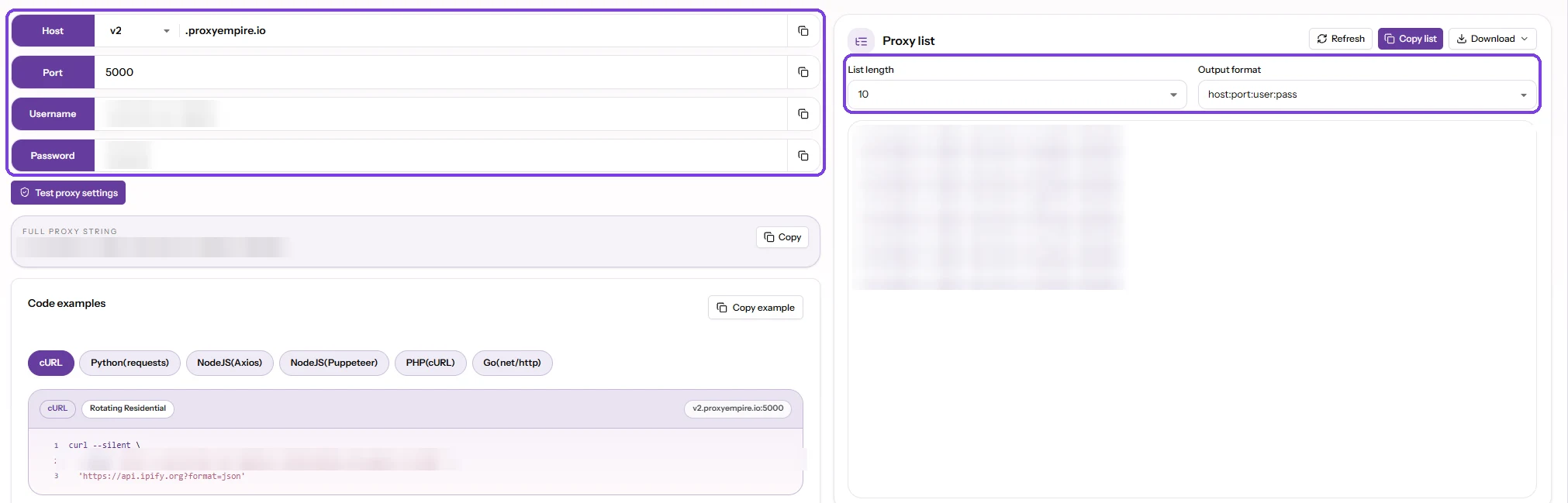
In the ProxyEmpire dashboard, open Proxy Manager. In the Connection Builder, pick Residential or Mobile, a country and an IP rotation mode. For accounts you log in to, choose Same IP so each profile keeps one sticky IP.

Below the builder you’ll find the Host, Port, Username and Password, plus Test proxy settings to check the login. The Proxy list on the right generates several proxies at once. With Same IP selected, each line has its own session, so you can give each FlashID profile a different sticky IP.
Step 2: Download FlashID
Download FlashID from its official download page. It runs on Windows 10 and later (64-bit) and on macOS 12 Monterey and later, with separate builds for Apple silicon and Intel Macs. A Linux version is listed as coming soon. Install the app and sign in.
Step 3: Create a profile
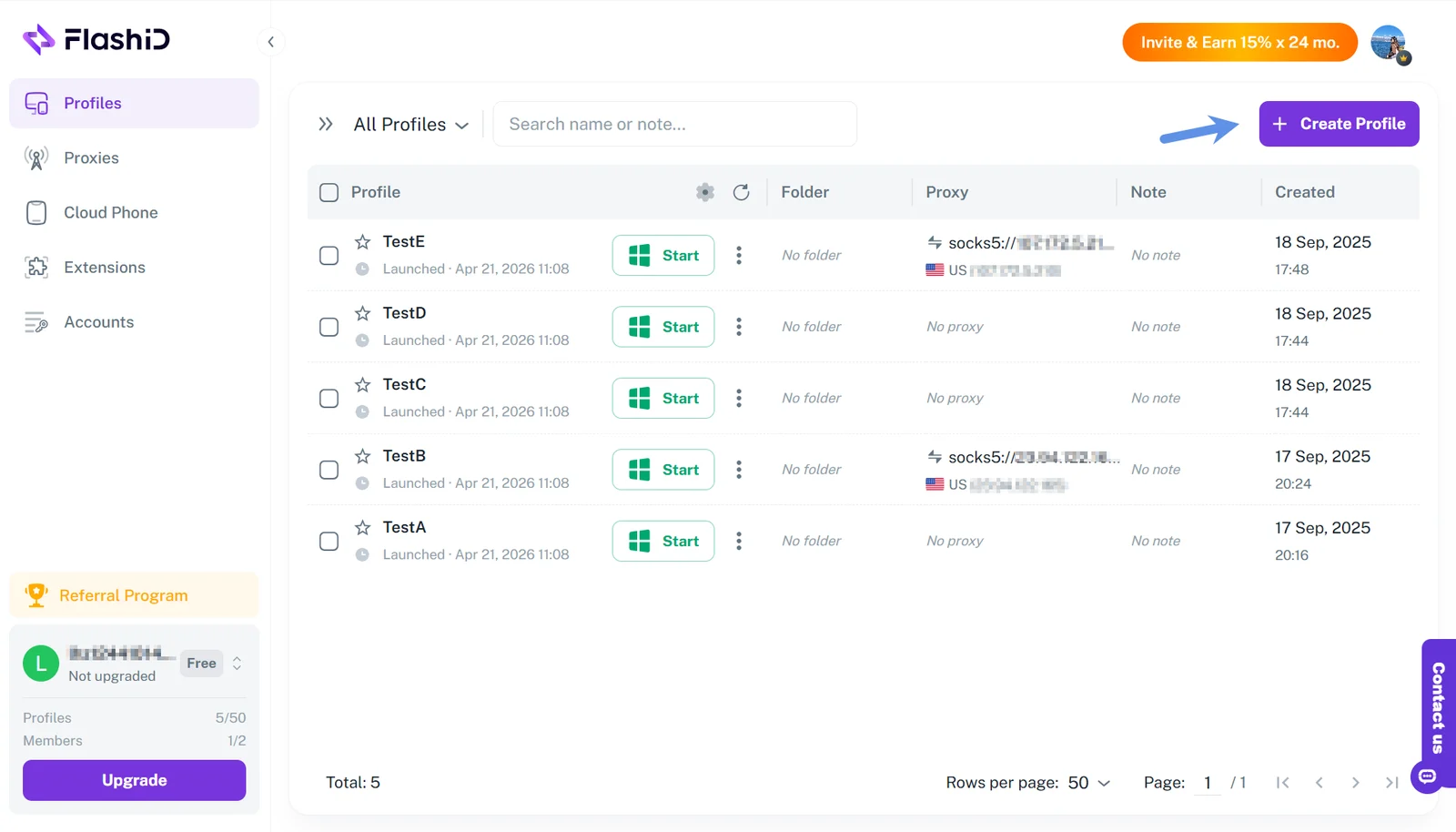
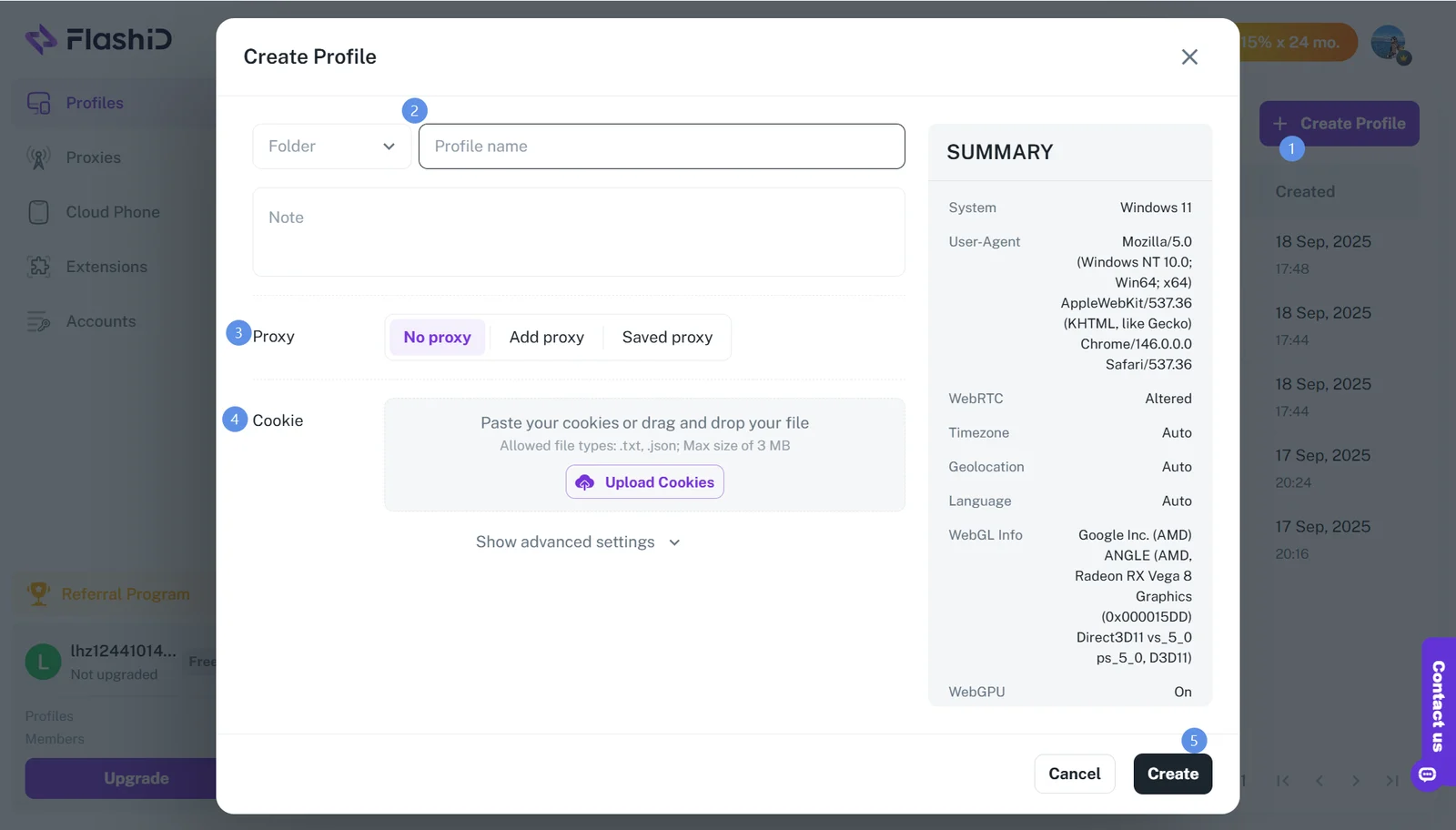
In the dashboard, click Create Profile. Enter a name and configure the fingerprint parameters. Each profile generates its own browser fingerprint and is the base of an independent environment. The summary on the right shows the system, user agent, WebRTC, time zone, geolocation and other settings the profile will use.
Step 4: Add your ProxyEmpire proxy
In the Proxy section of the profile, choose Add proxy (or Saved proxy if you’ve stored the proxy before) and enter the details from the ProxyEmpire dashboard:
| Setting | What to enter |
|---|---|
| Proxy type | HTTP or SOCKS5 |
| Host | v2.proxyempire.io |
| Port | 5000 |
| Username | Your ProxyEmpire proxy username, copied in full from the Connection Builder |
| Password | Your ProxyEmpire proxy password |
Copy the whole username: it carries the location and session settings, so a shortened username gives you a different location or a rotating IP. Click Test to check the connection, then save the profile. ProxyEmpire uses username and password authentication, so you don’t need to whitelist an IP.
Step 5: Launch the profile
Click Start next to the profile. A new browser or cloud phone window opens with its own fingerprint, IP address and cache. To double-check, open an IP-checking page such as api.ipify.org inside the profile and confirm the IP and location match what you picked in the Connection Builder.
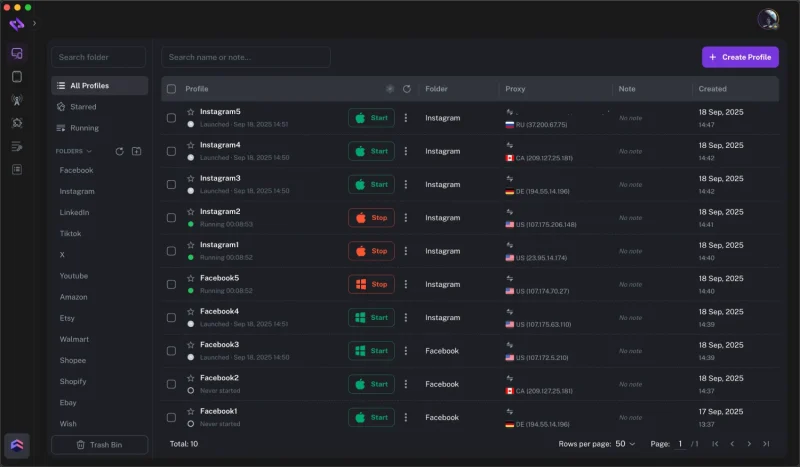
For each additional account, create another profile and give it a new sticky session, so no two accounts share an IP.
Which ProxyEmpire Proxy to Choose
Match the IP to the account| Proxy type | Best for | Typical FlashID use |
|---|---|---|
| Rotating residential with Same IP | Flexible locations, sticky sessions | Social media and ad accounts across many regions |
| Rotating mobile | Real carrier connections | Cloud phone accounts and mobile-first apps such as TikTok and Instagram |
| Static residential | The same IP for weeks or months | Long-running e-commerce stores and seller accounts |
For logged-in accounts, a sticky session is almost always the right choice, because an IP that changes on every request looks unusual for a real user. Our guide to sticky vs rotating proxies explains the trade-offs. You can target rotating residential and mobile proxies by country, region, city, ZIP code, ISP or carrier, and ASN across 170+ countries.
Why Teams Choose FlashID
The benefits FlashID highlightsFlashID is built on what it calls a full-stack environment architecture, with browser, device and network layers in one system. Beyond isolation, it offers role-based access control and operation logs, which give organizations visibility and control over multi-account work. FlashID sums up the business value like this:
- Security: a consistent browser, device and network environment reduces detection risk.
- Scalability: create and manage new environments as the business grows.
- Efficiency: built-in automation reduces repetitive work.
- Cost-effectiveness: cloud infrastructure replaces expensive hardware setups.
- Reliability: one unified system supports stable, long-term account performance.
FlashID Pricing
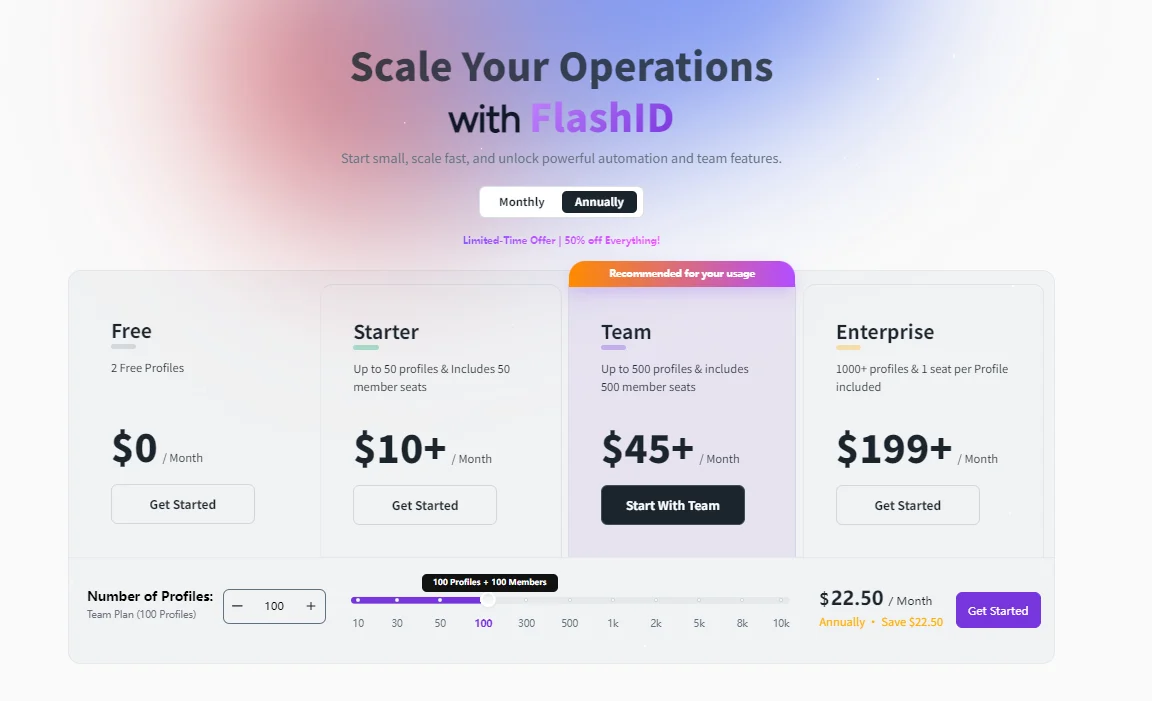
Plans checked on 23 November 2026FlashID’s pricing page lists four plans, billed monthly or annually, with the price scaling by the number of profiles:
| Plan | What’s included | List price |
|---|---|---|
| Free | 2 profiles | $0 per month |
| Starter | Up to 50 profiles, includes 50 member seats | From $10 per month |
| Team | Up to 500 profiles, includes 500 member seats | From $45 per month |
| Enterprise | 1,000+ profiles, 1 seat per profile | From $199 per month |
At the time of writing, FlashID was running a limited-time offer of 50% off all plans. Check the pricing page for current prices, and see the next section for the ProxyEmpire code.
FlashID Promo Code
An exclusive offer for ProxyEmpire usersProxyEmpire users get 70% off FlashID with the promo code proxyempire. The offer is valid for one year, until November 2027.
- Create your account through the ProxyEmpire link to FlashID.
- Choose a plan and enter the code proxyempire at checkout.
- Add your ProxyEmpire proxies to your profiles as described in the setup steps.
Looking for other tools? The ProxyEmpire integrations page lists every anti-detect browser we have a guide and a discount for.
Frequently Asked Questions
FlashID and ProxyEmpireWhat is FlashID?
FlashID is an anti-detect browser and cloud phone platform for managing many accounts. Each browser profile or cloud phone runs in its own isolated environment with a separate fingerprint, storage and proxy, and the platform adds automation, Window Sync, templates and team workspaces.
Does FlashID work with ProxyEmpire proxies?
Yes. FlashID supports HTTP and SOCKS5 proxies from your own provider. Enter host v2.proxyempire.io, port 5000 and your ProxyEmpire username and password in the profile’s proxy settings, then click Test.
Is there a free version of FlashID?
Yes. The Free plan includes 2 profiles at no cost. Paid plans start with Starter, which covers up to 50 profiles.
What is the FlashID promo code for ProxyEmpire users?
Use the code proxyempire for 70% off. The offer is valid for one year, until November 2027.
Which proxy should I use for FlashID cloud phones?
Mobile accounts usually fit best with mobile proxies, because the IP comes from a real carrier network. Use a sticky session (Same IP) so each cloud phone keeps one IP while you’re logged in.
Which operating systems does FlashID support?
Windows 10 and later (64-bit) and macOS 12 Monterey and later, on both Apple silicon and Intel. FlashID lists a Linux version as coming soon.
Give Every FlashID Profile Its Own IP
Start with 100 MB of residential and 50 MB of mobile traffic for $1.97, then add a sticky ProxyEmpire session to each FlashID profile.