If you manage several accounts on Facebook, Amazon, TikTok or Google, you already know how fragile it can be: one shared cookie or one familiar fingerprint and accounts you spent weeks building get flagged together. Incogniton is an anti-detect browser built to stop that. In this Incogniton review we look at how it works, the features that matter, what it costs today, who it suits, and how to pair it with residential or mobile proxies so accounts stay separate on the network as well as in the browser.
The short version
Incogniton is a solid, reasonably priced anti-detect browser: every profile gets its own fingerprint and isolated storage, and paid plans add a Cookie Collector, a Synchronizer for repeating actions across profiles, Selenium and Puppeteer support, an API and team seats. The free plan is fine for testing, and paid plans start at $13.99 a month. Pair each profile with its own residential or mobile IP, and use the code ProxyEmpire for a 20% recurring discount on any plan.
What Incogniton Does

Separate identities on one computerIncogniton is a Chromium-based anti-detect browser. It lets you create many browser profiles, and each one behaves like a different person on a different device. These aren’t just separate windows or Chrome user profiles. Each Incogniton profile has its own browser fingerprint: the combination of canvas and WebGL output, audio context, installed fonts, screen resolution, timezone, language and dozens of other signals that platforms use to recognise a device.
Nothing is shared between profiles. Cookies, local storage, cache and history stay inside the profile they belong to, so a platform’s fraud checks have no common thread to link two accounts through the browser. That is the key difference from running several Chrome windows or several browsers side by side, which still leak signals that tie everything back to one machine.
The Incogniton Features That Matter
What you actually use day to dayProfile isolation and fingerprint control
Everything else is built on this. Each profile carries its own fingerprint, which you can set by hand or let Incogniton generate with realistic values. Incogniton integrates checks from BrowserLeaks, Pixelscan and BrowserScan, so you can confirm a profile’s fingerprint looks healthy without leaving the browser. Close a profile and reopen it later and it is exactly as you left it, with its cookies and sessions intact.
Cookie management and the Cookie Collector
Incogniton can import, export, block or allow cookies per profile. Its most useful extra is the Cookie Collector. A brand-new account with no browsing history looks suspicious to many platforms, and the Cookie Collector automatically generates organic-looking cookies for each profile, giving accounts a more natural footprint before you start working in them. It is included from the Entrepreneur plan upwards.
The Synchronizer
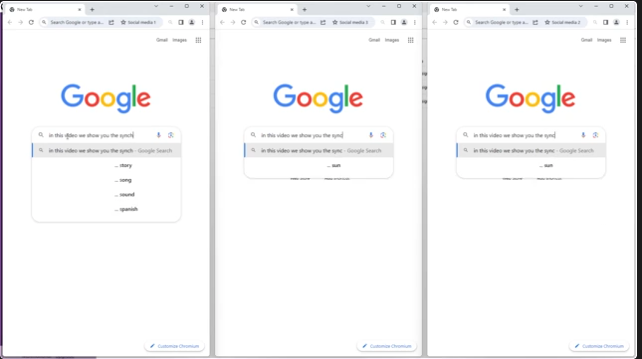
Repeating the same steps in twenty profiles is slow. The Synchronizer lets you perform actions once, such as logging in, filling a form or moving through a page, and have them mirrored across several profiles at the same time, with no code. It is part of the paid plans from Entrepreneur up.
Selenium, Puppeteer and the API
For developers, Incogniton supports Selenium and Puppeteer and offers API access, so profiles can be started and driven from code. That makes it one of the few anti-detect browsers that works equally well for non-technical teams and for automation, and it means you don’t need to change stack when a manual workflow turns into a script.
Teams and shared workspaces
Agencies and larger teams can share profiles through workspaces with role-based access. An admin creates profiles and grants colleagues access to just the ones they need, without sharing account passwords. The Professional plan includes three team member seats, and custom packages add more.
CAS AI assistant
A newer addition, Incogniton’s built-in AI assistant helps you find your way around the tool, troubleshoot and configure profiles without digging through documentation.
Incogniton and Proxies
The part the browser can’t do aloneFingerprint isolation handles the device side of detection. Platforms also look at IP addresses, and if several profiles share one IP, all the fingerprint work can be undone at once. Each Incogniton profile needs its own IP address to be properly separate.
Incogniton supports HTTP, HTTPS and SOCKS5 proxies, and so does ProxyEmpire. Each profile has a Proxy tab where you paste a proxy string and click Check proxy, and the Proxy Library stores proxies so you can bulk-add them and assign them to profiles. Incogniton also offers free built-in proxies, and a free unblocked proxy option, but Incogniton itself notes the free proxy isn’t recommended for account management. For accounts you want to keep, use a dedicated IP per profile.
With ProxyEmpire, the usual setup is one sticky session per profile on rotating residential proxies, which keeps the same home IP until you rotate it or the device behind it goes offline. Use rotating mobile proxies for social media and app-first platforms, and static residential proxies for accounts that should log in from the same address for months. Targeting by country, region, city, ZIP, ISP or carrier, ASN and OS fingerprint is included at no extra cost.
The full walkthrough, with screenshots, the Proxy Library and bulk add, is in our Incogniton proxy setup guide.
Incogniton proxy checklist
- One sticky session per profile, never shared between accounts on the same platform.
- Keep timezone and language filled from the IP, so the profile matches the proxy’s location.
- Set WebRTC to Altered or Disabled, never Real.
- Keep each account in the same country, and ideally the same city, at every login.
Incogniton vs a VPN
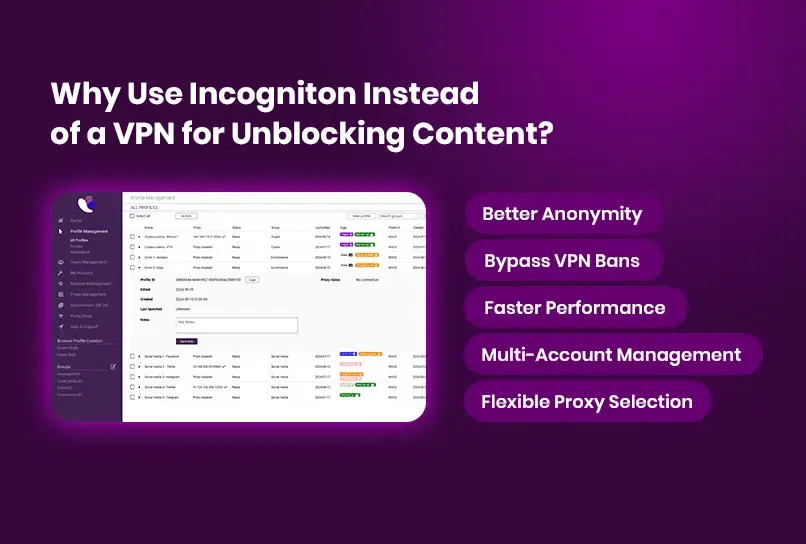
Different tools for different problemsA VPN changes your IP address, but it doesn’t touch your browser fingerprint, and everything you do through it shares one IP. That’s fine for privacy on public Wi-Fi, but it doesn’t help with multiple accounts: every account still looks like the same device on the same address. Incognito mode clears cookies when you close it but shares everything else about your device.
Incogniton works at the browser level, giving each account its own fingerprint and storage, and a proxy per profile then gives each account its own IP. Together they separate accounts in the two places platforms look: the device and the network.
Incogniton Pricing
Checked on 27 September 2026| Plan | Monthly price | Browser profiles | Main extras |
|---|---|---|---|
| Free | $0 | 10 for the first 2 months, then 3 | Profile, proxy and cookie management |
| Starter Plus | $13.99 | 10 | Free built-in proxies |
| Entrepreneur | $20.99 | 50 | Cookie Collector, Synchronizer, Selenium and Puppeteer, API |
| Professional | $55.99 | 150 | Everything above plus 3 team seats |
| Custom | From $104.99 | 500+ | 10+ team seats |
Incogniton discounts longer commitments by 30% for six months and 40% for a year. On top of that, ProxyEmpire customers can use the code ProxyEmpire for a 20% recurring discount on any Incogniton plan. The free plan is enough to test the browser properly; for ongoing multi-account work, Entrepreneur is where the automation tools start.
Remember to budget for proxies as well as the browser. With ProxyEmpire, residential bandwidth starts at $3.50/GB pay as you go and goes down to $1.50/GB on larger plans, unused bandwidth rolls over, and a $1.97 trial lets you test with Incogniton first.
Choosing a plan mostly comes down to two numbers: how many accounts you run and whether you need automation. Count one profile per account plus a few spare for testing. If you run fewer than ten accounts by hand, Starter Plus is enough. Once you want the Cookie Collector to warm up new accounts, the Synchronizer to repeat work across profiles, or scripts through Selenium, Puppeteer or the API, Entrepreneur is the practical starting point. Teams that need several people in the same profiles should look at Professional, because that is where team seats begin. Whatever the plan, you will need one proxy session per active profile.
Who Incogniton Is For
Multi-account work at volume- Social media managers running client accounts on Facebook, Instagram, TikTok and X, who need fast profile switching and controlled team access.
- E-commerce sellers with several storefronts on Amazon, eBay or Etsy, where accounts must never look connected.
- Affiliate and performance marketers who run campaigns across separate identities.
- Developers and data teams who want an anti-detect browser layer under Selenium or Puppeteer scripts.
It’s less useful for casual privacy browsing. If you only want to hide your IP on public Wi-Fi, a VPN is simpler and cheaper. Incogniton’s value is specifically in keeping many accounts apart.
Incogniton Review: Pros, Cons and Verdict
Our takeIncogniton does what an anti-detect browser should, at a price that doesn’t require an enterprise budget. Profile isolation is solid, the fingerprint tools are easy to verify, and the Synchronizer and developer integrations save real time once you run more than a handful of accounts. The main caveats are that the free plan shrinks after two months and the most useful tools start on the Entrepreneur plan.
Like any anti-detect browser, it covers only half of the problem. Paired with one residential or mobile IP per profile, Incogniton separates your accounts in both the browser and the network, and that combination is hard to beat for serious multi-account work. This Incogniton review reflects the plans and features published on Incogniton’s site on 27 September 2026.
Incogniton FAQ
Straight answersIs Incogniton free?
There is a free plan with 10 browser profiles for the first two months, after which it drops to 3 profiles unless you upgrade. Paid plans start at $13.99 a month.
How much does Incogniton cost?
Starter Plus is $13.99 a month for 10 profiles, Entrepreneur $20.99 for 50, Professional $55.99 for 150 with 3 team seats, and custom packages start at $104.99. Six-month and yearly plans are 30% and 40% cheaper.
Is there an Incogniton discount code?
Yes. The code ProxyEmpire gives a 20% recurring discount on any Incogniton plan.
Is Incogniton safe to use?
Incogniton keeps each profile’s data separate and lets you check fingerprints with built-in tools. As with any tool, follow the terms of the platforms you use and give each profile its own proxy.
Does Incogniton need a proxy?
For multi-account work, yes. Incogniton separates fingerprints and storage, but profiles without their own proxies share your IP address, which can link accounts.
What proxies work with Incogniton?
Incogniton supports HTTP, HTTPS and SOCKS5 proxies. Residential proxies with a sticky session per profile suit most accounts, and mobile proxies suit social and app-first platforms.
Does Incogniton support Selenium and Puppeteer?
Yes, on the Entrepreneur plan and above, together with API access.
Incogniton or a VPN?
They solve different problems. A VPN changes your IP but not your fingerprint, and every account shares that IP. Incogniton gives each account its own fingerprint, and a proxy per profile gives each its own IP.
References
Sources- Incogniton — Official site. incogniton.com
- Incogniton — Pricing (checked 27 September 2026). incogniton.com/pricing
- Incogniton — Synchronizer. incogniton.com/features/synchronizer
- Incogniton Blog — Browser fingerprinting: the complete guide. incogniton.com/blog/browser-fingerprinting-complete-guide
- Incogniton Blog — Mastering cookie management. incogniton.com/blog/master-cookie-management
- Incogniton — Affiliate marketing use case. incogniton.com/use-cases/affiliate-marketing
Pair Incogniton with real residential IPs
Residential, 4G mobile and static residential proxies with city, ZIP, ISP and carrier targeting included, a sticky session for every profile, bandwidth that rolls over and 24/7 support from real people. Try it for $1.97.