A proxy manager is the tool that holds your proxy settings, signs in to the proxy for you and switches between locations without you retyping a host, port, username and password each time. It can be a browser extension, a desktop program, a phone app or the dashboard of the provider you buy from. This guide explains the four kinds, what separates a good one from a bad one, and how to set up ProxyEmpire in our free Android app and our free Chrome extension, step by step.
The short version
A proxy manager saves your proxies as profiles, handles the username and password, and lets you connect or switch with one click, either for one browser, for chosen apps, or for the whole device. For ProxyEmpire, use the free ProxyEmpire Proxy Manager app on Android, the extension of the same name in Chrome, and the dashboard to build the proxy details both of them use.
What Is a Proxy Manager?
One place for every proxy you useA proxy on its own is just a set of connection details: a host name, a port, and usually a username and password. Every program that should use it has to be told those details, and most programs make that awkward. Chrome on Windows has no proxy fields of its own. Android’s Wi-Fi proxy setting has no field for a password. Many desktop apps have no proxy option at all.
Proxy management software sits between those programs and the proxy. You enter the details once, save them as a profile, and from then on you pick a profile and click connect. A good tool also answers the proxy’s login challenge automatically, lets you keep several locations side by side, tells you whether the connection works, and stops your real address from slipping out when something goes wrong.
What it does not do is supply IP addresses. A manager is the steering wheel, not the engine: the addresses, their locations and their quality come from the proxy service you connect it to. That is why the most useful managers are free, and why providers such as ProxyEmpire publish their own.
browser or app
   |  manager: extension, app, client
   |  adds saved username + password
   v
v2.proxyempire.io:5000  (gateway)
   |  reads location + session
   |  from the username
   v
exit IP  (residential or mobile)
   |
   v
website sees the exit IP, not yours
Key takeaways
- The job is to store proxy profiles, sign in for you and switch between them quickly.
- There are four common forms: browser extension, desktop app, mobile app, and the provider’s own dashboard and gateway.
- The features that matter most are saved logins, clear scope (browser, app or device), leak protection and fast switching.
- ProxyEmpire has a free Android app and a free Chrome extension, both called ProxyEmpire Proxy Manager.
- It is not a VPN: it routes traffic through a proxy, it doesn’t encrypt it for you.
The Four Kinds of Proxy Management Tool
Pick by what you need to coverEvery tool in this category solves the same problem, but at a different level of your system. The level decides what traffic is covered, which is the first question to answer before choosing one.
| Kind | What it covers | Typical example | Best for |
|---|---|---|---|
| Browser extension | One browser only; the rest of the computer stays direct | ProxyEmpire’s Chrome extension, FoxyProxy, ZeroOmega | Browsing from another location, ad and SERP checks, account work in one browser |
| Desktop app | Chosen programs, or everything, by rules you set | Proxifier on Windows and macOS | Apps without their own proxy settings, per-app routing, proxy chains |
| Mobile app | All apps on the phone, or only the apps you pick | ProxyEmpire’s Android app | Social, shopping and other mobile-first apps; testing on a real phone |
| Dashboard and gateway | Builds the connection details; the gateway rotates IPs on the provider’s side | The Proxy Manager page in the ProxyEmpire dashboard | Scrapers, scripts and any tool you configure yourself |
Many people use two of these at once. A typical setup is the dashboard to choose the location and session type, and then an extension or app to apply those details where they are needed. For a comparison of browser add-ons from different makers, see our guide to the best proxy extension for Chrome.
What to Look For
Six features that separate good tools from bad onesProfiles and switching. The core job is holding several proxies and moving between them without retyping anything. Look for bulk import if you work with lists, and a visible indicator of which profile is live, because the most common mistake with any proxy tool is forgetting which one is on.
Per-app or per-site rules. A browser extension covers one browser, which is often exactly right. A desktop client such as Proxifier can send one program through the proxy and leave the rest alone. On Android, a VPN-based app can include or exclude individual apps. Android’s own developer documentation describes the mechanism: when a VPN app lists allowed applications, “other, un-added applications will use networking as if the VPN wasn’t running.”
Authentication. Paid proxies need a username and password, and ProxyEmpire uses username and password only, with no IP whitelisting. HTTP proxies ask for credentials with a 407 Proxy Authentication Required response, defined in RFC 9110, and the client answers with a Proxy-Authorization header. SOCKS5 uses its own username and password exchange, defined in RFC 1929. A manager that handles this for you removes the pop-ups and the typos.
Leak protection. A browser can reveal your real address through WebRTC even while a proxy is set, and a dropped proxy can quietly fall back to your own connection. Chrome gives extensions a WebRTC IP handling setting, whose documented values include disable_non_proxied_udp, and a well-built extension uses it while connected. A kill switch that blocks traffic when the proxy fails is the other half.
Testing and status. A connection check, latency reading or IP check saves guesswork. The best tools also compare the browser’s timezone, language and location with the proxy’s country, since a mismatch is an easy tell.
Trust. A proxy tool sees where your traffic goes. Prefer one from a known publisher, check the store’s data-safety or privacy section, and avoid look-alike copies of popular tools.
How to Set Up ProxyEmpire on Android
The free app on Google Play, no rootAndroid’s built-in proxy lives in the Wi-Fi network’s advanced options. It covers one Wi-Fi network, has no username or password field, and apps are free to ignore it. That is why we built our own app. Its Google Play listing says it routes all your apps through an HTTP or SOCKS5 proxy with no root required, using a local VPN service to redirect the device’s traffic, and that it works with all apps or per app. The listing’s data-safety section states that no data is collected and none is shared with third parties.
- Install the appSearch Google Play for ProxyEmpire Proxy Manager, or use the button at the top of this page. It is free.
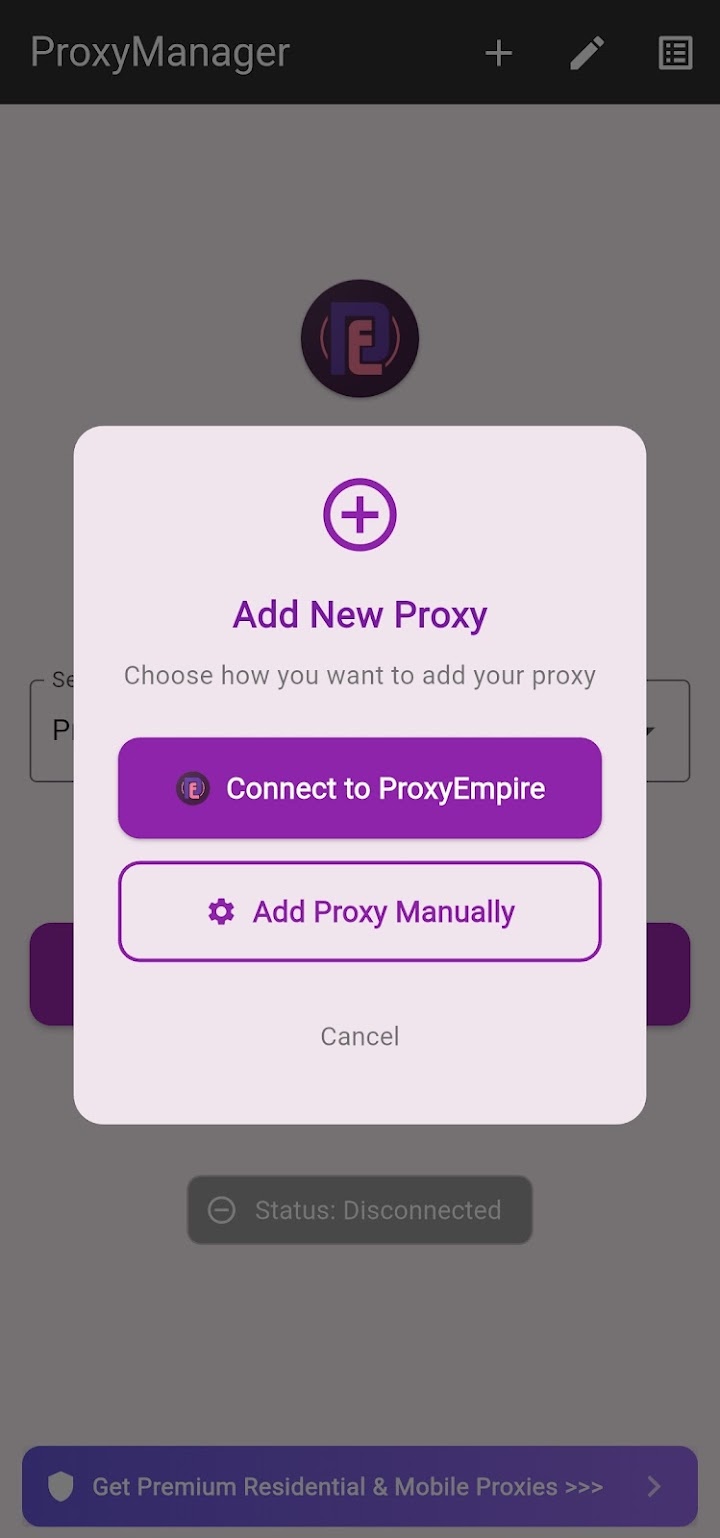
- Connect your accountTap +, choose Connect to ProxyEmpire and enter your proxy username and password once.
- Set the locationPick a country, then a region, city or ISP if you need one. Turn on a sticky session to keep one IP.
- StartSelect the profile on the home screen, tap Start and accept Android’s connection request.
Step 1 and 2: install the app and add a profile
After installing, tap + to add a profile. The app offers two options. Connect to ProxyEmpire asks for your ProxyEmpire proxy username and password once and then creates your profiles automatically, already pointed at v2.proxyempire.io on port 5000, so you never type a host or port. Add Proxy Manually is for any other HTTP or SOCKS5 proxy, where you enter the details yourself.
Step 3: choose where the IP comes from
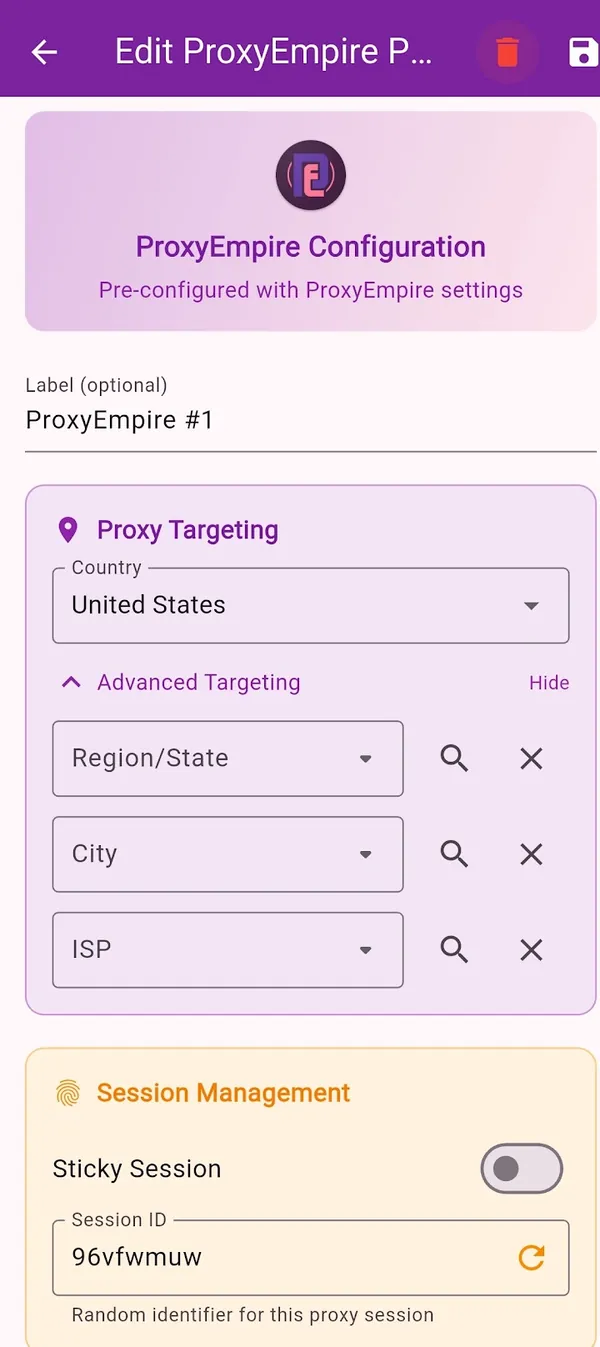
Each profile has its own targeting. Pick a Country, then open Advanced Targeting to narrow it to a Region/State, City or ISP. Narrow only as far as you need: a small city combined with one ISP may have few addresses. Under Session Management, the Sticky Session switch keeps the same IP for the session, which is what you want for logins and anything with several steps. The Session ID shows the session in use, and generating a new one gives you a fresh IP. Leave it off for a rotating IP.
Step 4: start and check
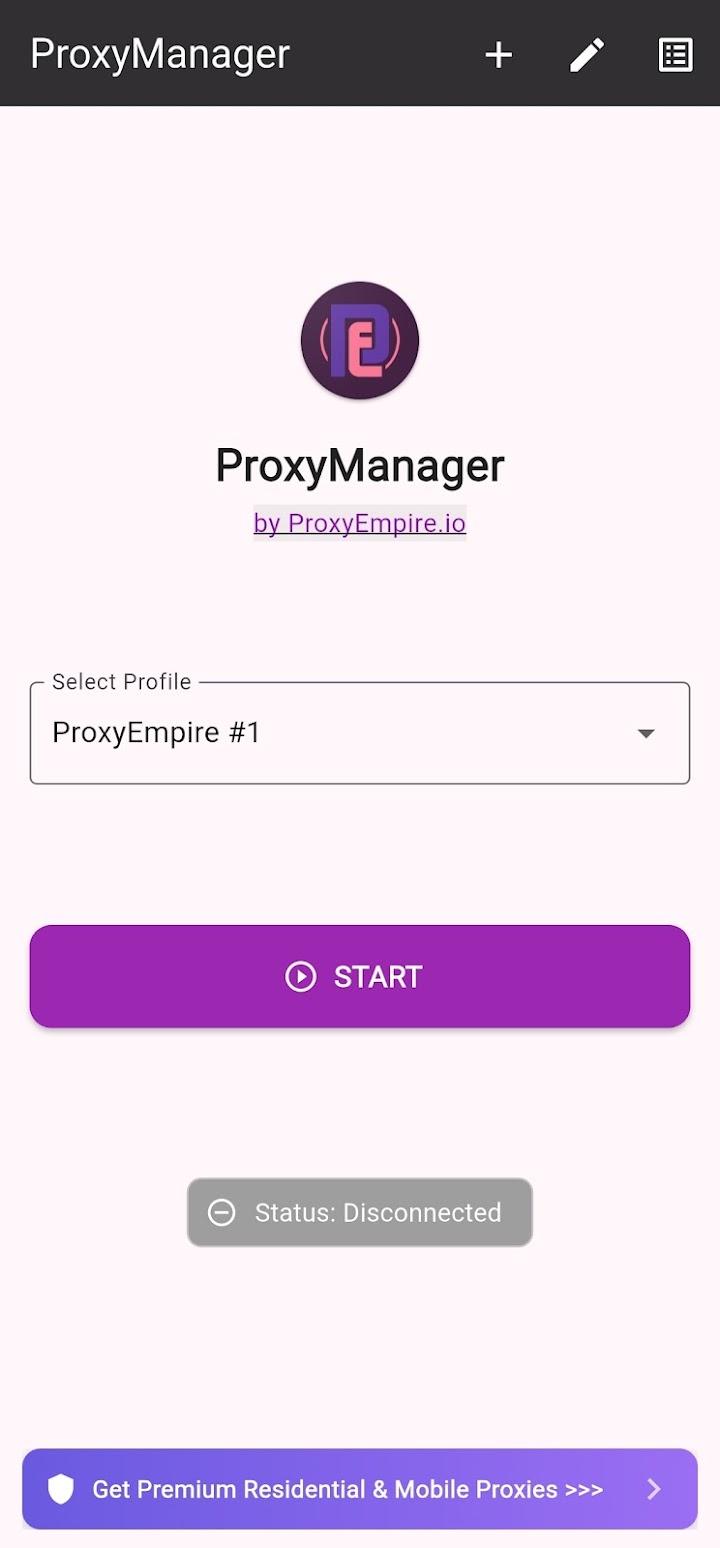
Back on the home screen, pick the profile under Select Profile and tap Start. The first time, Android asks you to allow the app to set up a VPN connection. That is the standard consent step for any app that uses Android’s VPN service, and the app needs it to route traffic. Then open Chrome and search for “what is my IP”: the address and location should match the profile, not your own connection.
The app works on Wi-Fi and on mobile data, so the proxy stays on when you leave Wi-Fi range. For phones and mobile-first apps, rotating mobile proxies are the natural match: 4M+ carrier IPs in 174 countries, with country, city and carrier targeting included at no extra charge. Our full Android proxy guide also covers the Wi-Fi setting, per-app use and troubleshooting.
How to Set Up ProxyEmpire in Chrome
The free extension from the Chrome Web StoreOn Windows, macOS and Linux, Chrome uses the computer’s proxy settings, so any proxy you set there moves every app that follows them. An extension changes the proxy for Chrome alone. Chrome’s proxy API lets an extension set the browser’s proxy, and Chrome’s webRequest API lets it answer the proxy’s sign-in challenge, which is how an extension logs in to a password-protected HTTP proxy without a pop-up.
Our extension, version 1.1.0 on the Chrome Web Store (updated 31 August 2026), does that and more. Its listing describes one-click connect and switching between profiles, bulk import and built-in proxy testing, folders, tags, favourites and search, and support for username and password proxies. For privacy it lists WebRTC leak protection enforced at browser level, timezone, language, geolocation and User-Agent matched to the proxy’s region, a custom User-Agent option, a one-click Leak & Consistency Check and a kill switch that blocks traffic if the proxy drops. It also shows connection status, latency and approximate bandwidth, and can block images to save data.
- Add it to ChromeOpen the ProxyEmpire Proxy Manager listing in the Chrome Web Store and click Add to Chrome. The extension also works in Microsoft Edge and Brave.
- Pin itPin the icon from the puzzle-piece menu. Alt+Shift+P also opens it.
- Create a profileEnter
v2.proxyempire.io, port 5000, and your proxy username and password. - Connect and checkClick the profile, then run the Leak & Consistency Check.
Create the profile. The host and port are the same for rotating residential and mobile. The username and password come from the dashboard, and because the location and session are encoded in the username, you can make one profile per country simply by copying a different username for each. If you work from a list, use bulk import instead.
Connect and verify. Click the profile to connect. The Leak & Consistency Check compares your IP, WebRTC, timezone, language and geolocation with the proxy’s location, so you can see at a glance whether anything gives away your real connection. If you updated from an older version, Chrome asks you to approve the extension again, because 1.1.0 added the WebRTC privacy permission.
Use HTTP in Chrome. Chrome’s proxy API has no fields for a username or password, and the sign-in challenge extensions answer is an HTTP one. In practice this means Chrome extensions can log in to HTTP proxies but not to password-protected SOCKS5 proxies. ProxyEmpire’s HTTP endpoint is the right choice in the browser. Our Chrome proxy settings guide covers the system settings and command-line flags as well.
Choose a sticky session for anything you log in to. A browser sends dozens of requests per page, and a new IP on each one can break a checkout halfway.
The Dashboard and the Rotating Gateway
Management that happens on the provider’s sideNot all proxy management happens on your device. With a rotating residential or mobile service, the provider’s gateway does the heavy lifting: you connect to one address, and the gateway picks an exit IP from the pool, rotates it, or holds it for a sticky session. You don’t need software to cycle through a list, retire dead IPs or balance load, because none of that reaches you.
In the ProxyEmpire dashboard, the page that builds your connection is itself called Proxy Manager. ProxyEmpire’s help centre describes the steps: open it, choose the proxy type, the country and any other targeting, and the rotation mode, then copy the host, port, username and password, or the full proxy string, into your software. Your targeting and session settings are part of the username, so a new country means copying a new username. The same page generates proxy lists in formats such as host:port:user:pass, shows code examples for cURL, Python, Node.js, PHP and Go, and can test your settings.
On rotating residential proxies you can target by country, region or state, city, ZIP, ISP, ASN and OS fingerprint, at no extra charge, across 30M+ IPs in 179 countries and territories. Static residential and datacenter proxies are targeted by country. All proxy types support HTTP, HTTPS and SOCKS5; only ports 80 and 443 are open by default, and UDP (ports 443 and 53) is available on Rotating Residential and Rotating Mobile only.
Desktop Apps and Proxifier
Rules for programs that have no proxy settingSome programs have no proxy option at all, and some you want on the proxy while everything else stays direct. A desktop client handles both. The best-known example is Proxifier for Windows and macOS. Its documentation describes proxification rules that send each connection directly, through a proxy or chain, or block it, with rules based on application names, target host names or IP addresses, and port numbers. Rules are read from top to bottom, and a Default rule catches everything that matches nothing else.
That rule system is what makes it a manager rather than a simple on-off switch. You can send one scraper or messaging app through a residential proxy, a second app through a different country, and leave your browser and updates alone. Proxifier also supports proxy chains, where traffic passes through more than one proxy in sequence. It is paid software with a free trial. Our guide to managing proxies with Proxifier walks through the setup with ProxyEmpire.
Proxy Manager vs Proxy Switcher vs VPN
Three tools that are often confused| Proxy manager | Proxy switcher | VPN | |
|---|---|---|---|
| Main job | Store, sign in to and switch between proxies | Turn a proxy on or off, or change it, often by URL rules | Tunnel all device traffic to a VPN server |
| Scope | A browser, chosen apps or the device | Usually one browser | Usually the whole device |
| Encryption | None added; HTTPS sites stay encrypted end to end | None added | Encrypts traffic between you and the VPN server |
| IP choice | Any proxy you add, down to city, ISP or session | Any proxy you add | The provider’s server list |
| Typical use | Location testing, account work, data collection | Sending some sites through a proxy | Privacy on public Wi-Fi, one location for everything |
In practice the first two overlap. “Switcher” is the older name for browser add-ons that flip between proxy profiles, and most current proxy extensions do that plus login, testing and leak protection. The VPN is the one that really differs. A VPN encrypts everything between your device and its server and gives you the server’s address. A proxy tool routes traffic through a proxy without adding encryption, but it gives you far more choice of exit IP, including real residential and mobile addresses. Our Android app uses Android’s VPN interface only to capture traffic on the phone; it forwards that traffic to your proxy rather than to a VPN server. For a longer comparison, read residential proxies vs VPNs.
Other Tools with the Same Name
Server software and reverse proxiesThe phrase is also used for two kinds of software that do something different from the tools above.
- Provider-run local proxy servers. Some providers publish software that runs on your own server, accepts connections from your scrapers and forwards them to the provider’s network with IP rotation and load balancing. Bright Data’s open-source Proxy Manager, installed through npm or Docker and configured in a web interface, is the best-known example. It is built for that provider’s network. With ProxyEmpire the equivalent work happens at the rotating gateway, so there is nothing extra to install.
- Reverse-proxy managers. Nginx Proxy Manager is an open-source web interface for running Nginx as a reverse proxy: it publishes web services from a private network and issues free SSL certificates through Let’s Encrypt. It manages incoming traffic to your own servers, which is the opposite direction to the forward proxies this guide is about.
If you came here for one of those, the rest of this page is about forward proxies, the kind you use to browse or collect data from another IP.
Good Habits with Any Proxy Tool
Small things that prevent most problems- Match the session to the task. Sticky sessions for logins, carts and multi-step forms; rotation for price checks, search results and large-scale data collection.
- Name profiles by location and type. “US mobile, sticky” beats “Profile 3” when you have twenty of them.
- Check before you work. Run a leak check or an IP check after connecting, and again after changing profile.
- Keep personal apps off the proxy. Per-app routing on Android and rules in desktop clients keep email and banking on your normal connection.
- Know what’s blocked. Financial, government, crypto, bank and payment sites are blocked on all ProxyEmpire proxy types; unblocking needs KYC and a use-case review.
- Remember UDP. ProxyEmpire carries UDP only on Rotating Residential and Rotating Mobile, and only on ports 443 and 53 by default, so apps that depend on other UDP ports, such as many games and voice calls, won’t work through them.
- Update the tool. Browser and phone updates change proxy and privacy settings, and maintained tools keep up.
Proxy Manager FAQ
Short answersWhat does a proxy manager do?
It stores proxy connection details as profiles, signs in to the proxy for you, and lets you connect, disconnect or switch location in one click, for a browser, chosen apps or the whole device.
Is ProxyEmpire’s app free?
Yes. The Android app on Google Play and the Chrome extension on the Chrome Web Store are both free. You pay only for the proxy bandwidth you use; the $1.97 trial includes 100 MB of residential and 50 MB of mobile traffic.
Does the Android app need root?
No. It uses Android’s VPN service to route traffic, so it needs only the standard connection request that Android shows the first time you tap Start.
Can I use the extension with another provider’s proxies?
Yes. You can enter any HTTP proxy with its host, port, username and password. The Android app’s Add Proxy Manually option works the same way for HTTP and SOCKS5.
Why can’t I use a SOCKS5 proxy with a password in Chrome?
Chrome’s proxy API has no username or password fields, and extensions can only answer HTTP sign-in challenges. Use the HTTP endpoint in Chrome, or a desktop client for SOCKS5.
Is a proxy manager the same as a VPN?
No. A VPN encrypts traffic to its own server. A proxy tool routes traffic through the proxies you choose without adding encryption, and gives you residential or mobile IPs in the exact location you need.
Do I need one for rotating proxies?
Not for rotation itself: ProxyEmpire’s gateway rotates IPs or holds a sticky session for you. A manager is still useful to apply the connection details in a browser or on a phone.
What is the difference between a proxy manager and a proxy switcher?
A switcher mainly turns proxies on and off or changes them by site. A manager adds saved logins, testing, organisation and often leak protection. Most modern extensions do both.
References
Primary documentation and store listings- ProxyEmpire Proxy Manager — Google Play listing (Android app). play.google.com/store/apps/details?id=com.proxymanager.proxymanager
- ProxyEmpire Proxy Manager — Chrome Web Store listing (extension, version 1.1.0). chromewebstore.google.com/detail/proxyempire-proxy-manager
- ProxyEmpire docs — How do I connect to your proxies? proxyempire.io/docs/how-do-i-connect-to-your-proxies
- ProxyEmpire docs — What connection protocols do you support? proxyempire.io/docs/what-connection-protocols-do-you-support
- ProxyEmpire docs — Are there any blocked websites? proxyempire.io/docs/are-there-any-blocked-websites
- Chrome for Developers —
chrome.proxyAPI. developer.chrome.com/docs/extensions/reference/api/proxy - Chrome for Developers —
chrome.webRequestAPI (onAuthRequired). developer.chrome.com/docs/extensions/reference/api/webRequest - Chrome for Developers —
chrome.privacyAPI (webRTCIPHandlingPolicy). developer.chrome.com/docs/extensions/reference/api/privacy - Android Developers —
VpnService.Builder(allowed and disallowed applications). developer.android.com/reference/android/net/VpnService.Builder - IETF — RFC 9110, “HTTP Semantics”: Proxy-Authorization (11.7.2) and 407 Proxy Authentication Required (15.5.8). rfc-editor.org/rfc/rfc9110
- IETF — RFC 1929, “Username/Password Authentication for SOCKS V5”. rfc-editor.org/rfc/rfc1929
- Proxifier v4 for Windows documentation — Proxification Rules. proxifier.com/docs/win-v4/rules.html
- Nginx Proxy Manager — project site. nginxproxymanager.com
Free tools, real residential and mobile IPs
Our Android app and Chrome extension are free. Plug them into 30M+ residential IPs in 179 countries and territories or 4M+ mobile IPs in 174 countries, with city, ISP and carrier targeting at no extra charge, sticky or rotating sessions, and 24/7 support from real people. The $1.97 trial includes 100 MB of residential and 50 MB of mobile traffic.