Apify runs your scrapers in the cloud, and every Actor that takes a proxy setting can use proxies from outside Apify. This guide shows how to set up an Apify proxy configuration with ProxyEmpire residential or mobile IPs. It covers Store Actors in Apify Console, where no code is needed, and your own Actors written with the Apify SDK for JavaScript and Python. Every Console step below comes from a real run on 19 November 2026, and the code was tested with the current SDK versions.
The short version
In any Actor’s input, open the proxy section, choose Own proxies and paste http://USERNAME:[email protected]:5000 with the username and password from ProxyEmpire’s Connection Builder. Percent-encode special characters in the password. In your own Actors, pass the same URL to Actor.createProxyConfiguration() (JavaScript) or Actor.create_proxy_configuration() (Python), and keep the password in a secret environment variable.
Key takeaways
- Every Actor whose input has a proxy field shows an Own proxies tab. Paste one proxy URL per line and the Actor uses them instead of Apify Proxy.
- The URL format is
http://username:password@host:port. Use thehttp://scheme with the ProxyEmpire gatewayv2.proxyempire.io:5000. - Characters such as
@,:and/in a password must be percent-encoded, or the SDK rejects the URL. - Rotation is set in ProxyEmpire’s Connection Builder, not in Apify. Apify’s Proxy rotation setting only applies to Apify Proxy.
- A
407 Proxy Authentication Requiredin the run log means the ProxyEmpire gateway rejected the username or password.
Why Use Your Own Proxies on Apify
Apify Proxy is built in, but it isn’t the only optionApify ships its own proxy service, Apify Proxy, and most Store Actors default to it. It works well, and you can switch to another provider at any time. Apify’s documentation describes using your own proxies in Console and in the SDK, and the proxy input editor has a dedicated Own proxies tab for it.
Teams usually bring their own proxies for one of these reasons:
Apify still bills for the Actor’s own compute. The proxy traffic is billed by ProxyEmpire, from your ProxyEmpire GB balance.
What You Need
Two accounts and five minutes- An Apify account. The Free plan includes $5 of platform usage a month. The test run in this guide cost $0.001.
- A ProxyEmpire plan with residential or mobile bandwidth. The $1.97 trial gives you 100 MB of residential and 50 MB of mobile traffic, which is plenty for testing.
- An Actor with a proxy input. Many scraping Actors in Apify Store have one. Look for a section called something like Proxy configuration on the Actor’s Input tab. If an Actor has no proxy field, you can’t plug in outside proxies without changing its code.
Step 1: Get Your ProxyEmpire Proxy URL
Everything comes from the Connection BuilderSign in to the ProxyEmpire dashboard and click Proxy Manager in the sidebar.

The Connection Builder opens at the top. Pick Residential or Mobile (the remaining balance is shown on each), a country, and an IP rotation mode. The modes are covered in the rotation section below. Open Advanced targeting settings if you need a region, city, ZIP code, ISP or ASN.

Below the builder, the dashboard shows the Host, Port, Username and Password for those settings, each with a copy button. Test proxy settings checks the login before you go to Apify. On the right, the Proxy list generates several ready-made proxies at once, which you’ll need for sticky sessions.
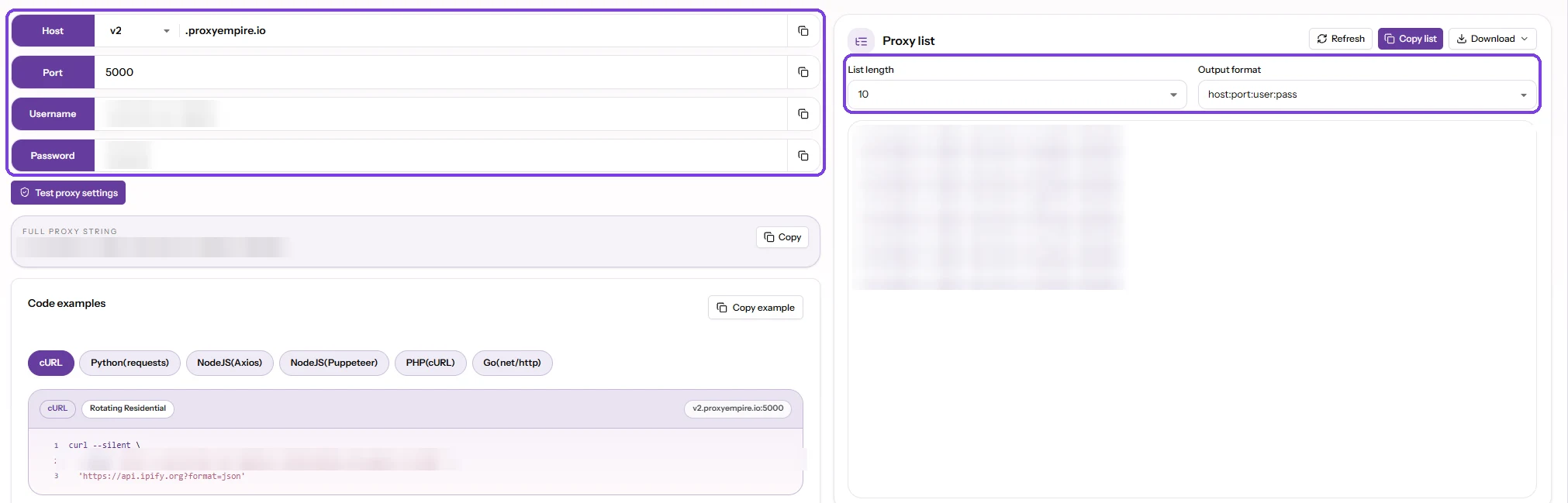
Apify needs those four values as a single URL:
http://USERNAME:[email protected]:5000Replace USERNAME with the username exactly as the dashboard shows it. The location and session settings are part of the username, so copy it rather than typing it. Use http:// even though most targets are HTTPS: the scraper opens an HTTPS tunnel through the proxy with CONNECT, and the page itself stays encrypted end to end.
Percent-encode special characters
The @, : and / characters have a meaning inside a URL. If your password contains them, encode them, or the URL will be split in the wrong place. In our tests, the Apify SDK refused a URL with an unencoded @ in the password and stopped with an ArgumentError about proxyUrls.
@becomes%40:becomes%3A/becomes%2F#becomes%23,?becomes%3F,%becomes%25
If you export several proxies from the dashboard’s Proxy list in the host:port:user:pass format, this short script turns each line into a ready, encoded Apify proxy URL:
"""Turn a ProxyEmpire proxy list (host:port:user:pass) into Apify proxy URLs."""
import sys
from urllib.parse import quote

for line in sys.stdin:
    line = line.strip()
    if not line:
        continue
    host, port, user, password = line.split(":", 3)
    print(f"http://{quote(user, safe='')}:{quote(password, safe='')}@{host}:{port}")
Run it with python3 to_proxy_urls.py < proxies.txt and paste the output into Apify, one URL per line.
Step 2: Add ProxyEmpire to an Actor in Apify Console
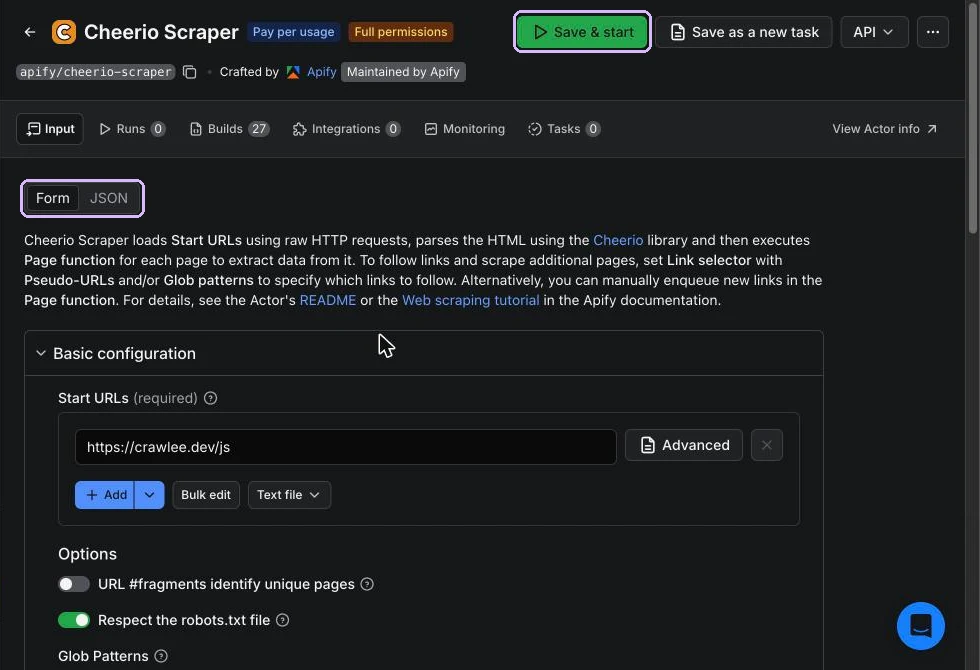
No code: works for Store ActorsWe used Cheerio Scraper, a general-purpose scraper made and maintained by Apify. The steps are the same for any Actor with a proxy field.
- Open the Actor in Apify Console and go to the Input tab. Set your start URLs as usual.
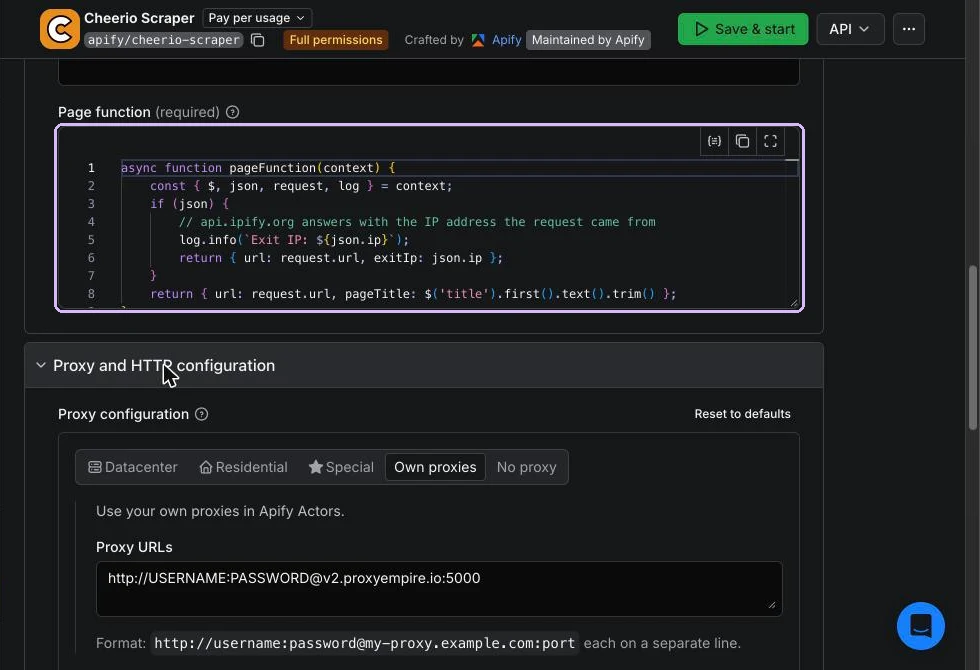
- Scroll to the proxy section. In Cheerio Scraper it’s called Proxy and HTTP configuration, and the field is Proxy configuration.
- Click Own proxies. The other tabs (Datacenter, Residential, Special) are Apify Proxy groups.
- Paste your ProxyEmpire URL into Proxy URLs. For several proxies, put one URL on each line.
- Click Save & start.
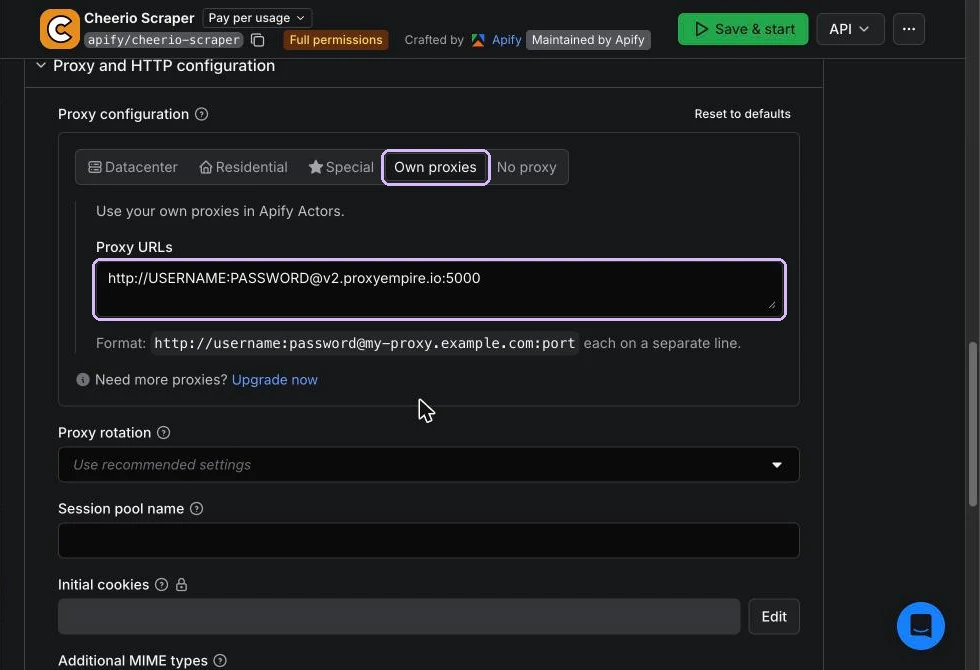
Below the proxy URLs, Cheerio Scraper also shows a Proxy rotation drop-down. The Actor’s own input description says this setting “can only be used in conjunction with Apify Proxy”, so leave it alone when you use your own proxies. Rotation with ProxyEmpire is controlled by the username you copied from the Connection Builder.
First run of an Actor: Apify may ask you to authorize an Actor that requests full permissions before its first run. Cheerio Scraper is one of them. Read the prompt, and only authorize Actors from developers you trust.
Under the JSON tab of the input, the setting looks like this. You can paste it when you call the Actor through the Apify API too:
"proxyConfiguration": {
    "useApifyProxy": false,
    "proxyUrls": [
        "http://USERNAME:[email protected]:5000"
    ]
}
Step 3: Run the Actor and Check the Exit IP
Prove the traffic goes through ProxyEmpireBefore a long crawl, do a two-page test run. We added https://api.ipify.org/?format=json as an extra start URL. It answers with the IP address the request came from, which is the proxy exit IP. Cheerio Scraper handles application/json pages by default and passes the parsed body to the page function as context.json, so the page function only needs one extra branch:
async function pageFunction(context) {
    const { $, json, request, log } = context;
    if (json) {
        // api.ipify.org answers with the IP address the request came from
        log.info(`Exit IP: ${json.ip}`);
        return { url: request.url, exitIp: json.ip };
    }
    return { url: request.url, pageTitle: $('title').first().text().trim() };
}
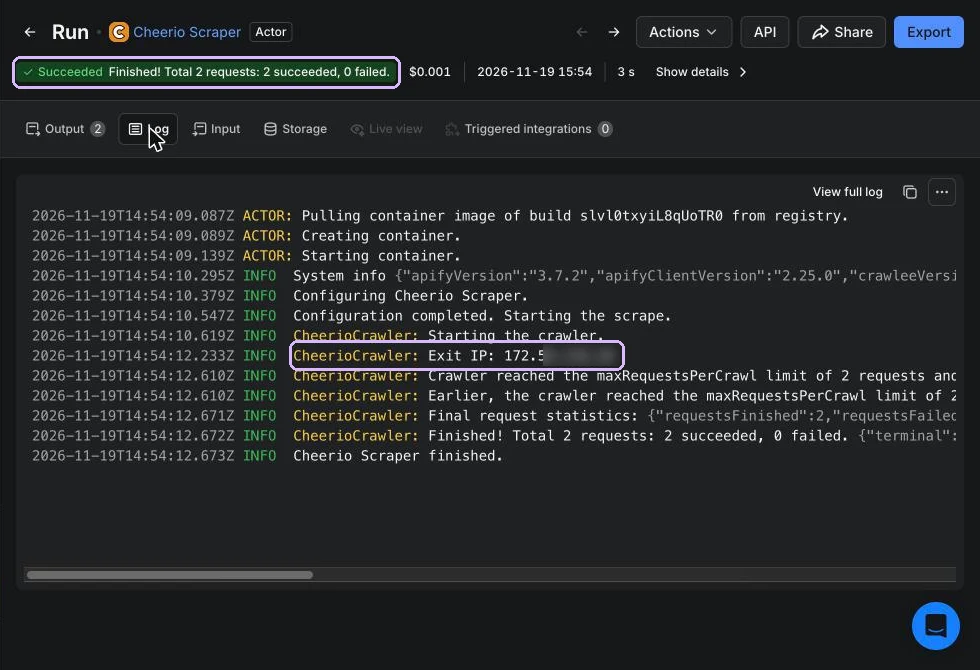
With the ProxyEmpire URL in place, the run finished in 3 seconds with both requests successful, and the log shows the exit IP that ipify reported:
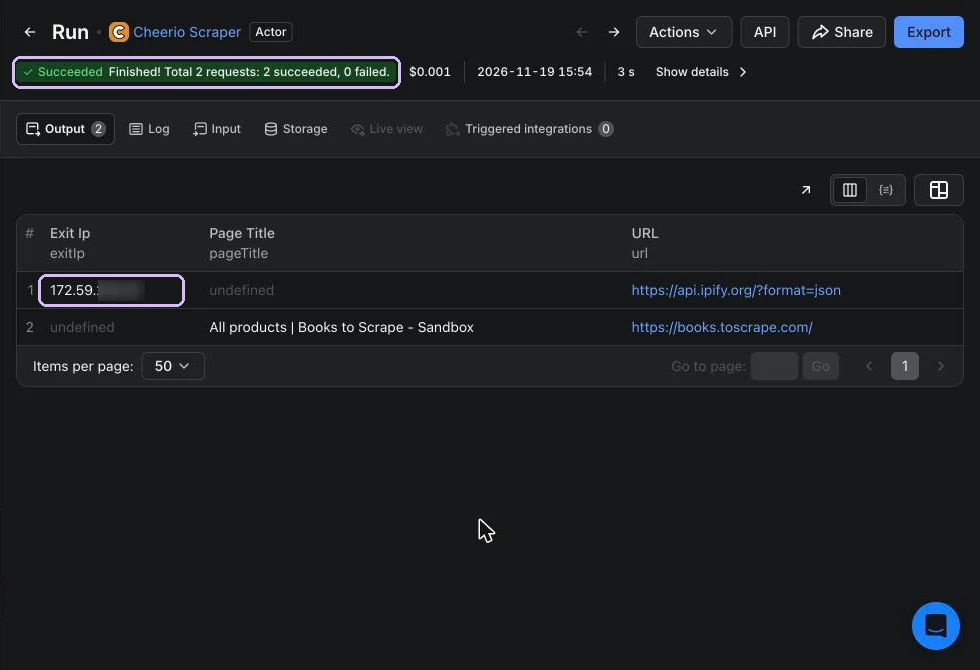
The Output tab has the same IP in the dataset, next to the page title from the second URL. Compare it with your own IP address: if they match, the proxy wasn’t used.
Once the test passes, remove the ipify URL, set your real start URLs and limits, and save the input as a task (the Save as a new task button) so you can rerun or schedule it with the same proxy settings.
Rotating and Sticky Sessions on Apify
Pick the mode in ProxyEmpire, then decide how many URLs to pasteProxyEmpire’s Connection Builder has three IP rotation modes: Same IP keeps one IP for a sticky session, Every request gives a new IP per request, and Custom TTL rotates on a timer of up to 2 hours. The mode is part of the username, so Apify doesn’t need to know about it. If you’re unsure which to choose, our guide on sticky vs rotating proxies covers the trade-offs.
On the Apify side, the Actor rotates through the URLs you pasted. We read the Crawlee source (@crawlee/core 3.18.2), which most JavaScript Actors use under the hood. It hands out your proxy URLs round-robin and remembers which URL each crawler session got, so a session keeps the same proxy URL for its whole life. In practice:
- One URL with Every request: the simplest setup for broad crawls. Every request leaves from a new IP, whatever Crawlee does with sessions.
- Several URLs, each a separate Same IP session: each crawler session sticks to one of them, so each session keeps a stable IP. Use this for logins, carts or paginated flows. With Same IP selected, the dashboard’s Proxy list generates up to the chosen List length of proxies. Each has its own session ID in the username, so each is its own sticky IP. Copy the list, convert it with Example 2, and paste all the lines into Proxy URLs. The sticky sessions guide has more detail.
- One URL with Same IP: every request in the run shares one IP. That’s fine for small jobs but slow and easy to rate-limit on big ones (see how to handle 429 Too Many Requests).
Your Own Actor in JavaScript
Apify SDK 3.8.0 and Crawlee 3.18.2If you build your own Actor, give it the same proxy field that Store Actors have. Then the person running it can choose Own proxies in Console, and your code reads the value. Start a project with the Apify CLI (apify create), then add a proxy editor field to .actor/input_schema.json:
{
    "title": "ProxyEmpire demo input",
    "type": "object",
    "schemaVersion": 1,
    "properties": {
        "startUrls": {
            "title": "Start URLs",
            "type": "array",
            "editor": "requestListSources",
            "prefill": [{ "url": "https://books.toscrape.com/" }]
        },
        "maxRequests": {
            "title": "Max requests",
            "type": "integer",
            "default": 20,
            "minimum": 1
        },
        "proxyConfiguration": {
            "title": "Proxy configuration",
            "type": "object",
            "editor": "proxy",
            "description": "Choose Own proxies and paste your ProxyEmpire proxy URL.",
            "prefill": { "useApifyProxy": false }
        }
    },
    "required": ["startUrls"]
}
The Actor below supports two ways to get the proxy. Option A reads the Own proxies URLs from the input. Option B builds the URL from environment variables, which is the better choice for scheduled production runs (see keeping the password out of the input). It first logs the exit IP, then scrapes book titles and prices from the books.toscrape.com sandbox, following the pagination.
import { Actor, log } from 'apify';
import { CheerioCrawler } from 'crawlee';

await Actor.init();

const input = (await Actor.getInput()) ?? {};
const { startUrls = [{ url: 'https://books.toscrape.com/' }], maxRequests = 20 } = input;

// Option B: build the URL from secret environment variables (Actor settings).
// The URL setters percent-encode special characters in the username and password.
function proxyEmpireUrlFromEnv() {
    const { PROXYEMPIRE_USER: user, PROXYEMPIRE_PASSWORD: password } = process.env;
    if (!user || !password) return null;
    const url = new URL(process.env.PROXYEMPIRE_SERVER ?? 'http://v2.proxyempire.io:5000');
    url.username = user;
    url.password = password;
    return url.href;
}

const envProxyUrl = proxyEmpireUrlFromEnv();
const proxyConfiguration = envProxyUrl
    ? await Actor.createProxyConfiguration({ proxyUrls: [envProxyUrl] })
    // Option A: the "Proxy configuration" input field with "Own proxies" selected.
    : input.proxyConfiguration && await Actor.createProxyConfiguration(input.proxyConfiguration);

if (!proxyConfiguration) {
    throw new Error('No proxy set: choose "Own proxies" in the input or set PROXYEMPIRE_USER/PASSWORD.');
}

// One request through the proxy to record which exit IP the run used.
const exitIp = new CheerioCrawler({
    proxyConfiguration,
    additionalMimeTypes: ['application/json'],
    async requestHandler({ json }) {
        log.info(`Exit IP: ${json.ip}`);
        await Actor.setValue('EXIT_IP', json);
    },
});
await exitIp.run(['https://api.ipify.org/?format=json']);

const crawler = new CheerioCrawler({
    proxyConfiguration,
    maxRequestsPerCrawl: maxRequests,
    maxRequestRetries: 3,
    async requestHandler({ request, $, enqueueLinks, proxyInfo }) {
        const books = $('article.product_pod').map((_, el) => ({
            title: $(el).find('h3 a').attr('title'),
            price: $(el).find('.price_color').text().trim(),
        })).get();
        log.info(`${request.url}: ${books.length} books via ${proxyInfo?.hostname}`);
        await Actor.pushData(books.map((book) => ({ ...book, page: request.url })));
        await enqueueLinks({ selector: 'li.next a' });
    },
    failedRequestHandler({ request, error }) {
        log.error(`Failed ${request.url}: ${error.message}`);
    },
});

await crawler.run(startUrls);
await Actor.exit();
A few details that matter:
Actor.createProxyConfiguration(input.proxyConfiguration)understands the proxy editor’s value directly. WithuseApifyProxy: falseit usesproxyUrls, and if there are none it returnsundefined. That’s why the code checks the result and fails loudly instead of quietly scraping from Apify’s own IP.- Don’t call
Actor.createProxyConfiguration()with no input at all for this use case. With nothing set, the SDK tries to use Apify Proxy. In a local run without an Apify token, it logged a warning and carried on without a proxy. - Setting
url.usernameandurl.passwordon aURLobject percent-encodes them for you, so passwords with special characters just work. - The same
proxyConfigurationworks forPlaywrightCrawlerandPuppeteerCrawler. Our Crawlee proxy tutorial covers browser crawlers in more depth.
We ran this Actor locally (node src/main.js) against a local authenticated proxy with a password containing @, : and /. Both options scraped 20 books per page through the proxy. A wrong password produced Proxy responded with 407 Proxy Authentication Required. An empty proxy setting stopped the run with the error message from the code.
Your Own Actor in Python
Apify SDK for Python 4.3.0 with Crawlee 1.11.2The Python SDK mirrors the JavaScript one. Actor.create_proxy_configuration() takes either actor_proxy_input, which is the proxy editor’s value, or proxy_urls. The Python SDK needs Python 3.11 or newer, and BeautifulSoupCrawler needs the extra: pip install "apify==4.3.0" "crawlee[beautifulsoup]==1.11.2".
"""Apify Actor (Python): scrape books.toscrape.com through ProxyEmpire."""
import asyncio
import os
from urllib.parse import quote, urlsplit

from apify import Actor
from crawlee.crawlers import BeautifulSoupCrawler, BeautifulSoupCrawlingContext


def proxyempire_url_from_env():
    """Option B: build the proxy URL from secret environment variables."""
    user = os.getenv('PROXYEMPIRE_USER')
    password = os.getenv('PROXYEMPIRE_PASSWORD')
    if not user or not password:
        return None
    server = urlsplit(os.getenv('PROXYEMPIRE_SERVER', 'http://v2.proxyempire.io:5000'))
    # Percent-encode, so characters such as @ : / in the password stay intact.
    return f'{server.scheme}://{quote(user, safe="")}:{quote(password, safe="")}@{server.netloc}'


async def main() -> None:
    async with Actor:
        actor_input = await Actor.get_input() or {}
        start_urls = [u['url'] for u in actor_input.get('startUrls', [{'url': 'https://books.toscrape.com/'}])]

        env_url = proxyempire_url_from_env()
        if env_url:
            proxy_configuration = await Actor.create_proxy_configuration(proxy_urls=[env_url])
        elif actor_input.get('proxyConfiguration'):
            # Option A: the "Proxy configuration" input field with "Own proxies".
            proxy_configuration = await Actor.create_proxy_configuration(
                actor_proxy_input=actor_input['proxyConfiguration'])
        else:
            proxy_configuration = None
        if proxy_configuration is None:
            raise RuntimeError('No proxy set: choose "Own proxies" in the input '
                               'or set PROXYEMPIRE_USER and PROXYEMPIRE_PASSWORD.')

        crawler = BeautifulSoupCrawler(
            proxy_configuration=proxy_configuration,
            max_requests_per_crawl=actor_input.get('maxRequests', 20),
            max_request_retries=3,
        )

        @crawler.router.default_handler
        async def handle(context: BeautifulSoupCrawlingContext) -> None:
            books = [{
                'title': card.select_one('h3 a')['title'],
                'price': card.select_one('.price_color').get_text(strip=True),
                'page': context.request.url,
            } for card in context.soup.select('article.product_pod')]
            via = context.proxy_info.hostname if context.proxy_info else 'no proxy'
            Actor.log.info(f'{context.request.url}: {len(books)} books via {via}')
            await context.push_data(books)
            await context.enqueue_links(selector='li.next a')

        await crawler.run(start_urls)


if __name__ == '__main__':
    asyncio.run(main())
The input schema from Example 5 works unchanged. We tested both options locally on Python 3.12 against the same local proxy: each page returned 20 books through it.
Keep the Password Out of the Input
Secret environment variablesPasting the proxy URL into the input is quick, but the password then sits in the saved input of every run and task. For your own Actors, store the credentials as environment variables instead:
- Open your Actor in Apify Console and go to its Source page.
- In the Environment variables section, add
PROXYEMPIRE_USERandPROXYEMPIRE_PASSWORD, and tick Secret for the password. - Optionally add
PROXYEMPIRE_SERVERif you want a value other thanhttp://v2.proxyempire.io:5000. - Build and run the Actor. Examples 6 and 7 pick the variables up automatically (option B).
According to Apify’s documentation, secret values are encrypted at rest and redacted from run logs. If you deploy with the CLI, you can keep secrets out of your repository with apify secrets add proxyempirePassword YOUR_PASSWORD and reference them in .actor/actor.json as "PROXYEMPIRE_PASSWORD": "@proxyempirePassword" under environmentVariables. Keep in mind that variables in a local actor.json override the ones set in Console when you push.
Locally, export the same three variables and run the Actor. Nothing in the code changes between your laptop and the platform.
Troubleshooting
The errors we actually hit407 Proxy Authentication Required
Our first Console run used an outdated login, and the whole run failed in about 4 seconds. The run status said Succeeded, because the Actor itself finished, but the summary read 2 requests: 0 succeeded, 2 failed, and the log was full of these lines:
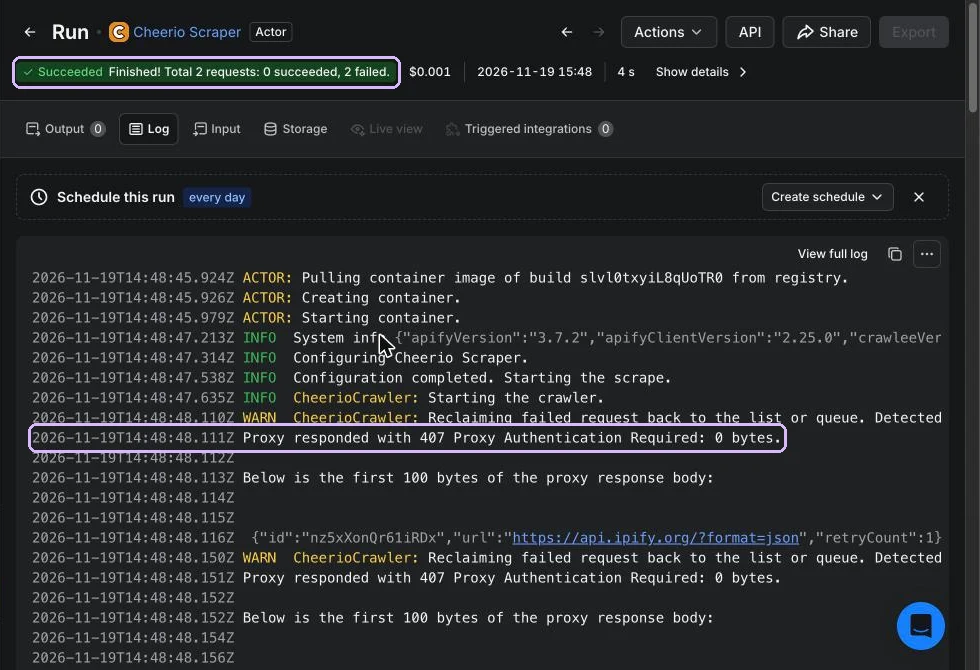
A 407 comes from the ProxyEmpire gateway, not from the website. Crawlee treats it as a session error and retries with a new session until it gives up, so you’ll see many retries in a row. Check these in order:
- The username and password match the Connection Builder exactly, with no spaces at either end. Click Test proxy settings in the dashboard to confirm the login itself works.
- Special characters in the password are percent-encoded.
- The product you’re using still has bandwidth. The Connection Builder shows what’s left next to Residential and Mobile.
- The URL uses the host
v2.proxyempire.ioand port5000.
The run used no proxy, or Apify Proxy
If the Own proxies box is empty, Actors either run without a proxy or fall back to Apify Proxy, depending on how they’re built. Always check the exit IP on a test run, as in Step 3.
ArgumentError about proxyUrls
The SDK validates each URL. An unencoded @ or / in the password, a missing http://, or a stray space makes the URL invalid. Re-encode the password as described in Step 1.
Some sites fail, others work
ProxyEmpire blocks some categories by default, including banking sites, payment processors and crypto exchanges. Separately, a target may rate-limit or block a specific IP. In that case, switch to Every request rotation or add more sticky sessions rather than retrying the same IP.
Frequently Asked Questions
Apify proxy questions we get mostCan I use ProxyEmpire with any Apify Store Actor?
You can with any Actor whose input has a proxy configuration field. In that field, choose Own proxies and paste your ProxyEmpire URL. Actors without a proxy field can’t take outside proxies without changes to their code.
Do I still pay for Apify Proxy if I use my own proxies?
Traffic through your own proxies isn’t Apify Proxy traffic, so it’s billed by ProxyEmpire from your GB balance. Apify still charges for the Actor’s compute, or for its per-result price on pay-per-event Actors.
Should I use HTTP or SOCKS5 with Apify?
Use http://v2.proxyempire.io:5000. HTTPS sites still work through it, because the connection is tunnelled and stays encrypted. Apify’s own field description shows the http://username:password@host:port format, and that’s what we tested.
Can one run use several countries?
Yes. Create one username per country in the Connection Builder and paste one URL per line. The crawler rotates through them. If you need full control over which request uses which country, use separate runs or tasks, one per country.
Does Apify’s Proxy rotation setting affect ProxyEmpire?
No. In Cheerio Scraper, its own description says it only works with Apify Proxy. With ProxyEmpire, rotation comes from the mode you pick in the Connection Builder: Same IP, Every request or Custom TTL.
Where should I keep the proxy password?
For your own Actors, in a secret environment variable on the Actor’s Source page. Apify encrypts secret values at rest and redacts them from run logs. For Store Actors, the URL has to go in the input, so consider a dedicated ProxyEmpire login that you can rotate if needed.
Run Your Apify Actors on Real Residential IPs
Get 100 MB of residential and 50 MB of mobile traffic for $1.97, paste the proxy URL into Apify, and check the exit IP on your first run.